Yes! You can use AI to fill out Form MC-011, Memorandum of Costs (Worksheet)
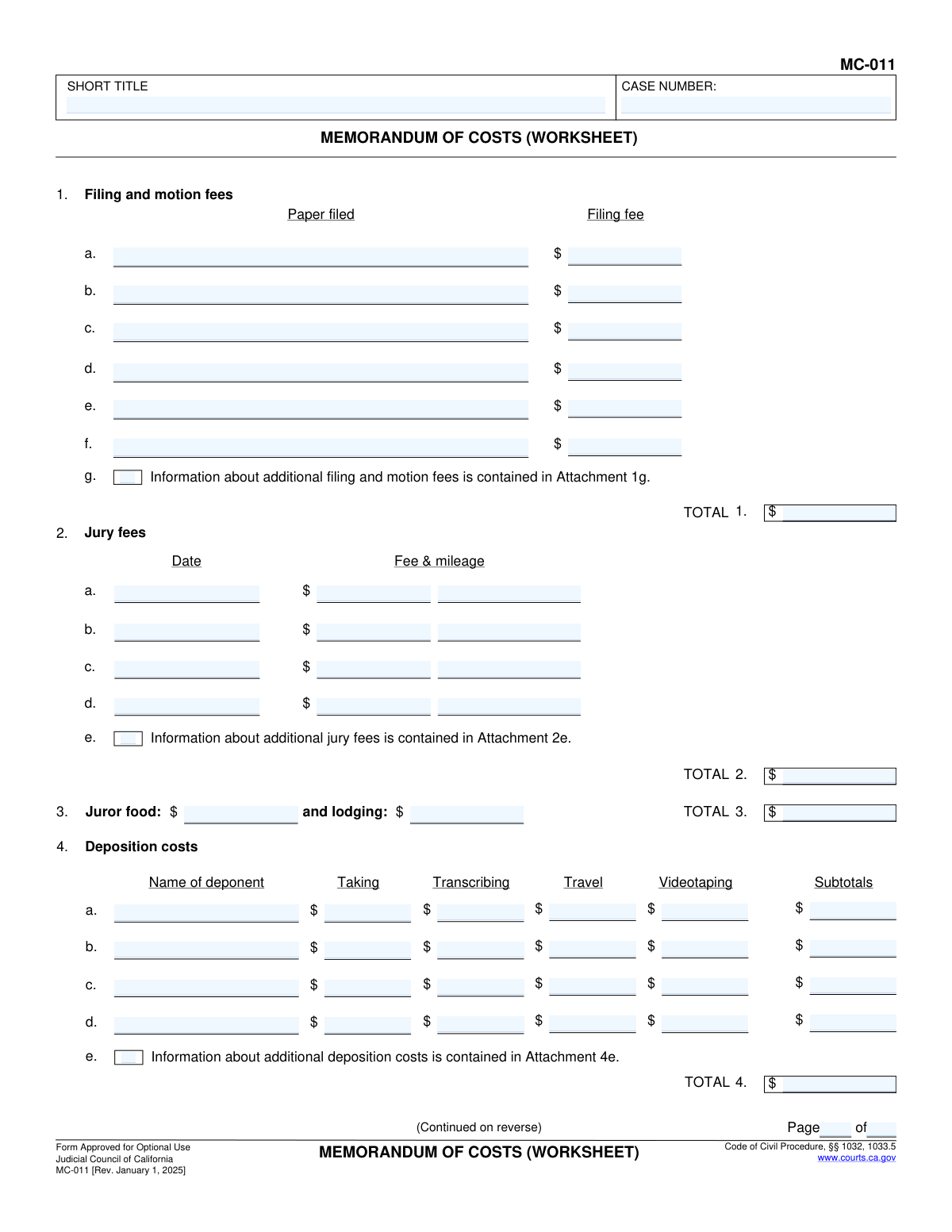
Form MC-011, Memorandum of Costs (Worksheet), is a document used in California courts to help parties calculate the costs they are entitled to recover after winning a lawsuit. It provides a detailed breakdown of various expenses, such as filing fees, deposition costs, and witness fees, ensuring all recoverable costs are accounted for before filing the final cost memorandum. Today, this form can be filled out quickly and accurately using AI-powered services like Instafill.ai, which can also convert non-fillable PDF versions into interactive fillable forms.
MC-011 is part of the
California court forms category on Instafill.
Our AI automatically handles information lookup, data retrieval, formatting, and form filling.
It takes less than a minute to fill out MC-011 using our AI form filling.
Securely upload your data. Information is encrypted in transit and deleted immediately after the form is filled out.
Form specifications
| Form name: | Form MC-011, Memorandum of Costs (Worksheet) |
| Number of fields: | 190 |
| Number of pages: | 1 |
| Language: | English |
Instafill Demo: How to fill out PDF forms in seconds with AI
How to Fill Out MC-011 Online for Free in 2026
Are you looking to fill out a MC-011 form online quickly and accurately? Instafill.ai offers the #1 AI-powered PDF filling software of 2026, allowing you to complete your MC-011 form in just 37 seconds or less.
Follow these steps to fill out your MC-011 form online using Instafill.ai:
- 1 Navigate to Instafill.ai and upload your MC-011 form or select it from the library of official documents.
- 2 Allow the AI to scan and process the worksheet, identifying all fields for case information and cost itemization.
- 3 Enter the Case Number and Short Title at the top of the form as prompted by the AI assistant.
- 4 Systematically input your costs into the corresponding sections, such as filing fees, deposition costs, service of process, and witness fees, following the guided process.
- 5 Review all entered amounts for accuracy. The AI tool will automatically calculate the subtotals for each category and the final 'TOTAL COSTS' at the end of the worksheet.
- 6 Once all costs are itemized and verified, download the completed MC-011 worksheet for your records or to transfer the information to the official Memorandum of Costs.
Our AI-powered system ensures each field is filled out correctly, reducing errors and saving you time.
Why Choose Instafill.ai for Your Fillable MC-011 Form?
Speed
Complete your MC-011 in as little as 37 seconds.
Up-to-Date
Always use the latest 2026 MC-011 form version.
Cost-effective
No need to hire expensive lawyers.
Accuracy
Our AI performs 10 compliance checks to ensure your form is error-free.
Security
Your personal information is protected with bank-level encryption.
Frequently Asked Questions About Form MC-011
This form is an optional worksheet to help you itemize and calculate all the legal costs you want to recover from the opposing party after winning a case. It serves as a tool to organize your expenses before filing the official Memorandum of Costs (form MC-010).
The prevailing party (the winner) in a California civil lawsuit who wishes to claim their allowable court costs from the losing party should use this worksheet to prepare their cost bill.
No, you are not required to use this specific MC-011 worksheet. It is provided as a helpful tool to ensure you accurately calculate and categorize your costs before submitting the mandatory Memorandum of Costs (form MC-010).
The form indicates that you can provide details about additional costs on a separate attachment. Clearly label the attachment with the corresponding section number, such as 'Attachment 4e for Deposition Costs,' and include all the necessary details.
You can only list attorney fees in section 10 if the amount is fixed by a contract or statute and does not require a court's determination. In most other cases, you must file a separate noticed motion to have the court determine and award attorney fees.
Ordinary witness fees are for non-expert witnesses and are typically a small daily fee plus mileage set by statute. Expert fees are for specialists who provided testimony and are based on their hourly rate, but they are only recoverable under specific circumstances like a rejected CCP § 998 offer.
You should gather all receipts, invoices, and statements related to your litigation expenses. This includes court filing receipts, invoices from process servers, deposition transcripts, court reporters, and expert witnesses.
This worksheet is for your own calculations. The next step is to transfer the totals from this worksheet to the official Judicial Council Form MC-010, Memorandum of Costs (Summary), which you will then sign and file with the court.
The 'Other' category is for any allowable costs that do not fit into the pre-defined categories. You must specify what the cost is for, and it must be a cost that is legally recoverable under California Code of Civil Procedure section 1033.5.
Yes, AI-powered services like Instafill.ai can significantly speed up the process. These tools can accurately auto-fill form fields with your case information and cost details, reducing manual data entry and saving you time.
You can use a service like Instafill.ai to fill out the form online. Simply upload the MC-011 PDF, and the platform will make it an interactive, fillable form where you can easily type in your information and calculations.
If you have a non-fillable or 'flat' PDF, you can use Instafill.ai to solve this problem. The service can convert the non-fillable PDF into an interactive form that you can complete, save, and print electronically.
This section is for the costs you paid to formally deliver legal documents to other parties in the case. This can include fees paid to a public officer like a sheriff, a registered process server, or costs for service by publication if approved by the court.
Compliance MC-011
Validation Checks by Instafill.ai
1
Validate Case Number Format and Presence
This check ensures the 'CASE NUMBER' field is not empty and conforms to the expected format for the jurisdiction. The case number is the primary identifier linking this document to a specific legal proceeding. If the number is missing or incorrectly formatted, the document could be misfiled or rejected, causing significant delays.
2
Cross-Page Header Consistency
Verifies that the 'CASE NUMBER' and 'SHORT TITLE' are identical on every page of the form where they appear. This is crucial for document integrity, especially if pages are separated or scanned individually. A mismatch could indicate an error in document assembly or data entry, leading to confusion and potential rejection by the court.
3
Section 1 Filing Fees Total Calculation
This validation confirms that the 'TOTAL' for Filing and motion fees (Item 1) is the correct sum of all individual line item fees (1a through 1g). This automated check prevents mathematical errors in calculating the section total, ensuring the claim is accurate from the start. If the sum is incorrect, the system should flag the total field and prompt the user to review the line items.
4
Section 4 Deposition Costs Row Subtotal Calculation
For each row in the Deposition costs section, this check verifies that the 'Subtotal' is the correct sum of the 'Taking', 'Transcribing', 'Travel', and 'Videotaping' costs for that specific deponent. This ensures accuracy at the individual line-item level before these amounts are aggregated. An incorrect subtotal would lead to an incorrect section total and final claim amount.
5
Section 5 'Other' Service Cost Specification Requirement
This rule checks that if a monetary value is entered into the 'Other' fee column for Service of process (Section 5), the adjacent '(specify)' text field must also be filled out. This prevents ambiguous or unexplained costs from being submitted. Failure to provide a description for an 'Other' cost should trigger an error, requiring the user to provide a justification for the expense.
6
Section 8a Ordinary Witness Fee Calculation
Validates the calculation for each ordinary witness fee subtotal in section 8a. The system must confirm that the subtotal correctly equals '(days * $/day) + (miles * ¢/mile)'. This is a complex calculation with multiple inputs, making it prone to manual error. This check ensures the fee claimed for each witness is calculated according to the specified rates and inputs.
7
Section 8b Expert Fee Calculation
For each expert witness listed in section 8b, this check ensures the 'Fee' subtotal is the correct product of the 'hours' and '$/hr' rate fields. This validation is critical for accurately capturing high-value expert costs. If the calculation is incorrect, the system should highlight the discrepancy and prevent submission until corrected.
8
Section 8 Grand Total Calculation (Witness and Expert Fees)
This validation ensures that the 'TOTAL' for item 8 is the correct sum of the subtotals from 8a (Ordinary witness fees), 8b (Expert fees), and 8c (Court-ordered expert fees). This check aggregates multiple complex sub-sections into a single, accurate total for all witness-related costs. An error here would significantly impact the overall cost memorandum.
9
Final 'TOTAL COSTS' Calculation
This is a critical final check that verifies the grand 'TOTAL COSTS' amount is the correct sum of the totals from all preceding sections (Items 1 through 15). This ensures the final amount claimed on the memorandum is mathematically sound and accurately reflects the sum of all itemized costs. If this master calculation fails, the entire document is invalid and must be corrected before submission.
10
Paired Entry for Cost and Description
This rule ensures that for any line item where a monetary value is entered, the corresponding description field (e.g., 'Paper filed', 'Name of deponent', 'Name of witness') is not left blank. This is essential for justifying each cost and providing a clear audit trail. The system should flag any cost that lacks a corresponding description, as this would likely be questioned by the court or opposing counsel.
11
Numeric Currency Field Validation
This check is applied to all fields intended to contain a monetary value. It ensures that the entry is a positive numeric value and can be formatted as currency (e.g., allows for two decimal places). This prevents the entry of text, special characters, or negative numbers, which would cause calculation errors and invalidate the form.
12
Conditional Specification for Itemized Costs
This validation applies to sections 6, 7, 9, 13, and 15, where a single cost is entered next to a 'specify' or 'itemize' instruction. If a dollar amount is entered for 'Attachment expenses', 'Surety bond premiums', 'Court-ordered transcripts', etc., the corresponding text field for specification must be populated. This ensures that lump-sum costs are properly explained as required by the form.
13
Page Number Integrity
This check validates that the 'Page X of Y' fields are logical. It ensures that the current page number ('PageNo') is a positive integer and is less than or equal to the total number of pages ('PageTotal'). It also verifies that the 'PageTotal' value is consistent across all pages of the document, ensuring the document is complete.
14
Jury Fee Date Format
Verifies that any entry in the 'Date' column of the Jury fees section (Item 2) is a valid date format (e.g., MM/DD/YYYY). This ensures that the dates provided are actual calendar dates and are recorded consistently. An invalid date format could lead to rejection or require manual clarification, delaying the cost recovery process.
Common Mistakes in Completing MC-011
This form is a worksheet requiring numerous calculations for subtotals and a grand total. It's common for filers to make manual addition errors, leading to an incorrect final cost amount. This can result in the court clerk rejecting the memorandum or the opposing party successfully challenging the amounts, causing delays and a reduction in recoverable costs. To avoid this, meticulously double-check all calculations or use a calculator; AI-powered tools like Instafill.ai can perform these calculations automatically to ensure accuracy.
Sections 6, 7, 9, 13, and 15 require the filer to 'specify' or 'itemize' the costs being claimed. A frequent mistake is entering a total cost without providing a clear, detailed description of what the cost covers. This lack of detail can lead to the court disallowing the cost because its basis is unsubstantiated and its allowability cannot be determined. Always provide a concise but complete description for each cost to ensure it is properly justified.
Section 10 is strictly for contractual or statutory attorney fees that are fixed and do not require a separate court hearing. A critical error is to claim other types of attorney fees here, which almost always require a separate, noticed motion. Claiming fees improperly in this section will result in their denial and requires the filer to start over with the correct motion process, wasting time and effort. Carefully read the instructions for Section 10 and seek legal advice if unsure about the proper procedure.
Section 4 explicitly asks for deposition costs to be broken down into 'Taking,' 'Transcribing,' 'Travel,' and 'Videotaping' for each deponent. Filers often make the mistake of lumping these into a single figure or entering the total in only one column. This fails to provide the required level of detail and may lead to challenges and potential disallowance of these costs. To prevent this, obtain an itemized invoice from the court reporting agency and enter each component cost in its respective column.
The 'Case Number' and 'Short Title' fields appear at the top of every page of the form. A common oversight is to fill this information on the first page but leave it blank on the following pages. This can cause confusion and processing delays, especially if pages become separated during filing or handling by the court. Ensure that the case number and short title are accurately entered on every single page before submission.
Section 8a for ordinary witness fees requires a specific calculation breakdown (days x daily rate + miles x mileage rate). A common error is to simply enter a total fee without showing this calculation, or to miscalculate the mileage by using the wrong rate. This lack of transparency can lead to the fee being challenged or reduced by the opposing party or the court. Always show the full calculation as requested on the form to justify the amount claimed.
The form has separate, distinct sections for ordinary witness fees (8a), expert fees (8b), and court-ordered expert fees (8c). People often list all witnesses under one section without differentiating between lay witnesses and paid experts. This is incorrect and can lead to the denial of recoverable expert fees, which are governed by different rules and statutes. Carefully categorize each witness and list their associated fees in the correct corresponding section.
Several sections provide limited space and instruct the filer to use an attachment for additional items. A mistake is to either try to cram more information into the limited space or to use an attachment without explicitly referencing it in the main form. This can lead to the information on the attachment being overlooked or disregarded. When you have more costs than lines available, check the box or write 'See Attachment [Number]' on the last line and include a clearly labeled attachment with the rest of the items.
The bottom of each page includes a 'Page __ of __' field. Filers frequently forget to complete this, leaving it blank or only filling in the first number. This creates ambiguity about whether the submission is complete, especially when attachments are included. An incomplete-looking document can be rejected or cause confusion, so always fill in both the current page number and the total number of pages (including all attachments) on every page.
Section 5 breaks down service costs into categories like 'Public officer,' 'Registered process server,' and 'Publication.' A frequent data entry error is placing a cost in the incorrect column, for example, putting a private process server's fee in the 'Public officer' column. This can cause confusion and may require clarification or correction later. To avoid this, carefully match the type of service cost with the correct column on the form. AI-powered form filling tools like Instafill.ai can help prevent this by guiding users to the correct field based on the type of expense.
Saved over 80 hours a year
“I was never sure if my IRS forms like W-9 were filled correctly. Now, I can complete the forms accurately without any external help.”
Kevin Martin Green
Your data stays secure with advanced protection from Instafill and our subprocessors

Robust compliance program
Transparent business model
You’re not the product. You always know where your data is and what it is processed for.
ISO 27001, HIPAA, and GDPR
Our subprocesses adhere to multiple compliance standards, including but not limited to ISO 27001, HIPAA, and GDPR.
Security & privacy by design
We consider security and privacy from the initial design phase of any new service or functionality. It’s not an afterthought, it’s built-in, including support for two-factor authentication (2FA) to further protect your account.
Fill out MC-011 with Instafill.ai
Worried about filling PDFs wrong? Instafill securely fills form-mc-011-memorandum-of-costs-worksheet forms, ensuring each field is accurate.