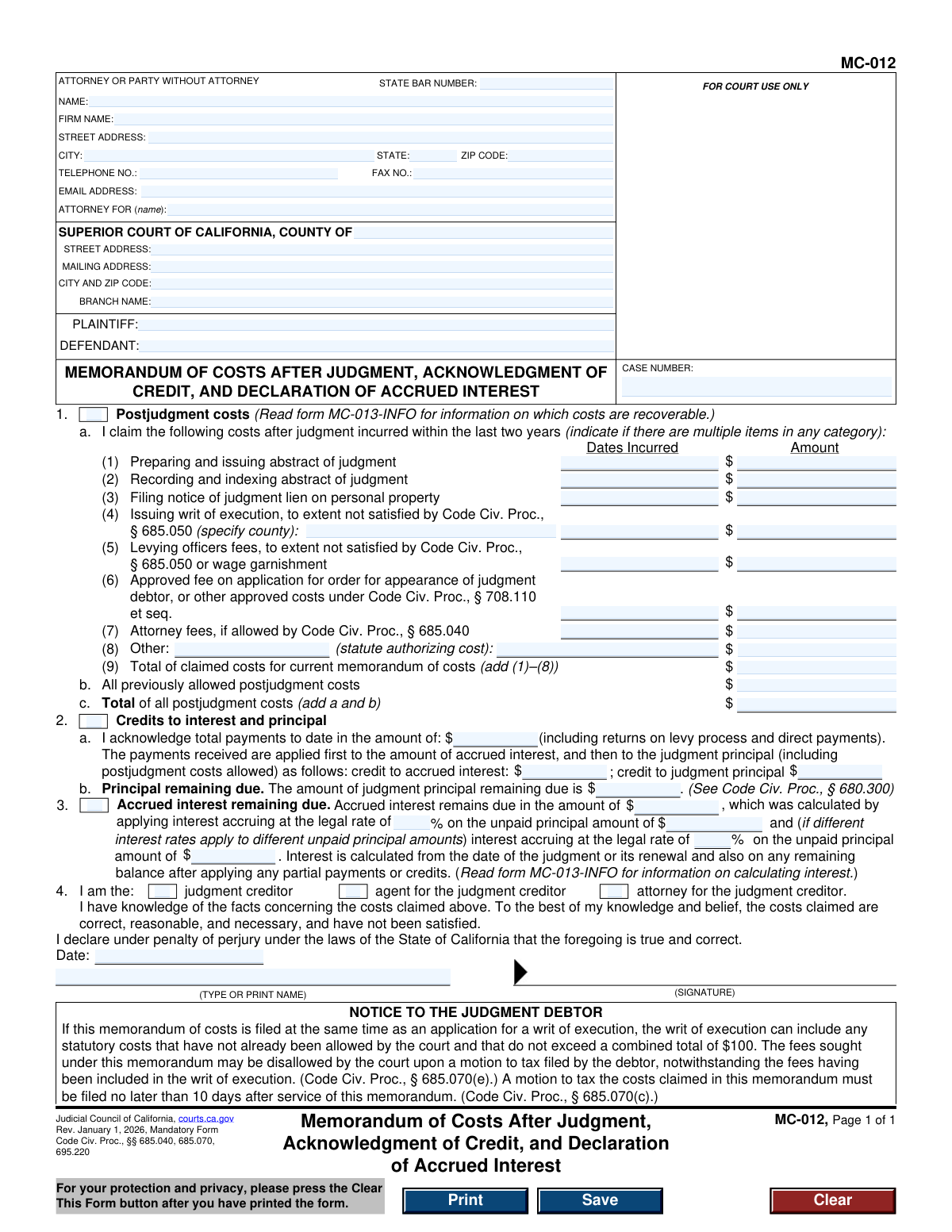
Yes! You can use AI to fill out Form MC-012, Memorandum of Costs After Judgment, Acknowledgment of Credit, and Declaration of Accrued Interest

Form MC-012, Memorandum of Costs After Judgment, is a mandatory California Judicial Council form filed by a judgment creditor to officially document costs incurred while trying to collect a debt after a court judgment. It details these costs, acknowledges any payments (credits) made by the debtor, and calculates the total interest that has accrued on the unpaid balance. Today, this form can be filled out quickly and accurately using AI-powered services like Instafill.ai, which can also convert non-fillable PDF versions into interactive fillable forms.
MC-012 is part of the California court forms category on Instafill.
Our AI automatically handles information lookup, data retrieval, formatting, and form filling.
It takes less than a minute to fill out MC-012 using our AI form filling.
Securely upload your data. Information is encrypted in transit and deleted immediately after the form is filled out.

Form specifications

Form name: Form MC-012, Memorandum of Costs After Judgment, Acknowledgment of Credit, and Declaration of Accrued Interest
Number of fields: 60
Number of pages: 1
Language: English
main-image

Instafill Demo: How to fill out PDF forms in seconds with AI

How to Fill Out MC-012 Online for Free in 2026

Are you looking to fill out a MC-012 form online quickly and accurately? Instafill.ai offers the #1 AI-powered PDF filling software of 2026, allowing you to complete your MC-012 form in just 37 seconds or less.
Follow these steps to fill out your MC-012 form online using Instafill.ai:
  1. 1 Navigate to Instafill.ai and upload or select Form MC-012, Memorandum of Costs After Judgment.
  2. 2 Use the AI assistant to automatically populate the court, case number, and party information in the header section.
  3. 3 In Section 1, itemize all recoverable postjudgment costs incurred within the last two years, such as fees for writs of execution or recording liens.
  4. 4 Complete Section 2 by acknowledging the total payments received to date and correctly applying them to the accrued interest and judgment principal.
  5. 5 In Section 3, calculate and declare the amount of accrued interest remaining due, specifying the legal interest rate used.
  6. 6 Review all entered information for accuracy, then check the appropriate box in Section 4, and type your name and date to declare the information is true under penalty of perjury.
  7. 7 Download the completed form to print, sign, and file with the court and serve on the judgment debtor.

Our AI-powered system ensures each field is filled out correctly, reducing errors and saving you time.

Why Choose Instafill.ai for Your Fillable MC-012 Form?

Speed

Complete your MC-012 in as little as 37 seconds.

Up-to-Date

Always use the latest 2026 MC-012 form version.

Cost-effective

No need to hire expensive lawyers.

Accuracy

Our AI performs 10 compliance checks to ensure your form is error-free.

Security

Your personal information is protected with bank-level encryption.

Frequently Asked Questions About Form MC-012

This form is used by a judgment creditor (the person owed money) to officially claim costs incurred after a court judgment, acknowledge payments received from the debtor, and declare the total interest that has accrued on the unpaid judgment.

The judgment creditor, or their attorney, should complete this form. It is used to update the total amount owed by the judgment debtor by adding post-judgment costs and accrued interest.

You can claim specific costs incurred in the last two years to enforce the judgment, such as fees for issuing writs, recording liens, and certain attorney fees if allowed by statute. For a complete list, you should review form MC-013-INFO.

You must acknowledge all payments received to date. These payments are first applied to the accrued interest on the judgment, and any remaining amount is then applied to the principal balance.

You must apply the legal interest rate to the unpaid principal amount from the date of the judgment or its renewal. Form MC-013-INFO provides detailed guidance on how to perform this calculation correctly.

The judgment debtor has 10 days to file a 'motion to tax costs' if they want to dispute the amounts you've claimed. If they do not object within that timeframe, the costs are typically added to the total judgment amount.

You can only claim attorney's fees if they are specifically allowed by a statute, such as Code of Civil Procedure section 685.040. You must cite the specific statute that authorizes the fees when you claim them.

The judgment debtor has the right to challenge the costs by filing a motion with the court. This motion must be filed no later than 10 days after they are served with your memorandum of costs.

The completed form should be filed with the Superior Court in the county where the judgment was originally entered, under the same case number. You must also serve a copy on the judgment debtor.

The form must be signed under penalty of perjury by the judgment creditor, an authorized agent for the creditor, or the attorney representing the creditor. The person signing must have personal knowledge of the facts stated in the form.

Yes, services like Instafill.ai use AI to auto-fill form fields accurately and save time. These tools can populate your case information, reducing manual data entry and potential errors.

To use Instafill.ai, you would upload the MC-012 PDF to their platform. The AI will identify the fields, and you can provide your case details to have it automatically and accurately filled in, ready for you to review, download, and file.

If you have a non-fillable PDF, you can use a service like Instafill.ai. It can convert flat, non-interactive PDFs into fillable forms, allowing you to easily type your information into the correct fields online before printing.

Compliance MC-012
Validation Checks by Instafill.ai

1
Verifies Total Claimed Costs Calculation
This check ensures that the value in 'Total of claimed costs for current memorandum of costs' (Item 1a(9)) is the correct sum of all individual cost amounts listed in Items 1a(1) through 1a(8). This is crucial for mathematical accuracy and prevents miscalculation of claimed expenses. If the sum is incorrect, the form submission should be flagged for review, as it could lead to an incorrect judgment amount.
2
Ensures Total Postjudgment Costs Calculation is Correct
Validates that the 'Total of all postjudgment costs' (Item 1c) correctly equals the sum of 'Total of claimed costs for current memorandum' (Item 1a(9)) and 'All previously allowed postjudgment costs' (Item 1b). This check maintains the integrity of the total cost calculation by including both current and prior costs. A failed validation indicates a calculation error that must be corrected before filing.
3
Validates Credit Application Consistency
This check confirms that the sum of 'credit to accrued interest' and 'credit to judgment principal' (Item 2a) equals the 'total payments to date' amount. This is a critical logical check to ensure that all acknowledged payments are correctly allocated. If the amounts do not reconcile, the filing is inaccurate and could misrepresent the remaining balance owed.
4
Requires Exclusive Declarant Role Selection
Ensures that exactly one of the three checkboxes in Item 4 ('judgment creditor', 'agent for the judgment creditor', or 'attorney for the judgment creditor') is selected. This is necessary to clearly establish the identity and authority of the person signing the declaration. If zero or more than one box is checked, the declaration is ambiguous and the form should be rejected until a single, valid role is chosen.
5
Validates Case Number Presence and Format
This check verifies that the 'CASE NUMBER' field is not empty and, if possible, conforms to the expected format for the specified court. The case number is the primary identifier for the legal proceeding and is essential for the clerk to file the document correctly. A missing or malformed case number will result in the document being rejected or misfiled.
6
Checks for Valid Declaration Date
Validates that the 'Date' field in the declaration section is a valid calendar date and is not a future date. The date of the declaration is legally significant as it attests to the facts as of that day. An invalid or future date would invalidate the declaration, requiring the user to provide a current and correct date.
7
Requires Declarant's Printed Name
Ensures that the field for the declarant's typed or printed name, located next to the signature line, is not empty. This field is required to clearly identify the signatory, as a signature alone may be illegible. Failure to provide a printed name can create ambiguity about who signed the document, potentially leading to its rejection.
8
Validates State Bar Number for Attorneys
This check verifies that if the 'ATTORNEY FOR' field is filled, the 'STATE BAR NUMBER' field contains a valid numeric value. The State Bar Number is a required identifier for practicing attorneys in California. A missing or invalid number for a listed attorney would make the submission incomplete and require correction.
9
Constrains Cost Incurred Dates to Last Two Years
This validation checks that any dates entered in the 'Dates Incurred' column of Item 1a are valid dates that fall within the last two years, as specified by the form's instructions. This rule is based on legal statutes governing the time frame for claiming postjudgment costs. Any costs with dates outside this window would be disallowed and should be flagged.
10
Requires Justification for 'Other' Costs
Ensures that if a monetary amount is entered for 'Other' costs in Item 1a(8), the corresponding '(statute authorizing cost)' field is also filled out. This is necessary because any claimed cost must have a legal basis. A failure to provide the authorizing statute for an 'Other' cost will likely result in that specific cost being denied by the court.
11
Verifies All Monetary Fields are in Currency Format
This check scans all fields intended for dollar amounts to ensure they contain valid numeric or currency data (e.g., 1234.56). This prevents data entry errors, such as entering text into a currency field, which would break calculations. If a non-numeric value is found, the user must correct the entry before the form can be processed.
12
Ensures Plaintiff and Defendant Names are Provided
Validates that the 'PLAINTIFF' and 'DEFENDANT' fields are both filled out. These fields are essential for identifying the primary parties to the case and ensuring the document is associated with the correct legal action. A submission with missing party information is incomplete and cannot be properly filed with the court.
13
Validates Interest Rate Percentage Format
This check ensures that the interest rate fields in Item 3 are entered as valid percentages (e.g., '10' or '7.5'). The interest rate is a key component for calculating the accrued interest owed. An invalid format would make the calculation impossible, so the system should prompt the user to correct the entry.
14
Logical Check for Section 1 Checkbox
Verifies that if any cost amount is entered in the sub-items of Section 1a, the main checkbox for Item 1 ('Postjudgment costs') is selected. This provides a clear indication that the section is being used and contains data. If costs are listed but the box is unchecked, it creates ambiguity and the user should be prompted to check the box to confirm their intent.

Common Mistakes in Completing MC-012

Incorrect Calculation of Accrued Interest

Filers often struggle with Section 3, incorrectly calculating interest on the judgment balance. This happens because they may use the wrong interest rate, miscalculate based on partial payments, or improperly compound interest. An incorrect interest calculation is a primary reason for the opposing party to file a motion to tax costs, leading to delays and potential disallowance of the claimed interest. To avoid this, meticulously follow the steps in the MC-013-INFO guide and double-check all calculations.

Misapplication of Payments to Principal and Interest

In Section 2a, a frequent error is applying payments received from the debtor to the principal balance first. California law requires that payments are credited first to accrued postjudgment interest, with any remainder applied to the principal. This mistake understates the remaining interest due and incorrectly reduces the principal, leading to an inaccurate total balance and likely rejection or challenge. AI-powered form fillers like Instafill.ai can be configured with these rules to help automate and validate such complex calculations.

Claiming Non-Recoverable Postjudgment Costs

Users often list costs in Section 1a that are not legally recoverable, such as routine postage, faxes, or travel time. This occurs from a misunderstanding of what Code of Civil Procedure § 685.040 allows. Including unauthorized costs almost guarantees the debtor will file a motion to tax, forcing a court hearing to dispute the amounts. Always consult the MC-013-INFO information sheet to confirm a cost is allowable before including it on the memorandum.

Arithmetic Errors in Cost Totals

Simple addition mistakes in Section 1a(9) (Total of claimed costs) and Section 1c (Total of all postjudgment costs) are surprisingly common. These errors can happen due to manual calculation and can undermine the credibility of the entire document. A calculation error, even a small one, can be grounds for a successful challenge by the debtor, requiring the filer to submit a corrected form. Using a calculator or a spreadsheet to verify totals before transcribing them onto the form is a crucial step.

Missing Statutory Authority for 'Other' Costs

When claiming a cost under Section 1a(8) 'Other', filers frequently list the expense but omit the required legal justification. The form explicitly requires citing the statute that authorizes the cost. Failure to provide the specific code section makes the claim invalid on its face and will result in it being disallowed by the court. Always research and include the precise statutory basis for any cost not explicitly listed in items (1) through (7).

Incomplete or Incorrect Case Caption Information

Mistakes in the top section of the form, such as an incorrect case number, misspelling plaintiff/defendant names, or listing the wrong court branch, are common and can lead to immediate rejection by the court clerk. This often happens when filling out the form in a hurry or using information from a different case. These details must match the court's records exactly to ensure the document is filed into the correct case file. Using a tool like Instafill.ai can help by saving and accurately populating this repetitive information across all case documents.

Forgetting to Include Previously Allowed Costs

Filers often focus only on new costs and leave Section 1b, 'All previously allowed postjudgment costs,' blank. This is a significant error if prior cost memorandums have been filed and approved. Forgetting to carry over this balance results in an inaccurate and understated total amount due, which can be difficult to correct later and may result in the creditor losing out on money they are owed.

Failure to Sign or Date the Declaration

An unsigned or undated declaration in Section 4 is one of the most critical and easily avoidable errors. The signature under penalty of perjury is what makes the document a sworn statement of facts. Without a valid signature and date, the form is legally worthless and will be rejected by the court, invalidating the entire cost claim and potentially missing the filing deadline. If the form is a non-fillable PDF, a tool like Instafill.ai can convert it to a fillable version, making it easier to manage fields and avoid missing the signature line.

Incorrectly Identifying the Declarant's Role

In Section 4, filers must check a box to identify themselves as the judgment creditor, agent, or attorney. People sometimes check the wrong box, for example, an attorney might incorrectly check 'judgment creditor'. This can create legal issues regarding who has personal knowledge of the claimed costs and payments. An incorrect designation can be used by the opposing party to challenge the validity of the declaration.

Omitting Required Details for Specific Costs

Several cost categories require specific details that are often overlooked. For example, Section 1a(4) requires specifying the county where a writ of execution was issued. Failing to provide these small but necessary pieces of information can lead to that specific cost item being challenged and disallowed. Carefully read each line item to ensure all supplemental information is provided as required.
Saved over 80 hours a year

“I was never sure if my IRS forms like W-9 were filled correctly. Now, I can complete the forms accurately without any external help.”

Kevin Martin Green

Your data stays secure with advanced protection from Instafill and our subprocessors

Robust compliance program

Transparent business model

You’re not the product. You always know where your data is and what it is processed for.

ISO 27001, HIPAA, and GDPR

Our subprocesses adhere to multiple compliance standards, including but not limited to ISO 27001, HIPAA, and GDPR.

Security & privacy by design

We consider security and privacy from the initial design phase of any new service or functionality. It’s not an afterthought, it’s built-in, including support for two-factor authentication (2FA) to further protect your account.

Fill out MC-012 with Instafill.ai

Worried about filling PDFs wrong? Instafill securely fills form-mc-012-memorandum-of-costs-after-judgment-acknowledgment-of-credit-and-declaration-of-accrued-interest forms, ensuring each field is accurate.