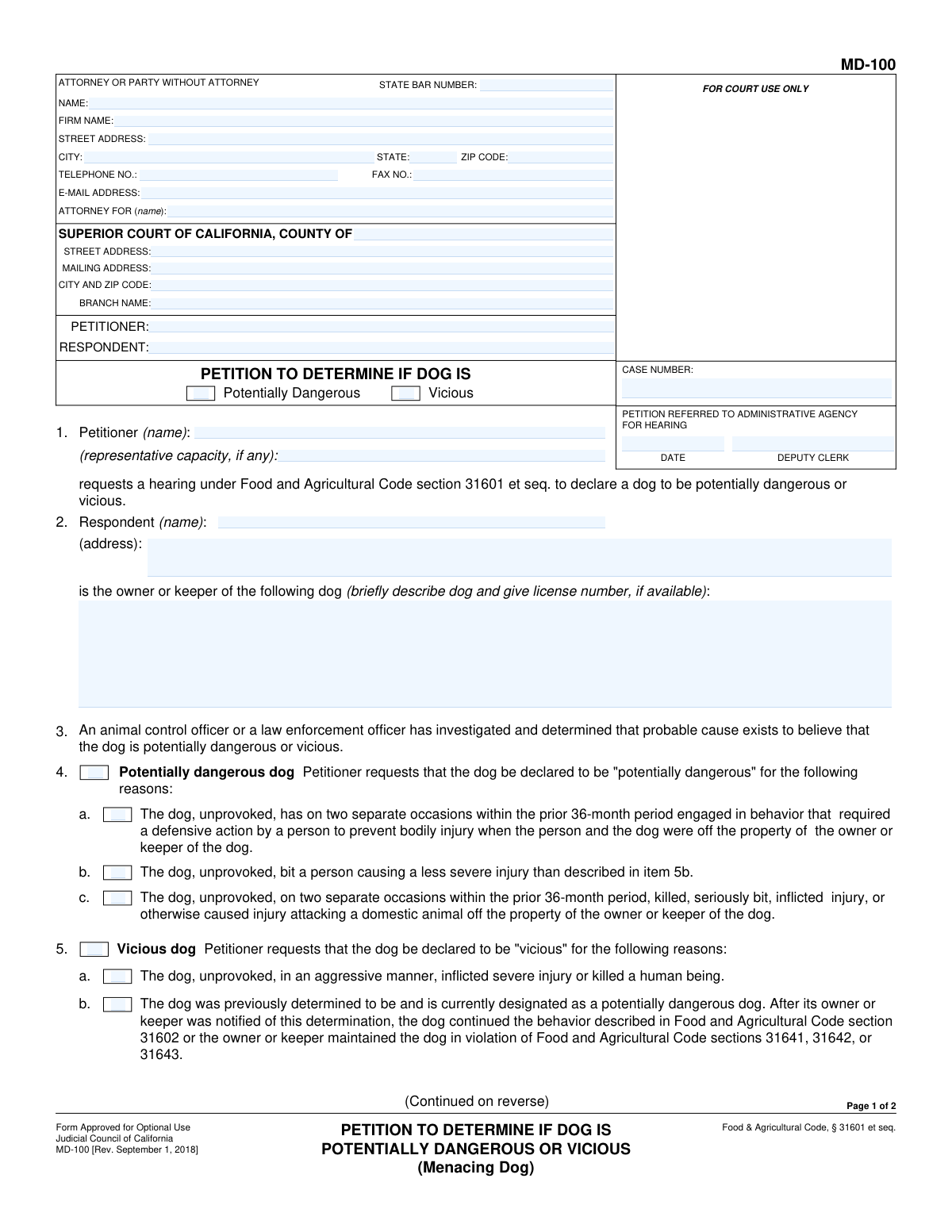
Yes! You can use AI to fill out Form MD-100, Petition to Determine If Dog Is Potentially Dangerous or Vicious (Menacing Dog)
California Form MD-100, Petition to Determine If Dog Is Potentially Dangerous or Vicious, is a legal document filed with the Superior Court to initiate a hearing regarding a dog's aggressive behavior. This petition is crucial for public safety, allowing officials or citizens to request a legal determination that can lead to specific controls or actions concerning the dog. Today, this form can be filled out quickly and accurately using AI-powered services like Instafill.ai, which can also convert non-fillable PDF versions into interactive fillable forms.
MD-100 is part of the
California court forms category on Instafill.
Our AI automatically handles information lookup, data retrieval, formatting, and form filling.
It takes less than a minute to fill out MD-100 using our AI form filling.
Securely upload your data. Information is encrypted in transit and deleted immediately after the form is filled out.
Form specifications
| Form name: | Form MD-100, Petition to Determine If Dog Is Potentially Dangerous or Vicious (Menacing Dog) |
| Number of fields: | 58 |
| Number of pages: | 1 |
| Language: | English |
Instafill Demo: How to fill out PDF forms in seconds with AI
How to Fill Out MD-100 Online for Free in 2026
Are you looking to fill out a MD-100 form online quickly and accurately? Instafill.ai offers the #1 AI-powered PDF filling software of 2026, allowing you to complete your MD-100 form in just 37 seconds or less.
Follow these steps to fill out your MD-100 form online using Instafill.ai:
- 1 Navigate to Instafill.ai and upload your Form MD-100 or select it from the platform's template library.
- 2 Use the AI assistant to accurately fill in the petitioner's information, attorney details (if any), and the specific Superior Court information.
- 3 Enter the respondent's (dog owner's) name and address, followed by a detailed description of the dog, including its license number if available.
- 4 Select whether you are petitioning for the dog to be declared 'Potentially Dangerous' or 'Vicious' and check the boxes corresponding to the specific incidents that justify the claim.
- 5 In section 6, indicate all supporting documents you are attaching, such as declarations, incident reports, or witness affidavits.
- 6 Carefully review all entered information for accuracy, then date and e-sign the petition under penalty of perjury.
- 7 Download the completed Form MD-100 to file with the appropriate court clerk.
Our AI-powered system ensures each field is filled out correctly, reducing errors and saving you time.
Why Choose Instafill.ai for Your Fillable MD-100 Form?
Speed
Complete your MD-100 in as little as 37 seconds.
Up-to-Date
Always use the latest 2026 MD-100 form version.
Cost-effective
No need to hire expensive lawyers.
Accuracy
Our AI performs 10 compliance checks to ensure your form is error-free.
Security
Your personal information is protected with bank-level encryption.
Frequently Asked Questions About Form MD-100
This form is used to formally request a court hearing to legally declare a dog as either 'potentially dangerous' or 'vicious' based on its past behavior, as defined by California's Food and Agricultural Code.
An animal control officer or a law enforcement officer who has investigated and found probable cause can file this petition. It can also be initiated based on a verified written complaint from a member of the public, which then prompts an official investigation.
A 'potentially dangerous' dog has engaged in behaviors like causing minor bites, forcing a person to take defensive action, or attacking other domestic animals. A 'vicious' dog has inflicted severe injury or killed a human, or it continued aggressive behavior after already being designated as potentially dangerous.
The Petitioner is the person or agency filing the form to request the hearing, such as a law enforcement officer. The Respondent is the owner or keeper of the dog that is the subject of the petition.
You will need to provide your contact information (as the petitioner), the dog owner's name and address (the respondent), a description of the dog, and check the boxes that describe the specific incidents that justify the petition.
You should attach copies of any relevant documents, such as a declaration from an animal control or law enforcement officer, an official incident report, or a sworn affidavit from a witness to the incident.
Yes, for a dog to be considered 'potentially dangerous' based on repeated behavior (like forcing defensive action or attacking domestic animals), the incidents must have occurred on two separate occasions within the prior 36-month period.
The form asks for the dog's license number 'if available.' While helpful for identification, you can still file the petition if you do not have this information.
This petition must be filed with the Superior Court of California in the county where the respondent resides or where the incident occurred. The form includes fields for the specific court's address.
After the petition is filed with the court, it may be referred to an administrative agency or a hearing will be scheduled to determine if the dog meets the legal definition of potentially dangerous or vicious.
If you have a non-fillable PDF, you can use a service like Instafill.ai. It can convert flat, non-interactive PDFs into fillable forms that you can easily complete online.
Yes, AI-powered services like Instafill.ai can help you complete this form quickly and accurately. These tools can auto-fill your personal information and other fields to save you time and reduce potential errors.
Simply upload the Form MD-100 PDF to the Instafill.ai platform. The AI will make the document interactive, allowing you to click and type directly into the fields, and can help auto-fill information to streamline the process.
Compliance MD-100
Validation Checks by Instafill.ai
1
Petitioner Name Consistency
Ensures the petitioner's name is identical in the header caption, in section 1, and on the signature line. This is critical for legal consistency and to unambiguously identify the filing party throughout the document. If the names do not match, the form could be rejected for ambiguity.
2
Respondent Information Completeness
Verifies that both the Respondent's name and address are filled out in section 2. This information is legally required to properly serve notice to the dog's owner or keeper about the legal proceedings. A petition without complete respondent details cannot proceed as it fails to meet due process requirements.
3
Mandatory Petition Type Selection
Validates that at least one of the main petition type checkboxes, 'Potentially Dangerous' or 'Vicious', is selected. This selection is fundamental as it defines the legal basis and potential outcome of the hearing. A submission without this selection is incomplete and cannot be processed by the court.
4
Logical Link for Petition Reasons
Checks that if 'Potentially Dangerous' is selected, at least one reason from section 4 is also checked, and if 'Vicious' is selected, a reason from section 5 is checked. This enforces logical completeness, as a petition must state the specific grounds for its claim. A petition that declares a type without providing a supporting reason is legally insufficient.
5
Dog Description Requirement
Confirms that section 3, which asks for a description of the dog and its license number, is not empty. A clear description is essential to positively identify the specific animal in question, preventing ambiguity and ensuring any court order applies to the correct dog. A petition without a dog description is invalid.
6
Case Number Consistency Across Pages
Verifies that if a Case Number is entered, it is identical on both page 1 and page 2 of the form. Maintaining a consistent case number is critical for document management and ensuring that all pages are correctly associated with the same court case. Inconsistent numbers can lead to filing errors and misplacement of documents.
7
Email Address Format Validation
Checks that the value entered in the 'E-MAIL ADDRESS' field conforms to a standard email format (e.g., [email protected]). This is important for ensuring that electronic communications and notices from the court can be successfully delivered to the filer. An invalid format will prevent electronic service and correspondence.
8
Phone Number Format
Validates that the 'TELEPHONE NO.' field contains a string that can be parsed as a valid phone number, typically 10 digits with optional formatting. This ensures the court and other parties have a reliable method of contact for the filer. An invalid number could delay proceedings if urgent contact is needed.
9
Signature Date Presence and Format
Ensures the 'Date' field in the signature block is filled out with a valid calendar date. The signature date is legally significant as it attests to when the declaration was made under penalty of perjury. A missing or improperly formatted date can invalidate the declaration and the petition itself.
10
Supporting Document Detail Requirement
This check verifies that if a checkbox is marked in section 6 (a-e) to indicate an attached document, the corresponding field for the name or specification is also filled. This ensures that all cited evidence is properly identified and accounted for. A failure would mean a claimed piece of evidence is not properly described.
11
Attachment Page Count Logic
Validates that if any supporting documents are indicated by checking a box in section 6, the 'Number of pages attached' field must contain a positive integer. This serves as a cross-reference to ensure all submitted materials are accounted for by the court clerk. A mismatch could lead to the case file being deemed incomplete.
12
State Bar Number Format
Validates that the 'STATE BAR NUMBER' field, if filled, contains only numeric characters. This field is for an attorney's official identification number, which is a numerical value. Submitting non-numeric characters could lead to rejection or failure to correctly identify the attorney of record.
Common Mistakes in Completing MD-100
Users often confuse the Petitioner (the animal control/law enforcement officer filing the petition) with the Respondent (the dog's owner or keeper). This mistake can lead to the petition being filled out with the wrong information in the wrong places, causing confusion and potential dismissal. To avoid this, carefully read the definitions on the form; the Petitioner is listed in Section 1, and the Respondent in Section 2.
In Section 3, filers may provide a generic description like 'brown dog' instead of specific details. This is insufficient for legal identification. A proper description should include breed, colors, distinct markings, size, weight, and the dog's name and license number, if known, to prevent any ambiguity about the animal in question. Lack of detail can weaken the petition by making the dog's identity disputable.
A critical error is checking the main box for 'Potentially Dangerous' (Section 4) or 'Vicious' (Section 5) without checking any of the specific sub-points (e.g., 4a, 4b, 4c). The petition is legally insufficient without specifying the exact behavior that justifies the declaration. To prevent this, the filer must review the criteria and check the box for the specific statutory reason that applies to the case.
In Section 6, petitioners frequently check boxes for supporting documents (like an incident report or witness affidavit) but forget to physically attach them, or they attach documents without checking the corresponding box. This discrepancy can lead the court to disregard crucial evidence or deem the petition incomplete, causing delays. Always double-check that every checked item is attached and every attached item is checked.
Section 6b asks the filer to specify the 'Number of pages attached,' a detail that is very commonly overlooked. Court clerks use this number to verify that the entire submission has been received and nothing is missing. Forgetting this can cause administrative delays while the clerk manually verifies the page count, slowing down the filing process.
Forgetting to sign and date the declaration in Section 7 is one of the most common and fatal errors. An unsigned petition is not legally valid and will be immediately rejected by the court clerk, requiring the entire filing process to be restarted. Always perform a final review to ensure the signature and date fields are completed before submission.
A party filing without a lawyer (i.e., 'in pro per') often gets confused by the 'ATTORNEY FOR (name):' field and may leave it blank or write 'N/A'. This can cause clerical confusion. The correct procedure is to write your own name or the phrase 'Self-Represented' to make your status clear to the court.
Filers may enter the wrong court address, confuse the mailing address with the street address, or not know the correct 'BRANCH NAME'. Filing a petition at the wrong court location will result in rejection and significant delays, as it must be refiled in the proper jurisdiction. It is essential to verify the exact Superior Court address and branch for the county where the incident occurred before filling out the form.
The petition requires the full name and address of the Respondent (the dog's owner) in Section 2 for legal service of process. Often, this information is incomplete or inaccurate. If the Respondent cannot be properly served notice, the case cannot proceed, leading to major delays until the correct information is found and provided to the court.
The Petitioner and Respondent names must be written identically in the top caption, on the page 2 header, and within the main body of the form. People sometimes use abbreviations or slight variations, which can create ambiguity in the official court record. This can lead to clerical errors and delays. AI-powered form-filling tools like Instafill.ai can prevent this by auto-populating recurring information consistently across the entire document.
Saved over 80 hours a year
“I was never sure if my IRS forms like W-9 were filled correctly. Now, I can complete the forms accurately without any external help.”
Kevin Martin Green
Your data stays secure with advanced protection from Instafill and our subprocessors

Robust compliance program
Transparent business model
You’re not the product. You always know where your data is and what it is processed for.
ISO 27001, HIPAA, and GDPR
Our subprocesses adhere to multiple compliance standards, including but not limited to ISO 27001, HIPAA, and GDPR.
Security & privacy by design
We consider security and privacy from the initial design phase of any new service or functionality. It’s not an afterthought, it’s built-in, including support for two-factor authentication (2FA) to further protect your account.
Fill out MD-100 with Instafill.ai
Worried about filling PDFs wrong? Instafill securely fills form-md-100-petition-to-determine-if-dog-is-potentially-dangerous-or-vicious-menacing-dog forms, ensuring each field is accurate.