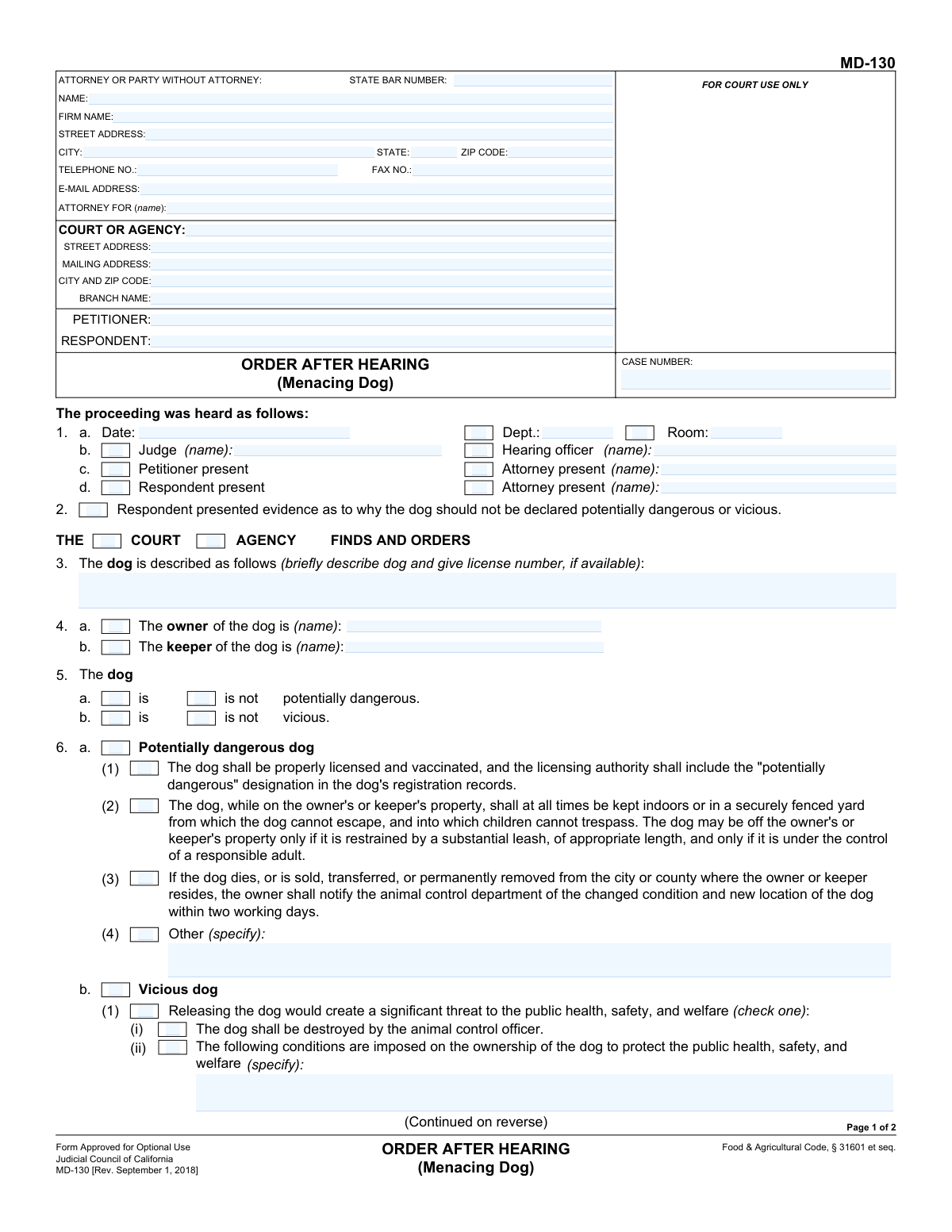
Yes! You can use AI to fill out Form MD-130, Order After Hearing (Menacing Dog)

The Order After Hearing (Menacing Dog), Form MD-130, is a legal document used in California to formalize the findings and orders of a court or agency after a hearing about a dog's behavior. It specifies whether the dog is deemed potentially dangerous or vicious and outlines the conditions imposed on the owner, which can include specific containment measures or, in severe cases, an order for the dog to be destroyed. Today, this form can be filled out quickly and accurately using AI-powered services like Instafill.ai, which can also convert non-fillable PDF versions into interactive fillable forms.
MD-130 is part of the California court forms category on Instafill.
Our AI automatically handles information lookup, data retrieval, formatting, and form filling.
It takes less than a minute to fill out MD-130 using our AI form filling.
Securely upload your data. Information is encrypted in transit and deleted immediately after the form is filled out.

Form specifications

Form name: Form MD-130, Order After Hearing (Menacing Dog)
Number of fields: 82
Number of pages: 1
Language: English
main-image

Instafill Demo: How to fill out PDF forms in seconds with AI

How to Fill Out MD-130 Online for Free in 2026

Are you looking to fill out a MD-130 form online quickly and accurately? Instafill.ai offers the #1 AI-powered PDF filling software of 2026, allowing you to complete your MD-130 form in just 37 seconds or less.
Follow these steps to fill out your MD-130 form online using Instafill.ai:
  1. 1 Navigate to Instafill.ai and upload or select Form MD-130.
  2. 2 Enter the court or agency information, including the branch name, address, and case number in the designated fields.
  3. 3 Provide the full details for the petitioner, respondent, and any attorneys involved, including names, addresses, and state bar numbers.
  4. 4 Input the specifics of the hearing, such as the date, department, and the name of the judge or hearing officer.
  5. 5 Document the court's findings by checking the appropriate boxes to describe the dog and its legal status (e.g., potentially dangerous, vicious).
  6. 6 Clearly state the court's orders, detailing any conditions for ownership, restrictions, or other specific actions required.
  7. 7 Review all entered information for accuracy before downloading the completed form for signature and official submission.

Our AI-powered system ensures each field is filled out correctly, reducing errors and saving you time.

Why Choose Instafill.ai for Your Fillable MD-130 Form?

Speed

Complete your MD-130 in as little as 37 seconds.

Up-to-Date

Always use the latest 2026 MD-130 form version.

Cost-effective

No need to hire expensive lawyers.

Accuracy

Our AI performs 10 compliance checks to ensure your form is error-free.

Security

Your personal information is protected with bank-level encryption.

Frequently Asked Questions About Form MD-130

This form documents the official decision made by a court or agency after a hearing to determine if a dog is legally 'potentially dangerous' or 'vicious'. It outlines the findings and any required actions the dog's owner or keeper must take.

The judge or hearing officer who presided over the hearing fills out and signs this form. It is an official order, not a form for the petitioner or respondent to complete.

These are legal classifications based on evidence presented at the hearing regarding the dog's behavior. A 'vicious' designation is more severe and may result in stricter penalties, including the destruction of the dog.

The court will impose specific conditions you must follow, such as keeping the dog licensed, vaccinated, and securely enclosed. When off your property, the dog must be on a substantial leash and controlled by a responsible adult.

The court can find the dog is not dangerous, find it is potentially dangerous and impose conditions, or find it is vicious and order its destruction. In some cases, the owner or keeper may be prohibited from owning any dog for a period of time.

You must comply with the order within the timeframe set by the animal control department, but it will not be more than 30 days from the date of the order (or 35 days if the order was mailed to you).

The form states that you may appeal the decision to the superior court within five days of receiving the order. The address for the appeal is specified in section 8 of the form.

The 'owner' is the legal owner of the dog, while the 'keeper' is the person who has care, custody, or control of the dog at the time of the incident. The order can apply to either or both parties.

Yes, if the court finds the dog is 'vicious' and that releasing it would create a significant threat to public health, safety, and welfare, it can order the dog to be destroyed by an animal control officer.

This section records the date, department, and location of the hearing, the name of the judge or hearing officer, and confirms which parties and attorneys were present.

Yes, if the court finds that your ownership or possession of any dog would create a significant threat, it can prohibit you from owning, controlling, or having custody of any dog for a specified period.

While you do not fill out this specific order form yourself, AI-powered services like Instafill.ai can help you accurately complete other related documents, such as a petition or response, saving you time and reducing errors.

You can upload any related PDF form to Instafill.ai. The AI will identify the fields and you can provide your information once to have it auto-filled across all your documents accurately.

Services like Instafill.ai can convert flat, non-fillable PDFs into interactive, fillable forms. This allows you to easily type your information directly into the document online.

Compliance MD-130
Validation Checks by Instafill.ai

1
Case Number Consistency
Validates that the case number entered in the header of page 1 is identical to the case number entered in the header of page 2. This check is critical to ensure the integrity of the multi-page document and prevent pages from being mismatched or misfiled. A mismatch would compromise the legal validity of the document.
2
State Bar Number Format
Ensures that the 'STATE BAR NUMBER' field, if filled, contains only numeric digits. This is important for verifying the credentials of the attorney listed on the form. If an attorney's name is present, this field is expected, and an invalid format could indicate a data entry error that needs correction.
3
Email Address Format
Checks that the value entered in the 'E-MAIL ADDRESS' field follows the standard format for an email address (e.g., [email protected]). This ensures that contact information is valid for electronic communication and service. An invalid format would prevent successful delivery of electronic notices.
4
Authority Selection Requirement
Validates that exactly one of the 'COURT' or 'AGENCY' checkboxes in section 2 is selected. This selection is fundamental as it establishes the legal authority under which the order is issued. Failure to select one, or selecting both, creates ambiguity about the order's jurisdiction and enforceability.
5
Mutually Exclusive Finding for 'Potentially Dangerous'
Ensures that in section 5, either the 'is potentially dangerous' checkbox or the 'is not potentially dangerous' checkbox is selected, but not both. This prevents the issuance of a logically contradictory order. A failure in this check would indicate a critical error in the hearing's finding that must be corrected before the order is finalized.
6
Mutually Exclusive Finding for 'Vicious'
Verifies that in section 5, either the 'is vicious' checkbox or the 'is not vicious' checkbox is selected, but not both. Similar to the 'potentially dangerous' finding, this check is critical for maintaining the logical consistency of the court's determination. An error would make the order's primary finding ambiguous and unenforceable.
7
Logical Conflict Between Destruction and Ownership Conditions
Checks that if checkbox 6.a ('The dog shall be destroyed') is selected, then checkbox 6.b ('The following conditions are imposed on the ownership of the dog') is not. A dog cannot be both destroyed and have ownership conditions imposed. This validation prevents the issuance of a nonsensical and impossible-to-follow order.
8
Conditional Requirement for 'Other' Order Specification
Validates that if the 'Other (specify)' checkbox in section 6.b.(4) is checked, the associated text field is not empty. This ensures that any custom orders are clearly documented and not left ambiguous. An empty field would render the 'Other' order meaningless and unenforceable.
9
Conditional Requirement for Prohibition Period
Checks that if the ownership prohibition in section 6.b.(ii) is selected, the text field specifying the duration of the ban is filled in. This is essential for the order to be specific and enforceable. Without a specified time period, the prohibition is incomplete and cannot be enforced.
10
Conditional Requirement for Prohibition Target
Verifies that if the ownership prohibition in section 6.b.(ii) is active, either the 'owner' or 'keeper' checkbox must be selected. This specifies who is being banned from owning dogs. An order that prohibits ownership without specifying the subject of the prohibition is vague and legally deficient.
11
Hearing Date Validity
Validates that the 'Date' field in section 1 contains a valid date in a recognized format and is not a future date. This form is an 'Order After Hearing', so the hearing must have already occurred. An invalid or future date would compromise the document's timeline and legal standing.
12
Mailing Date Chronology
Validates that the date entered in the 'Clerk's Certificate of Mailing' on page 2 is on or after the hearing date specified in section 1. It is logically impossible for the order to be mailed before the hearing takes place. This check ensures the chronological integrity of the legal process documented on the form.
13
Dog Description Completeness
Ensures the text field for the dog's description in section 3 is not left blank. This description is the primary identifier for the animal subject to the order. Without it, the order is ambiguous and could be applied to the wrong animal, making it unenforceable and potentially dangerous.
14
Party Identification Completeness
Verifies that the 'PETITIONER' and 'RESPONDENT' fields in the form header are filled out. These fields are essential for identifying the primary parties involved in the legal action. An order is not valid if the parties to whom it applies are not clearly named.

Common Mistakes in Completing MD-130

Confusing Petitioner and Respondent

Users often mix up the Petitioner (the party who initiated the legal action, typically an animal control agency or victim) and the Respondent (the dog's owner or keeper). This mistake can lead to significant legal confusion, incorrect service of documents, and potential dismissal of the case. Always verify the roles from the initial petition or complaint to ensure names are entered in the correct fields.

Missing or Inconsistent Case Number

The case number is the primary identifier for the proceeding and must be entered correctly on both page 1 and page 2. People frequently forget to fill it in on the second page, or they transpose digits. An incorrect or missing case number can cause the document to be rejected by the court clerk or misfiled, leading to significant delays and complications.

Incomplete 'Attorney or Party Without Attorney' Section

Parties representing themselves (pro se litigants) often leave this section partially blank, assuming it's only for lawyers. It is crucial to provide a full name, address, and phone number to ensure the court and other parties can send official notices. Failing to provide complete information can result in missed deadlines or hearings because you were not properly notified.

Providing a Vague Dog Description

In section 3, simply writing 'brown dog' is insufficient and can make the order unenforceable, especially if the owner has other dogs. The description should be as specific as possible, including the dog's name, breed, color, markings, and license number if available. A clear description ensures the order applies to the correct animal.

Failing to Distinguish Between 'Owner' and 'Keeper'

Section 4 asks for the dog's 'owner' and 'keeper,' which may not be the same person. The owner holds legal title, while the keeper has physical custody and control. Failing to identify the correct party or parties can make the order's conditions difficult to enforce. It is important to accurately name the person(s) responsible for the dog's care and behavior.

Making Contradictory Selections in Orders

When filling out the findings in section 5 or the orders in section 6, it is a critical error to check conflicting boxes. For example, checking that a dog both 'is' and 'is not' potentially dangerous, or ordering both destruction (6a) and conditional ownership (6b). Such contradictions can render the entire order ambiguous, legally unsound, and unenforceable.

Writing Unenforceable 'Other' Conditions

The 'Other (specify)' fields in sections 6.b.(1)(iv) and 6.b.(4) require clear and precise language. A common mistake is to write vague conditions like 'owner must be more responsible.' For an order to be enforceable, it must contain specific, actionable requirements, such as 'install a six-foot-tall privacy fence with a locking gate'.

Omitting Prohibition Duration in Section 6.b.(2)(i)

If the court prohibits the owner or keeper from owning any dog, section 6.b.(2)(i) requires specifying the length of this prohibition. A frequent oversight is checking the box but failing to write in the time period (e.g., '3 years'). This omission makes a key part of the order ambiguous and potentially invalid.

Incorrectly Identifying the Party in the 'Attorney For' Field

When a party is representing themselves, they may get confused by the 'ATTORNEY FOR (name)' field. They should enter their own name, followed by 'In Pro Per' or 'Self-Represented,' not the name of the opposing party or leaving it blank. This clarifies their status to the court. AI-powered tools like Instafill.ai can help guide users to fill these legal-specific fields correctly.

Using an Outdated Form Version

This form shows a revision date of September 1, 2018. Courts periodically update their forms, and using an outdated version can lead to rejection. The form number and revision date (e.g., MD-130 [Rev. September 1, 2018]) should always be checked against the official court website to ensure the most current version is being used.

Illegible Handwriting on Paper Submissions

While this is a fillable PDF, it is often printed and filled out by hand. Illegible handwriting for names, addresses, or specific conditions can lead to critical data entry errors by court clerks. This can result in misdirected mail, unenforceable orders, or incorrect public records. Using a tool like Instafill.ai to convert the form to a fillable version and type the information ensures perfect clarity.
Saved over 80 hours a year

“I was never sure if my IRS forms like W-9 were filled correctly. Now, I can complete the forms accurately without any external help.”

Kevin Martin Green

Your data stays secure with advanced protection from Instafill and our subprocessors

Robust compliance program

Transparent business model

You’re not the product. You always know where your data is and what it is processed for.

ISO 27001, HIPAA, and GDPR

Our subprocesses adhere to multiple compliance standards, including but not limited to ISO 27001, HIPAA, and GDPR.

Security & privacy by design

We consider security and privacy from the initial design phase of any new service or functionality. It’s not an afterthought, it’s built-in, including support for two-factor authentication (2FA) to further protect your account.

Fill out MD-130 with Instafill.ai

Worried about filling PDFs wrong? Instafill securely fills form-md-130-order-after-hearing-menacing-dog forms, ensuring each field is accurate.