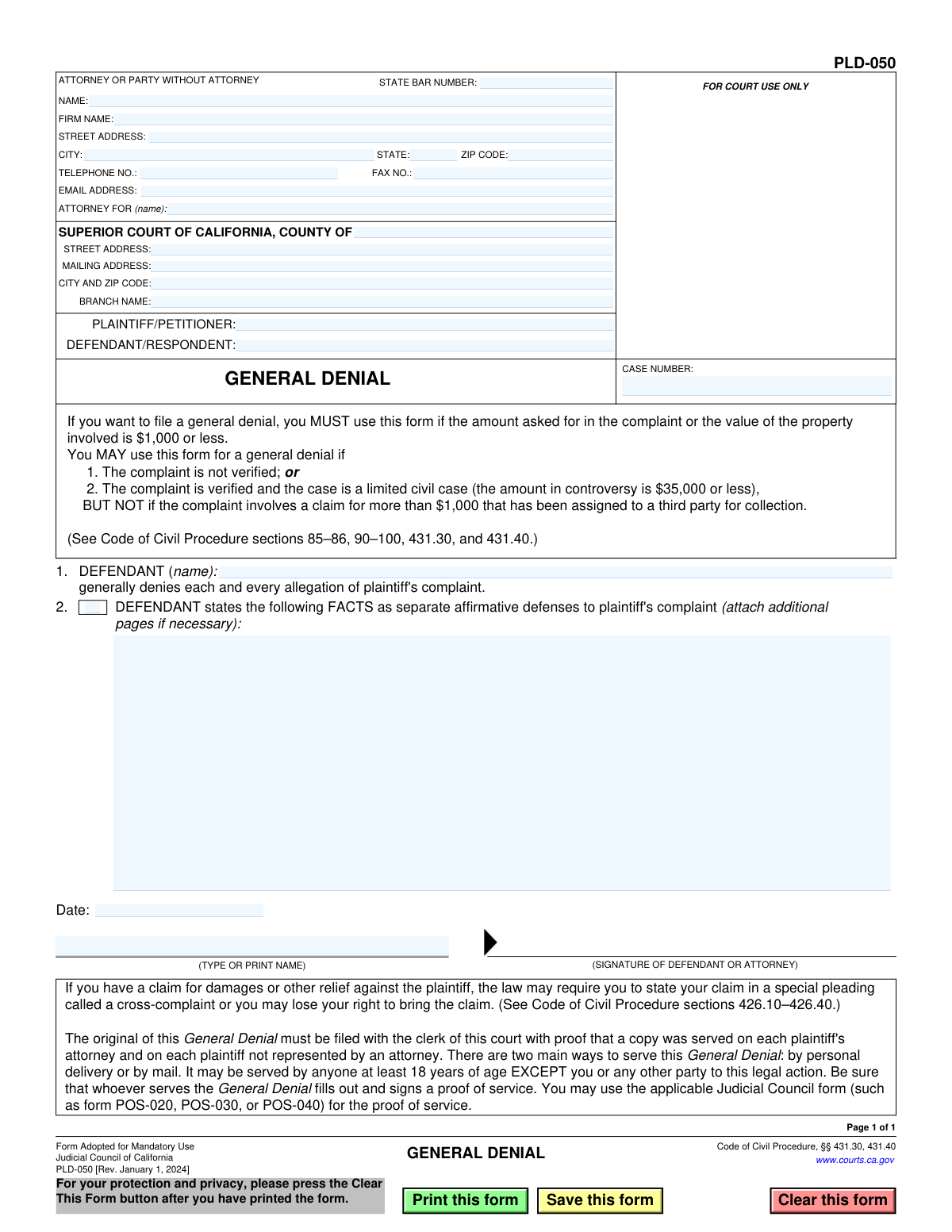
Yes! You can use AI to fill out Form PLD-050, General Denial

Form PLD-050, General Denial, is a Judicial Council of California form used by a defendant in a civil lawsuit to respond to a complaint by denying all of its allegations. Filing this form is a crucial step to avoid a default judgment and to formally contest the claims made by the plaintiff under specific conditions outlined in the Code of Civil Procedure. Today, this form can be filled out quickly and accurately using AI-powered services like Instafill.ai, which can also convert non-fillable PDF versions into interactive fillable forms.
PLD-050 is part of the California court forms category on Instafill.
Our AI automatically handles information lookup, data retrieval, formatting, and form filling.
It takes less than a minute to fill out PLD-050 using our AI form filling.
Securely upload your data. Information is encrypted in transit and deleted immediately after the form is filled out.

Form specifications

Form name: Form PLD-050, General Denial
Number of fields: 28
Number of pages: 1
Language: English
main-image

Instafill Demo: How to fill out PDF forms in seconds with AI

How to Fill Out PLD-050 Online for Free in 2026

Are you looking to fill out a PLD-050 form online quickly and accurately? Instafill.ai offers the #1 AI-powered PDF filling software of 2026, allowing you to complete your PLD-050 form in just 37 seconds or less.
Follow these steps to fill out your PLD-050 form online using Instafill.ai:
  1. 1 Navigate to Instafill.ai and upload or select the California Form PLD-050, General Denial.
  2. 2 Provide your personal or attorney information, including name, address, contact details, and State Bar number if applicable.
  3. 3 Enter the court and case information, including the county, court address, plaintiff and defendant names, and the case number.
  4. 4 Input the name of the defendant who is generally denying the allegations in the designated field.
  5. 5 If you have affirmative defenses, describe them in the provided space or attach additional pages as necessary.
  6. 6 Review all the information you have entered for accuracy, then date and e-sign the document.
  7. 7 Download the completed General Denial form, ready for filing with the court and serving on the plaintiff.

Our AI-powered system ensures each field is filled out correctly, reducing errors and saving you time.

Why Choose Instafill.ai for Your Fillable PLD-050 Form?

Speed

Complete your PLD-050 in as little as 37 seconds.

Up-to-Date

Always use the latest 2026 PLD-050 form version.

Cost-effective

No need to hire expensive lawyers.

Accuracy

Our AI performs 10 compliance checks to ensure your form is error-free.

Security

Your personal information is protected with bank-level encryption.

Frequently Asked Questions About Form PLD-050

This form is used by a defendant in a California civil lawsuit to formally respond to and deny all of the allegations made in the plaintiff's complaint. It is a simple way to answer a lawsuit without addressing each allegation individually.

You MUST use this form if the amount of money or value of property involved in the lawsuit is $1,000 or less. For larger amounts in limited civil cases, its use is optional under certain conditions.

An affirmative defense is a reason why the plaintiff should not win the case, even if their claims are true. You can list these legal arguments in Section 2, but you should consider seeking legal advice to identify them.

You must file the original with the court clerk and have a copy 'served' on the plaintiff or their attorney. Serving means having someone who is over 18 and not a party to the case deliver or mail the documents.

Yes, a proof of service is a separate form (like POS-020 or POS-030) that the person who served your General Denial must sign. This form is then filed with the court to prove that you legally notified the other side.

The form warns that if you have a claim against the plaintiff, you may need to file a separate form called a 'cross-complaint'. If you don't, you could lose your right to bring that claim later.

You will need the case number, the court's name and address, and the names of the plaintiff and defendant. This information can be found on the complaint you received.

No, the form explicitly states it must be served by someone who is at least 18 years old and is not you or any other party in the legal action.

A General Denial denies everything in the complaint at once, which is allowed in specific, often smaller, cases. A more detailed answer would respond to each of the plaintiff's allegations one by one.

Yes, services like Instafill.ai use AI to help you accurately auto-fill form fields with your personal information and case details, which can save time and reduce errors.

You can use Instafill.ai to upload the PDF of the form. The service will make it an interactive, fillable form that you can complete on your computer, then download to print for filing and service.

Instafill.ai can convert flat, non-fillable PDFs into interactive, fillable forms. Simply upload the document to their platform to make it easy to type your information directly into the fields.

The case number is printed on the top-right corner of the complaint and summons documents that you were served with. You must copy this number exactly onto your General Denial.

Compliance PLD-050
Validation Checks by Instafill.ai

1
Case Number Presence
This check ensures that the 'CASE NUMBER' field is not empty. The case number is a unique identifier assigned by the court to a specific lawsuit, and it is essential for associating this document with the correct case file. A missing case number will result in the court clerk rejecting the filing.
2
State Bar Number Format
Validates that the 'STATE BAR NUMBER' field, if filled, contains only numeric digits. This number uniquely identifies an attorney licensed to practice in California. An incorrect format could lead to misidentification of the legal counsel, and while not always mandatory (for self-represented parties), if provided it must be correct.
3
Attorney or Party Name Completeness
Ensures the 'NAME' field in the 'ATTORNEY OR PARTY WITHOUT ATTORNEY' section is filled out. This field identifies the person filing the document, whether it's the attorney of record or a self-represented party. Failure to provide this information makes the document invalid as its origin cannot be determined.
4
Filer's Full Address Requirement
This check verifies that the 'STREET ADDRESS', 'CITY', 'STATE', and 'ZIP CODE' fields for the filer are all completed. A complete and accurate address is legally required for the service of subsequent court documents and official correspondence. An incomplete address can delay legal proceedings and may lead to a default judgment if the party cannot be properly served.
5
Telephone Number Format
Validates that the 'TELEPHONE NO.' field follows a standard US phone number format (e.g., XXX-XXX-XXXX or (XXX) XXX-XXXX). This ensures the court and other parties have a valid means of contact for the filer. An invalid number can hinder communication and slow down the legal process.
6
Email Address Format
This check ensures that the 'EMAIL ADDRESS' field, if provided, is in a valid format (e.g., [email protected]). With the increasing use of electronic service and communication in courts, a valid email address is crucial for timely receipt of notices and documents. An invalid format will cause communication failures.
7
Court County Specification
Verifies that the 'COUNTY OF' field under 'SUPERIOR COURT OF CALIFORNIA' is filled. This specifies the correct court jurisdiction where the case is being heard. Filing a document in the wrong county court will result in its rejection and could cause the filer to miss critical deadlines.
8
Plaintiff/Petitioner Name Completeness
Ensures that the 'PLAINTIFF/PETITIONER' field is filled out. This field must contain the name of the party who initiated the lawsuit. Omitting this information makes it unclear who the denial is being filed against, rendering the document ambiguous and likely to be rejected by the court.
9
Defendant/Respondent Name Completeness
This check validates that the 'DEFENDANT/RESPONDENT' field is not empty. This identifies the party who is responding to the complaint and filing the General Denial. This information is fundamental for correctly captioning the case and identifying the parties involved.
10
Defendant Name Consistency
This validation compares the name in the 'DEFENDANT/RESPONDENT' field with the name in the 'DEFENDANT (name)' field in section 1. The names must match to ensure consistency throughout the legal document. A mismatch could create confusion about who is denying the allegations.
11
Signature Date Validity
Ensures the 'Date' field is a valid calendar date and is not set in the future. The signature date attests to when the document was signed, which has legal significance regarding deadlines and attestations. An invalid or future date can call the document's authenticity into question and lead to its rejection.
12
Printed Name for Signature Requirement
This check verifies that the 'TYPE OR PRINT NAME' field below the signature line is completed. This field clarifies the identity of the person who signed the document, as signatures can often be illegible. Legal documents require a clear identification of the signatory, and its absence can invalidate the filing.
13
Attorney Representation Consistency
If the 'ATTORNEY FOR (name)' field is filled, this check ensures the name provided matches the name in the 'DEFENDANT/RESPONDENT' field. This confirms that the attorney is officially representing the party filing the denial. A mismatch could indicate a clerical error or an unauthorized filing.
14
ZIP Code Format Validation
Validates that the 'ZIP CODE' for the filer's address is a valid 5-digit or 9-digit (ZIP+4) numerical format. An incorrect ZIP code can lead to misdirected or returned mail, which is critical for the service of legal documents. This ensures the address of record is valid for postal delivery.

Common Mistakes in Completing PLD-050

Entering an Incorrect Case Number

Users often mistype the case number or copy it incorrectly from the complaint document. Since the case number is the primary identifier for the court filing system, any error, even a single transposed digit, will cause the document to be rejected by the clerk or misfiled. To avoid this, meticulously double-check the case number against the summons and complaint before submitting the form.

Mismatched or Misspelled Party Names

Filers frequently misspell the names of the plaintiff or defendant, or they reverse the roles in the caption. The names on the General Denial must exactly match the names as they appear on the complaint. Any discrepancy can lead to filing rejection or create legal ambiguities, requiring corrected documents to be filed.

Improper Use of the General Denial Form

Many individuals use this form when it is not appropriate for their case, such as when responding to a 'verified' complaint in an unlimited civil case. The form's instructions specify its limited use, but this legal nuance is often missed, leading to the response being legally invalid and potentially struck by the court. This can result in the defendant needing to file a new, proper answer under a tight deadline to avoid a default judgment.

Forgetting to File a Proof of Service

A critical and common error is filing the General Denial with the court but failing to serve a copy on the plaintiff and file a separate Proof of Service form (e.g., POS-030). The form itself is not considered properly filed until the court receives proof that the opposing party has been notified. This omission can lead to the plaintiff successfully requesting a default judgment because, legally, no response was received.

Missing Signature or Date

Forgetting to physically sign and date the form is a frequent oversight, especially when dealing with printed documents. An unsigned legal document is invalid and will be rejected by the court clerk without exception. This can cause the filer to miss the strict deadline for responding to the lawsuit, which could result in a default judgment being entered against them.

Omitting Defendant's Name in Item 1

While the defendant's name appears in the top caption, filers often forget to repeat it in the specific field for Item 1 ('DEFENDANT (name): generally denies...'). This makes the denial technically incomplete, as it doesn't explicitly state who is making the denial. This can lead to the filing being questioned or rejected by the court clerk for being incomplete.

Improperly Stating Affirmative Defenses

In Item 2, self-represented parties often write a narrative of their side of the story instead of concise legal 'affirmative defenses' (e.g., 'Statute of Limitations'). This can inadvertently admit to facts and fails to properly preserve legal defenses for trial, potentially waiving them permanently. If you are unsure what to write, it is often safer to leave this section blank, as the General Denial itself is the primary purpose of the form.

Incorrect Court Information

Filers sometimes enter the information for their local courthouse instead of the specific court where the lawsuit was filed. The court name, street address, and branch name must exactly match the information on the complaint. Filing the document in the wrong court will lead to rejection and significant delays, jeopardizing the ability to respond within the legal time limit.

Confusion in 'ATTORNEY FOR' Field for Self-Represented Parties

A person representing themselves (in 'pro per') often mistakenly puts their own name in the 'ATTORNEY FOR (name):' field. This field is intended for an attorney to state which party they represent. A self-represented party should fill in their name and contact details in the main box, but for the 'ATTORNEY FOR' line, they should either leave it blank or write 'Defendant, In Pro Per' to avoid confusion.

Using Illegible Handwriting on a Non-Fillable Form

When a form is only available as a flat PDF, users may print it and fill it out by hand, but illegible handwriting can cause major issues. The court clerk may misinterpret names, addresses, or the case number, leading to data entry errors in the court's system or outright rejection of the form. To prevent this, it's best to use a fillable version of the form. If one isn't available, AI-powered tools like Instafill.ai can convert the PDF into a fillable format to ensure all entries are typed and perfectly clear.
Saved over 80 hours a year

“I was never sure if my IRS forms like W-9 were filled correctly. Now, I can complete the forms accurately without any external help.”

Kevin Martin Green

Your data stays secure with advanced protection from Instafill and our subprocessors

Robust compliance program

Transparent business model

You’re not the product. You always know where your data is and what it is processed for.

ISO 27001, HIPAA, and GDPR

Our subprocesses adhere to multiple compliance standards, including but not limited to ISO 27001, HIPAA, and GDPR.

Security & privacy by design

We consider security and privacy from the initial design phase of any new service or functionality. It’s not an afterthought, it’s built-in, including support for two-factor authentication (2FA) to further protect your account.

Fill out PLD-050 with Instafill.ai

Worried about filling PDFs wrong? Instafill securely fills form-pld-050-general-denial forms, ensuring each field is accurate.