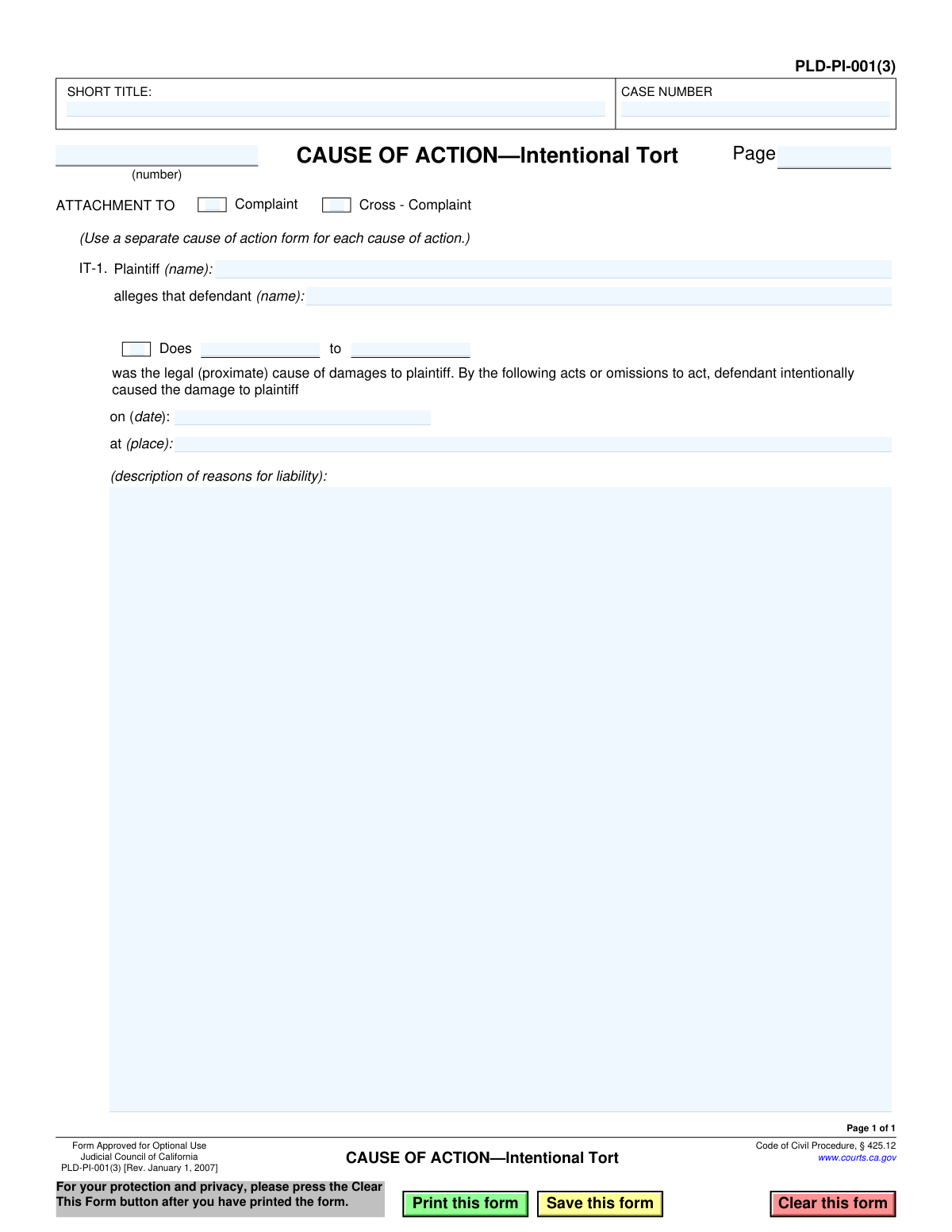
Yes! You can use AI to fill out Form PLD-PI-001(3), Cause of Action—Intentional Tort

Form PLD-PI-001(3) is a crucial legal document used in California civil litigation to formally state a cause of action for an intentional tort, such as assault, battery, or fraud. As an attachment to a complaint or cross-complaint, it details the plaintiff's allegations, including the specific actions of the defendant, the date, and the location of the incident. Today, this form can be filled out quickly and accurately using AI-powered services like Instafill.ai, which can also convert non-fillable PDF versions into interactive fillable forms.
PLD-PI-001(3) is part of the California court forms category on Instafill.
Our AI automatically handles information lookup, data retrieval, formatting, and form filling.
It takes less than a minute to fill out PLD-PI-001(3) using our AI form filling.
Securely upload your data. Information is encrypted in transit and deleted immediately after the form is filled out.

Form specifications

Form name: Form PLD-PI-001(3), Cause of Action—Intentional Tort
Number of fields: 19
Number of pages: 1
Language: English
main-image

Instafill Demo: How to fill out PDF forms in seconds with AI

How to Fill Out PLD-PI-001(3) Online for Free in 2026

Are you looking to fill out a PLD-PI-001(3) form online quickly and accurately? Instafill.ai offers the #1 AI-powered PDF filling software of 2026, allowing you to complete your PLD-PI-001(3) form in just 37 seconds or less.
Follow these steps to fill out your PLD-PI-001(3) form online using Instafill.ai:
  1. 1 Navigate to Instafill.ai and upload or select the PLD-PI-001(3) form.
  2. 2 Enter the case information, including the short title and case number, in the header section.
  3. 3 Indicate whether the form is an attachment to a Complaint or Cross-Complaint.
  4. 4 Identify the plaintiff and the defendant(s) by name in the designated fields.
  5. 5 Provide a detailed description of the defendant's acts or omissions that intentionally caused the damage, along with the date and location of the incident.
  6. 6 Review all entered information for legal and factual accuracy before finalizing the document.
  7. 7 Download or print the completed form to be attached to your primary legal filing with the court.

Our AI-powered system ensures each field is filled out correctly, reducing errors and saving you time.

Why Choose Instafill.ai for Your Fillable PLD-PI-001(3) Form?

Speed

Complete your PLD-PI-001(3) in as little as 37 seconds.

Up-to-Date

Always use the latest 2026 PLD-PI-001(3) form version.

Cost-effective

No need to hire expensive lawyers.

Accuracy

Our AI performs 10 compliance checks to ensure your form is error-free.

Security

Your personal information is protected with bank-level encryption.

Frequently Asked Questions About Form PLD-PI-001(3)

This form is used in California courts to specify a legal claim that someone intentionally harmed you or your property. It is not a standalone lawsuit but an attachment to a main Complaint or Cross-Complaint that details a specific cause of action.

A plaintiff (the person initiating the lawsuit) or a cross-complainant (a defendant filing a claim back) uses this form. It's required when you are alleging that the defendant's intentional actions caused you damages.

An intentional tort is a wrongful act done on purpose, such as assault, battery, false imprisonment, defamation, or intentional infliction of emotional distress. This form is specifically for these types of claims, not for accidents or negligence.

This form cannot be filed by itself; it must be attached to a primary legal document like a Complaint (Form PLD-PI-001) or a Cross-Complaint. It provides the specific details for one of the legal claims listed in that main document.

No, the form instructions state to use a separate cause of action form for each cause of action. If you are suing for both battery and false imprisonment, for example, you must complete two separate forms.

In this section, you must clearly and concisely describe the specific actions the defendant took that you believe were intentional and resulted in your damages. State the facts of what happened, when, and where.

'Does' are placeholders for defendants whose names or identities you do not yet know. Including them allows you to add them to the lawsuit later once their identity is discovered through the legal process.

You will need the names of the plaintiff and defendant(s), the exact date and location where the incident occurred, and a factual description of the defendant's intentional act that caused harm.

You file this form, along with your main Complaint or Cross-Complaint, with the clerk of the Superior Court in the California county where you are filing the lawsuit.

Yes, services like Instafill.ai use AI to help you accurately auto-fill form fields with your case information. This can save significant time and help reduce errors, though it is not a substitute for legal advice.

You can use a service like Instafill.ai to complete the form digitally. Simply upload the PDF, and the AI will make the fields interactive so you can type in your information and then download the completed document.

If you have a non-fillable or 'flat' PDF, you can upload it to a platform like Instafill.ai. Its technology can convert the document into an interactive, fillable form that you can easily complete on your computer.

The 'SHORT TITLE' is an abbreviated name for the case (e.g., 'Smith v. Jones') used for easy reference on all documents. The plaintiff and defendant fields require the full legal names of the parties involved in this specific cause of action.

Compliance PLD-PI-001(3)
Validation Checks by Instafill.ai

1
Ensures Case Number is Provided
Verifies that the 'CASE NUMBER' field is not empty. The case number is the primary identifier for the entire lawsuit within the court system. Submitting this form without a case number would make it impossible to file correctly and associate it with the parent complaint, leading to rejection by the court clerk.
2
Requires Short Title of the Case
Checks that the 'SHORT TITLE' field, which typically contains the primary parties' names (e.g., 'Plaintiff v. Defendant'), is filled out. This title is used on all subsequent documents for quick identification. An empty short title would cause confusion and processing delays for court personnel and all parties involved.
3
Exclusive Attachment Type Selection
Ensures that exactly one of the 'Complaint' or 'Cross - Complaint' checkboxes is selected. This form is an attachment and must be explicitly linked to one of these two originating documents. Selecting neither or both creates an ambiguity that would likely cause the filing to be rejected for being improperly pleaded.
4
Validates Cause of Action Number
Verifies that the cause of action number field is populated, typically with an ordinal word like 'First' or 'Second'. This number is critical for organizing multiple legal claims within a single complaint, allowing each to be addressed separately. Failure to number the cause of action can make the complaint confusing and subject to a motion to strike.
5
Requires Plaintiff Name
Ensures that the 'Plaintiff (name)' field is not left blank. Identifying the party bringing the claim is a fundamental requirement for any legal action. A cause of action without a named plaintiff has no legal standing and is fundamentally invalid.
6
Requires Defendant Name
Validates that the 'defendant (name)' field is populated with the name of the party being sued. A claim must be directed at a specific legal person or entity to be valid. Omitting the defendant's name would render the cause of action unenforceable and legally meaningless.
7
Conditional Validation for Doe Defendants
This check ensures that if the 'Does' checkbox is marked, the corresponding field specifying the range of Doe defendants (e.g., '1 to 10') is also filled out. This is required to properly plead against unknown defendants under California law. Failure to specify the Doe numbers can invalidate the claim against those future-named parties.
8
Validates Incident Date
This validation checks that the incident date is a complete, validly formatted date (e.g., MM/DD/YYYY) and that it occurs in the past. The date of the alleged tort is a critical fact for establishing the timeline and for statute of limitations purposes. An invalid, future, or missing date would make the claim logically and legally unsound.
9
Ensures Incident Place is Specified
Verifies that the 'at (place)' field describing the location of the incident is not empty. The location where the tort occurred is an essential fact for establishing the court's proper jurisdiction and venue. Omitting this information could lead to the case being challenged for improper venue or dismissed.
10
Ensures Substantive Description of Liability
Confirms that the 'description of reasons for liability' text area contains a sufficient amount of text, beyond a minimal entry. This section must contain the factual basis for the claim, outlining the defendant's alleged intentional acts. An empty or overly brief description fails to adequately state a cause of action and would be subject to dismissal upon challenge.
11
Verifies Plaintiff and Defendant are Different Parties
This logical check compares the Plaintiff's name and the Defendant's name to ensure they are not identical. A party cannot legally bring an intentional tort claim against itself. This validation prevents a logically impossible and legally invalid filing that would be dismissed by the court.
12
Validates Page Number Format
Ensures the 'Page' number field contains a positive integer. Correct and sequential page numbering is a standard requirement for all court filings to ensure the document is complete and its integrity is maintained. An incorrect or missing page number can lead to the document being rejected by the court clerk.

Common Mistakes in Completing PLD-PI-001(3)

Mismatched Case Title or Number

Filers often enter a 'SHORT TITLE' or 'CASE NUMBER' on this attachment that doesn't exactly match the main Complaint document. This happens due to typos or copy-paste errors when handling multiple documents, leading to confusion and potential rejection by the court clerk. To avoid this, meticulously cross-reference the information with the primary Complaint before filing, or use a tool that ensures consistency across all case documents.

Forgetting to Number the Cause of Action

The form requires numbering each cause of action (e.g., 'First,' 'Second') in the space provided, but this small field is easily overlooked. When a complaint alleges multiple claims, failing to number them creates confusion for the court and opposing counsel, potentially leading to legal challenges like a motion to strike. Always sequentially number each cause of action form you attach, starting with 'First'.

Providing a Vague or Conclusory Liability Description

In the description field, filers often state legal conclusions (e.g., 'Defendant assaulted plaintiff') instead of specific facts. Legal pleadings require a description of the actual events—what the defendant did, said, when, and where—that constitute the tort. A vague description can lead to a demurrer (a motion to dismiss the claim), forcing the plaintiff to amend the complaint or risk having the cause of action dismissed by the judge.

Combining Multiple Causes of Action on a Single Form

A filer might try to describe several distinct legal wrongs (e.g., battery, defamation, and false imprisonment) in the description box of one form to save time. However, the form explicitly instructs to 'Use a separate cause of action form for each cause of action.' Combining claims will likely result in the filing being rejected or challenged for being procedurally improper, requiring a complete redraft of the complaint attachments.

Incorrectly or Incompletely Identifying Parties

Using incomplete names, nicknames, or incorrect legal names for the plaintiff or defendant is a critical error that can invalidate service of process and create grounds for dismissal. This often stems from carelessness or not having the party's full legal name. Always use the full, correct legal names for all parties involved, ensuring they are spelled identically across all documents.

Inconsistent Information Across Documents

The names and case details on this attachment must be identical to those on the main Complaint and other legal forms. Even minor variations, like using a middle initial on one form but not another, can create legal ambiguity and lead to filing rejections. AI-powered tools like Instafill.ai prevent this by auto-populating data from a single source, ensuring perfect consistency across the entire filing.

Missing or Ambiguous Incident Details

Leaving the 'on (date)' or 'at (place)' fields blank or providing vague information like 'last month' is a common mistake. These details are essential for establishing jurisdiction, venue, and compliance with the statute of limitations. Omitting this information can give the defendant grounds to challenge the sufficiency of the complaint, causing delays and potentially jeopardizing the claim.

Illegible Handwriting on Printed Forms

When this form is printed as a non-fillable PDF and completed by hand, poor penmanship can render critical information unreadable. Illegible names, dates, or factual descriptions can lead to clerical errors, filing rejections, or misinterpretation by the court. To ensure clarity, it is best to use a tool that allows you to type directly into the fields; services like Instafill.ai can convert such non-fillable PDFs into fillable versions, ensuring your submission is professional and easy to read.

Improper Use of 'Doe' Defendant Allegations

The form allows for claims against unknown defendants ('Does'), but litigants without legal counsel often misunderstand their purpose. They might incorrectly list a known person as a 'Doe' or fail to include Doe allegations when other responsible parties are suspected but unidentified. This can result in confusion or, more seriously, the inability to add a newly discovered defendant to the case after the statute of limitations has passed.
Saved over 80 hours a year

“I was never sure if my IRS forms like W-9 were filled correctly. Now, I can complete the forms accurately without any external help.”

Kevin Martin Green

Your data stays secure with advanced protection from Instafill and our subprocessors

Robust compliance program

Transparent business model

You’re not the product. You always know where your data is and what it is processed for.

ISO 27001, HIPAA, and GDPR

Our subprocesses adhere to multiple compliance standards, including but not limited to ISO 27001, HIPAA, and GDPR.

Security & privacy by design

We consider security and privacy from the initial design phase of any new service or functionality. It’s not an afterthought, it’s built-in, including support for two-factor authentication (2FA) to further protect your account.

Fill out PLD-PI-001(3) with Instafill.ai

Worried about filling PDFs wrong? Instafill securely fills form-pld-pi-0013-cause-of-actionintentional-tort forms, ensuring each field is accurate.