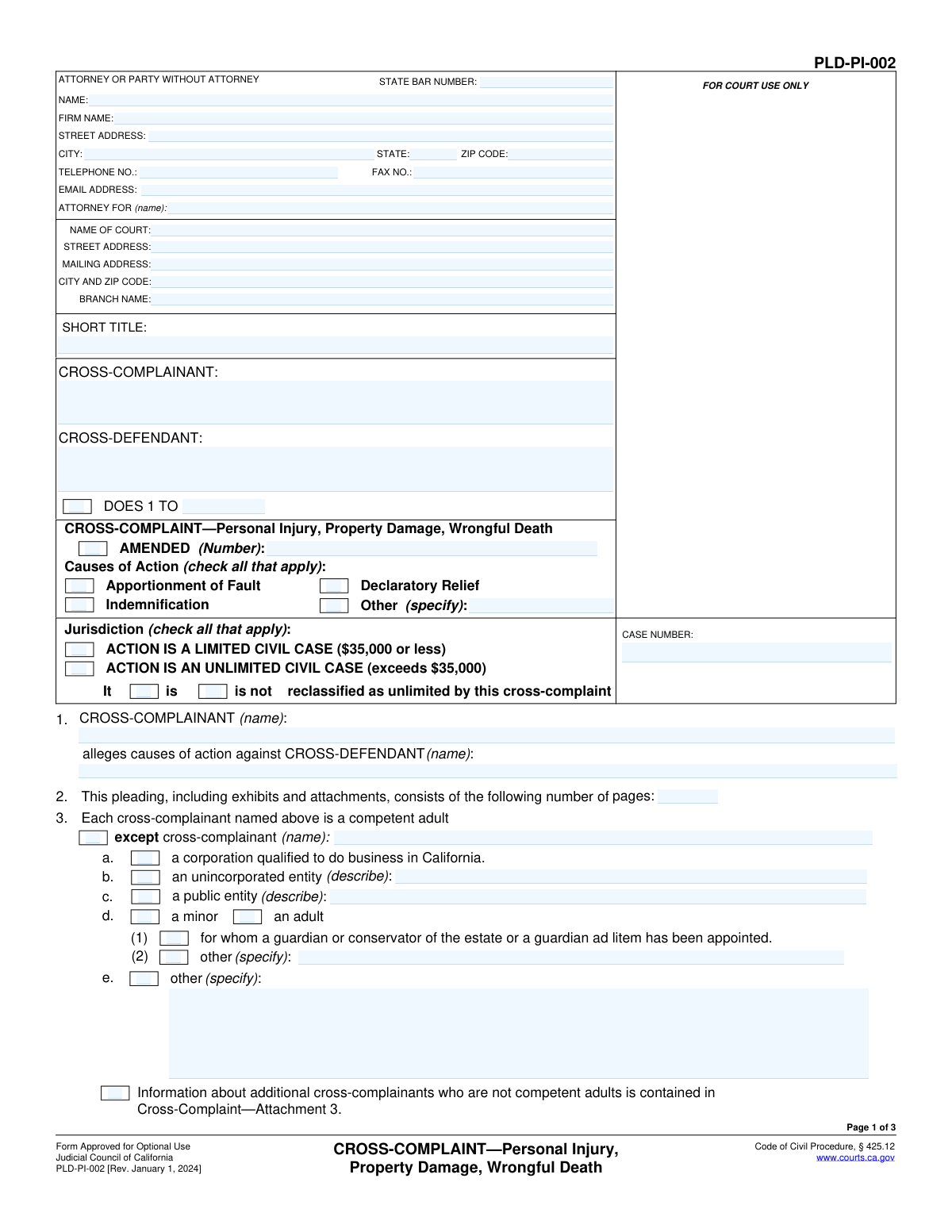
Yes! You can use AI to fill out Form PLD-PI-002, CROSS-COMPLAINT—Personal Injury, Property Damage, Wrongful Death
Form PLD-PI-002, approved for use by the Judicial Council of California, is a pleading filed by a defendant in a lawsuit to bring in another party they believe is responsible for the plaintiff's alleged damages. This is crucial for seeking indemnification or apportionment of fault in personal injury, property damage, or wrongful death cases. Today, this form can be filled out quickly and accurately using AI-powered services like Instafill.ai, which can also convert non-fillable PDF versions into interactive fillable forms.
PLD-PI-002 is part of the
California court forms category on Instafill.
Our AI automatically handles information lookup, data retrieval, formatting, and form filling.
It takes less than a minute to fill out PLD-PI-002 using our AI form filling.
Securely upload your data. Information is encrypted in transit and deleted immediately after the form is filled out.
Form specifications
| Form name: | Form PLD-PI-002, CROSS-COMPLAINT—Personal Injury, Property Damage, Wrongful Death |
| Number of fields: | 117 |
| Number of pages: | 1 |
| Language: | English |
Instafill Demo: How to fill out PDF forms in seconds with AI
How to Fill Out PLD-PI-002 Online for Free in 2026
Are you looking to fill out a PLD-PI-002 form online quickly and accurately? Instafill.ai offers the #1 AI-powered PDF filling software of 2026, allowing you to complete your PLD-PI-002 form in just 37 seconds or less.
Follow these steps to fill out your PLD-PI-002 form online using Instafill.ai:
- 1 Navigate to Instafill.ai and upload or select Form PLD-PI-002.
- 2 Use the AI-powered fields to input the court information, case number, and the names of the cross-complainant and cross-defendant.
- 3 Specify the legal status of each cross-complainant and cross-defendant (e.g., individual, corporation, public entity).
- 4 Check the boxes for the relevant causes of action you are asserting, such as Indemnification, Apportionment of Fault, or Declaratory Relief.
- 5 Indicate any additional cause of action forms that are being attached to this cross-complaint.
- 6 Complete the 'prayer for relief' section, detailing the judgment you are requesting from the court, such as total indemnity or compensatory damages.
- 7 Review all entered information for accuracy, then e-sign and date the form before downloading it for filing.
Our AI-powered system ensures each field is filled out correctly, reducing errors and saving you time.
Why Choose Instafill.ai for Your Fillable PLD-PI-002 Form?
Speed
Complete your PLD-PI-002 in as little as 37 seconds.
Up-to-Date
Always use the latest 2026 PLD-PI-002 form version.
Cost-effective
No need to hire expensive lawyers.
Accuracy
Our AI performs 10 compliance checks to ensure your form is error-free.
Security
Your personal information is protected with bank-level encryption.
Frequently Asked Questions About Form PLD-PI-002
This form is used in a California lawsuit by a defendant who wants to sue another person or entity (a co-defendant or a new party) in the same case, alleging they are also responsible for the personal injury, property damage, or wrongful death.
The Cross-Complainant is the original defendant who is now filing this new complaint against someone else. The Cross-Defendant is the person or entity being sued by this Cross-Complaint.
Apportionment of Fault (Section 8) asks the court to make other at-fault parties pay their proportional share of the damages. Indemnification (Section 7) is a claim that another party should have to reimburse you for 100% of any judgment against you, usually because your liability is only indirect.
A Limited Civil Case is for disputes valued at $35,000 or less. An Unlimited Civil Case is for disputes exceeding $35,000.
'Does' are placeholders for additional parties you believe may be responsible but whose names you don't know at the time of filing. This allows you to add them to the cross-complaint later once their identity is discovered.
This section is relevant if you are suing a government entity. You must typically file a formal claim with that agency and have it rejected before you can sue them in court; this section is where you state you have complied with that requirement.
As indicated in Section 11, you may need to attach other Judicial Council forms that detail specific causes of action, such as 'Motor Vehicle' (PLD-PI-001(1)) or 'General Negligence' (PLD-PI-001(2)), depending on the facts of your case.
The 'Prayer' is where you tell the court what you want. You should check the boxes that match your claims, such as asking for total indemnity, a judgment in a proportionate share from others, or a judicial determination of fault.
After completing and signing the form, you must file it with the court clerk where the original lawsuit is pending. You must also arrange for formal legal 'service' of the cross-complaint on all parties, including the new cross-defendants.
Yes, services like Instafill.ai use AI to help you accurately fill out legal forms. They can auto-populate your case number, party names, and other information across all pages to save time and reduce errors.
You can upload the PLD-PI-002 PDF to the Instafill.ai website. The platform will make the document interactive, allowing you to easily type your information into the correct fields and save or print the completed form.
If you have a flat, non-fillable PDF, you can use a service like Instafill.ai. It has the capability to convert the static document into an interactive, fillable form that you can complete on your computer.
Compliance PLD-PI-002
Validation Checks by Instafill.ai
1
Exclusive Jurisdiction Selection
This check ensures that only one of the jurisdiction options, either 'ACTION IS A LIMITED CIVIL CASE' or 'ACTION IS AN UNLIMITED CIVIL CASE', is selected. A legal action cannot be classified as both simultaneously, so selecting more than one is a logical contradiction. If both or neither are selected, the form submission should be blocked until the user corrects the selection to reflect the single, correct jurisdiction.
2
Conditional 'Other' Cause of Action Specification
Validates that if the 'Other' checkbox under 'Causes of Action' is selected, the corresponding 'specify' text field is not empty. This is critical because the court and opposing parties must be informed of the specific nature of any unlisted cause of action being alleged. Failure to provide this information would make the pleading ambiguous and could lead to its rejection.
3
Jurisdictional Amount Consistency for Limited Civil Cases
This check verifies that if the action is declared a 'LIMITED CIVIL CASE', any amount entered in section 12.d.(2) for compensatory damages does not exceed $35,000. This is important as the monetary amount is the defining characteristic of a limited civil case in California. If the amount exceeds the threshold, the form should prompt the user to either correct the amount or reclassify the case as unlimited.
4
State Bar Number Requirement and Format
Ensures that the 'STATE BAR NUMBER' field contains a valid numeric value if an attorney's name is provided. The State Bar number is a unique identifier for a licensed attorney and is required for verification and official court records. If an attorney is listed but the number is missing or improperly formatted, the submission should be flagged to prevent filing with incomplete or invalid attorney information.
5
Page Count Logical Minimum
This validation confirms that the number entered in section 2, for the total number of pages, is an integer greater than or equal to 3. Since the base form itself is three pages long, any valid submission must consist of at least this many pages. An entry less than 3 would be logically incorrect and indicates a mistake by the filer, requiring correction before submission.
6
Cause of Action Cross-Reference Consistency
Verifies that if a cause of action (e.g., 'Indemnification', 'Apportionment of Fault') is checked in the top section, the corresponding numbered section in the body of the complaint (e.g., section 7, section 8) is also checked. This ensures the pleading is internally consistent and that the filer is explicitly asserting the detailed allegations for each cause of action selected. A mismatch should trigger a warning to the user to review their selections.
7
Conditional Description for Entity Types
This check ensures that if a party (in section 3 or 4) is identified as an 'unincorporated entity', 'public entity', or 'other', the associated 'describe' or 'specify' field is filled out. This information is necessary to properly identify the legal nature and capacity of the party being sued or filing the suit. An empty description field would render the identification incomplete and should halt submission until corrected.
8
Claims Statute Compliance Selection Logic
Validates that if the checkbox in section 6 ('Cross-complainant is required to comply with a claims statute') is selected, one of the two sub-options (6a 'has complied' or 6b 'is excused') must also be selected. Checking the main box creates a requirement to provide further detail on the status of compliance. An incomplete selection here would leave a critical legal assertion unresolved and must be corrected.
9
Required Explanation for Claims Statute Excuse
Ensures that if sub-option 6b ('is excused from complying') is checked, the 'specify' text field explaining the reason for the excuse is not empty. The court requires a legal or factual basis for excusing compliance with a claims statute. Failure to provide this justification would make the assertion legally insufficient and should prevent form submission.
10
Party Name Consistency Between Caption and Body
This check verifies that the 'CROSS-COMPLAINANT' name listed in the caption at the top of page 1 matches the name entered in section 1 of the pleading. This consistency is crucial for avoiding ambiguity and ensuring the document clearly identifies the filing party throughout. A mismatch should generate a warning, prompting the user to confirm the correct party name in both locations.
11
Email Address Format Validation
This validation checks that the value entered into the 'EMAIL ADDRESS' field follows the standard format of a valid email address (e.g., '[email protected]'). Proper formatting is essential for ensuring that electronic communications and service from the court and other parties are deliverable. An invalid format should trigger an error message and prevent submission until corrected.
12
Signature Date Validity
Ensures the 'Date' field next to the signature line contains a valid, properly formatted date that is not in the future. The signature date is legally significant as it marks when the document was executed by the filer. An invalid or future date would call the document's authenticity into question and must be corrected before the form can be considered complete.
Common Mistakes in Completing PLD-PI-002
Filers often mix up these roles. The Cross-Complainant is the party filing this form (typically the original defendant), while the Cross-Defendant is the party being sued by this new claim. This mistake happens due to the complexity of legal terminology and can lead to the entire pleading being legally defective and subject to dismissal, causing significant delays and requiring refiling. To avoid this, carefully identify your role in this specific action before filling in the names in the caption and Section 1.
The 'Short Title' and 'Case Number' must be copied exactly from the original complaint and other official court documents. People sometimes abbreviate the title differently or mis-type the case number, especially on subsequent pages. This can cause the court clerk to reject the filing or mis-file the document, delaying its entry into the case record. Always use the initial court-filed documents as the definitive source for this information.
Choosing between 'Limited Civil Case' ($35,000 or less) and 'Unlimited Civil Case' (exceeds $35,000) is a critical decision with financial and procedural consequences. A common error is failing to check the box indicating the cross-complaint reclassifies the case from limited to unlimited. This can result in paying incorrect filing fees, having the case heard in the wrong jurisdiction, or facing procedural challenges. Carefully evaluate the total potential value of your claims before making this selection.
Sections 3 and 4 require you to specify whether each party is a natural person, a corporation, a public entity, or another type of organization. Filers often leave these sections blank or fail to provide the required description for entities like 'unincorporated entity' or 'public entity'. This ambiguity can make the pleading legally insufficient and vulnerable to a demurrer (a motion to dismiss), forcing you to amend the document. Always research and accurately describe the legal status of every party involved.
Section 2 asks for the total number of pages in the pleading, including all attachments. This is frequently forgotten as it's one of the last details to confirm after the entire document is assembled. While seemingly minor, a missing page count can lead to rejection by a strict court clerk or create disputes later if a page is lost. To prevent this, make it a final checklist item to count all pages and write the total in Section 2 before filing.
A frequent error is checking a box for a cause of action on page 1 (e.g., 'Indemnification') but failing to complete the corresponding detailed section (e.g., Section 7) on the following pages. This inconsistency renders the cause of action unsupported and subject to being stricken by the court. To avoid this, ensure that for every box you check in the 'Causes of Action' list, you fully complete the corresponding numbered paragraph section that contains the specific allegations for that claim.
Section 6 is a trap for the unwary when suing a government entity. Many filers are unaware that they must first present a formal claim to the public entity and have it rejected before they are legally allowed to sue. Simply checking box 6a ('has complied') without actually having done so, or ignoring the section altogether, is a fatal error. This will result in the dismissal of the cross-complaint against that government entity, often permanently.
Section 11 allows you to incorporate other detailed complaint forms by reference (e.g., PLD-PI-001(1) for Motor Vehicle). A critical mistake is checking a box in Section 11 but failing to complete and physically attach the corresponding form to the cross-complaint. This means the cause of action you intended to plead is not actually included, leaving a major gap in your legal claims. Treat Section 11 as a checklist, ensuring each selected form is completed and attached.
In Section 12, filers must clearly state what they are asking the court to award. A common mistake in 'Limited Civil Cases' is checking box 12.d.(2) but forgetting to write in the specific dollar amount of damages being sought. This omission creates ambiguity and can procedurally cap your potential recovery. Always double-check that your 'prayer' is complete and consistent with your case's jurisdiction.
An unsigned or undated legal document is invalid and will be rejected by the court clerk. This simple oversight is surprisingly common, often occurring when filers are rushing to meet a deadline. A rejection can cause you to miss a statute of limitations or other critical filing date, with severe consequences for your case. Always perform a final review to ensure the signature and date are present on page 3. AI-powered tools like Instafill.ai can help by flagging missing signature fields before you finalize the document.
The attorney or self-represented party information block in the top-left corner must be filled out completely. Errors include attorneys omitting their State Bar Number or parties leaving email and phone numbers blank. This can lead to rejection of the filing or missed communications from the court and opposing counsel. Using an AI form-filler like Instafill.ai can help prevent this by saving your information and auto-populating it correctly every time, ensuring no field is missed.
The 'Short Title' and 'Case Number' fields appear at the top of pages 2 and 3, not just the first page. It is a very common mistake to fill out the main caption on page 1 and forget to repeat this essential identifying information on the subsequent pages. This can lead to pages becoming separated and lost, creating confusion for the court and opposing parties. Since this form is often a non-fillable PDF, tools like Instafill.ai can convert it to a smart, fillable version that can automatically populate repeating information across all pages.
Saved over 80 hours a year
“I was never sure if my IRS forms like W-9 were filled correctly. Now, I can complete the forms accurately without any external help.”
Kevin Martin Green
Your data stays secure with advanced protection from Instafill and our subprocessors

Robust compliance program
Transparent business model
You’re not the product. You always know where your data is and what it is processed for.
ISO 27001, HIPAA, and GDPR
Our subprocesses adhere to multiple compliance standards, including but not limited to ISO 27001, HIPAA, and GDPR.
Security & privacy by design
We consider security and privacy from the initial design phase of any new service or functionality. It’s not an afterthought, it’s built-in, including support for two-factor authentication (2FA) to further protect your account.
Fill out PLD-PI-002 with Instafill.ai
Worried about filling PDFs wrong? Instafill securely fills form-pld-pi-002-cross-complaintpersonal-injury-property-damage-wrongful-death forms, ensuring each field is accurate.