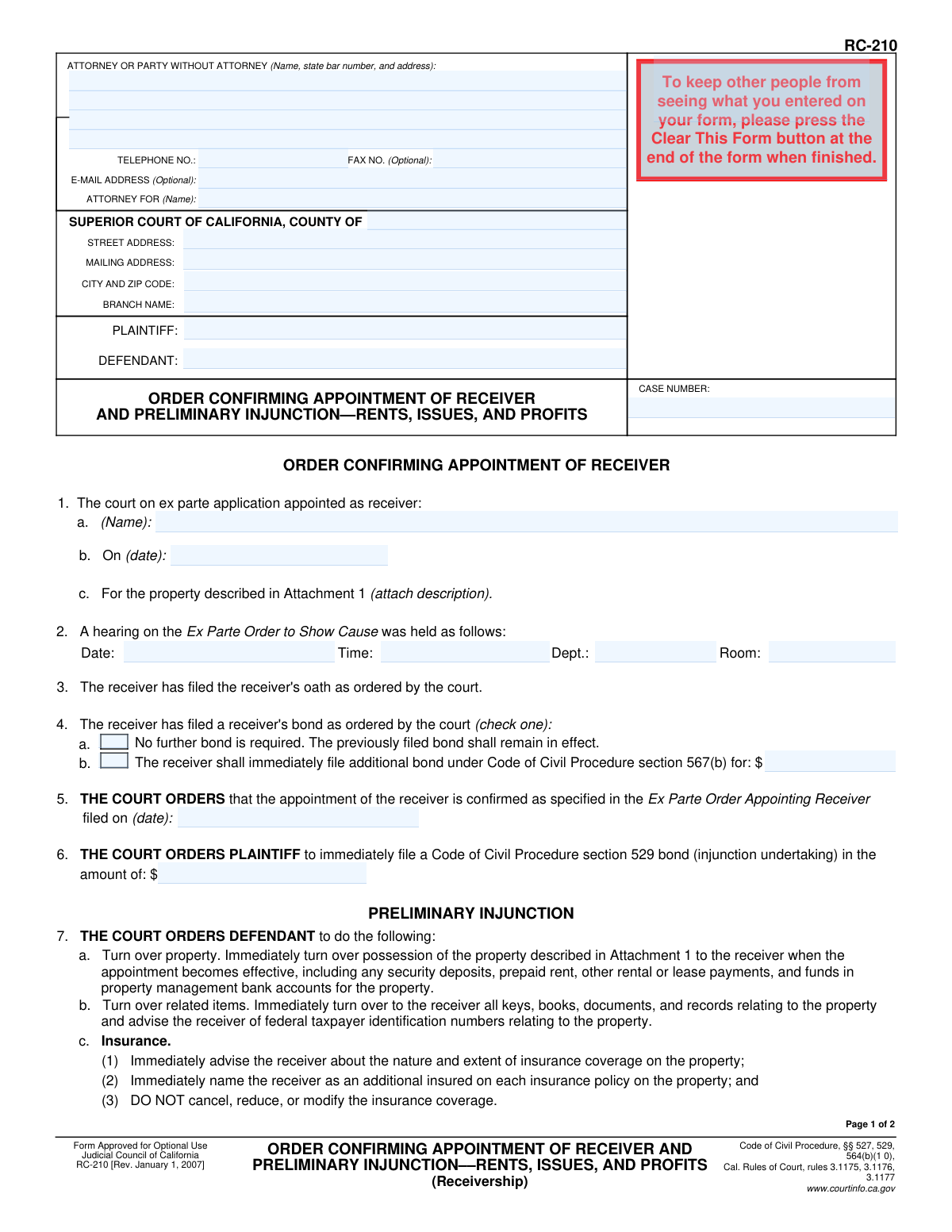
Yes! You can use AI to fill out Form RC-210, Order Confirming Appointment of Receiver and Preliminary Injunction—Rents, Issues, and Profits

Form RC-210, the Order Confirming Appointment of Receiver and Preliminary Injunction, is a crucial legal document issued by the Superior Court of California. It formalizes the court's decision to appoint a receiver to manage a property and collect its income, while also legally preventing the defendant from interfering with the property or its revenue streams. This order is vital in legal disputes, such as foreclosures, to preserve the value of the asset. Today, this form can be filled out quickly and accurately using AI-powered services like Instafill.ai, which can also convert non-fillable PDF versions into interactive fillable forms.
RC-210 is part of the California court forms category on Instafill.
Our AI automatically handles information lookup, data retrieval, formatting, and form filling.
It takes less than a minute to fill out RC-210 using our AI form filling.
Securely upload your data. Information is encrypted in transit and deleted immediately after the form is filled out.

Form specifications

Form name: Form RC-210, Order Confirming Appointment of Receiver and Preliminary Injunction—Rents, Issues, and Profits
Number of fields: 43
Number of pages: 1
Language: English
main-image

Instafill Demo: How to fill out PDF forms in seconds with AI

How to Fill Out RC-210 Online for Free in 2026

Are you looking to fill out a RC-210 form online quickly and accurately? Instafill.ai offers the #1 AI-powered PDF filling software of 2026, allowing you to complete your RC-210 form in just 37 seconds or less.
Follow these steps to fill out your RC-210 form online using Instafill.ai:
  1. 1 Navigate to Instafill.ai and upload or select Form RC-210.
  2. 2 Provide the case information, including the court, county, plaintiff, defendant, and case number in the designated fields.
  3. 3 Enter the details of the ex parte appointment, including the receiver's name, date of appointment, and a description of the property.
  4. 4 Indicate the hearing details and confirm the status of the receiver's oath and bond as ordered by the court.
  5. 5 Specify the terms of the preliminary injunction, detailing the defendant's obligations regarding property turnover, insurance, and other restraints.
  6. 6 Use the AI assistant to review all entered information for accuracy and completeness, ensuring all court requirements are met.
  7. 7 Securely download, print, or file the completed Form RC-210 as required for the court proceedings.

Our AI-powered system ensures each field is filled out correctly, reducing errors and saving you time.

Why Choose Instafill.ai for Your Fillable RC-210 Form?

Speed

Complete your RC-210 in as little as 37 seconds.

Up-to-Date

Always use the latest 2026 RC-210 form version.

Cost-effective

No need to hire expensive lawyers.

Accuracy

Our AI performs 10 compliance checks to ensure your form is error-free.

Security

Your personal information is protected with bank-level encryption.

Frequently Asked Questions About Form RC-210

Form RC-210 is a court order issued by a judge, not a form you fill out to make a request. It is used to officially confirm the appointment of a receiver and issue a preliminary injunction, affecting the plaintiff, defendant, and the receiver in a legal case concerning property income.

The order's primary purpose is to legally finalize the appointment of a neutral third party (a receiver) to manage a property and collect its income. It also legally prohibits the defendant from interfering with the property or the receiver's duties.

A receiver is an individual or entity appointed by the court to take control of, manage, and preserve a property that is the subject of a lawsuit. Their duties often include collecting rent, paying bills, and maintaining the property.

You are ordered to immediately turn over the property, along with all keys, books, records, and funds like security deposits, to the receiver. You must also stop collecting rent or interfering in any way with the receiver's management of the property.

A preliminary injunction is a court order that commands a party (in this case, the defendant) to either perform specific actions or, more commonly, to refrain from certain actions until the lawsuit is fully resolved.

Failing to obey a court order like this one is a serious offense. A defendant who does not comply can be held in contempt of court, which may lead to penalties such as fines or even jail time.

Yes, Item 6 indicates the court can order the plaintiff to file a bond (an 'injunction undertaking'). This is a financial guarantee to cover any damages the defendant might incur if the injunction is later found to have been wrongfully granted.

The top of the form must be filled out with the court's location, the names of the plaintiff and defendant, the case number, and the contact information for the attorney or party submitting the proposed order.

This means the receiver will be covered by the property's insurance policy. The order requires the defendant to arrange this with the insurance company and prohibits them from canceling or reducing the coverage.

This order confirms a receiver who was likely appointed on an emergency basis through an 'ex parte' application. This order is issued after a formal hearing where both parties had the opportunity to be heard by the judge.

Yes. While a judge makes the final decisions, AI-powered services like Instafill.ai can help an attorney or party accurately auto-fill the case information, party details, and other standard fields on the proposed order to save time and reduce errors.

You can use a service like Instafill.ai to upload the form's PDF. Their platform allows you to easily and accurately fill in all the necessary fields, such as court details and party names, before printing it for submission.

If you have a non-fillable or 'flat' PDF, you can use a tool like Instafill.ai. It can convert the static document into an interactive, fillable form online, making it easy to type information directly into the fields.

Compliance RC-210
Validation Checks by Instafill.ai

1
Case Number Presence and Format
This check ensures the 'CASE NUMBER' field in the header is filled out. The case number is a critical identifier for legal documents, and its absence would make the form impossible to file or associate with the correct legal proceeding. The validation should also check for a format typical of California court case numbers, flagging entries that are clearly incorrect.
2
Header and Footer Case Number Consistency
This validation compares the 'CASE NUMBER' field from the header (page 1) with the 'CASE NUMBER' field in the footer (page 2). It is crucial that these numbers match exactly to ensure the integrity and proper assembly of the multi-page document. A mismatch could lead to pages being separated or the document being rejected during processing.
3
Header and Footer Party Name Consistency
This check verifies that the 'PLAINTIFF' and 'DEFENDANT' names in the header section match the corresponding names in the footer of page 2. This ensures consistency across the document, preventing confusion and confirming that all pages belong to the same order. Failure to match could indicate a document assembly error or incorrect data entry.
4
Receiver Appointment Details Completeness
This validation confirms that the receiver's name (Section 1a) and the date of their ex parte appointment (Section 1b) are both provided. These fields are fundamental to the purpose of the order, which is to confirm a specific appointment made on a specific date. If this information is missing, the order is incomplete and its primary function is unfulfilled.
5
Valid Date Formatting
This check iterates through all date fields on the form (e.g., 1b, 2, 5, and the signature date) to ensure they are entered in a valid and recognizable format, such as MM/DD/YYYY. This is important for data integrity and to prevent ambiguity regarding key dates in the legal process. An invalid format would trigger an error, requiring the user to correct the entry before submission.
6
Logical Date Sequence
This validation checks the logical chronological order of key dates. Specifically, it ensures the final Order Date (at the bottom) is on or after the Hearing Date (Section 2), which should be on or after the initial ex parte Appointment Date (Section 1b). This prevents illogical entries, such as an order being signed before the hearing for it took place, which would invalidate the document's timeline.
7
Receiver's Bond Selection Logic
This check ensures that for the receiver's bond in Section 4, exactly one of the two options ('No further bond is required' or 'The receiver shall immediately file additional bond') is selected. The form requires a definitive choice on the bond status. This validation prevents ambiguity by flagging submissions where neither option or both options are checked.
8
Conditional Bond Amount Requirement
This validation is linked to the receiver's bond selection in Section 4. If the checkbox for filing an 'additional bond' (Section 4b) is selected, this check ensures that the corresponding dollar amount field is filled with a positive numeric value. If the box is not checked, this field should be empty; an error is raised if the amount is missing when required.
9
Plaintiff's Injunction Bond Amount Format
This check validates that the amount entered for the plaintiff's injunction undertaking in Section 6 is a valid, non-negative currency value. This bond is a critical financial component of the preliminary injunction. The validation ensures that a properly formatted numeric value is entered, preventing non-numeric or invalid entries that would make the order unenforceable.
10
Attachment Count Logic
This validation examines the 'Number of pages attached' field (Section 9). It ensures the entry is a non-negative integer. Furthermore, it checks for logical consistency; since Section 1c requires 'Attachment 1', this number should be at least 1. The count should also increase if 'Attachment 8' (Section 8) is checked.
11
Conditional 'Other Orders' Text
This check applies to the 'Other Orders' section (Section 8). If the checkbox indicating that other orders 'are as follows (specify)' is checked, this validation ensures the corresponding text area is not empty. This prevents a user from indicating there are other orders without specifying what they are, which would make the form incomplete.
12
Court County Requirement
This validation ensures the 'COUNTY OF' field in the court header is not empty. Specifying the county is a fundamental requirement for establishing jurisdiction and ensuring the document is filed in the correct court. An empty field would result in an immediate rejection by the court clerk, so this check is essential for a valid submission.
13
Hearing Details Completeness
This check ensures that if a hearing 'Date' is provided in Section 2, the 'Time' and 'Dept.' fields are also filled out. A hearing cannot be properly identified without all of these components. This validation prevents partial or incomplete hearing information from being submitted, which would cause confusion and potential scheduling issues.

Common Mistakes in Completing RC-210

Incomplete or Inconsistent Case Header Information

Users often make typos in the Case Number or use slightly different versions of Plaintiff/Defendant names across documents. On this form, a critical error is forgetting to re-enter the Plaintiff, Defendant, and Case Number in the header of page 2. This happens due to oversight when focusing on the main body of the form, and can lead to the second page being misfiled or the order being considered defective by the court clerk.

Incorrect Court Identification

Parties frequently select the wrong court branch, especially in large counties with multiple superior court locations. A common error is also confusing the 'STREET ADDRESS' with the 'MAILING ADDRESS' (e.g., using a P.O. Box for the physical courthouse address). This can cause the document to be routed incorrectly or rejected upon filing, leading to significant delays in getting the order confirmed.

Missing Attorney State Bar Number

Attorneys, particularly in busy law offices, sometimes forget to include their state bar number next to their name in the top section. While it seems minor, this is a required piece of information for the court to identify and verify the attorney of record. Its absence can lead to the filing being rejected by the clerk, requiring correction and resubmission.

Failure to Specify Bond Amounts

The form requires specific dollar amounts for bonds in two places: Section 4b for an additional receiver's bond and Section 6 for the plaintiff's injunction undertaking. Users often check the box in 4b without entering an amount, or leave the amount in Section 6 blank. An order lacking a specific bond amount is legally insufficient and unenforceable, rendering the preliminary injunction ineffective until corrected.

Forgetting to Attach Required Descriptions

Section 1c explicitly requires the property description to be attached as 'Attachment 1,' and Section 8 allows for 'Other Orders' in 'Attachment 8.' A frequent mistake is referencing these attachments in the form but failing to physically include them with the submission. This makes the order fatally ambiguous, as the court and the parties cannot know what property or specific orders are being referenced, making the entire order potentially void.

Incomplete Receiver's Bond Selection

In Section 4, the user must choose between two options regarding the receiver's bond: 'No further bond is required' (4a) or 'The receiver shall immediately file additional bond' (4b). A common error is to leave both boxes unchecked, creating ambiguity. The court requires a clear directive on the bond, and failing to provide one will likely result in the judge returning the proposed order for correction.

Omitting Hearing Details

Section 2 requires the date, time, department, and room of the hearing where the order was granted. Since this is an order confirming a prior action, these details are historical facts that must be included for the record. Parties sometimes leave this section blank, especially when preparing the form in advance, but its absence can lead to rejection as it fails to properly document the procedural history.

Neglecting the Attachment Page Count

Section 9 asks for the 'Number of pages attached.' This is often overlooked or filled out incorrectly, especially when attachments are added or removed at the last minute. An incorrect page count can cause confusion and may lead the clerk or judge to believe that the submission is incomplete, potentially delaying the processing of the order.

Vague Language in 'Other' Sections

The form provides space for 'Other' orders in Section 7e. Users sometimes fill this with vague or imprecise language like 'as discussed in court' instead of a specific, actionable directive. Court orders must be crystal clear to be enforceable, and ambiguous language can lead to future disputes over interpretation and non-compliance.

Inconsistent Dates

The form requires several dates, such as the date of the ex parte appointment (1b), the date of the hearing (2), and the filing date of the plaintiff's bond (6). A common mistake is entering inconsistent or incorrect dates, which can create a confusing or legally inaccurate record of events. This often happens when repurposing old templates without carefully updating all date fields, undermining the validity of the order.
Saved over 80 hours a year

“I was never sure if my IRS forms like W-9 were filled correctly. Now, I can complete the forms accurately without any external help.”

Kevin Martin Green

Your data stays secure with advanced protection from Instafill and our subprocessors

Robust compliance program

Transparent business model

You’re not the product. You always know where your data is and what it is processed for.

ISO 27001, HIPAA, and GDPR

Our subprocesses adhere to multiple compliance standards, including but not limited to ISO 27001, HIPAA, and GDPR.

Security & privacy by design

We consider security and privacy from the initial design phase of any new service or functionality. It’s not an afterthought, it’s built-in, including support for two-factor authentication (2FA) to further protect your account.

Fill out RC-210 with Instafill.ai

Worried about filling PDFs wrong? Instafill securely fills form-rc-210-order-confirming-appointment-of-receiver-and-preliminary-injunctionrents-issues-and-profits forms, ensuring each field is accurate.