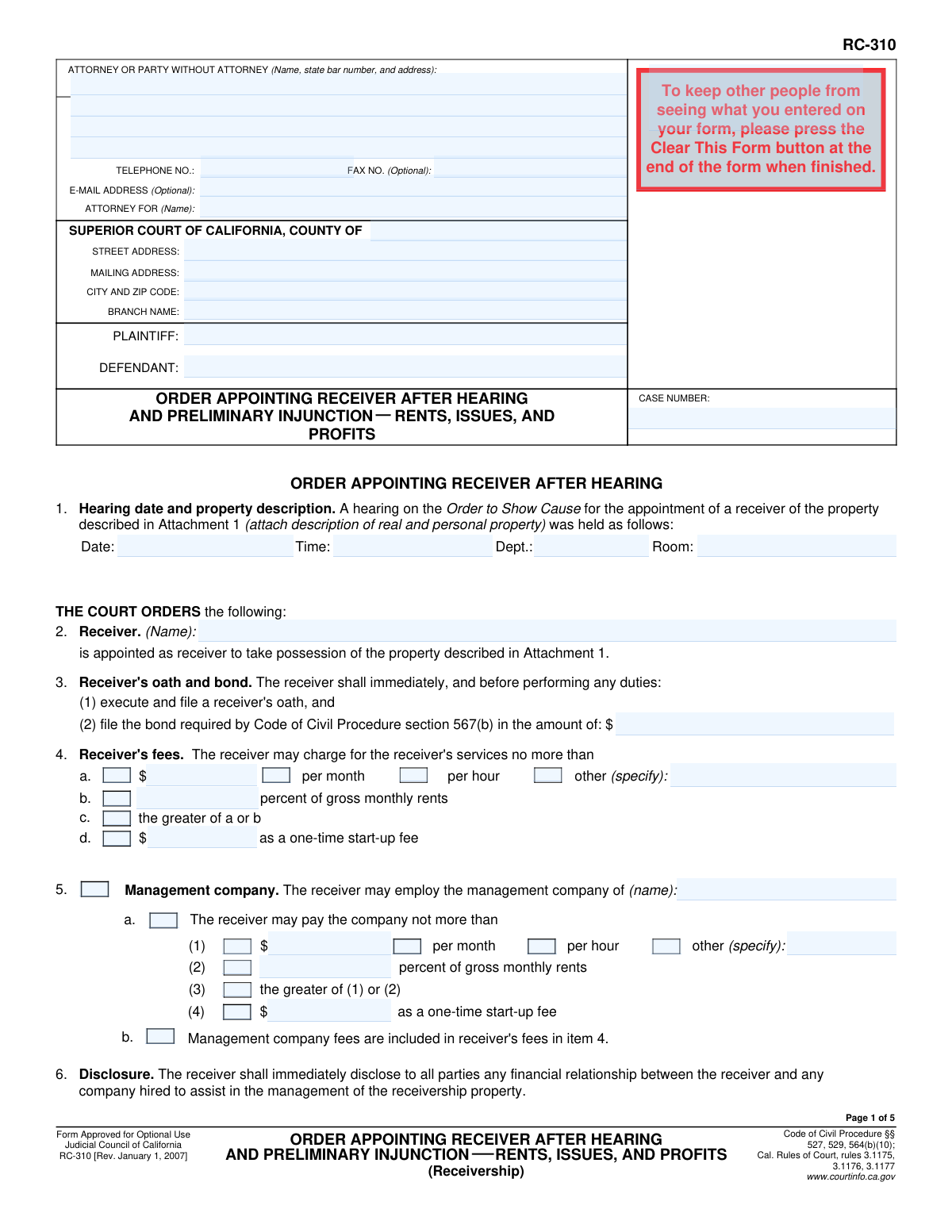
Yes! You can use AI to fill out Form RC-310, Order Appointing Receiver After Hearing and Preliminary Injunction—Rents, Issues, and Profits
Form RC-310 is a legal document issued by the Superior Court of California to formally appoint a receiver to manage a property and collect its income (rents, issues, and profits). This order, granted after a hearing, also includes a preliminary injunction that outlines specific actions the defendant must and must not take regarding the property. Today, this form can be filled out quickly and accurately using AI-powered services like Instafill.ai, which can also convert non-fillable PDF versions into interactive fillable forms.
RC-310 is part of the
California court forms category on Instafill.
Our AI automatically handles information lookup, data retrieval, formatting, and form filling.
It takes less than a minute to fill out RC-310 using our AI form filling.
Securely upload your data. Information is encrypted in transit and deleted immediately after the form is filled out.
Form specifications
| Form name: | Form RC-310, Order Appointing Receiver After Hearing and Preliminary Injunction—Rents, Issues, and Profits |
| Number of fields: | 82 |
| Number of pages: | 1 |
| Language: | English |
Instafill Demo: How to fill out PDF forms in seconds with AI
How to Fill Out RC-310 Online for Free in 2026
Are you looking to fill out a RC-310 form online quickly and accurately? Instafill.ai offers the #1 AI-powered PDF filling software of 2026, allowing you to complete your RC-310 form in just 37 seconds or less.
Follow these steps to fill out your RC-310 form online using Instafill.ai:
- 1 Navigate to Instafill.ai and upload or select Form RC-310.
- 2 Use the AI assistant to input the court, case, plaintiff, and defendant information in the header section.
- 3 Enter the details of the court hearing, including the date, time, and department, and attach the required property description.
- 4 Specify the appointed receiver's name, the required bond amount, and the details of the receiver's fee structure as ordered by the court.
- 5 Fill in the sections regarding the employment of a management company or attorneys, insurance requirements, and any other specific orders or attachments.
- 6 Detail the terms of the preliminary injunction, including the bond amount required for the plaintiff and any specific restraints on the defendant.
- 7 Review all AI-populated fields for accuracy, make any necessary adjustments, and then download the completed form for the judge's signature and court filing.
Our AI-powered system ensures each field is filled out correctly, reducing errors and saving you time.
Why Choose Instafill.ai for Your Fillable RC-310 Form?
Speed
Complete your RC-310 in as little as 37 seconds.
Up-to-Date
Always use the latest 2026 RC-310 form version.
Cost-effective
No need to hire expensive lawyers.
Accuracy
Our AI performs 10 compliance checks to ensure your form is error-free.
Security
Your personal information is protected with bank-level encryption.
Frequently Asked Questions About Form RC-310
This is a court order issued by a judge after a hearing. It appoints a neutral third party, called a receiver, to take control of and manage a property, including its rents and profits, during a legal dispute.
No one 'fills out' this form in the traditional sense, as it is an official order completed and signed by a judge. The parties involved, such as the plaintiff, defendant, and receiver, must read and comply with the orders it contains.
The receiver is ordered to take possession of the property, manage it, collect income like rent, and care for the property. They are also required to provide monthly financial accountings to the parties involved.
You are ordered to immediately turn over possession of the property to the receiver, including all keys, records, and funds like security deposits. You are also prohibited from interfering with the receiver or the property in any way.
The receiver's bond is an insurance policy that the receiver must purchase in an amount set by the court. It protects the parties against financial loss due to the receiver's improper actions or failure to perform their duties.
The receiver's fees are specified in the order and can be a percentage of rents, a flat fee, or an hourly rate. The receiver must follow specific procedures, such as giving parties notice, before paying themselves from the property's funds.
Yes, the order grants the receiver the authority to obtain and evict tenants and to set or modify lease terms. The receiver may also enter into new leases for terms not exceeding one year.
The receiver is only responsible for refunding a security deposit if the original landlord (the defendant) has turned that specific deposit over to them.
No, the receiver is prohibited from making any capital improvements to the property without prior court approval. Their role is to manage and preserve the property, which includes necessary maintenance and repairs.
The order outlines specific procedures the receiver must follow, which may involve turning the property over to the bankruptcy trustee. The receiver may only remain in possession if the plaintiff is actively seeking relief from the bankruptcy court.
The receivership terminates upon events like a foreclosure sale or the defendant curing the loan default. The receiver must then file a final report and account with the court to be formally discharged from their duties.
Yes, while this is a court-issued order, AI-powered services like Instafill.ai can be very helpful. They can help you extract key dates, obligations, and contact information, and organize all your legal documents in one place.
You can upload the PDF of your RC-310 order to Instafill.ai to keep it with your other case documents. The platform allows you to keep everything organized, searchable, and accessible from anywhere.
Services like Instafill.ai can convert flat, non-fillable PDFs into interactive, searchable documents. This allows you to easily select, copy, and search the text within the order, making it much easier to manage and reference.
Compliance RC-310
Validation Checks by Instafill.ai
1
Case Number Consistency Across Pages
This check verifies that the 'CASE NUMBER' field is populated and contains the exact same value on every page of the form where it appears. This is critical for ensuring the document is correctly filed and associated with the proper court case. A mismatch could lead to filing errors, delays, or the order being applied to the wrong case.
2
Hearing Date and Time Validity
Validates that the 'Date' and 'Time' fields in Item 1 contain valid, properly formatted entries. The date should be a real calendar date, and the time should be in a recognizable format (e.g., HH:MM AM/PM). This ensures the order accurately reflects the hearing record and prevents ambiguity about when the hearing occurred.
3
Receiver's Bond Amount Presence and Format
Ensures that the bond amount specified in Item 3 is a positive numeric value. This is a mandatory financial detail required by the Code of Civil Procedure for the receiver to qualify. Failure to provide a valid, positive dollar amount would render the appointment incomplete and legally ineffective.
4
Receiver's Fee Structure Logic
This validation checks for logical consistency within the fee options in Item 4. If checkbox 'c' ('the greater of a or b') is selected, the system must verify that both the dollar amount in 'a' and the percentage in 'b' are filled with valid numeric data. This prevents an incomplete or ambiguous fee instruction, which is crucial for proper compensation and accounting.
5
Management Company Fee Logic
Performs a logical check on the management company fees in Item 5. If sub-item (3) ('the greater of (1) or (2)') is selected, this validation ensures that both the fee in (1) and the percentage in (2) are populated with valid, positive numbers. This is important for creating an unambiguous and enforceable payment term for the management company.
6
Attorney Employment and Rate Completeness
This check ensures that if the receiver is authorized to employ a specific attorney in Item 18b, both the attorney's name and their hourly rate are provided. If either the name or the rate is entered, the other field must also be completed. This prevents an incomplete authorization that could lead to disputes over approved counsel or billing rates.
7
Preliminary Injunction Bond Amount Validation
Verifies that the preliminary injunction bond amount in Item 28d is a positive numeric value. This bond is a critical requirement to protect the defendant from potential damages, and the order is incomplete without this financial detail. The system should flag any non-numeric or zero/negative values.
8
Attachment Page Count Consistency
This validation cross-references the attachment checkboxes (e.g., Item 1, 27, 30) with the total page count in Item 31. If any 'Attachment' box is checked, the 'Number of pages attached' must be greater than zero. This check prevents discrepancies where referenced documents are missing or the page count is inaccurate, ensuring a complete and correct submission.
9
Completeness of 'Specify' Text Fields
Checks that if an option to 'specify' is selected (e.g., in Item 27 or 30), the corresponding text box is not empty. This rule ensures that when a user indicates they are providing custom information, that information is actually present. An empty 'specify' field makes the order ambiguous and potentially unenforceable.
10
Party Name Consistency
This validation confirms that the 'PLAINTIFF' and 'DEFENDANT' names are identical in the header and footer sections across all pages. Consistent party identification is fundamental for the legal validity of the document. Inconsistencies could create confusion and challenge the order's applicability.
11
Receiver Name Mandatory Check
Ensures that the receiver's name in Item 2 is not left blank. The entire purpose of the order is to appoint a specific receiver, making this a critical, non-optional field. An order without a named receiver is fundamentally invalid and cannot be executed.
12
Telephone Number Format
Validates that the 'TELEPHONE NO.' field in the attorney information block conforms to a standard phone number format (e.g., 10 digits, optional parentheses and hyphens). This ensures that contact information is usable and correctly formatted for court records and communication. An invalid format could hinder attempts to contact the filing party.
13
Email Address Format
This check verifies that if an 'E-MAIL ADDRESS' is provided, it follows the standard '[email protected]' format. While optional, if a user attempts to fill it, the data should be valid to ensure successful electronic communication and service. The system should reject entries that are clearly not valid email addresses.
14
Financial Fields Numeric Validation
This is a comprehensive check across all fields intended for dollar amounts or percentages (e.g., Items 3, 4, 5, 18, 28). It ensures that these fields only contain positive numeric characters and appropriate decimal points. This prevents data entry errors and ensures all financial terms of the order are clear and mathematically sound.
Common Mistakes in Completing RC-310
This mistake occurs when the party submits the form without a complete and legally sufficient description of the property in Attachment 1. Often, only a street address is provided, which may be insufficient to define the full scope of the receivership estate, including all real and personal property. An ambiguous description can lead to disputes over the receiver's authority and may render the order unenforceable against certain assets. To avoid this, always attach a full legal description from a deed or title report, along with a detailed inventory of any significant personal property. AI-powered tools like Instafill.ai can help manage and attach supplementary documents correctly.
Users frequently leave the dollar amounts for the receiver's bond (Item 3) or the plaintiff's preliminary injunction bond (Item 28d) blank. This often happens when the amount is still being determined or was not explicitly stated in the tentative ruling. An order lacking these mandatory financial safeguards is incomplete and may be rejected by the clerk or deemed unenforceable, delaying the entire process. Always confirm the bond amounts ordered by the judge during the hearing and double-check that these fields are filled before submitting the proposed order for the judge's signature.
Simple data entry errors, such as transposing digits in the case number or using abbreviated party names (e.g., 'ABC Corp.' instead of 'ABC Corporation, a Delaware Corporation'), are common. These mistakes occur due to manual typing and lack of verification. The consequences range from filing rejection by the court clerk to creating ambiguity in the legal record, which could be challenged later. To prevent this, meticulously cross-reference the information with the initial complaint. AI form-filling tools like Instafill.ai can autofill this data from a case management system or prior documents, ensuring consistency and accuracy.
The form is an 'Order Appointing Receiver After Hearing,' yet filers sometimes forget to complete the hearing details in Item 1 (Date, Room, Dept., Time). This can happen when adapting a template or rushing to finalize the order. An order that purports to be the result of a hearing without specifying when and where it occurred is procedurally defective and may be rejected by the judge or clerk. Always ensure these details are accurately recorded as they form the official record of the court's action.
In Item 4, users may select conflicting options (e.g., both a monthly fee and a percentage without specifying 'the greater of') or use the 'other' field with a vague description. This ambiguity creates a high risk of future disputes and litigation over the receiver's compensation. The consequences can be costly, requiring further court intervention to clarify the fees. To avoid this, clearly define the fee structure by selecting only the intended options and providing precise, unambiguous language if the 'other' field is used.
When authorizing the receiver to employ counsel in Item 18, it is a common error to name the attorney but neglect to fill in the approved hourly rate. This omission leaves a critical term of the attorney's employment undefined in the court's order. This can lead to challenges regarding the reasonableness of legal fees billed to the receivership estate later on. To prevent this, ensure the proposed order reflects the specific rate approved by the court for the named counsel.
Parties often list the county's main courthouse mailing address instead of the specific street address and branch name where the case is being heard. This happens due to unfamiliarity with court locations or using a generic template. This error can cause the document to be misrouted, delaying filing and service. Always verify the exact street address and branch name for the specific department hearing the case to ensure proper and timely processing by the court.
The field for the number of attached pages (Item 31) is frequently overlooked or contains an incorrect number. This mistake happens when attachments are added or removed during drafting without updating the final count on the main form. An incorrect page count can cause a filing to be rejected by the clerk, who needs to verify that the document is complete. It can also create confusion about what constitutes the full and final order. Always perform a final check of all attachments and update this number just before submission.
Users may try to squeeze complex, custom-tailored provisions into the small text boxes in Item 27 or 30. This results in cramped, hard-to-read text and often lacks the necessary detail and clarity. The proper procedure is to check the box indicating that additional orders are specified in an attachment. Failing to use an attachment for extensive custom orders looks unprofessional and can lead to misinterpretation. Using an attachment allows for clear, well-formatted, and comprehensive provisions.
Attorneys or their staff sometimes forget to include the attorney's state bar number in the header section. This number is a unique identifier required by the court to verify the attorney's standing and eligibility to practice. Submitting a form without it can lead to the document being rejected at the filing window, causing delays and requiring refiling. AI-powered tools like Instafill.ai can store this information and automatically populate it on all legal forms, preventing such omissions. If the form is a non-fillable PDF, Instafill.ai can also convert it into an interactive, fillable version to streamline the process.
Saved over 80 hours a year
“I was never sure if my IRS forms like W-9 were filled correctly. Now, I can complete the forms accurately without any external help.”
Kevin Martin Green
Your data stays secure with advanced protection from Instafill and our subprocessors

Robust compliance program
Transparent business model
You’re not the product. You always know where your data is and what it is processed for.
ISO 27001, HIPAA, and GDPR
Our subprocesses adhere to multiple compliance standards, including but not limited to ISO 27001, HIPAA, and GDPR.
Security & privacy by design
We consider security and privacy from the initial design phase of any new service or functionality. It’s not an afterthought, it’s built-in, including support for two-factor authentication (2FA) to further protect your account.
Fill out RC-310 with Instafill.ai
Worried about filling PDFs wrong? Instafill securely fills form-rc-310-order-appointing-receiver-after-hearing-and-preliminary-injunctionrents-issues-and-profits forms, ensuring each field is accurate.