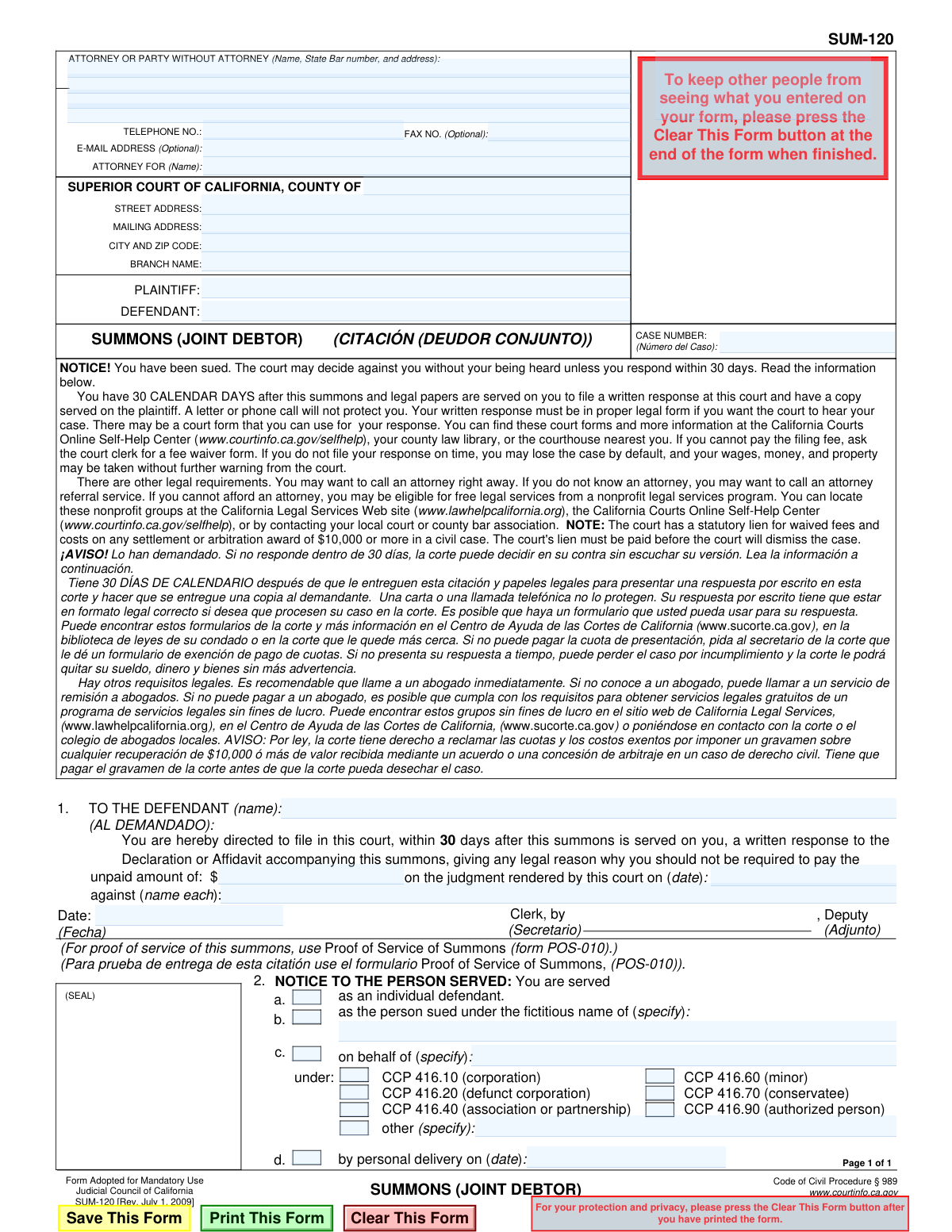
Yes! You can use AI to fill out Form SUM-120, Summons (Joint Debtor)

Form SUM-120, the Summons (Joint Debtor), is a legal document used in the California Superior Court system to notify a person who was not originally served in a lawsuit that a judgment has been entered and the plaintiff is now seeking to enforce it against them. The recipient has 30 days to respond to the court to avoid a default judgment. Today, this form can be filled out quickly and accurately using AI-powered services like Instafill.ai, which can also convert non-fillable PDF versions into interactive fillable forms.
SUM-120 is part of the California court forms category on Instafill.
Our AI automatically handles information lookup, data retrieval, formatting, and form filling.
It takes less than a minute to fill out SUM-120 using our AI form filling.
Securely upload your data. Information is encrypted in transit and deleted immediately after the form is filled out.

Form specifications

Form name: Form SUM-120, Summons (Joint Debtor)
Number of fields: 42
Number of pages: 1
Language: English
main-image

Instafill Demo: How to fill out PDF forms in seconds with AI

How to Fill Out SUM-120 Online for Free in 2026

Are you looking to fill out a SUM-120 form online quickly and accurately? Instafill.ai offers the #1 AI-powered PDF filling software of 2026, allowing you to complete your SUM-120 form in just 37 seconds or less.
Follow these steps to fill out your SUM-120 form online using Instafill.ai:
  1. 1 Navigate to Instafill.ai and upload or select the SUM-120 form.
  2. 2 Enter the court information, including the county, court address, and branch name.
  3. 3 Provide the names of the plaintiff and defendant, along with the case number.
  4. 4 Input the details of the original judgment, including the date and the unpaid amount, and name the joint debtor being summoned.
  5. 5 Fill in the information for the attorney or the party filing the summons without an attorney.
  6. 6 Review all entered information for accuracy, then download the completed form for filing with the court and service on the defendant.

Our AI-powered system ensures each field is filled out correctly, reducing errors and saving you time.

Why Choose Instafill.ai for Your Fillable SUM-120 Form?

Speed

Complete your SUM-120 in as little as 37 seconds.

Up-to-Date

Always use the latest 2026 SUM-120 form version.

Cost-effective

No need to hire expensive lawyers.

Accuracy

Our AI performs 10 compliance checks to ensure your form is error-free.

Security

Your personal information is protected with bank-level encryption.

Frequently Asked Questions About Form SUM-120

This form is a court summons used to bring a new person, called a 'joint debtor,' into a lawsuit after a judgment has already been entered. Its purpose is to notify you that a plaintiff believes you are also responsible for paying the unpaid amount of an existing court judgment.

You received this because the plaintiff (the person who won the original case) is now claiming that you are also legally responsible for the debt. This process allows them to add you to the judgment without starting a brand new lawsuit from scratch.

You must file a formal written response with the court listed on the form within 30 calendar days of being served. A simple letter or phone call is not sufficient and will not protect your rights.

If you do not file a response on time, you may lose the case by default. This means the court can add you to the judgment without hearing your side, and the plaintiff can then legally take your wages, money, and property to satisfy the debt.

The plaintiff or their attorney fills out the case information, including the court, parties, and details of the original judgment. It is then filed with the court, and a clerk signs and issues it for service on the joint debtor.

The plaintiff must provide the court and case information, the names of the plaintiff and defendant, the date the original judgment was rendered, and the total unpaid amount of that judgment.

The form itself strongly recommends you call an attorney right away. Because this is a complex legal matter involving an existing judgment, seeking legal advice is highly advisable to understand your rights and options.

You must file your written response at the Superior Court location listed in the box at the top of the summons. You also need to ensure a copy of your response is served on the plaintiff or their attorney.

No, the form explicitly states that 'A letter or phone call will not protect you.' You must file a formal, written response in the proper legal format with the court.

Yes, AI-powered services like Instafill.ai can help a plaintiff or their attorney accurately auto-fill form fields with case information, which saves time and reduces the risk of clerical errors.

To fill out the SUM-120 form, you can upload it to Instafill.ai. The platform's AI will identify the form fields, allowing you to easily type in your information, review for accuracy, and then download the completed document.

If you have a non-fillable or 'flat' PDF, you can use a service like Instafill.ai. It can convert the non-fillable PDF into an interactive, fillable form online, so you can easily complete and save it.

The POS-010 form is a separate document that the person who serves you with the SUM-120 must fill out and file with the court. It is their sworn declaration proving when, where, and how they delivered the legal papers to you.

Compliance SUM-120
Validation Checks by Instafill.ai

1
Case Number Presence and Format
This check ensures the 'CASE NUMBER' field is not empty and follows the standard format for California court cases. The case number is the primary identifier for the legal action and is essential for all filing, tracking, and correspondence with the court. A missing or incorrectly formatted case number will result in the rejection of the document by the court clerk.
2
Plaintiff and Defendant Name Completeness
Validates that the 'PLAINTIFF' and 'DEFENDANT' fields in the case caption are both filled out. A legal action requires at least one plaintiff and one defendant to be clearly identified. Failure to name the parties makes the summons legally deficient and incomprehensible, preventing the case from proceeding.
3
Court County Validation
This check verifies that the county name entered in the 'SUPERIOR COURT OF CALIFORNIA, COUNTY OF' field is a valid California county. Specifying the correct jurisdiction is fundamental to the court's authority to hear the case. An invalid or misspelled county name could lead to filing in the wrong venue and significant legal delays.
4
Judgment Date Validity
Ensures the date provided in section 1, 'on the judgment rendered by this court on (date)', is a valid calendar date and occurs in the past. This summons is based on a pre-existing judgment, so the date must be historically accurate. An invalid, future, or blank date would undermine the legal basis for the summons.
5
Unpaid Amount Format and Value
This validation confirms that the 'unpaid amount' in section 1 is a positive numeric value, formatted as currency (e.g., 1234.56). The amount represents the outstanding debt and must be clearly and accurately stated. Non-numeric characters, negative values, or a blank field would make the claim ambiguous and legally unenforceable.
6
Original Judgment Debtor Name Completeness
Verifies that the field 'against (name each)' in section 1 is filled with the name(s) of the original judgment debtors. This is crucial for establishing the connection between the original judgment and the joint debtor being summoned. Omitting this information creates a gap in the legal argument and could be grounds for dismissing the summons.
7
Service Capacity Selection
This check ensures that at least one of the primary checkboxes in the 'NOTICE TO THE PERSON SERVED' section (options 'a', 'b', or 'c') is selected. This selection specifies the legal capacity in which the defendant is being served (e.g., as an individual, on behalf of a corporation). Without this information, the service is legally ambiguous and may be deemed improper.
8
Conditional Fictitious Name Specification
If checkbox 'b' ('as the person sued under the fictitious name of') is selected, this validation requires that the corresponding 'specify' text field is not empty. The form must state the fictitious name being used to properly identify the party being served. Failure to specify the name makes the service notice incomplete and potentially invalid.
9
Conditional 'On Behalf Of' Details
If checkbox 'c' ('on behalf of') is selected, this check ensures both the 'specify' text field for the entity's name is filled and at least one of the sub-checkboxes (e.g., 'CCP 416.10 (corporation)') is also checked. This two-part information is required to legally define who is being served and in what capacity. Missing either piece of information results in an incomplete and defective service notice.
10
Attorney or Party Information Completeness
Validates that the 'ATTORNEY OR PARTY WITHOUT ATTORNEY' block contains a name, address, and telephone number. This contact information is mandatory for the court and the opposing party to send notices and other legal documents. Missing information can halt legal proceedings, as proper communication cannot be established.
11
State Bar Number Format
This check verifies that if an attorney's name is provided, the 'State Bar number' field contains a numeric value. The State Bar number is the official identifier for a licensed attorney in California. This validation helps confirm the attorney's credentials and ensures the number is recorded correctly for the court record.
12
Defendant Name Consistency Check
Ensures the name listed in the 'TO THE DEFENDANT (name)' field at the top of the form matches one of the names listed in the 'DEFENDANT' field in the case caption. This cross-reference confirms that the summons is correctly addressed to a party officially named in the lawsuit. A mismatch could invalidate the service of the summons on that individual.
13
Personal Delivery Date Logic
This validation checks that the 'by personal delivery on (date)' field in section 'd' contains a valid date. Furthermore, it should check that this date is not before the issuance date of the summons (the 'Date' near the clerk's signature). Service cannot logically occur before the summons is officially issued by the court.
14
Court Address Completeness
Verifies that the 'STREET ADDRESS', 'CITY AND ZIP CODE', and 'BRANCH NAME' for the court are all filled in. This information is essential for ensuring that the defendant and their attorney file responsive documents at the correct physical courthouse location. Incomplete address details can lead to misfilings, missed deadlines, and default judgments.

Common Mistakes in Completing SUM-120

Entering an Incorrect Case Number

Users often mistype the case number or use a number from a related but separate legal matter. Since this summons is tied to a pre-existing judgment, the case number must match the original case file exactly. An incorrect case number can lead to the document being rejected by the court clerk or filed in the wrong case, causing significant delays and potentially invalidating the summons.

Failing to Identify the Correct Court and Branch

People may list the wrong county court or fail to specify the correct branch name, especially in larger counties with multiple courthouses. This happens due to confusion or simply not verifying the original court of judgment. This error will cause the summons to be sent to the wrong location, leading to rejection and lost time, and may require the filer to start the process over.

Inaccurately Listing Plaintiff and Defendant Names

The names of the Plaintiff and Defendant must be written exactly as they appear on the original judgment. Filers sometimes use abbreviations, misspell names, or omit parties, which creates a legal discrepancy. This can give the defendant grounds to challenge the summons and may result in the court refusing to enforce it until the information is corrected and re-filed.

Misidentifying the Party Being Summoned

In the 'TO THE DEFENDANT (name):' field, the filer must name the specific joint debtor being added to the case, not the original defendant from the judgment. This mistake occurs when filers copy information directly from the old judgment without understanding this form's purpose. Summoning the wrong party makes the filing legally ineffective and wastes time and filing fees.

Errors in the Original Judgment Details

Section 1 requires the exact date of the original judgment, the names of all parties the judgment was against, and the precise unpaid amount. Mistakes like entering the wrong date, omitting a defendant's name, or miscalculating the remaining debt are common. These inaccuracies can invalidate the summons or lead to legal challenges, requiring amended filings and court hearings to resolve.

Incomplete 'Attorney or Party Without Attorney' Section

Self-represented parties often get confused by this box and may leave it blank or fill it out incorrectly. It requires the name, address, and phone number of the person filing the form. Attorneys must also include their State Bar number. Omitting this information can lead to the clerk rejecting the document, as the court has no way to contact the filing party.

Failing to File the Required Accompanying Affidavit

The form explicitly states it must be accompanied by a 'Declaration or Affidavit' explaining why the joint debtor is liable. A very common and fatal error is filing the Summons (SUM-120) by itself. Without the supporting declaration, the summons has no legal basis, and the court will reject the filing, forcing the filer to restart the entire process.

Neglecting Proper Service and Proof of Service

Many filers mistakenly believe that filing the form with the court is the final step. The summons must be legally served on the joint debtor, and a separate Proof of Service of Summons (form POS-010) must be completed and filed with the court. Failure to properly serve the defendant and file the proof of service renders the entire action invalid and unenforceable.

Using a Non-Fillable PDF with Illegible Handwriting

Court forms are often available online as flat, non-fillable PDFs, forcing users to print and complete them by hand. This frequently results in illegible entries for names, dates, and case numbers, which can cause the court clerk to reject the form. To avoid this, AI-powered tools like Instafill.ai can convert non-fillable PDFs into fillable versions, ensuring all entries are clear and legible.

Incorrectly Calculating the 'Unpaid Amount'

Determining the exact 'unpaid amount' can be complex, involving principal, accrued interest, and costs, minus any payments made. Filers often make mathematical errors or apply the wrong interest rate, leading to an incorrect figure. An inaccurate amount gives the debtor a strong basis to dispute the summons, potentially leading to further litigation to determine the correct balance.
Saved over 80 hours a year

“I was never sure if my IRS forms like W-9 were filled correctly. Now, I can complete the forms accurately without any external help.”

Kevin Martin Green

Your data stays secure with advanced protection from Instafill and our subprocessors

Robust compliance program

Transparent business model

You’re not the product. You always know where your data is and what it is processed for.

ISO 27001, HIPAA, and GDPR

Our subprocesses adhere to multiple compliance standards, including but not limited to ISO 27001, HIPAA, and GDPR.

Security & privacy by design

We consider security and privacy from the initial design phase of any new service or functionality. It’s not an afterthought, it’s built-in, including support for two-factor authentication (2FA) to further protect your account.

Fill out SUM-120 with Instafill.ai

Worried about filling PDFs wrong? Instafill securely fills form-sum-120-summons-joint-debtor forms, ensuring each field is accurate.