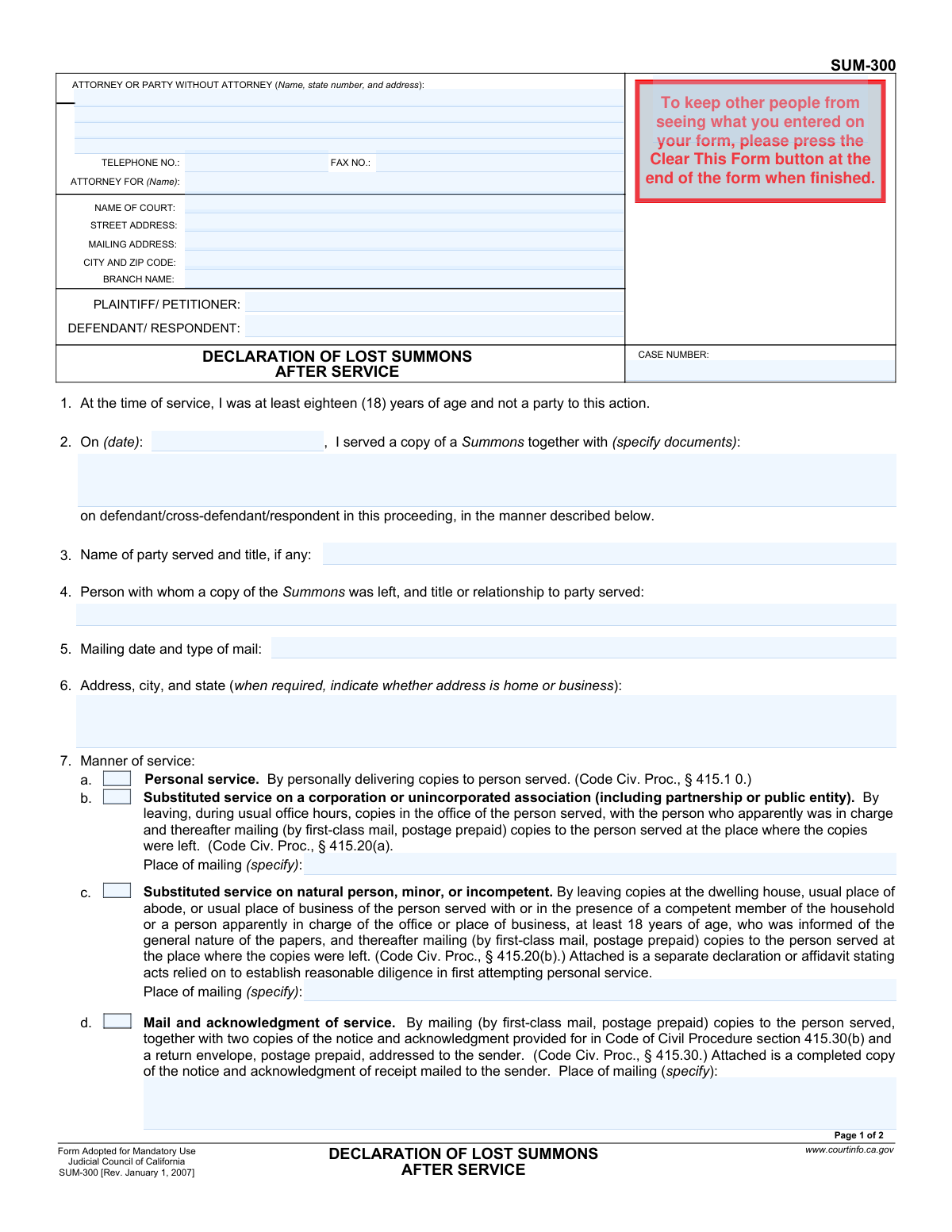
Yes! You can use AI to fill out Form SUM-300, Declaration of Lost Summons After Service
Form SUM-300, Declaration of Lost Summons After Service, is a mandatory California Judicial Council form used in a lawsuit. It is a sworn statement filed with the court to attest that a summons was properly served on a party, but the original document proving the service has been lost. This declaration is crucial as it provides an alternative proof of service, allowing the legal case to move forward without the original summons. Today, this form can be filled out quickly and accurately using AI-powered services like Instafill.ai, which can also convert non-fillable PDF versions into interactive fillable forms.
SUM-300 is part of the
California court forms category on Instafill.
Our AI automatically handles information lookup, data retrieval, formatting, and form filling.
It takes less than a minute to fill out SUM-300 using our AI form filling.
Securely upload your data. Information is encrypted in transit and deleted immediately after the form is filled out.
Form specifications
| Form name: | Form SUM-300, Declaration of Lost Summons After Service |
| Number of fields: | 59 |
| Number of pages: | 1 |
| Language: | English |
Instafill Demo: How to fill out PDF forms in seconds with AI
How to Fill Out SUM-300 Online for Free in 2026
Are you looking to fill out a SUM-300 form online quickly and accurately? Instafill.ai offers the #1 AI-powered PDF filling software of 2026, allowing you to complete your SUM-300 form in just 37 seconds or less.
Follow these steps to fill out your SUM-300 form online using Instafill.ai:
- 1 Navigate to Instafill.ai and upload your SUM-300 form or select it from the template library.
- 2 Use the AI assistant to automatically fill in the court information, including the court name, address, and branch name.
- 3 Enter the names of the Plaintiff/Petitioner and Defendant/Respondent, along with the case number.
- 4 Complete the main declaration section, specifying the date of service, the documents served, and the name of the party who was served.
- 5 Select the appropriate checkbox to indicate the manner of service (e.g., Personal, Substituted, Mail) and provide any required details like mailing addresses or dates.
- 6 Indicate how the party was served (e.g., as an individual, on behalf of a corporation) and provide the declarant's current address and phone number.
- 7 Review all entered information for accuracy, then date and e-sign the declaration before downloading the completed form for filing.
Our AI-powered system ensures each field is filled out correctly, reducing errors and saving you time.
Why Choose Instafill.ai for Your Fillable SUM-300 Form?
Speed
Complete your SUM-300 in as little as 37 seconds.
Up-to-Date
Always use the latest 2026 SUM-300 form version.
Cost-effective
No need to hire expensive lawyers.
Accuracy
Our AI performs 10 compliance checks to ensure your form is error-free.
Security
Your personal information is protected with bank-level encryption.
Frequently Asked Questions About Form SUM-300
This form is used to declare to the court that a summons was properly served on a party, but the original summons document has been lost. It acts as a legal substitute for the lost original, allowing the case to proceed.
The person who served the summons (the declarant) must complete and sign this form. The declarant must be at least 18 years old and cannot be a party to the lawsuit.
No, this form specifically replaces a lost original summons document. It is often filed along with a separate Proof of Service form to provide the court with a complete record of service.
You must provide the date of service, the name of the party served, any other documents served with the summons, and a detailed description of the manner of service (e.g., personal, substituted, mail).
Substituted service is an alternative method where copies are left with a competent person at the party's home or business, followed by mailing a copy. This method requires you to first attempt personal service with 'reasonable diligence'.
Yes, depending on the method of service, you may need to attach other documents. For example, substituted service requires a declaration of diligence, and service by mail may require an acknowledgment of receipt or a signed return receipt.
In Section 8, you must indicate how the served party was identified on the summons, such as an individual, a corporation, or a person sued under a fictitious name. Check the box that matches the notice on the copy of the summons you served.
Once completed and signed, the form must be filed with the court clerk at the courthouse where the lawsuit was filed. This ensures it becomes part of the official case record.
Without the original summons or this declaration, there is no official proof that the summons was ever issued and served, which could lead to delays or dismissal of your case.
Yes, services like Instafill.ai use AI to help auto-fill repetitive information such as court details, party names, and case numbers, saving you time and helping to prevent errors.
You can use a service like Instafill.ai to fill out the form online. Simply upload the PDF, and the platform will convert it into a fillable format that you can complete on your computer or mobile device.
If you have a non-fillable or 'flat' PDF, you can upload it to Instafill.ai. The service's technology will automatically detect the fields and convert the document into an interactive, fillable form for you.
Compliance SUM-300
Validation Checks by Instafill.ai
1
Case Number Presence
This check ensures the 'CASE NUMBER' field is not empty. The case number is the unique identifier for the legal proceeding in the court system. Submitting the form without a case number would make it impossible for the court clerk to file it with the correct case, leading to rejection of the document.
2
Valid Date of Service
Validates that the 'On (date):' field under section 2 contains a properly formatted, valid date. The date cannot be in the future, as service cannot have occurred on a day that has not yet passed. This date is fundamental for establishing legal timelines, and an invalid or future date would nullify the declaration.
3
Manner of Service Selection
Ensures that at least one checkbox from section 7 ('Manner of service', options a-f) is selected. The declarant must specify the exact legal method used to serve the summons. Failure to select a manner of service makes the declaration incomplete and fails to prove that service was executed according to required legal procedures.
4
Conditional Requirement for Place of Mailing
If checkbox 7a, 7b, 7c, or 7e is selected, this check verifies that the corresponding 'Place of mailing (specify)' field is filled out. The mailing location is a required component of these service methods under the Code of Civil Procedure. Omitting this detail invalidates the claim of proper service by mail or substitution.
5
Specification for 'Other' Manner of Service
Verifies that if checkbox 7f ('Other') is selected, the corresponding text field is filled with a description of the service method and the authorizing code sections. The court needs to understand the specific, non-standard method used to determine its legality. An empty description for 'Other' makes the declaration ambiguous and legally unacceptable.
6
Notice on Summons Selection
Confirms that at least one checkbox from section 8 ('The following notice appeared on the copy of the Summons served', options a-c) is selected. This information clarifies the capacity in which the defendant was served (e.g., as an individual or on behalf of a corporation). This detail is legally significant and must be included for the declaration to be complete.
7
Specification for Fictitious Name Service
If checkbox 8b ('You are served as... the person sued under the fictitious name of') is checked, this validation ensures the '(specify):' text field is not empty. The court must know the specific fictitious name used in the lawsuit to correctly identify the party being served. An empty field here would create a critical ambiguity in the legal record.
8
Completeness of 'On Behalf Of' Service
If checkbox 8c ('You are served on behalf of') is selected, this check validates two conditions: the '(specify):' text field must be filled, and at least one of the sub-checkboxes for the Code of Civil Procedure sections must be selected. This is crucial for identifying both the entity being served and the legal authority for serving its representative. Incomplete information would render the service declaration invalid for that entity.
9
Party Served Name Required
Ensures that the 'Name of party served and title, if any' field in section 4 is completed. This is a fundamental piece of information, identifying who was the target of the service attempt. Without the name of the party served, the entire declaration is meaningless as it doesn't state who was served.
10
Declarant Information Completeness
Validates that the declarant's name ('TYPE OR PRINT NAME') and the declaration date ('Date:') in the final section are both filled out. The declaration is a sworn statement, and the identity of the declarant and the date of the statement are essential for its legal validity. An anonymous or undated declaration is not a valid legal document.
11
Logical Declaration Date
Compares the 'Date:' of the declaration (section 10) with the 'On (date):' of service (section 2). The declaration date must be on or after the date of service. A person cannot declare under penalty of perjury that an event happened before it has occurred, so this check prevents a logical impossibility that would invalidate the document.
12
Plaintiff and Defendant Identification
Checks that the 'PLAINTIFF/ PETITIONER' and 'DEFENDANT/ RESPONDENT' fields in the header are both filled in. These fields identify the primary parties to the lawsuit. Without this information, the form cannot be correctly associated with the case file, leading to filing errors and delays.
13
Declarant Phone Number Format
Validates that the 'Telephone number' field in section 9 follows a standard phone number format (e.g., (XXX) XXX-XXXX). While not always legally fatal, an incorrect or malformed number prevents the court or opposing counsel from contacting the declarant for clarification. This ensures contact information is usable and professional.
14
Attachment Indication for Specific Service Types
This check verifies that if service types requiring attachments are selected (7b, 7c, 7e), there is an indication that the required documents are included. The form explicitly states that attachments like a 'declaration of diligence' (7b), 'acknowledgment of receipt' (7c), or 'signed return receipt' (7e) are required. The system should flag this to ensure the user includes the necessary proof, as its absence makes the service declaration incomplete.
Common Mistakes in Completing SUM-300
Forgetting to sign and date the declaration under penalty of perjury in section 10 is a critical error. An unsigned or undated form is legally invalid and will be rejected by the court, rendering the entire declaration void. Always double-check that the declarant has physically signed, dated, and printed their name before submission.
Simply checking a box in section 7 is not enough; filers often forget to provide the required supplemental information. For example, they may omit the 'Place of mailing' for substituted or mail service, which is essential for validating the service method. This omission can lead to the service being deemed improper and requires the process to be repeated, causing significant delays.
Section 8, which specifies how the party was served (e.g., as an individual, a corporation), is frequently left blank. This information is mandatory under the Code of Civil Procedure and explains the legal capacity of the person or entity served. Failing to complete this section makes the declaration incomplete and will likely lead to its rejection by the court clerk.
When using substituted service (section 7b), filers must attach a separate declaration detailing their attempts at personal service first (due diligence). Many people check the box for substituted service but forget to include this mandatory attachment. Without proof of due diligence, the substituted service is invalid, which can be grounds for a defendant to have the case dismissed.
In section 8c, filers must select the specific Code of Civil Procedure section that corresponds to the type of entity served, such as a corporation or partnership. People often guess or select the wrong code, which can legally invalidate the service. This mistake happens due to a lack of legal knowledge and can have serious consequences for the case's progression.
In section 2, filers sometimes write a generic term like 'legal papers' instead of specifying the exact documents served, such as 'Summons and Complaint'. This ambiguity can be challenged and may render the proof of service defective. It is crucial to list every single document that was included with the Summons to create a clear and indisputable record.
Certain service methods require specific attachments, which are often forgotten. For service by mail (7c or 7e), the filer must attach the signed Acknowledgment of Receipt or the signed return receipt, respectively. Submitting the declaration without this physical proof invalidates the chosen service method, as there is no evidence the defendant actually received the documents.
Mistakes in the header section, such as an incorrect case number or misspelled plaintiff/defendant names, are common and lead to immediate rejection. The court clerk uses this information to file the document in the correct case file. Using an AI-powered form filling tool like Instafill.ai can prevent these data entry errors by saving and auto-filling correct case information across all related documents.
Filers sometimes mix up the details for different service types, creating a contradictory record. For instance, they might indicate personal service (7d) but then fill out section 4, which is only for substituted service. This confusion makes it unclear how service was actually performed and can lead a judge to rule the service as defective. Since many legal forms are only available as non-fillable PDFs, a tool like Instafill.ai can convert them into interactive, fillable versions with guided fields to help prevent such contradictions.
Saved over 80 hours a year
“I was never sure if my IRS forms like W-9 were filled correctly. Now, I can complete the forms accurately without any external help.”
Kevin Martin Green
Your data stays secure with advanced protection from Instafill and our subprocessors

Robust compliance program
Transparent business model
You’re not the product. You always know where your data is and what it is processed for.
ISO 27001, HIPAA, and GDPR
Our subprocesses adhere to multiple compliance standards, including but not limited to ISO 27001, HIPAA, and GDPR.
Security & privacy by design
We consider security and privacy from the initial design phase of any new service or functionality. It’s not an afterthought, it’s built-in, including support for two-factor authentication (2FA) to further protect your account.
Fill out SUM-300 with Instafill.ai
Worried about filling PDFs wrong? Instafill securely fills form-sum-300-declaration-of-lost-summons-after-service forms, ensuring each field is accurate.