
Instafill.ai
7 days free
AI form filling · 123 fields · 3 pages · done in seconds

Yes! You can use AI to fill out Form SV-800, Receipt for Firearms, Firearm Parts, and Ammunition (Postsecondary School Violence Prevention)

Don't type 123 fields by hand. Tell our AI about yourself, or upload a document you already have, and it fills every field in seconds. You check it, then download, print or sign.
7 days free, then $19.99/month · Cancel anytime
AI fills it, no typingEncrypted, never used to train AICancel in two clicks
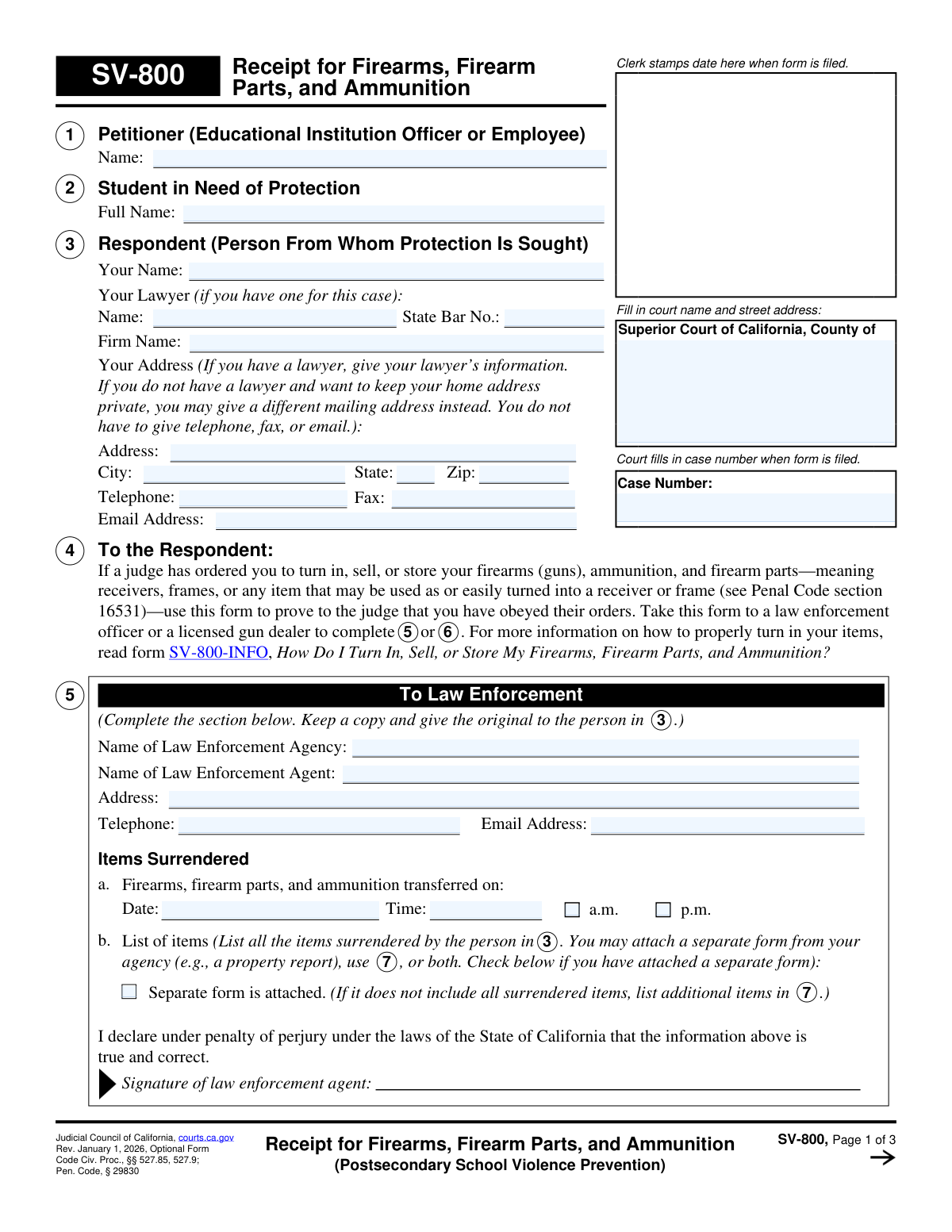
Form SV-800, Receipt for Firearms, Firearm Parts, and Ammunition (Postsecondary School Violence Prevention), page 1
Moderate · 50/100Form Complexity Index

The AI does the filling. You just check it.

No typing into boxes, nothing to install.

Tell the AI about youAnswer a few questions in plain words, or upload a document you already have. That is all the typing there is.
AI fills every field in secondsIt puts each answer in the right box on every page, checkboxes included.
Check it and downloadReview every field, change anything, then download, print or sign the PDF.

What this form asks for

The AI fills all of it, from your answers or your documents.

Form SV-800, Receipt for Firearms, Firearm Parts, and Ammunition, is a legal document used within the California court system for postsecondary school violence prevention cases. It serves as official proof that an individual (the respondent) has complied with a judge's order to turn in, sell, or store their firearms, firearm parts, and ammunition. The completed form, signed by law enforcement or a licensed gun dealer, must be filed with the court to demonstrate compliance. Today, this form can be filled out quickly and accurately using AI-powered services like Instafill.ai, which can also convert non-fillable PDF versions into interactive fillable forms.
Fillable fields123
Pages3
Form Complexity IndexModerate, 50/100

The AI checks your answers before you download

14 checks built for this form, so a wrong date or a missing answer is caught before anyone else sees it.

Case Number Consistency Across Pages

This validation ensures that the 'CaseNumber' field is identical on all pages of the form (pages 1, 2, and 3). Consistency is critical for legal documents to ensure all pages are correctly associated with a single court case. A mismatch could lead to the form being rejected by the court clerk or misfiled, causing significant legal delays and complications.

Exclusive Completion of Section 5 or 6

This check verifies that data is entered into either Section 5 (Law Enforcement) or Section 6 (Licensed Gun Dealer), but not both. The form is designed for a single type of transfer per submission, and completing both sections creates ambiguity. If both sections are filled, it is unclear who took possession of the items, which could invalidate the receipt and require the respondent to refile.

Respondent Information Completeness

This validation ensures that the respondent's full name and a complete address (street, city, state, zip) are provided in Section 3. This information is fundamental for positively identifying the person subject to the court order. An incomplete or missing name or address can lead to the court rejecting the form as insufficient proof of compliance.

Valid California State Bar Number Format

This check verifies that if a lawyer's name is provided in Section 3, the associated State Bar Number ('RestrainedLawyerBar_no') is a valid numerical format. The California State Bar number is a unique identifier for licensed attorneys, and its presence allows the court to verify the attorney's credentials. An invalid format or missing number when a lawyer is listed could prevent this verification and cause issues with the official record of representation.

Conditional Requirement for Section 8 'Yes' Answer

This validation ensures that if the respondent selects 'Yes' in Section 8 (indicating they possess other firearms not listed), they must also select one of the subsequent options (a, b, or c). This follow-up information is mandatory to inform the court about the status of the other items. Failure to select a sub-option leaves the declaration incomplete and may prompt the judge to require further clarification or find the respondent non-compliant.

Valid and Past-Dated Transfer Date

This check validates that the transfer date ('SoldDate_dt') in Section 5 or 6 is in a proper date format and is not a future date. The form serves as a receipt for an action that has already occurred. A future date would imply the transfer has not yet happened, invalidating the document as proof of compliance and leading to its rejection by the court.

And 8 more checks
  • Itemized List Entry Completeness
  • Exclusive Disposition for Surrendered Items
  • Receiving Party Information Completeness
  • Required Respondent Signature and Date
  • Required Explanation for Delayed Filing
  • Proof of Surrendered Items Existence
  • Valid US ZIP Code Format
  • Petitioner and Respondent Name Requirement

Let AI fill out your SV-800

No typing. Every field filled in seconds, checked, ready to sign.

7 days free, then $19.99/month · Cancel anytime

How to Fill Out SV-800 Online for Free in 2026

What the AI walks you through.

  1. Navigate to Instafill.ai and upload or select Form SV-800.
  2. Use the AI assistant to pre-fill your personal details, court information, and case number in the initial sections.
  3. Take the partially completed form to a law enforcement agency or a licensed gun dealer when you surrender your firearms, parts, and ammunition.
  4. Ensure the law enforcement agent or gun dealer accurately completes their designated section (Section 5 or 6), including a list of all surrendered items and their signature.
  5. Complete Section 8 on the form, declaring whether you own any other firearms, and provide your signature.
  6. Review the entire form for accuracy, then use Instafill.ai to download the completed document, make the required copies, and file the original with the court clerk.

Common Mistakes in Completing SV-800

The ones the AI is built to catch.

Incomplete Firearm Identification in Section 7
Respondents or officials often fail to list the complete Make, Model, and Serial Number for each firearm. This happens due to haste or not having the information readily available. An incomplete list can be rejected by the court as insufficient proof of compliance, potentially leading to legal penalties for violating the court order. To avoid this, carefully inspect each item and record all identifying marks before surrendering them.
Respondent Fills Out Official-Only Sections
The respondent (person in section 3) mistakenly fills out Section 5 or 6, which are explicitly designated for a Law Enforcement Agent or a Licensed Gun Dealer. This invalidates the receipt, as the court requires third-party verification. The respondent must take the form to the appropriate official and have them complete and sign their respective section. The respondent's only role in these sections is to ensure the official fills them out completely.
Missing Case Number on Subsequent Pages
People frequently fill in the Case Number on the first page but forget to carry it over to pages 2 and 3. When the multi-page document is filed, separated, or scanned, the subsequent pages can become disassociated from the case file. This can cause significant delays and may result in the filing being considered incomplete. Always double-check that the Case Number is written or typed on the top of every single page before filing.
Failure to Obtain Official Signature
The form is not valid proof without the signature of the law enforcement agent (Section 5) or licensed gun dealer (Section 6) who received the items. The respondent may leave the agency or dealer without realizing the signature is missing, rendering the document useless for court purposes. It is the respondent's responsibility to verify that the official has signed, dated, and completed their section before leaving their premises.
Ambiguous Declaration in Section 8
In Section 8, when a respondent answers 'Yes' to having other firearms, they often fail to check one of the required sub-options (a, b, or c) to explain the status of those items. This leaves the court uncertain about whether all firearms have been accounted for, which can lead to further legal scrutiny. To avoid this, if you check 'Yes', you must also check the appropriate box to clarify if proof was filed previously, is being filed now, or has not yet been filed, and provide an explanation if necessary.
Neglecting to Indicate Item Disposition
For each firearm, part, or ammunition listed in Section 7, there are checkboxes to indicate if the item was 'Sold', 'Stored', or is 'To be destroyed'. It is a common error to list the item but forget to check one of these boxes. This information is critical for the court's record-keeping and to confirm the items have been handled in a legally compliant manner. Ensure one box is checked for every single line item.
Respondent Forgets to Sign and Date Final Declaration
After ensuring the official sections are complete, the respondent often forgets to complete and sign the final declaration at the bottom of page 3. This signature, made under penalty of perjury, attests to the completeness of the information provided about all firearms. An unsigned form is an incomplete filing and will be rejected by the court, violating the court order. Always complete the final signature and date before making copies and filing.
Vague Description of Ammunition
When listing ammunition in Section 7, people often write generic entries like 'box of bullets' or 'ammo'. The form requires specific details: Brand, Type (e.g., 9mm, .223), and Amount (e.g., 50 rounds). Vague entries do not provide the court with adequate proof of compliance. To prevent this, inventory the ammunition carefully and record all required details for each distinct type.
Incorrectly Using Attached Documents
A person might check the 'Separate form is attached' box in Section 5 or 6 but then fail to attach the document, or the attached document (like a property report) may not list all surrendered items. This creates a discrepancy and an incomplete record. If using an attachment, ensure it is securely stapled to the form and that any items not on the attachment are manually listed in Section 7. AI-powered tools like Instafill.ai can help manage and merge data from multiple sources to prevent such omissions.
Confusing Respondent and Lawyer Information in Section 3
The instructions in Section 3 state that if the respondent has a lawyer, they should provide the lawyer's contact information. A common mistake is for the respondent to list their own address and phone number even when they have legal representation. This can lead to missed communications from the court. If you have a lawyer for this case, you must enter their name, State Bar number, firm name, and address. If the form is a non-fillable PDF, a tool like Instafill.ai can convert it to a fillable version to make data entry easier.

Frequently Asked Questions About SV-800


Is it really free for 7 days?
Yes. You pay $0 today. Cancel before Nov 4 and you are never charged. Keep it, and it is $19.99 a month for 5 fills of your SV-800.
Can I fill other forms too?
This plan is for your SV-800: your own AI agent fills it as often as 5 times a month. To fill other forms and upload your own, choose a Professional plan from your account.
How do I cancel?
From your account, in two clicks, any time. No email, no call.
How does the AI fill out SV-800?
You answer a few questions in plain words, or upload a document you already have. The AI reads what you give it and puts each answer into the right field of SV-800, on every page, in seconds. It checks the answers against the form's own rules, and you review and change anything before you download, print or sign.
What happens to my information?
It is encrypted in transit and at rest, and it is never used to train AI.
How complex is SV-800 to fill out?
SV-800 has a Form Complexity Index of 50 out of 100, in the moderate tier: 123 fillable fields across 3 pages. Instafill.ai's AI fills it in under a minute, with every field there for you to review before you download.
What is the purpose of Form SV-800?
Form SV-800 is a receipt used to prove to a California court that you have complied with a judge's order to turn in, sell, or store your firearms, firearm parts, and ammunition. It is specifically used in cases related to postsecondary school violence prevention.
Who needs to fill out this form?
The Respondent (the person ordered by the court to surrender their firearms) must initiate this form. However, a law enforcement agent or a licensed gun dealer must complete and sign the section documenting the transfer of the items.
How do I use this form to surrender my firearms?
You must take this form, along with your firearms and ammunition, to a law enforcement agency or a licensed gun dealer. They will complete either Section 5 or 6, and you will then sign Section 8 before filing the completed form with the court.
What is the difference between Section 5 and Section 6?
Section 5 is to be completed by a law enforcement agency if you surrender your items to them. Section 6 is for a licensed gun dealer to complete if you choose to sell or store your items with them instead.
What information is required for the items listed in Section 7?
For each firearm or firearm part, you must provide the make, model, and serial number. For ammunition, you need to list the brand, type, and amount surrendered.
What do I do after the form is completed and signed?
After the form is fully completed, you must make two additional copies. You then need to file the original and the copies with the court clerk and keep one copy for your personal records.
What happens if I don't file this receipt with the court?
Failing to file this receipt is a violation of the court's order. This can result in serious legal consequences, including fines and potential jail time.
What is Section 8 for?
In Section 8, you must declare whether you own any other firearms, parts, or ammunition besides those listed on the form. If you do, you must explain how you have complied with the court order for those items as well.
Can I keep my home address private on this form?
Yes, the instructions for Section 3 state that if you do not have a lawyer, you may use a different mailing address instead of your home address to keep it private.
Can I attach other documents to this form?
Yes, a law enforcement agency or gun dealer may attach their own property report or a Department of Justice form listing the surrendered items. They should check the box in Section 5 or 6 to indicate that a separate form is attached.
Can AI tools help me fill out Form SV-800?
Yes, services like Instafill.ai use AI to help you accurately auto-fill your personal and case information into the form fields. This can save time and help prevent errors before you take the form for official signatures.
How can I fill out this form online using Instafill.ai?
You can upload the SV-800 PDF to the Instafill.ai platform. It will make the form interactive, allowing you to type your information directly into the fields, which you can then print for signing and filing.
The PDF version of this form I have is not fillable. What can I do?
If you have a non-fillable or 'flat' PDF, you can use a service like Instafill.ai. It can convert the document into an interactive, fillable form that you can easily complete on your computer.
Encrypted in transit and at restNever used to train AIDelete your forms any time

Get your SV-800 filled out by AI

$0 today. Cancel before Nov 4 and you pay nothing.

7 days free, then $19.99/month · Cancel anytime