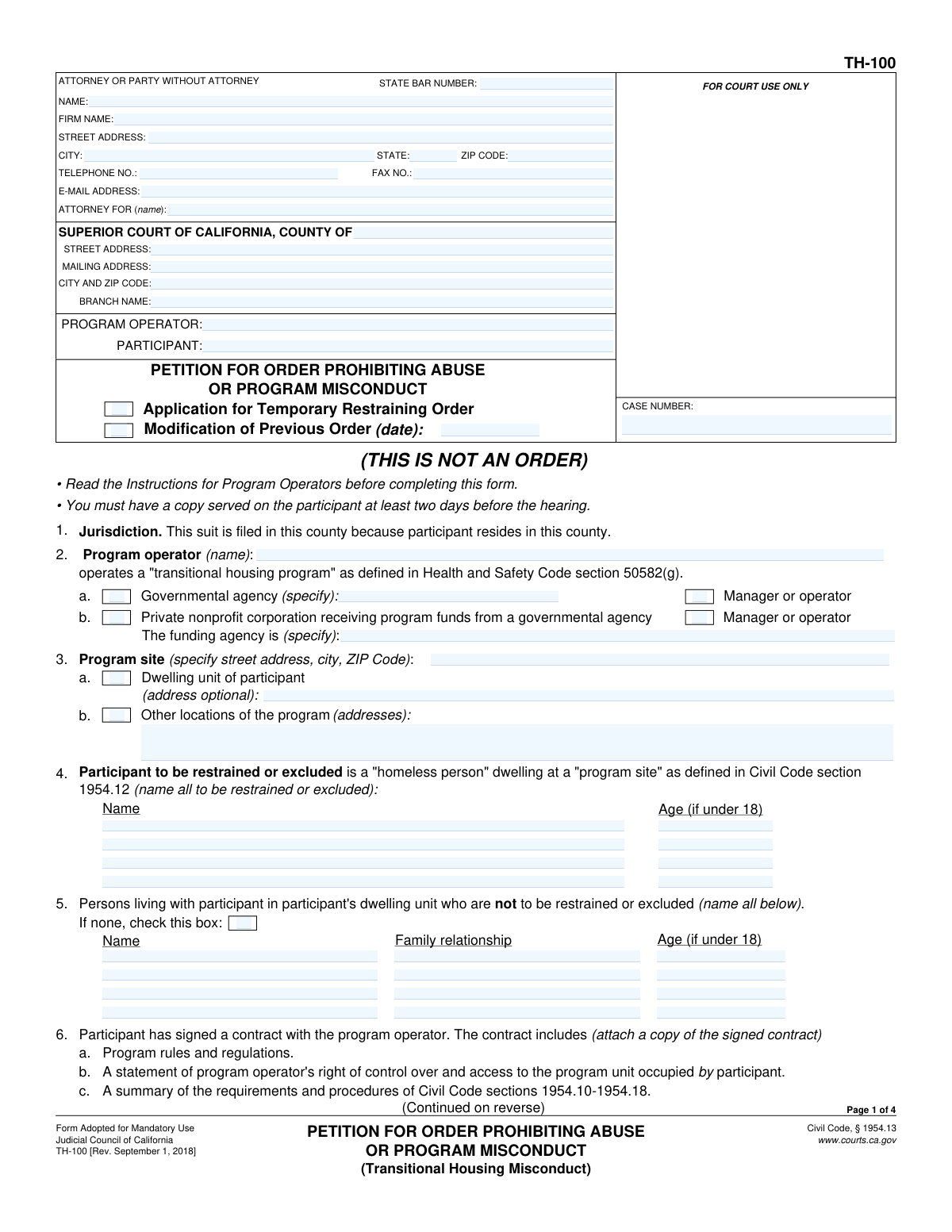
Yes! You can use AI to fill out Form TH-100, Petition for Order Prohibiting Abuse or Program Misconduct (Transitional Housing Misconduct)

Form TH-100, Petition for Order Prohibiting Abuse or Program Misconduct, is a legal document filed in the Superior Court of California by a transitional housing program operator. It is used to request a court order, which can include a temporary restraining order, against a program participant for reasons such as abuse, violence, or significant violation of program rules as defined under Civil Code § 1954.13. This petition is crucial for maintaining safety and order within the program. Today, this form can be filled out quickly and accurately using AI-powered services like Instafill.ai, which can also convert non-fillable PDF versions into interactive fillable forms.
TH-100 is part of the California court forms category on Instafill.
Our AI automatically handles information lookup, data retrieval, formatting, and form filling.
It takes less than a minute to fill out TH-100 using our AI form filling.
Securely upload your data. Information is encrypted in transit and deleted immediately after the form is filled out.

Form specifications

Form name: Form TH-100, Petition for Order Prohibiting Abuse or Program Misconduct (Transitional Housing Misconduct)
Number of fields: 154
Number of pages: 1
Language: English
main-image

Instafill Demo: How to fill out PDF forms in seconds with AI

How to Fill Out TH-100 Online for Free in 2026

Are you looking to fill out a TH-100 form online quickly and accurately? Instafill.ai offers the #1 AI-powered PDF filling software of 2026, allowing you to complete your TH-100 form in just 37 seconds or less.
Follow these steps to fill out your TH-100 form online using Instafill.ai:
  1. 1 Navigate to Instafill.ai and upload or select Form TH-100.
  2. 2 Enter the attorney/party information and the details of the Superior Court where the petition will be filed.
  3. 3 Identify the program operator (petitioner) and the participant to be restrained, along with details about the transitional housing program.
  4. 4 Describe the specific incidents of abuse or program misconduct, checking the relevant boxes and providing a detailed factual account with dates and times.
  5. 5 Select the specific restraining orders you are requesting from the court, such as abuse restraining orders, program site exclusion, or stay-away orders.
  6. 6 If requesting a Temporary Restraining Order (TRO), complete the section explaining the need for immediate court action to prevent irreparable harm.
  7. 7 Review all entered information for accuracy, then download the completed petition to be signed, dated, and filed with the court.

Our AI-powered system ensures each field is filled out correctly, reducing errors and saving you time.

Why Choose Instafill.ai for Your Fillable TH-100 Form?

Speed

Complete your TH-100 in as little as 37 seconds.

Up-to-Date

Always use the latest 2026 TH-100 form version.

Cost-effective

No need to hire expensive lawyers.

Accuracy

Our AI performs 10 compliance checks to ensure your form is error-free.

Security

Your personal information is protected with bank-level encryption.

Frequently Asked Questions About Form TH-100

This form is used by a transitional housing program operator to petition a California court for an order prohibiting a program participant from engaging in abuse or serious program misconduct.

The program operator of a transitional housing program, or their attorney, should complete this form. It is filed against a program participant who has allegedly committed abuse or violated program rules.

In Section 6, 'Abuse' refers to actions like causing bodily injury or sexual assault. 'Program Misconduct' refers to intentionally violating specific program rules, such as those against theft, drug use, or harassment, which substantially interferes with the program's operation.

You must attach a copy of the signed contract with the participant, which includes the program rules and regulations, as stated in Section 4. You may also attach witness declarations for additional support.

In Section 7, you must provide a detailed factual account of the most recent incidents. State what happened, the dates and times, who was involved, and cite the specific program rule violated for each act of misconduct.

A Temporary Restraining Order (TRO) is an immediate order effective until the court hearing. To request one, you must complete Sections 15 and 16, explaining the 'great and irreparable harm' that will occur without an immediate order.

Yes, you can request a temporary 'Program Site Exclusion Order' in Sections 10 and 15. However, you must prove there is an emergency and a need to prevent imminent serious bodily injury for the court to grant it before the hearing.

After completing the form, you must file it with the Superior Court and have a copy legally served on the participant at least two days before the court hearing.

You should list all law enforcement agencies with jurisdiction over your program sites so they can receive copies of any court orders. This ensures they are aware of the orders and can assist with enforcement if necessary.

Yes, you must disclose any previous petitions for restraining orders against the same participant in Section 13. You will need to provide the case numbers and dates of the prior filings.

Yes, services like Instafill.ai use AI to auto-fill form fields accurately and save time. This can help ensure all necessary information is included before you file with the court.

You can use a service like Instafill.ai to upload the PDF of Form TH-100. Their platform allows you to fill out the form interactively online and then download the completed document for printing and filing.

If you have a non-fillable PDF, you can use a service like Instafill.ai. It can convert flat, non-interactive PDFs into fillable forms that you can easily complete on your computer.

Compliance TH-100
Validation Checks by Instafill.ai

1
Ensures Participant and Program Operator Names are Provided
Validates that the names for both the 'PARTICIPANT' and 'PROGRAM OPERATOR' are filled in the header section of the form. These names are essential for identifying the parties involved in the legal action and are used throughout the document. A failure to provide these names would make the petition legally insufficient and result in its rejection.
2
Validates Program Operator Type Selection
This check ensures that in Section 4, one of the two checkboxes specifying the program operator's type ('Governmental agency' or 'Private nonprofit corporation') is selected. This information is crucial for establishing the operator's legal standing to file the petition under the relevant code. If neither is selected, the form is incomplete and the operator's authority is not established.
3
Requires Funding Agency if Operator is a Private Nonprofit
This is a conditional logic check for Section 4. If the 'Private nonprofit corporation' checkbox is selected, this validation ensures that the name of the funding agency is specified in the corresponding text field. This detail is required by law to confirm the program's eligibility and funding source, and failure to provide it will lead to an incomplete petition.
4
Ensures a Basis for the Petition is Stated
This validation confirms that at least one checkbox is selected in either Section 7a (Abuse) or Section 7b (Program Misconduct). The petition must allege either abuse or misconduct to have a legal basis for the requested orders. Without this selection, the petition lacks a cause of action and cannot proceed.
5
Verifies Factual Basis for Allegations is Provided
This check ensures that the text area in Section 7c, which asks for a detailed description of the incidents, is not empty. This narrative provides the specific facts and evidence the court will use to evaluate the petition's merits. An empty description means there is no supporting evidence for the claims, leading to an immediate denial of the petition.
6
Requires Rule Number for Each Claimed Misconduct Violation
This validation applies to Section 7b. For every type of program misconduct checked (e.g., 'theft,' 'arson'), the system verifies that a corresponding rule number has been entered in the adjacent text field. This links the alleged action to a specific, documented program rule, which is necessary to prove a 'program misconduct' violation.
7
Requires Location for Stay-Away Order Request
This check is triggered if the petitioner requests a 'STAY-AWAY ORDER' in Section 11. It validates that at least one specific location is identified in the associated text fields. The court cannot issue a vague order; it must specify the exact places the participant must stay away from for the order to be enforceable.
8
Ensures Justification for Immediate Order is Provided
If the petitioner requests a Temporary Restraining Order (TRO) in Section 15, this validation ensures the text box explaining the risk of 'great and irreparable harm' is filled out. This justification is the legal standard for granting emergency orders before a full hearing. Without a compelling reason, the court will not grant the TRO.
9
Validates Selection of Participant's Contract Duration
This check verifies that in Section 15a, one of the two mutually exclusive options regarding the participant's contract length (less than or more than six months) is selected. This information is critical as it can affect the legal procedures and standards required for exclusion. An omission here leaves out a key jurisdictional fact.
10
Requires Contract Date if Under Six Months
This is a conditional check related to Section 15a. If the box indicating the participant 'has not been under contract with the program for more than six months' is checked, this validation ensures the contract date field is filled with a valid date. This date provides the evidence for the selected status, and its absence would make the claim unsubstantiated.
11
Ensures Method of Notice for TRO is Specified
When a TRO is requested, this check confirms that one of the three options in Section 15b detailing how (or why not) the participant was notified has been selected. Proper notice is a fundamental due process requirement, and the court must know what steps were taken before issuing an emergency order. Failure to complete this section will likely result in the denial of the temporary order request.
12
Verifies Signature Block is Complete and Dated
This validation ensures that the signature date, printed name, and title of the person signing are all filled out on the final page. The declaration is made 'under penalty of perjury,' so the identity of the declarant and the date of the declaration are legally essential. An unsigned or undated petition is invalid and will not be accepted by the court for filing.
13
Validates Attorney State Bar Number Format
This check verifies that if a State Bar Number is entered in the attorney information section, it consists only of numerical digits. This ensures data integrity for attorney records and proper identification within the court system. An incorrectly formatted number could cause processing delays or errors in identifying the attorney of record.
14
Requires Attachment of Signed Contract
This validation checks if a file has been attached to the submission, corresponding to the instruction in Section 3 to 'attach a copy of the signed contract'. The contract is a key piece of evidence establishing the relationship between the operator and participant and contains the rules being enforced. Without the attachment, the petition is incomplete and lacks essential supporting documentation.

Common Mistakes in Completing TH-100

Failure to Attach Signed Contract

Section 3c explicitly requires the petitioner to attach a copy of the signed contract with the participant. Filers often overlook this requirement in their haste, assuming the factual narrative is sufficient. Without the contract, the court cannot verify the program's rules or the operator's right to control the property, which is a foundational element of the petition and will likely lead to its denial.

Vague or Incomplete Factual Narrative

In Section 7c, filers often use general terms like 'was disruptive' or 'acted threateningly' without providing specifics. A successful petition requires a detailed account of each incident, including exact dates, times, specific actions, direct quotes if possible, and the names of any witnesses. A vague narrative makes it impossible for a judge to find that abuse or misconduct occurred, resulting in the petition being denied.

Not Citing Specific Program Rule Numbers

When alleging program misconduct in Section 7, it is mandatory to cite the specific rule number from the program's regulations that was violated. Many filers check the box for a violation like 'theft' but forget to write in 'rule no. 12.b,' for example. This omission weakens the legal basis of the petition, as it fails to connect the participant's action to a formal, agreed-upon rule, making it harder for the court to grant the order.

Insufficient Justification for a Temporary Restraining Order (TRO)

Section 15 requires showing that 'great and irreparable harm' will occur before the court hearing. Filers often just repeat the past incidents instead of explaining why the threat is urgent and immediate. To get a temporary exclusion order, you must demonstrate a risk of 'imminent serious bodily injury,' a very high standard that requires a clear explanation of present danger, not just past events.

Incorrect or Incomplete Court Information

Petitioners frequently enter the wrong court address or branch name in the header section. Each county has specific courthouses that handle these types of civil harassment cases, and filing at the wrong location will cause the clerk to reject the document, delaying the legal process. To avoid this, verify the correct Superior Court branch and its full address for filing transitional housing petitions in that specific county.

Omitting Law Enforcement Agency Details

Section 12 asks for the law enforcement agencies that have jurisdiction over the program sites. Forgetting to list the correct police or sheriff's departments means that if the restraining order is granted, it won't be entered into the state system for enforcement. This makes the order ineffective, as officers responding to a future incident will have no record of it and no authority to enforce it.

Inconsistent Party Names Across Pages

The form requires the 'Participant' and 'Program Operator' names to be written at the top of each page. It's a common error to misspell a name, use a variation, or accidentally switch the parties on subsequent pages. This creates confusion for the court clerk and judge, potentially delaying the case or requiring the filer to submit corrected documents.

Forgetting Signature, Date, or Title

The declaration in Section 16 must be signed, dated, and include the title of the person signing on behalf of the program operator. A missing signature or date is one of the most common reasons for a court clerk to reject a filing on the spot. This simple oversight invalidates the entire petition, forcing the filer to start the process over again.

Failing to List All Persons to Be Protected

In Section 9, when requesting an Abuse Restraining Order, the form asks for the specific persons to be protected. Filers sometimes check the box for 'program employees' or 'program participants' but fail to list their actual names. A judge can only issue an order protecting the specific individuals named in the petition, so omitting names leaves those people legally unprotected.

Mismatching Requested Orders with Factual Allegations

A filer might describe a violent physical attack in detail in Section 7c but then only request an order against 'Program Misconduct' (breaking rules) in Section 8, forgetting to also request an 'Abuse Restraining Order' in Section 9. This inconsistency can lead a judge to grant a weaker order than intended or question the severity of the events. It is crucial to ensure every fact alleged has a corresponding order requested.
Saved over 80 hours a year

“I was never sure if my IRS forms like W-9 were filled correctly. Now, I can complete the forms accurately without any external help.”

Kevin Martin Green

Your data stays secure with advanced protection from Instafill and our subprocessors

Robust compliance program

Transparent business model

You’re not the product. You always know where your data is and what it is processed for.

ISO 27001, HIPAA, and GDPR

Our subprocesses adhere to multiple compliance standards, including but not limited to ISO 27001, HIPAA, and GDPR.

Security & privacy by design

We consider security and privacy from the initial design phase of any new service or functionality. It’s not an afterthought, it’s built-in, including support for two-factor authentication (2FA) to further protect your account.

Fill out TH-100 with Instafill.ai

Worried about filling PDFs wrong? Instafill securely fills form-th-100-petition-for-order-prohibiting-abuse-or-program-misconduct-transitional-housing-misconduct forms, ensuring each field is accurate.