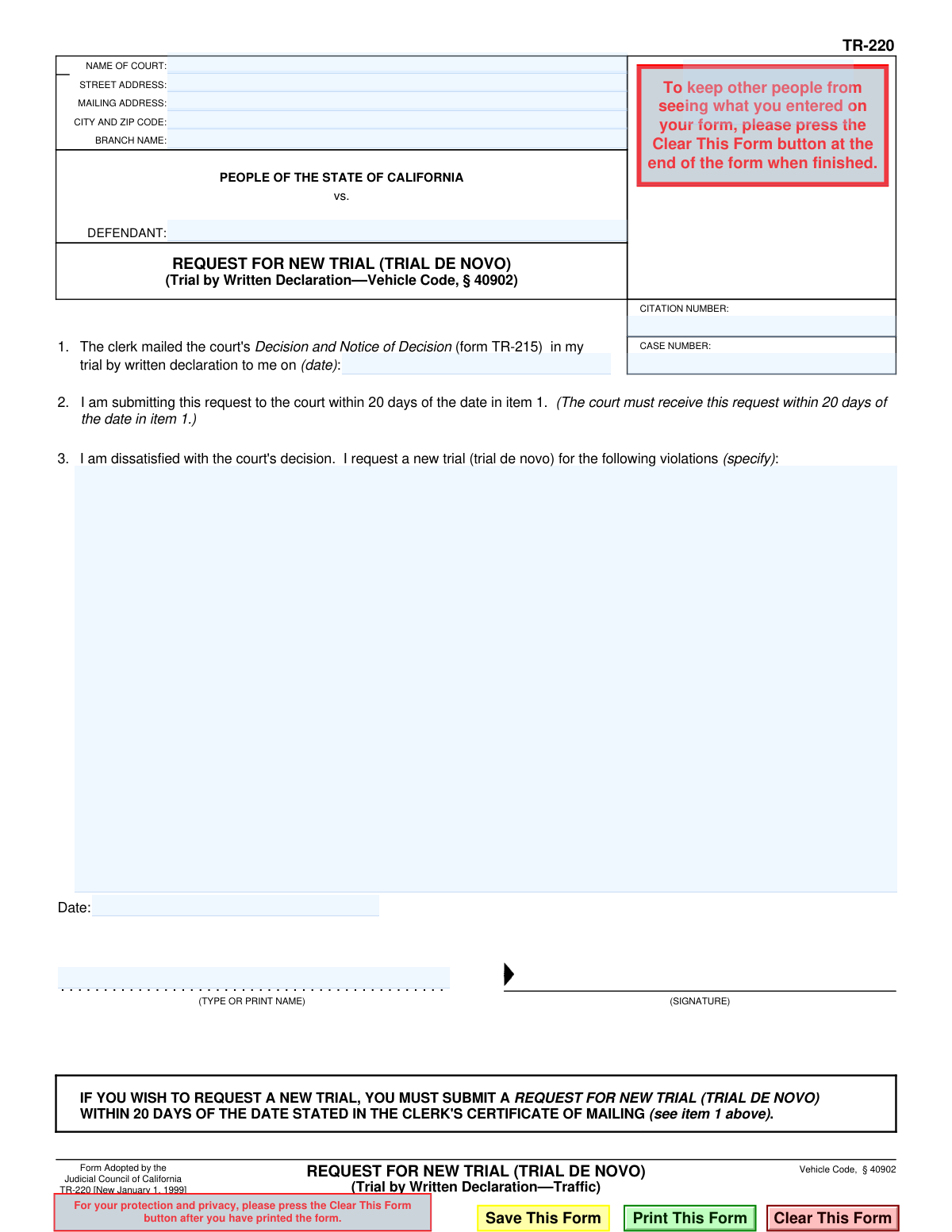
Yes! You can use AI to fill out Form TR-220, Request for New Trial (Trial de Novo) (Trial by Written Declaration—Traffic)
The TR-220, Request for New Trial (Trial de Novo), is a legal document used in California by individuals who are dissatisfied with the court's decision in their traffic trial by written declaration. Filing this form is a formal request for a completely new trial, typically held in person before a judge. It is crucial to file this form within 20 days of the original decision's mailing date to preserve your right to a new hearing. Today, this form can be filled out quickly and accurately using AI-powered services like Instafill.ai, which can also convert non-fillable PDF versions into interactive fillable forms.
TR-220 is part of the
California court forms category on Instafill.
Our AI automatically handles information lookup, data retrieval, formatting, and form filling.
It takes less than a minute to fill out TR-220 using our AI form filling.
Securely upload your data. Information is encrypted in transit and deleted immediately after the form is filled out.
Form specifications
| Form name: | Form TR-220, Request for New Trial (Trial de Novo) (Trial by Written Declaration—Traffic) |
| Number of fields: | 18 |
| Number of pages: | 1 |
| Language: | English |
Instafill Demo: How to fill out PDF forms in seconds with AI
How to Fill Out TR-220 Online for Free in 2026
Are you looking to fill out a TR-220 form online quickly and accurately? Instafill.ai offers the #1 AI-powered PDF filling software of 2026, allowing you to complete your TR-220 form in just 37 seconds or less.
Follow these steps to fill out your TR-220 form online using Instafill.ai:
- 1 Navigate to Instafill.ai and upload or select the California Form TR-220.
- 2 Provide your personal details and the court information, including the court's name and address, your name, case number, and citation number.
- 3 Enter the date the court clerk mailed the 'Decision and Notice of Decision' (form TR-215) to you.
- 4 Specify the traffic violations for which you are requesting the new trial.
- 5 Review all the information populated by the AI to ensure it is accurate and complete.
- 6 Date and digitally sign the form in the designated signature field.
- 7 Download the completed TR-220 and ensure it is received by the court within the 20-day deadline.
Our AI-powered system ensures each field is filled out correctly, reducing errors and saving you time.
Why Choose Instafill.ai for Your Fillable TR-220 Form?
Speed
Complete your TR-220 in as little as 37 seconds.
Up-to-Date
Always use the latest 2026 TR-220 form version.
Cost-effective
No need to hire expensive lawyers.
Accuracy
Our AI performs 10 compliance checks to ensure your form is error-free.
Security
Your personal information is protected with bank-level encryption.
Frequently Asked Questions About Form TR-220
This form is used to officially request a new, in-person trial (a 'trial de novo') after you have received an unfavorable decision from a trial by written declaration for a traffic violation.
Anyone who has gone through a trial by written declaration for a traffic ticket in California and is dissatisfied with the court's decision can file this form to request a new trial.
A 'trial de novo' is a new trial. When you are granted a trial de novo, the case is heard again from the beginning, as if the previous trial by written declaration had not occurred.
The court must receive this form within 20 days of the date the clerk mailed the decision from your written trial. This mailing date is what you must enter in item 1 of the form.
The date for item 1 is the mailing date found on the 'Decision and Notice of Decision' (form TR-215) that the court sent you. It is crucial to use this specific date to calculate the 20-day deadline.
In this section, you must list the specific traffic violations from your ticket for which you are requesting a new trial. You can find these on your original citation or the court's decision notice.
Your Case Number and Citation Number are printed on the original traffic ticket and on all official court notices you have received, including the TR-215 decision form.
After the court processes your timely request, you will be scheduled for a new, in-person trial. The court will send you a notice with the date, time, and location of your new trial.
You must submit the form to the same court that handled your trial by written declaration. The court's name and address are listed at the top of the form.
No, you typically only need to submit the completed and signed TR-220 form itself. Keep copies of all your documents, including the TR-215 decision, for your own records.
Yes, services like Instafill.ai use AI to help you accurately auto-fill form fields with your personal and case information, saving time and reducing the chance of errors.
You can use a service like Instafill.ai to fill out the form online. Simply upload the TR-220 PDF, and the platform will guide you through completing all the necessary fields digitally.
If you have a non-fillable or 'flat' PDF, you can upload it to Instafill.ai. The service can convert it into an interactive, fillable form that you can easily complete on your computer.
Compliance TR-220
Validation Checks by Instafill.ai
1
Item 1 Mailing Date Presence
This check verifies that the date field in item 1, indicating when the court's decision was mailed, is not empty. This date is the starting point for the 20-day filing deadline, making it a mandatory field for the request to be processed. If this date is missing, the clerk cannot determine if the request is timely and the form will be rejected.
2
Item 1 Mailing Date Validity
Validates that the date entered in item 1 is a real, correctly formatted date (e.g., MM/DD/YYYY) and is not a future date. An invalid or future date would make the 20-day deadline calculation impossible or incorrect. This check prevents data entry errors and ensures the legal timeline is based on a plausible event date.
3
Defendant Name Completeness
Ensures the 'DEFENDANT' field is filled out with the name of the individual involved in the case. This is a primary identifier for the legal proceeding and is crucial for associating the request with the correct person and case file. A form without a defendant name is unidentifiable and cannot be processed.
4
Case Number Completeness and Format
This validation confirms that the 'CASE NUMBER' field is not empty and that the entered value conforms to the expected format for the court. The case number is the unique identifier for the court proceedings, and its absence or incorrect format would prevent the clerk from locating the case file. Failure to provide a valid case number will result in the rejection of the request.
5
Citation Number Presence
Verifies that the 'CITATION NUMBER' field has been filled in. The citation number is a key reference to the original traffic violation and is used to cross-reference the case, especially in its early stages. Omitting this number can cause delays or rejection if the clerk cannot easily identify the original offense being contested.
6
Violation Specification Completeness
This check ensures that the text area in item 2, for specifying the violations, is not left blank. The user must state which specific violation(s) they are requesting a new trial for. A request that does not specify the grounds is considered incomplete and legally insufficient, and will be returned to the filer.
7
Submission Timeliness (20-Day Rule)
This is a critical cross-field validation that calculates the difference between the submission date (the 'Date' field by the signature) and the clerk's mailing date (from item 1). The form explicitly states the request must be received within 20 days. If the calculated duration exceeds 20 days, the request is statutorily late and will be denied.
8
Signature Date Presence
Validates that the 'Date' field next to the signature line is filled out. This date legally establishes when the document was signed and attested to by the defendant. An undated signature can raise questions about the document's timeliness and validity, leading to its rejection.
9
Signature Presence
Confirms that the signature field has been completed, either through a digital signature, a typed attestation, or an uploaded image. An unsigned legal document has no legal force and is invalid. The system must ensure a signature is present before accepting the submission.
10
Printed Name Presence
This check verifies that the 'TYPE OR PRINT NAME' field beneath the signature line is not empty. The printed name clarifies the identity of the signatory, especially if the signature itself is illegible. This is a standard requirement for legal documents to ensure clear identification.
11
Printed Name and Defendant Name Consistency
Compares the name entered in the 'TYPE OR PRINT NAME' field with the 'DEFENDANT' name at the top of the form. While not always a hard failure (e.g., legal representative), a mismatch should trigger a warning to ensure the person signing is authorized. This helps prevent fraudulent or incorrectly filed requests.
12
Logical Date Sequence
Ensures the signature date is on or after the clerk's mailing date from item 1. It is logically impossible for a defendant to sign a request for a new trial before the decision they are appealing was even mailed to them. This check catches significant data entry errors and ensures the timeline of events is plausible.
Common Mistakes in Completing TR-220
This mistake occurs when filers enter the date they received the decision or the current date, instead of the exact mailing date from the 'Notice of Decision' (form TR-215). The 20-day deadline to request a new trial is calculated from this specific mailing date. An incorrect date will cause the court to miscalculate the deadline and likely deny the request as untimely, forfeiting your right to a new trial.
The form explicitly states it must be *received* by the court within 20 days of the mailing date in Item 1, not just postmarked. People often miscalculate this window or wait until the last minute to mail the form. Missing this strict deadline results in an automatic denial of the request for a new trial, with no exceptions.
Filers may transpose digits, confuse the case number with the citation number, or write them illegibly. These numbers are the primary identifiers for your court file. An error here means the clerk's office cannot locate your records, which will lead to the rejection of your request or processing delays that cause you to miss the filing deadline.
Submitting an unsigned form is a common and critical error, often made in haste. An unsigned legal document is invalid and will be immediately rejected by the court clerk. This simple oversight can cause you to miss the strict 20-day filing deadline while you wait for the rejected form to be returned, thereby losing your chance for a new trial.
The form requires you to specify the violations for which you are requesting a new trial. Simply writing 'speeding' or leaving it blank is insufficient, especially if the original ticket had multiple charges. This ambiguity can lead the court to reject the form as incomplete or misunderstand which charges are being contested, potentially limiting the scope of your new trial.
When a form is filled out by hand, poor penmanship can make names, dates, and case numbers impossible for court staff to read accurately. This leads to data entry errors on the court's end or outright rejection of the form if it's unprocessable. To avoid this, it's best to use a fillable PDF; tools like Instafill.ai can convert flat, non-fillable PDFs into fillable versions to ensure perfect clarity.
People often guess the court address or use a general county courthouse address instead of the specific branch that handled their case. Sending the form to the wrong location will cause significant delays as it gets rerouted. These delays almost always result in the form arriving after the 20-day deadline has passed, leading to a denial of the request.
While a signature is required, it is often stylized and illegible. The 'TYPE OR PRINT NAME' field is there to ensure the court can clearly identify the filer. Forgetting to print your name can cause processing delays if the clerk cannot decipher the signature to match it with the case file.
In the rush to complete the form, some individuals forget to fill out Item 2 entirely, leaving the violation list blank. A request for a new trial with no specified violation is legally incomplete and has no basis. The court will reject it, as it's impossible to know what the defendant is appealing.
Filers sometimes mistakenly enter the decision mailing date from Item 1 on the signature line. The signature date should be the actual date you are signing the form. While not as critical as an error in Item 1, it reflects a lack of attention to detail and can cause minor confusion during processing.
Not all courts accept filings via fax or email, and rules can vary by jurisdiction. Assuming you can submit the form electronically without confirming the court's local rules can lead to your request never being officially filed. Always check the specific court's website or call the clerk to confirm accepted filing methods (e.g., in-person, mail, e-filing) to ensure your request is received on time.
The defendant name must be written exactly as it appears on court records and the original citation. Using a nickname, an initial instead of a full middle name, or having a typo can create a mismatch in the system. This forces the clerk to do extra work to find your case and can delay the processing of your request. AI-powered tools like Instafill.ai can help prevent this by saving and auto-filling your name correctly across all documents.
Saved over 80 hours a year
“I was never sure if my IRS forms like W-9 were filled correctly. Now, I can complete the forms accurately without any external help.”
Kevin Martin Green
Your data stays secure with advanced protection from Instafill and our subprocessors

Robust compliance program
Transparent business model
You’re not the product. You always know where your data is and what it is processed for.
ISO 27001, HIPAA, and GDPR
Our subprocesses adhere to multiple compliance standards, including but not limited to ISO 27001, HIPAA, and GDPR.
Security & privacy by design
We consider security and privacy from the initial design phase of any new service or functionality. It’s not an afterthought, it’s built-in, including support for two-factor authentication (2FA) to further protect your account.
Fill out TR-220 with Instafill.ai
Worried about filling PDFs wrong? Instafill securely fills form-tr-220-request-for-new-trial-trial-de-novo-trial-by-written-declarationtraffic forms, ensuring each field is accurate.