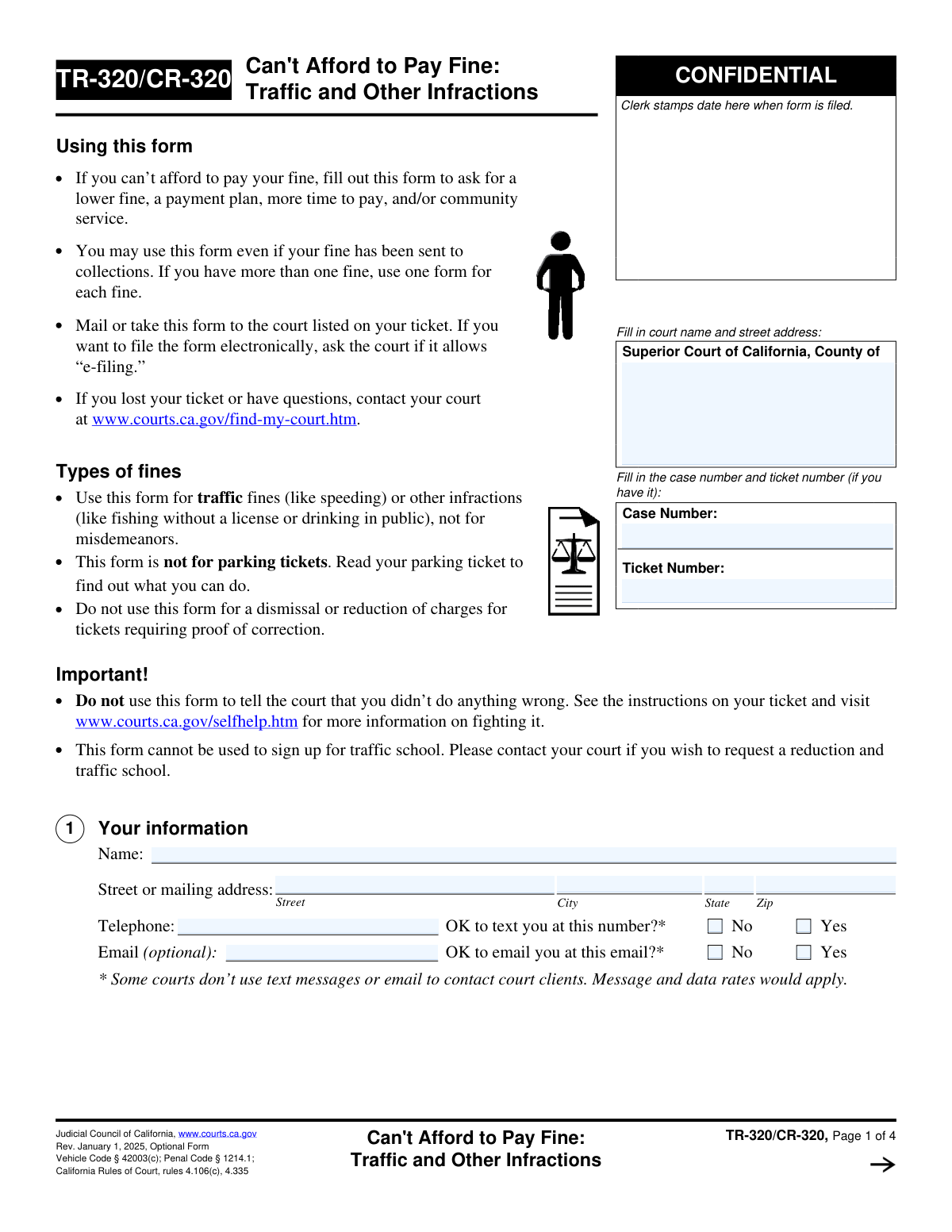
Yes! You can use AI to fill out Form TR-320/CR-320, Can't Afford to Pay Fine: Traffic and Other Infractions

This form, officially titled 'Can't Afford to Pay Fine: Traffic and Other Infractions', is used in California courts to formally request a modification to a fine for a traffic ticket or other infraction based on financial hardship. It allows individuals to ask for a reduced fine, a payment plan, an extension, or community service instead of payment. This is a critical tool for ensuring that financial inability does not lead to more severe legal consequences. Today, this form can be filled out quickly and accurately using AI-powered services like Instafill.ai, which can also convert non-fillable PDF versions into interactive fillable forms.
TR-320/CR-320 is part of the California court forms category on Instafill.
Our AI automatically handles information lookup, data retrieval, formatting, and form filling.
It takes less than a minute to fill out TR-320/CR-320 using our AI form filling.
Securely upload your data. Information is encrypted in transit and deleted immediately after the form is filled out.

Form specifications

Form name: Form TR-320/CR-320, Can't Afford to Pay Fine: Traffic and Other Infractions
Number of fields: 79
Number of pages: 1
Language: English
main-image

Instafill Demo: How to fill out PDF forms in seconds with AI

How to Fill Out TR-320/CR-320 Online for Free in 2026

Are you looking to fill out a TR-320/CR-320 form online quickly and accurately? Instafill.ai offers the #1 AI-powered PDF filling software of 2026, allowing you to complete your TR-320/CR-320 form in just 37 seconds or less.
Follow these steps to fill out your TR-320/CR-320 form online using Instafill.ai:
  1. 1 Navigate to Instafill.ai and upload or select the TR-320/CR-320 form.
  2. 2 Provide your personal information, court details, case number, and ticket number in the designated fields.
  3. 3 Use the AI assistant to accurately complete the sections on your income, public benefits, and financial hardship, checking all applicable boxes.
  4. 4 Indicate whether you have supporting documents and if you have previously informed the court about your inability to pay.
  5. 5 Select what you are asking the court to do, such as lowering the fine, setting up a payment plan, or assigning community service.
  6. 6 Carefully review the plea section, understand the rights you are waiving, and select either 'guilty' or 'no contest' to proceed with the request.
  7. 7 Review the entire completed form for accuracy, then electronically sign and date it before downloading for submission to the court.

Our AI-powered system ensures each field is filled out correctly, reducing errors and saving you time.

Why Choose Instafill.ai for Your Fillable TR-320/CR-320 Form?

Speed

Complete your TR-320/CR-320 in as little as 37 seconds.

Up-to-Date

Always use the latest 2026 TR-320/CR-320 form version.

Cost-effective

No need to hire expensive lawyers.

Accuracy

Our AI performs 10 compliance checks to ensure your form is error-free.

Security

Your personal information is protected with bank-level encryption.

Frequently Asked Questions About Form TR-320/CR-320

This form is used to ask a California court for help if you cannot afford to pay a fine for a traffic ticket or another infraction. You can request a lower fine, a payment plan, more time to pay, or community service.

Anyone who has received a fine for a traffic violation or other infraction in California and cannot afford to pay the full amount can use this form. This applies even if your fine has already been sent to collections.

No, this form is not for parking tickets, misdemeanors, or for contesting the ticket itself. It is only for requesting financial assistance after you have admitted responsibility for a traffic or other infraction.

Yes, to use this form, you must enter a plea of 'guilty' or 'no contest' in Section 7, which means you are admitting responsibility for the violation. If you want to fight the ticket, you should not use this form and should contact the court instead.

You should attach copies of documents that prove your financial situation, such as pay stubs, tax returns, or proof of public benefits like CalFresh or Medi-Cal. Remember to cross out any private information like social security numbers on the copies you submit.

If you do not have any documents to provide, you must explain why in Section 3b of the form. The court will still review your request based on the information you provide.

You can mail the form or deliver it in person to the court listed on your ticket. Some courts may also allow you to file it electronically ('e-filing'), so you should check with your specific court for their procedures.

No, the form instructions state that you must fill out and submit a separate TR-320/CR-320 form for each individual fine you are unable to pay.

In Section 5, you can ask the court to lower the fine amount, set up a monthly payment plan, give you more time to pay, or allow you to complete community service. You can check all the options you are willing and able to do.

No, this form cannot be used to sign up for traffic school. If you wish to request both a fine reduction and traffic school, you must contact the court directly for instructions.

Yes, Section 2 asks for the total money you get from all sources, which includes income received in your family from a spouse or live-in romantic partner. This helps the court understand your complete household financial situation.

Yes, services like Instafill.ai use AI to accurately auto-fill form fields from your records, which can save you time and help avoid errors. This ensures your information is entered correctly before you submit the form to the court.

You can use a service like Instafill.ai to easily fill out the form online. Simply upload the PDF, and the tool will make it interactive, allowing you to type your information directly into the fields before printing for submission.

If you have a non-fillable or 'flat' PDF, you can use a tool like Instafill.ai to convert it into an interactive, fillable form. This allows you to easily complete it on your computer before printing and submitting it.

Compliance TR-320/CR-320
Validation Checks by Instafill.ai

1
Case Identifier Presence
This check ensures that either the 'Case Number' or 'Ticket Number' field is filled out. At least one of these identifiers is crucial for the court clerk to locate the correct case file. If neither is provided, the form cannot be processed and the submission will be rejected with an error message prompting the user to provide this information.
2
Personal Information Completeness
Validates that the user's full name and complete mailing address (Street, City, State, and Zip) are provided in Section 1. This information is mandatory for court records and for sending official correspondence regarding the case. Failure to provide a complete name and address will prevent form submission.
3
Telephone Number Format
Verifies that the value entered in the 'Telephone' field is a valid 10-digit phone number. A valid number is necessary for the court to contact the individual if needed. If the entry does not match a standard phone number format, an error will be displayed, and the user must correct it before proceeding.
4
Exclusive Income Source Selection
Ensures that exactly one of the three primary income status options in Section 2 is selected ('I do not get money', 'I get public benefits', or 'I get money from other sources'). These options are mutually exclusive and determine which subsequent fields are required. Selecting none or more than one will result in a validation error.
5
Public Benefits Specification
If the user checks 'I get public benefits' in Section 2, this validation confirms that at least one specific type of benefit (e.g., CalFresh, Medi-Cal, SSI) is also selected. This detail is required to verify eligibility for a reduced fine. If the main box is checked but no specific benefit is indicated, the form will prompt the user to make a selection.
6
Income Details Requirement
This check is triggered if the user selects 'I do not get public benefits, but I get money from other sources' in Section 2. It validates that the income amount, payment frequency, and the number of supported people (fields 2a and 2b) are all filled out. This information is essential for the court to assess the user's financial situation, and missing data will block submission.
7
Rent/Mortgage Expense Detail
In Section 2c, if the checkbox for 'Not have enough money to pay my rent/mortgage' is selected, this rule ensures the corresponding dollar amount and payment frequency are also provided. This specific data helps substantiate the claim of financial hardship. The form will show an error if the box is checked but the details are missing.
8
Proof of Hardship Explanation
Validates that if a user selects 'No, I do not have any papers to show' in Section 3, they must provide a reason in the associated text field. The court requires an explanation for the lack of documentation. An empty explanation field will trigger an error message and prevent the form from being submitted.
9
Change in Circumstances Explanation
In Section 4, if the user answers 'Yes' to having previously requested relief, this check verifies that at least one 'What has changed' checkbox is selected. This is necessary to justify a new request. If 'Yes' is selected without a corresponding reason, the user will be prompted to specify the change.
10
Payment Plan Details
If the 'Payment plan' option is selected in Section 5, this rule validates that both the monthly payment amount and the day of the month are filled in. The day must be a number between 1 and 31. These details are required to establish a formal payment agreement, and missing information will result in a validation error.
11
Payment Deadline Date Validity
When a user requests 'More time to pay' in Section 5, this check ensures the entered deadline is a valid, future date in a recognizable format (e.g., MM/DD/YYYY). A past or invalid date cannot be processed by the court. The system will reject invalid entries and require the user to input a valid future date.
12
Court Request Selection
This validation ensures that the user has selected at least one option in Section 5 ('What are you asking the court to do?'). The form's purpose is to make a specific request, so at least one action must be chosen. If no option is selected, the submission will be blocked until the user indicates their desired outcome.
13
Required Plea Selection
Verifies that one, and only one, plea option ('No contest plea' or 'Guilty plea') is selected in Section 7. Making a plea is a mandatory prerequisite for using this form to request fine relief. The form cannot be submitted until a single, valid plea is chosen.
14
Signature Block Completeness
This check confirms that the 'Date' and 'Type or print your name' fields in Section 8 are completed. These fields are part of the declaration under penalty of perjury and are legally required. The form submission will fail if either of these fields is left blank.
15
Case Number Consistency Across Pages
Validates that the 'Case Number' entered on the first page matches the 'Case Number' entered on the headers of pages 2, 3, and 4. This consistency is critical to ensure all pages of the submission are correctly associated with the same case file. A mismatch will trigger an alert to prevent filing errors.

Common Mistakes in Completing TR-320/CR-320

Missing or Incorrect Case and Ticket Numbers

Applicants often forget to fill in the Case Number and Ticket Number at the top of the form, or they transcribe them incorrectly. Without this information, the court clerk cannot locate the case file, and the submission will be rejected or significantly delayed. To avoid this, double-check the numbers on your original ticket or court notice and carefully enter them on every page where required. AI-powered tools like Instafill.ai can help by automatically populating this information across all pages of the form after it's entered once.

Using the Form to Dispute the Ticket

A frequent error is attempting to use this form to argue innocence or explain why the ticket was unfair. The form explicitly states it is not for disputing charges but for requesting financial assistance after admitting responsibility. This mistake leads to the court disregarding the financial request and treating the submission as an invalid attempt to contest the ticket, wasting time and forfeiting the opportunity for relief. To contest a ticket, you must follow the separate procedures outlined on the ticket itself.

Misunderstanding the Plea Requirement

Many people do not realize that submitting this form requires them to plead 'guilty' or 'no contest' in Section 7, thereby waiving their right to a trial. Filling out this form under the mistaken belief that they can still fight the ticket results in an unintended conviction on their record, which is then reported to the DMV. It is crucial to understand that this form is for sentence mitigation, not for challenging the charge itself.

Forgetting to Select a Plea or Sign the Form

An unsigned or undated form is legally invalid and will be immediately rejected by the court. Similarly, failing to check one of the plea boxes in Section 7 makes the application incomplete, as the court cannot grant financial relief without a formal plea. These simple oversights are common and require the applicant to start the process all over again. Always perform a final review of the completed form, paying special attention to the signature, date, and plea selection on the last page.

Inconsistent or Contradictory Income Reporting

Applicants may check 'I do not get money from any source' in Section 2, but then list income details or expenses elsewhere on the form. This contradiction makes the applicant's financial situation unclear and can damage their credibility, often leading to a denial. Carefully read the instructions for Section 2 and follow the 'skip' patterns correctly based on your income type to present a clear and consistent financial picture.

Incorrectly Calculating or Stating Income

In Section 2a, people often report their gross pay instead of the requested 'take-home pay,' or they select the wrong pay frequency (e.g., checking 'Month' for a bi-weekly paycheck). This can make their income appear higher than it actually is, potentially causing the court to deny their request for a reduced fine. To avoid this, use your net pay from a recent paystub and be precise when selecting the pay period. AI-powered form fillers like Instafill.ai can include validation checks to ensure income figures and frequencies are entered logically.

Forgetting to Attach Supporting Documents

In Section 3, applicants often check 'Yes, I have attached copies' but then fail to include the actual documents like paystubs, benefit statements, or utility bills. An application submitted with a claim of proof but no actual proof is considered incomplete and will be delayed or denied. Always create a checklist of the documents you plan to attach and ensure they are included with your submission before mailing or filing it.

Submitting Original Documents Instead of Copies

The form specifically instructs applicants to attach copies and keep their original documents. However, people sometimes send their original paystubs, EBT card statements, or other important papers, which the court may destroy after the case is decided. This can result in the permanent loss of critical personal records. Always make photocopies of your proof and redact sensitive information like Social Security numbers before submitting them.

Proposing an Unrealistic Payment Plan

When requesting a payment plan in Section 5, some individuals propose an amount that is excessively low (e.g., $5 per month on a $500 fine) without justification. The court may view this as a bad-faith proposal and reject the payment plan request outright. Your proposed payment should be a realistic amount that reflects a genuine effort to pay the fine based on the income and expenses you have declared on the form.

Leaving Explanation Fields Blank or Vague

The form provides several open-ended fields, such as explaining 'other problems' (2c) or providing 'other information' (6), which are opportunities to provide critical context about your hardship. Many people leave these blank or write unhelpful statements like 'I have no money.' This misses a chance to explain specific circumstances, such as unexpected medical debt or a family emergency, that could persuade the judge. Be specific, concise, and honest in these sections to strengthen your case.

Failing to Carry the Case Number to All Pages

The form is four pages long, and each page has a field for the Case Number at the top. It is a common mistake to only fill this out on the first page. If the pages become separated during processing, the clerk may be unable to reassemble the full application, leading to it being considered incomplete. Using a tool like Instafill.ai can prevent this by automatically populating the case number on every page after it is entered once, ensuring the document remains intact.
Saved over 80 hours a year

“I was never sure if my IRS forms like W-9 were filled correctly. Now, I can complete the forms accurately without any external help.”

Kevin Martin Green

Your data stays secure with advanced protection from Instafill and our subprocessors

Robust compliance program

Transparent business model

You’re not the product. You always know where your data is and what it is processed for.

ISO 27001, HIPAA, and GDPR

Our subprocesses adhere to multiple compliance standards, including but not limited to ISO 27001, HIPAA, and GDPR.

Security & privacy by design

We consider security and privacy from the initial design phase of any new service or functionality. It’s not an afterthought, it’s built-in, including support for two-factor authentication (2FA) to further protect your account.

Fill out TR-320/CR-320 with Instafill.ai

Worried about filling PDFs wrong? Instafill securely fills form-tr-320cr-320-cant-afford-to-pay-fine-traffic-and-other-infractions forms, ensuring each field is accurate.