Yes! You can use AI to fill out Form WG-005, Employer's Return (Wage Garnishment)
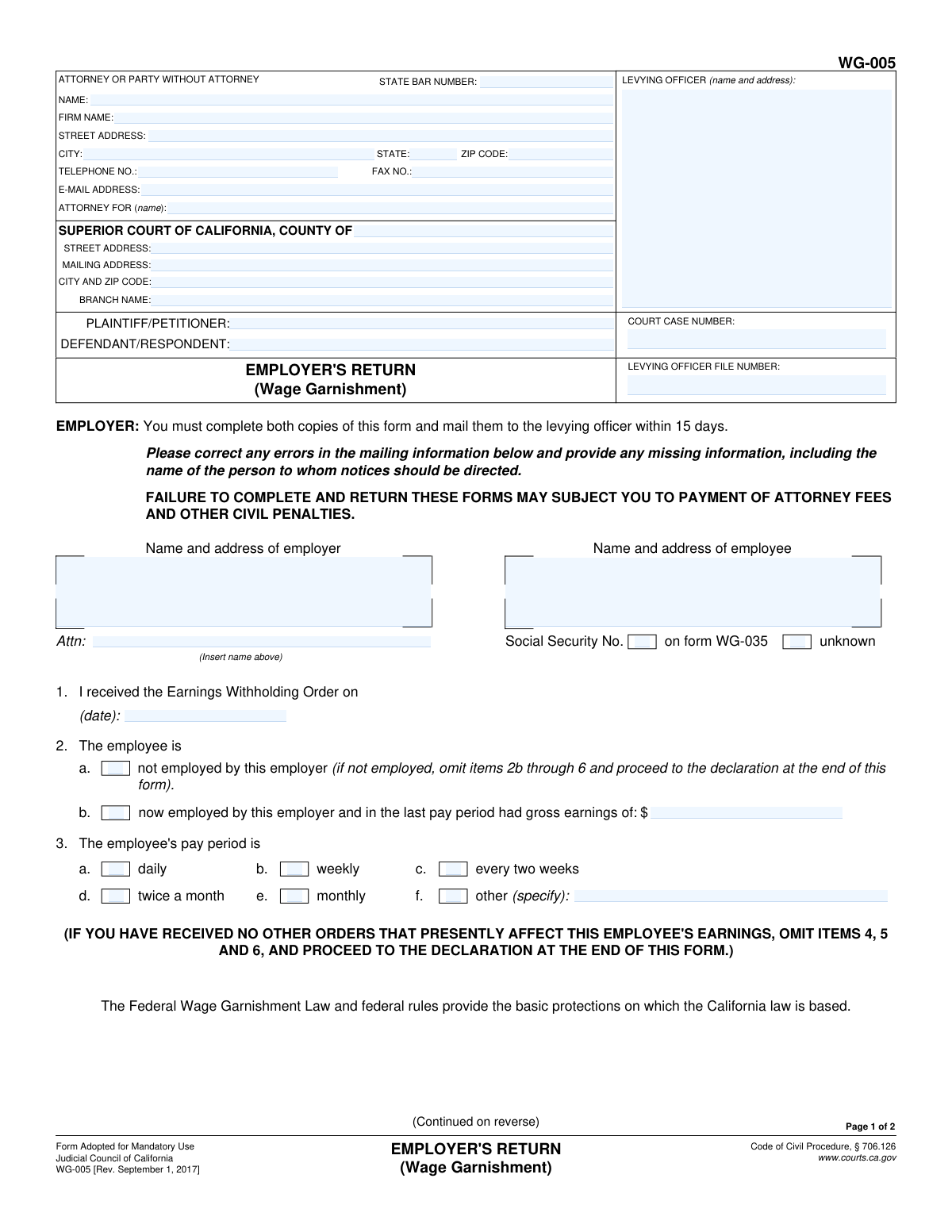
Form WG-005, Employer's Return, is a mandatory legal document used in California by an employer who has received an Earnings Withholding Order for an employee. The employer must complete and return this form to the levying officer within 15 days to provide details about the employee's employment status, pay schedule, and any other pre-existing garnishment orders. Completing this form accurately and on time is crucial to avoid civil penalties and attorney fees. Today, this form can be filled out quickly and accurately using AI-powered services like Instafill.ai, which can also convert non-fillable PDF versions into interactive fillable forms.
WG-005 is part of the
California court forms category on Instafill.
Our AI automatically handles information lookup, data retrieval, formatting, and form filling.
It takes less than a minute to fill out WG-005 using our AI form filling.
Securely upload your data. Information is encrypted in transit and deleted immediately after the form is filled out.
Form specifications
| Form name: | Form WG-005, Employer's Return (Wage Garnishment) |
| Number of fields: | 57 |
| Number of pages: | 1 |
| Language: | English |
Instafill Demo: How to fill out PDF forms in seconds with AI
How to Fill Out WG-005 Online for Free in 2026
Are you looking to fill out a WG-005 form online quickly and accurately? Instafill.ai offers the #1 AI-powered PDF filling software of 2026, allowing you to complete your WG-005 form in just 37 seconds or less.
Follow these steps to fill out your WG-005 form online using Instafill.ai:
- 1 Navigate to Instafill.ai and upload or select the Form WG-005.
- 2 Use the AI assistant to automatically populate court, case number, and levying officer details from the original order.
- 3 Enter the employer and employee's information, correcting any pre-filled details as necessary.
- 4 Indicate the employee's employment status, pay period, and gross earnings in the designated fields.
- 5 If applicable, provide information about any other wage garnishment orders that may have priority, attaching copies if required.
- 6 Review all entered information for accuracy, then use the platform to e-sign and date the declaration under penalty of perjury.
- 7 Download the completed form and mail both copies to the levying officer within the 15-day deadline.
Our AI-powered system ensures each field is filled out correctly, reducing errors and saving you time.
Why Choose Instafill.ai for Your Fillable WG-005 Form?
Speed
Complete your WG-005 in as little as 37 seconds.
Up-to-Date
Always use the latest 2026 WG-005 form version.
Cost-effective
No need to hire expensive lawyers.
Accuracy
Our AI performs 10 compliance checks to ensure your form is error-free.
Security
Your personal information is protected with bank-level encryption.
Frequently Asked Questions About Form WG-005
This form is used by an employer to respond to a wage garnishment order (Earnings Withholding Order). It officially informs the levying officer about the employee's employment status, pay schedule, and whether other garnishments are already in effect.
Yes, if you receive an Earnings Withholding Order for an employee, you are legally required to complete and return both copies of the Employer's Return form within 15 days.
Failure to complete and return Form WG-005 within the specified time may subject you to civil penalties, including being held liable for attorney fees.
You must complete and mail the form to the levying officer within 15 days of the date you received the Earnings Withholding Order.
In item 2, check the box indicating the person is 'not employed by this employer.' You can then skip the remaining items, sign the declaration, and return the form to the levying officer.
You must report the other order in items 4, 5, and 6. The form provides a priority list to help you determine which order to comply with first, and you may need to attach a copy of the other order.
The form lists the priority of orders on page 2. Support orders have the highest priority, followed by tax orders, orders for elder financial abuse, and finally other earnings withholding orders.
You must mail the completed form to the levying officer. Their name and address are printed in the box at the top left of the first page.
You must confirm their employment status, their gross earnings from the last pay period, and how often they are paid (e.g., weekly, bi-weekly, monthly).
While the form may show the SSN as unknown, you should provide it if you have it on record to ensure proper identification. However, the form does not explicitly require you to fill it in if it's missing.
Yes, services like Instafill.ai use AI to accurately auto-fill form fields, which can save you time and help prevent errors when completing legal documents like this one.
You can use a service like Instafill.ai to fill out the form online. Simply upload the WG-005 PDF, and the platform will make it an interactive, fillable form that you can complete and download.
If you have a non-fillable or 'flat' PDF, you can use a tool like Instafill.ai. It can convert the document into an interactive, fillable form that you can easily complete on your computer.
Compliance WG-005
Validation Checks by Instafill.ai
1
Validates Date of Receipt of Earnings Withholding Order
This check ensures that the date entered in item 1, 'I received the Earnings Withholding Order on (date)', is a valid calendar date and is not a future date. It is critical for establishing the timeline and legal effectiveness of the garnishment order. If the date is invalid or in the future, the form submission should be blocked until a valid past or present date is provided.
2
Ensures Mutually Exclusive Employment Status Selection
This validation verifies that only one of the two employment status options in item 2 is selected: either '2a. not employed' or '2b. now employed'. Selecting both is a logical contradiction that makes the rest of the form impossible to interpret correctly. If both are selected, an error should be displayed, requiring the user to choose only one status.
3
Conditional Requirement for Gross Earnings
This check enforces that if '2b. now employed' is selected, the 'gross earnings' amount must be filled in with a valid, non-negative numeric value. This amount is fundamental for calculating the withholding amount. Failure to provide this information when the employee is employed would render the return incomplete and should prevent submission.
4
Conditional Omission of Fields for Non-Employment
If '2a. not employed' is selected, this validation ensures that items 2b through 6 are left blank as instructed on the form. This prevents the submission of contradictory or irrelevant information. If any of these subsequent fields are filled, the system should flag an error and require them to be cleared before proceeding.
5
Single Selection for Pay Period
This validation ensures that exactly one pay period frequency (daily, weekly, etc.) is selected in item 3. The pay period is a key factor in calculating the legally allowed withholding amount. If zero or more than one option is selected, the form is ambiguous and an error message should prompt the user to make a single choice.
6
Conditional Specification for 'Other' Pay Period
If the 'other (specify)' checkbox (item 3f) is selected for the pay period, this check verifies that the corresponding text field is not empty. The specific pay period must be defined for correct calculation of withholdings. If the text field is blank, the user should be prompted to provide the specific pay period details.
7
Exclusive Selection of Order Priority Status
This check ensures that the checkboxes for item 4 ('This order appears to have higher priority') and item 5 ('The employer has received another order') are mutually exclusive. An order cannot simultaneously be the highest priority and also be superseded by another order. The system should prevent both from being checked at the same time.
8
Conditional Requirement for Other Order Details
If the primary checkbox for item 5 is selected, this validation confirms that the date in sub-item 5a is provided and that one of the sub-options (e.g., 5b, 5c, or 5d) is also completed. This information is legally required to justify why the current withholding order is not being acted upon. An incomplete item 5 section should trigger a validation error.
9
Conditional Completion of Other Order Description
If checkbox 5d ('A copy of the other order is NOT attached') is selected, this validation ensures that all descriptive fields (5d1, 5d2, and 5d3) are filled out. This information is the only record the levying officer will have about the superseding order. Missing details would require manual follow-up and delay the process, so submission should be blocked until the fields are complete.
10
Valid Currency Format for Total Amount to be Withheld
This check validates that the 'Total amount to be withheld' in item 5d(3) is a valid numerical currency format (e.g., 1234.56). This ensures data integrity for financial figures and prevents processing errors. An invalid format should trigger an error message requiring the user to input a proper monetary value.
11
Page Header Consistency Check
This validation verifies that the 'COURT CASE NUMBER' and 'LEVYING OFFICER FILE NUMBER' fields on Page 2 match the corresponding values entered on Page 1. This ensures document integrity and prevents confusion if the pages are separated. A mismatch should trigger a warning or error, as it indicates a potential data entry or document assembly problem.
12
Declaration Section Completeness
This check ensures that the Date, Printed Name, and Signature fields in the final declaration section are all completed. This section is a sworn statement under penalty of perjury, making it legally critical. An incomplete declaration invalidates the entire return, so the form submission must be blocked until all three components are present.
13
Valid Email Address Format
This check verifies that the value entered in the 'E-MAIL ADDRESS' field for the attorney or party follows the standard format for an email address (e.g., '[email protected]'). This is important for ensuring that electronic communications and notices are deliverable. An invalid format should prompt the user to correct the entry.
Common Mistakes in Completing WG-005
Employers are required to complete and mail both copies of the form to the levying officer within 15 days of receipt. This mistake often happens due to administrative oversight or misplacing the document. Failing to meet this deadline can result in the employer being held liable for the debt and facing civil penalties or attorney fees, as explicitly warned on the form.
The form details a strict priority for different types of orders (e.g., support orders take precedence over tax orders). Employers often mistakenly process the most recently received order instead of following this legal hierarchy. This can lead to improper withholding and legal liability for failing to honor the higher-priority garnishment, potentially requiring the employer to pay out of their own funds.
In item 2b, the form asks for the employee's 'gross earnings' for the last pay period, but employers sometimes enter the net (take-home) pay by mistake. This error leads to an incorrect calculation of the disposable earnings and the amount that can be legally withheld. To avoid this, always refer to the total earnings before any taxes or deductions are taken out.
When another order has priority, item 5 requires the employer to either attach a copy of that order or provide specific details about it (court, levying officer, amount). A common error is to simply check the box indicating another order exists without providing the necessary proof or details. This renders the return incomplete and forces the levying officer to follow up, delaying the process and potentially leading to penalties.
The declaration on page 2 must be signed, dated, and include the printed name of the declarant to be legally valid. Forgetting any of these elements is a frequent oversight that invalidates the entire form. An unsigned return is treated as if it were never submitted, exposing the employer to penalties for non-compliance.
Item 3 requires specifying the employee's pay period, which is crucial for calculating the correct withholding amount per paycheck. Employers may confuse 'every two weeks' (bi-weekly, 26 pay periods per year) with 'twice a month' (semi-monthly, 24 pay periods per year). This seemingly small error directly impacts the garnishment calculation and can result in under or over-withholding.
The form is often pre-filled with employer and employee details, and it explicitly instructs the recipient to correct any errors. Employers may overlook this instruction and submit the form with an old address or incorrect contact person. This can cause future notices to be misdirected, leading to missed communications and potential compliance issues.
The instructions clearly state that if a new order is not effective (e.g., because a higher-priority order is already in place), it should be returned immediately with the completed form. A common mistake is for the employer to hold onto the new order, intending to process it after the current one is satisfied. This violates procedure and can create confusion and legal issues regarding the order's status and effective date.
Item 1 asks for the specific date the Earnings Withholding Order was received by the employer. This date is critical as it establishes the start of the 15-day response window and helps determine priority between two orders of the same type. Leaving this field blank creates ambiguity and can cause the form to be rejected or processed incorrectly.
The form explicitly states, 'You must complete both copies of this form and mail them to the levying officer.' Employers, accustomed to making a copy for their own records, may only send one copy back. This fails to meet the requirement and can cause processing delays or be considered an incomplete filing. AI-powered tools like Instafill.ai can help prevent many of these data entry and formatting errors, and can also convert flat PDFs into fillable forms to ensure all fields are addressed correctly.
Saved over 80 hours a year
“I was never sure if my IRS forms like W-9 were filled correctly. Now, I can complete the forms accurately without any external help.”
Kevin Martin Green
Your data stays secure with advanced protection from Instafill and our subprocessors

Robust compliance program
Transparent business model
You’re not the product. You always know where your data is and what it is processed for.
ISO 27001, HIPAA, and GDPR
Our subprocesses adhere to multiple compliance standards, including but not limited to ISO 27001, HIPAA, and GDPR.
Security & privacy by design
We consider security and privacy from the initial design phase of any new service or functionality. It’s not an afterthought, it’s built-in, including support for two-factor authentication (2FA) to further protect your account.
Fill out WG-005 with Instafill.ai
Worried about filling PDFs wrong? Instafill securely fills form-wg-005-employers-return-wage-garnishment forms, ensuring each field is accurate.