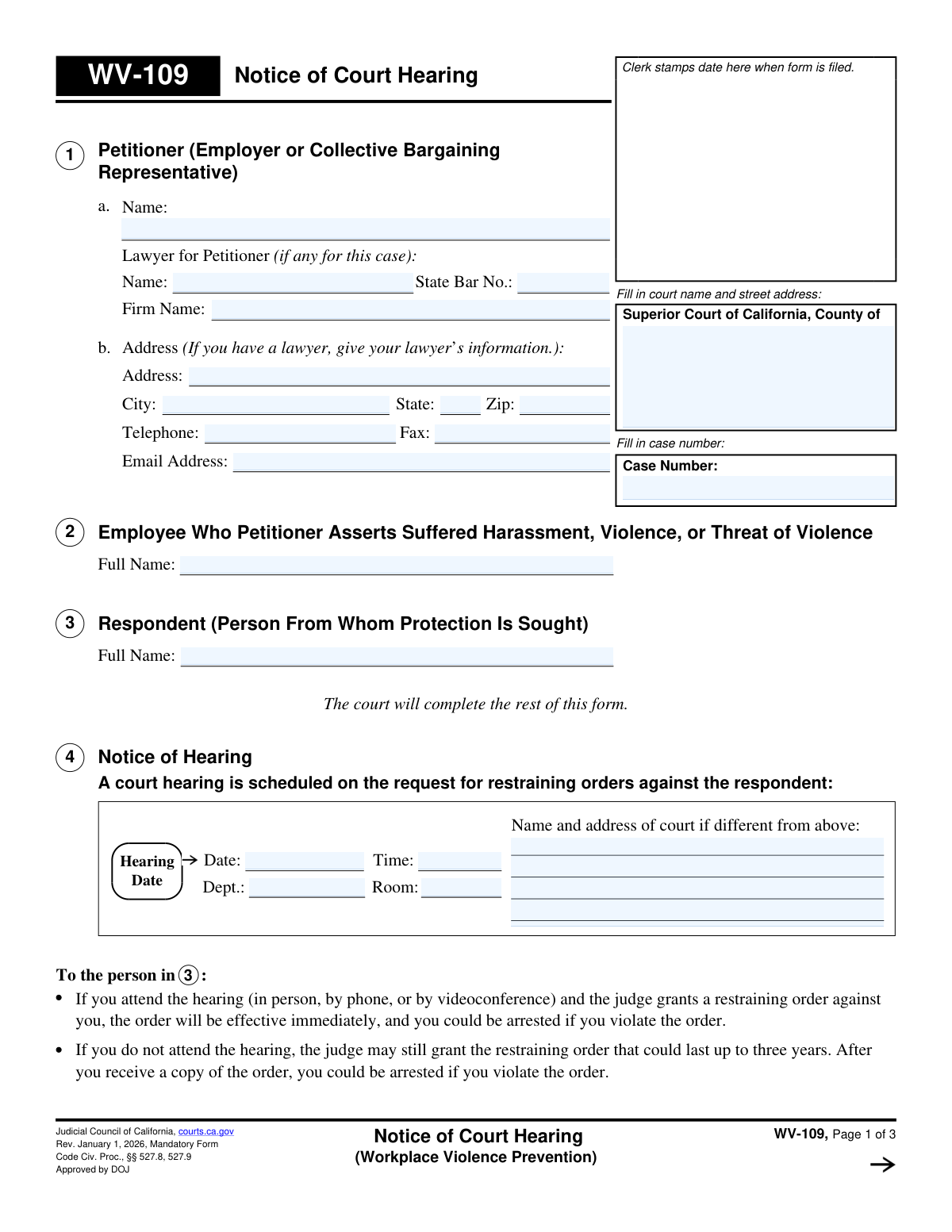
Yes! You can use AI to fill out Form WV-109, Notice of Court Hearing (Workplace Violence Prevention)

Form WV-109, Notice of Court Hearing (Workplace Violence Prevention), is a crucial legal document used in California courts to formally inform an individual (the respondent) that a court hearing has been scheduled to address a petition for a workplace violence restraining order. This notice details the hearing's date, time, and location, and indicates whether any temporary restraining orders have been granted or denied pending the hearing. Today, this form can be filled out quickly and accurately using AI-powered services like Instafill.ai, which can also convert non-fillable PDF versions into interactive fillable forms.
WV-109 is part of the California court forms category on Instafill.
Our AI automatically handles information lookup, data retrieval, formatting, and form filling.
It takes less than a minute to fill out WV-109 using our AI form filling.
Securely upload your data. Information is encrypted in transit and deleted immediately after the form is filled out.

Form specifications

Form name: Form WV-109, Notice of Court Hearing (Workplace Violence Prevention)
Number of fields: 41
Number of pages: 1
Language: English
main-image

Instafill Demo: How to fill out PDF forms in seconds with AI

How to Fill Out WV-109 Online for Free in 2026

Are you looking to fill out a WV-109 form online quickly and accurately? Instafill.ai offers the #1 AI-powered PDF filling software of 2026, allowing you to complete your WV-109 form in just 37 seconds or less.
Follow these steps to fill out your WV-109 form online using Instafill.ai:
  1. 1 Navigate to Instafill.ai and upload your WV-109 document or select it from the template library.
  2. 2 Use the AI assistant to accurately fill in the Petitioner's information (Section 1), including name, address, and lawyer details if applicable.
  3. 3 Enter the full name of the employee who suffered harassment (Section 2) and the respondent from whom protection is sought (Section 3).
  4. 4 Review the sections to be completed by the court (Sections 4 and 5), which will detail the hearing date, time, location, and any temporary orders granted or denied.
  5. 5 Verify all entered information for accuracy. The AI can help flag any missing fields or potential errors before you file the form with the court.
  6. 6 After the court clerk completes and stamps the form, use the platform to download, print, and prepare the necessary copies for service on the respondent as outlined in Section 6.

Our AI-powered system ensures each field is filled out correctly, reducing errors and saving you time.

Why Choose Instafill.ai for Your Fillable WV-109 Form?

Speed

Complete your WV-109 in as little as 37 seconds.

Up-to-Date

Always use the latest 2026 WV-109 form version.

Cost-effective

No need to hire expensive lawyers.

Accuracy

Our AI performs 10 compliance checks to ensure your form is error-free.

Security

Your personal information is protected with bank-level encryption.

Frequently Asked Questions About Form WV-109

This form officially notifies the person from whom protection is sought (the Respondent) about the date, time, and location of a court hearing for a workplace violence restraining order. It also states whether any temporary restraining orders have been granted before the hearing.

The petitioner (the employer or their representative) fills out the initial information in sections 1, 2, and 3. The court clerk and judge will then complete the rest of the form with the hearing details, service deadlines, and the status of any temporary orders.

You should review the hearing date and time and plan to attend if you wish to contest the order. You can also file a written response using Form WV-120, but you should still go to the hearing to present your case to the judge.

If you are the respondent and do not attend, the judge can grant a restraining order against you that may last up to three years. If you are the petitioner and do not attend, your request for a restraining order will likely be denied.

This means the court has issued a temporary order (Form WV-110) that is effective immediately and lasts until the hearing. The respondent must obey the orders listed on Form WV-110, or they could be arrested.

You must have someone else who is 18 or older—not you or the protected employee—personally deliver a copy of the filed forms to the respondent. The person who serves the documents must then fill out a Proof of Personal Service form (WV-200) and file it with the court.

You must serve the respondent with a copy of Form WV-109, the filed WV-100 (Petition), a blank WV-120 (Response), WV-120-INFO, and Form WV-110 (Temporary Restraining Order) if one was granted by the court.

If you need more time to find and serve the respondent, you can ask the court to reschedule the hearing. You should read form WV-115-INFO, 'How to Ask for a New Hearing Date,' for instructions on this process.

You can request an assistive listening system, interpreter, or other accommodation by contacting the clerk’s office at least five days before the hearing. You may need to complete Form MC-410, Disability Accommodation Request.

Yes, services like Instafill.ai use AI to accurately auto-fill form fields with your information, which can save time and help prevent errors on forms you need to complete, like the initial petition.

You can upload your case documents, like the initial WV-100 petition, to Instafill.ai. The platform can then use that information to automatically and accurately populate the petitioner, employee, and respondent details on related forms.

If you have a non-fillable or 'flat' PDF, you can use a service like Instafill.ai to convert it into an interactive, fillable form. This allows you to easily type your information directly into the fields before printing.

Form WV-100 is the petition the employer files to request a restraining order and start the case. Form WV-109 is the court's official notice, issued in response to the petition, that sets the date for the court hearing.

Compliance WV-109
Validation Checks by Instafill.ai

1
Ensures Case Number Consistency Across Pages
This check verifies that the Case Number entered on page 1, page 2, and page 3 are identical. Maintaining consistency is critical for document integrity, ensuring that all pages of the notice belong to the same legal case. A mismatch could lead to the form being rejected by the clerk or critical information being misfiled, causing significant legal and administrative problems.
2
Requires Petitioner Name
This validation ensures that the Petitioner's name field in Section 1 is not left blank. The petitioner is the party initiating the court action, and their identity is fundamental to the legal proceeding. A missing petitioner name would render the form legally invalid and prevent the court from processing the request for a restraining order.
3
Requires Respondent's Full Name
This check confirms that the Respondent's full name in Section 3 is provided. The respondent is the individual against whom the orders are sought, and they must be clearly identified for the notice to be legally effective and enforceable. Failure to name the respondent makes it impossible to serve the notice or enforce any subsequent court orders.
4
Requires Protected Employee's Full Name
This validation ensures that the full name of the employee who allegedly suffered harassment is entered in Section 2. This information is crucial for defining the scope of the requested restraining order and identifying the specific individual being protected. Ambiguity in this field could make the order unenforceable or ineffective.
5
Validates Lawyer's State Bar Number Presence
This check ensures that if a lawyer's name is provided in Section 1, the corresponding State Bar Number field is also filled. The State Bar Number is a unique identifier that officially confirms the attorney's eligibility to practice law. Missing this number requires manual verification by court staff, which can delay the processing of the case.
6
Validates Contact Address Completeness
This validation verifies that a complete address, including street, city, state, and ZIP code, is provided in Section 1b. This address serves as the official point of contact for the petitioner or their lawyer for all case-related correspondence. An incomplete address could result in missed notifications and failure to receive important legal documents from the court or the respondent.
7
Validates Email Address Format
This check ensures that if an email address is entered in Section 1b, it conforms to the standard '[email protected]' format. As courts increasingly use electronic communication, a valid email address is vital for timely notifications and service of documents. An invalid format would lead to communication failures and potential delays in the legal process.
8
Validates Hearing Date is a Valid Future Date
This check confirms that the Hearing Date entered in Section 4 is a valid calendar date and that it occurs in the future. The purpose of the notice is to inform the respondent of an upcoming hearing, so a past or invalid date would make the notice defective. This is a critical check on the court's data entry to ensure the notice is legally sound.
9
Ensures Exclusive Selection for TRO Status
This validation ensures that only one of the three checkboxes in Section 5a ('All GRANTED', 'All DENIED', 'Partly GRANTED') is selected. These options are mutually exclusive, and selecting more than one creates a logical contradiction that makes the court's temporary order ambiguous and unenforceable. The system should prevent or flag submissions with multiple selections.
10
Requires Reason for TRO Denial or Partial Denial
This check enforces the rule that if a Temporary Restraining Order (TRO) is 'All DENIED' or 'Partly GRANTED' (Section 5a), a reason for the denial must be provided in Section 5b. The court must specify the grounds for its decision. A missing explanation makes the ruling incomplete and could be grounds for an appeal or reconsideration.
11
Validates Service Deadline is a Positive Integer
This check ensures the number of days specified for serving the respondent in Section 6 is a positive integer (e.g., '5'). This deadline is a crucial legal requirement that guarantees due process by giving the respondent adequate time to prepare for the hearing. An invalid value would void the service instructions and could lead to the hearing being postponed.
12
Validates Judicial Officer Signature Date
This check verifies that the date entered next to the Judicial Officer's signature is a valid calendar date and is not set in the future. This date authenticates the notice and establishes when the hearing was officially set and any temporary orders were issued. An invalid or future date would call the document's authenticity and timing into question.

Common Mistakes in Completing WV-109

Listing the Employee as the Petitioner

This form is filed by an employer or collective bargaining representative on behalf of an employee. A frequent mistake is listing the affected employee's name in Section 1 (Petitioner) instead of the employer's. This can lead to the petition being rejected for lack of legal standing, causing significant delays. To avoid this, the employer's official name must be entered in Section 1, while the employee needing protection is listed in Section 2.

Completing Sections Reserved for the Court

Petitioners often see the blank fields for the hearing date, time, and TRO status (Sections 4 and 5) and attempt to fill them out. However, the form explicitly states that the court will complete these sections after the initial petition is reviewed. Submitting a form with these sections filled out by the petitioner will result in its rejection by the court clerk, forcing a refiling. Always leave court-designated sections blank.

Providing an Incomplete or Inaccurate Respondent Name

In Section 3, users may enter a nickname, partial name, or misspelled version of the respondent's name. This is a critical error because a restraining order is only enforceable against the specific legal name listed. An inaccurate name can make it impossible for law enforcement to identify the individual and enforce the order. Always use the respondent's full legal name and double-check the spelling for accuracy.

Improper Service of Court Documents

The petitioner often misunderstands the strict legal requirements for 'service' detailed in Section 6. Common errors include the petitioner serving the documents themselves or failing to include all required forms, such as the blank response form (WV-120). Improper service means the respondent was not legally notified, which will cause the judge to postpone the hearing, delaying the issuance of a protective order. To prevent this, use a professional process server or an uninvolved adult over 18 to serve all listed documents.

Forgetting to File the Proof of Service Form

After successfully serving the respondent, the petitioner must have the server complete and file a Proof of Service form (e.g., WV-200) with the court. Many filers mistakenly believe that serving the papers is the last step before the hearing. Without a filed Proof of Service, the court has no evidence the respondent was notified and cannot issue a final, long-term restraining order. Always ensure this crucial follow-up form is filed with the court clerk before the hearing date.

Entering the Wrong Address When Represented by Counsel

Section 1b explicitly instructs filers to provide their lawyer's contact information if they are represented. A common mistake is for the petitioner to enter their own company's address instead of their attorney's. This error misdirects all official court correspondence, which can lead to missed notices and critical deadlines. To avoid this, carefully follow the on-form instructions and provide the lawyer's firm address, phone, and email.

Using an Incorrect Case Number

The case number is the unique identifier for all court proceedings and must be written on every page and subsequent filing. Petitioners may accidentally transpose digits or forget to copy the number from the first page to the following pages. This can cause documents to be misfiled by the clerk, lost, or rejected, creating administrative chaos and delaying the case. Always double-check the case number stamped by the clerk and carefully transcribe it to all required fields.

Handwriting on a Non-Fillable PDF

Legal forms are often available online only as flat, non-fillable PDFs, leading users to print and handwrite the information. This can result in illegible entries that the court clerk may misinterpret or reject entirely. Illegible names or addresses can render a court order unenforceable. To ensure clarity and accuracy, use a service like Instafill.ai, which can convert non-fillable PDFs into easy-to-use fillable forms, preventing legibility issues.

Misunderstanding the Form's Purpose

This form (WV-109) is a 'Notice of Hearing' issued by the court, not the initial 'Petition' (WV-100) that starts the case. A fundamental error is treating this form as the initial request, leading to confusion about who fills out which sections. This misunderstanding can cause the entire filing to be done incorrectly, resulting in rejection. To avoid this, understand the workflow: first file Form WV-100, then the court will issue this WV-109 form with the hearing details.
Saved over 80 hours a year

“I was never sure if my IRS forms like W-9 were filled correctly. Now, I can complete the forms accurately without any external help.”

Kevin Martin Green

Your data stays secure with advanced protection from Instafill and our subprocessors

Robust compliance program

Transparent business model

You’re not the product. You always know where your data is and what it is processed for.

ISO 27001, HIPAA, and GDPR

Our subprocesses adhere to multiple compliance standards, including but not limited to ISO 27001, HIPAA, and GDPR.

Security & privacy by design

We consider security and privacy from the initial design phase of any new service or functionality. It’s not an afterthought, it’s built-in, including support for two-factor authentication (2FA) to further protect your account.

Fill out WV-109 with Instafill.ai

Worried about filling PDFs wrong? Instafill securely fills form-wv-109-notice-of-court-hearing-workplace-violence-prevention forms, ensuring each field is accurate.