
Yes! You can use AI to fill out Landlord Case Information Statement (LCIS)
Don't type 45 fields by hand. Tell our AI about yourself, or upload a document you already have, and it fills every field in seconds. You check it, then download, print or sign.
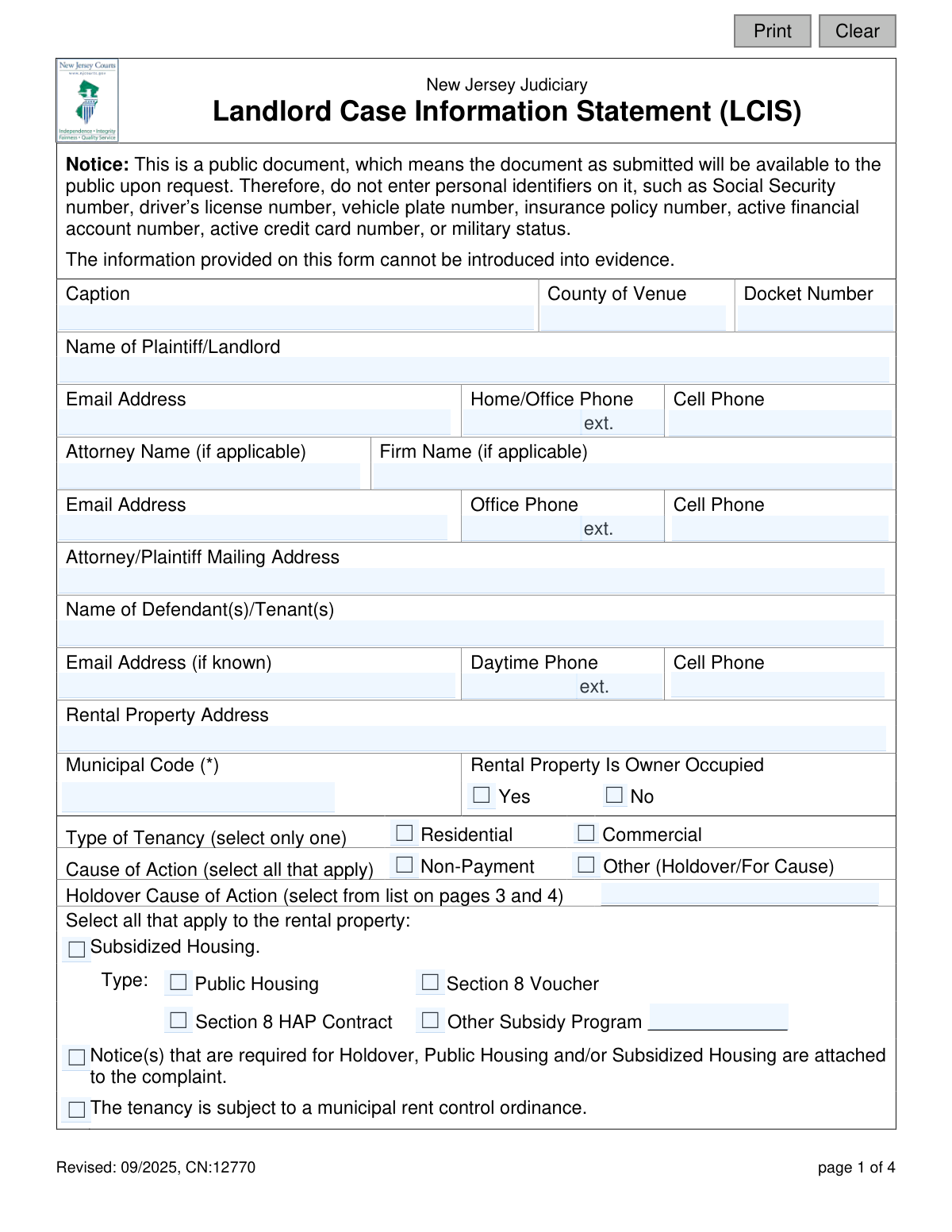
The AI does the filling. You just check it.
No typing into boxes, nothing to install.
What this form asks for
The AI fills all of it, from your answers or your documents.
The AI checks your answers before you download
15 checks built for this form, so a wrong date or a missing answer is caught before anyone else sees it.
This check verifies that the user has selected at least one checkbox under 'Cause of Action' (either 'Non-Payment' or 'Other (Holdover/For Cause)'). This is a critical field as it defines the legal basis for the landlord's case. If neither is selected, the form is incomplete and cannot be processed, as the court would not know the reason for the filing.
This validation ensures that if the 'Other (Holdover/For Cause)' checkbox is selected, the 'Holdover Cause of Action' field must be filled in. This field specifies the exact legal reason for a holdover case, referencing the list on pages 3 and 4. Failure to provide this code when required would make the filing ambiguous and legally insufficient.
This check cross-references the 'Holdover Cause of Action' code with the selected 'Type of Tenancy'. For example, codes 1-21 are for 'Residential' tenancies, while codes 22-27 are for 'Commercial' or other specific types. This prevents logical errors in the filing, ensuring the legal cause cited is applicable to the type of property in question.
This validation rule ensures that if 'Non-Payment' is selected as a Cause of Action, the fields 'The total number of months of unpaid rent', 'The first month of unpaid rent', and 'The amount due and owing' must all be completed. These details are essential for a non-payment case. A failure to provide this information would result in an incomplete claim.
This check verifies that the value entered in 'The amount due and owing by the tenant' is a valid positive numerical or currency format (e.g., '1500.00'). It should not contain letters or special characters other than a decimal point and currency symbol. This ensures data integrity for financial calculations and court records.
This check ensures that the entry for 'The first month of unpaid rent' is in a valid month and year format (e.g., 'January 2023' or '01/2023'). This is important for establishing the timeline of the non-payment claim. An invalid format could lead to misinterpretation by the court.
And 9 more checks
- Conditional Requirement for Subsidy Type
- Conditional Requirement for 'Other Subsidy' Description
- Ensures Plaintiff/Landlord Name is Provided
- Ensures Rental Property Address is Provided
- Validates Format for Email Address Fields
- Validates Format for Phone Number Fields
- Ensures Selection for 'Rental Property Is Owner Occupied'
- Validates Docket Number Format
- Ensures Certification Section is Complete
Let AI fill out your LCIS (CN:12770)
No typing. Every field filled in seconds, checked, ready to sign.
How to Fill Out LCIS (CN:12770) Online for Free in 2026
What the AI walks you through.
- Navigate to Instafill.ai and upload or select the Landlord Case Information Statement (LCIS) form.
- Provide information for the Plaintiff/Landlord and their attorney, including names, contact details, and mailing address.
- Enter the known details for the Defendant(s)/Tenant(s), such as name, email, and phone number.
- Input the rental property address, municipality code, and specify the tenancy type (Residential or Commercial).
- Select the cause of action (Non-Payment or Other), and if applicable, choose the specific holdover reason from the provided list and detail the amount owed.
- Indicate if the property involves subsidized housing or is subject to a municipal rent control ordinance.
- Review all the information populated by the AI, certify the statements are true, and provide your digital signature and date to complete the form.
Common Mistakes in Completing LCIS (CN:12770)
The ones the AI is built to catch.
Missing or Incorrect Municipality Code
Mismatch Between Cause of Action and Holdover Code
Including Confidential Personal Identifiers
Failing to Disclose Subsidized Housing Status
Inconsistent Calculation of Rent Owed
Forgetting to Certify Attachment of Required Notices
Using an Incorrect Holdover Cause of Action Code
Incomplete or Inaccurate Defendant/Tenant Names
Missing Signature or Date
Selecting the Wrong Tenancy Type
Frequently Asked Questions About LCIS (CN:12770)
Is it really free for 7 days?
Can I fill other forms too?
How do I cancel?
How does the AI fill out LCIS (CN:12770)?
What happens to my information?
How complex is LCIS (CN:12770) to fill out?
What is the purpose of the Landlord Case Information Statement (LCIS) form?
Who is required to fill out the LCIS form?
Why does the form warn against including personal identifiers like a Social Security number?
Where can I find the 'Municipality Code' for the rental property?
What is the difference between a 'Non-Payment' and a 'Holdover/For Cause' case?
How do I specify the 'Holdover Cause of Action' on page 1?
Do I need to attach any other documents with this form?
Does this form apply to both residential and commercial properties?
What does it mean that the information on this form 'cannot be introduced into evidence'?
What should I do if my PDF copy of the LCIS form is not fillable?
Can I use AI to help me fill out this form?
How do I use Instafill.ai to complete the Landlord Case Information Statement?
What information do I need to provide about the unpaid rent?
What am I confirming when I sign the certification on page 2?
Get your LCIS (CN:12770) filled out by AI
$0 today. Cancel before Nov 6 and you pay nothing.
Other forms like this one
New Jersey forms: State of New Jersey Alternate Benefit Program Withdrawal Request Acknowledgement Receipt, Horizon Blue Cross Blue Shield of New Jersey Applied Behavior Analysis Supplemental Information Form, State of New Jersey Application for Employment (Form DPF-663), New Jersey Judiciary Plea Form (Plea 01), Supplemental Plea Form for Certain Sexual Offenses: Megan’s Law/Parole Supervision for Life/Community Supervision for Life (Plea 05), Financial Questionnaire to Establish Indigency, New Jersey Judiciary Resource Family Information Form, Foreclosure Case Information Statement (FCIS) - Appendix XII-B2, New Jersey Judiciary Records Request Form, Superior Court of New Jersey, Application for Appeal and Order, FL Certification of Requested Background Checks for Kinship Legal Guardianship, Certification of Caregiver as to Knowledge of Identity and/or Location of Parents, FL Order Judgment for Kinship Legal Guardianship, New Jersey Judiciary Certification of Repair and Plea of Guilty, Uniform Summary Support Order (USSO), New Jersey Judiciary Volunteer Application (CN 10293), Application to Take the New Jersey Court Interpreter Oral Examination, New Jersey Judiciary Attorney Fee Arbitration Request, Order to Show Cause with Temporary Restraints Pursuant to Rule 4:52, Tax Court of New Jersey, State Tax Complaint
Let AI fill out your LCIS (CN:12770)
Your trial starts once a card is added. You pay nothing before Nov 6.
Our AI already knows this form, all 45 fields of it. Skip the typing: tell it about yourself, or upload what you have, and it fills the whole form in seconds.
- AI fills every field on both pages, checkboxes included
- No typing into boxes: answer a few questions, or upload a document you already have, an old copy of this form, a photo of a document
- The AI checks the answers; you review and change anything before you download
- Download the finished PDF, print it, or sign it online
- Encrypted, and never used to train AI
Cancel before Nov 6 and you pay nothing.
A card is needed to start the trial. Cancel in two clicks from your account.
Terms · Privacy