Yes! You can use AI to fill out Municipal Courts Order Restricting Use of Electronic Devices (Directive #06-24)

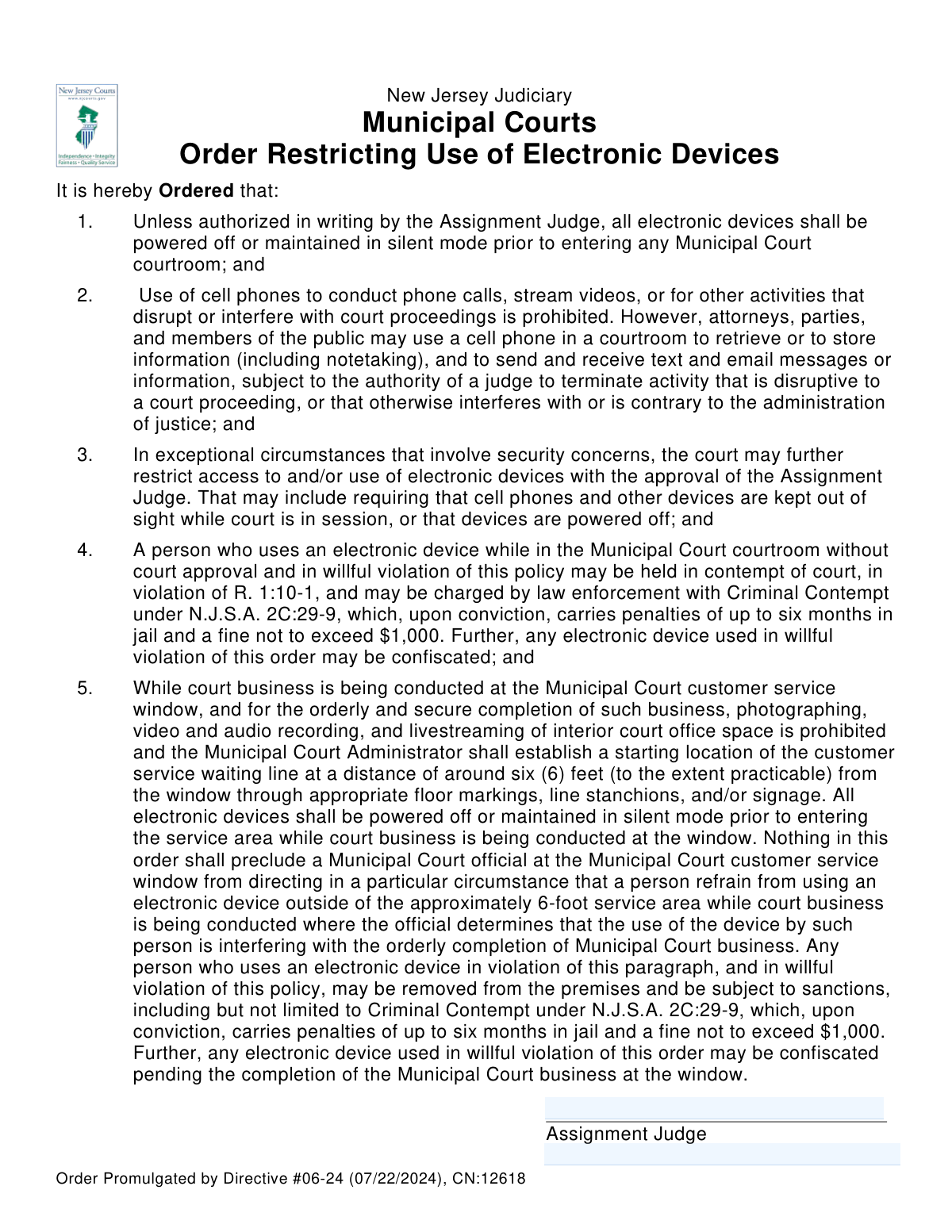
This document is an official order from the New Jersey Judiciary that establishes rules and restrictions on the use of electronic devices within Municipal Court courtrooms and service areas. It is crucial for maintaining order and the integrity of court proceedings by setting clear guidelines and penalties for violations. Today, this order can be prepared for signature quickly and accurately using AI-powered services like Instafill.ai, which can also convert non-fillable PDF versions into interactive fillable forms for judicial review.
Directive #06-24 is part of the New Jersey forms category on Instafill.
Our AI automatically handles information lookup, data retrieval, formatting, and form filling.
It takes less than a minute to fill out Directive #06-24 using our AI form filling.
Securely upload your data. Information is encrypted in transit and deleted immediately after the form is filled out.

Form specifications

Form name: Municipal Courts Order Restricting Use of Electronic Devices (Directive #06-24)
Number of fields: 2
Number of pages: 1
Language: English
main-image

Instafill Demo: How to fill out PDF forms in seconds with AI

How to Fill Out Directive #06-24 Online for Free in 2026

Are you looking to fill out a DIRECTIVE #06-24 form online quickly and accurately? Instafill.ai offers the #1 AI-powered PDF filling software of 2026, allowing you to complete your DIRECTIVE #06-24 form in just 37 seconds or less.
Follow these steps to fill out your DIRECTIVE #06-24 form online using Instafill.ai:
  1. 1 Navigate to Instafill.ai and upload or select the 'Municipal Courts Order Restricting Use of Electronic Devices' document.
  2. 2 Allow the AI to process the document and identify the signature and label fields, such as 'jdgSig' and 'vicLabeled'.
  3. 3 Review the main body of the order to ensure the text is correct and has not been altered.
  4. 4 The authorized Assignment Judge will be prompted to provide their digital or electronic signature in the designated field.
  5. 5 Enter the specific Vicinage (judicial district) information in the appropriate labeled field.
  6. 6 Review the completed order one final time to ensure the signature and any labels are correctly placed.
  7. 7 Securely download, print, or share the officially signed order for promulgation and record-keeping.

Our AI-powered system ensures each field is filled out correctly, reducing errors and saving you time.

Why Choose Instafill.ai for Your Fillable Directive #06-24 Form?

Speed

Complete your Directive #06-24 in as little as 37 seconds.

Up-to-Date

Always use the latest 2026 Directive #06-24 form version.

Cost-effective

No need to hire expensive lawyers.

Accuracy

Our AI performs 10 compliance checks to ensure your form is error-free.

Security

Your personal information is protected with bank-level encryption.

Frequently Asked Questions About Form Directive #06-24

This is an official order from the New Jersey Judiciary that outlines the rules for using electronic devices in Municipal Courts. These rules apply to everyone, including attorneys, parties in a case, and the general public, who enter a courtroom or use the customer service window.

No, you don't have to turn it completely off, but it must be powered off or switched to silent mode. You are strictly prohibited from making phone calls or streaming videos.

Yes, you may use your phone for quiet activities like taking notes, sending texts or emails, or looking up information. However, a judge can order you to stop at any time if your activity is deemed disruptive.

Violating this order can have serious consequences. You could be held in contempt of court, have your device confiscated, and even face criminal charges that carry penalties of up to six months in jail and a $1,000 fine.

Yes, specific rules apply at the service window. You are prohibited from photographing, video recording, or livestreaming, and you must keep a distance of about six feet from the window while waiting.

No, the order explicitly prohibits any photographing, video, or audio recording of the interior court office space while business is being conducted at the customer service window.

No, this is an official court order that establishes rules for the public. It is signed by an Assignment Judge to be put into effect and is not a form for you to complete.

This refers to situations with specific security concerns where the court may need to implement tighter restrictions. With a judge's approval, this could include requiring all devices to be powered off or kept completely out of sight.

The rules apply equally to attorneys, parties, and the public. While attorneys often use devices for case-related work, their use is still subject to the judge's authority to prevent disruption.

You must exit the courtroom to make or take a phone call. Conducting phone calls inside the courtroom is strictly prohibited and will disrupt the proceedings.

Since this is a court order for you to read and follow, not a form to complete, you don't need to fill it out. However, for other official forms you do need to complete, AI-powered services like Instafill.ai can help auto-fill your information accurately and save time.

You can upload your court form to the Instafill.ai platform. The service helps you fill out the fields, add your signature, and manage the document digitally, making the process faster and easier.

Services like Instafill.ai are designed to handle this. You can upload the flat, non-fillable PDF, and the tool will convert it into an interactive form that you can easily type your information into.

Compliance Directive #06-24
Validation Checks by Instafill.ai

1
Vicinage Presence Check
Verifies that the Vicinage field ('vicLabeled') is not empty. This is a mandatory field because the order must be associated with a specific judicial district to be legally applicable and enforceable. If this field is left blank, the form submission will be blocked, and the user will be prompted to provide the necessary information.
2
Valid Vicinage Identifier
Checks that the value entered in the Vicinage field corresponds to a predefined list of official New Jersey Judiciary Vicinages. This prevents spelling errors or the use of unofficial names, ensuring the order is correctly categorized and routed. An invalid entry will trigger an error message, possibly suggesting valid options from a dropdown list.
3
Judge's Signature Presence
Ensures the Assignment Judge's signature field ('jdgSig') contains data. An order is not legally valid or binding without the signature of an authorized judge. The system must block any submission attempt where the signature field is empty to prevent the creation of invalid documents.
4
Judge-Vicinage Association Check
Performs a logical cross-check to confirm that the judge applying the signature is the authorized Assignment Judge for the vicinage specified in the 'vicLabeled' field. This is a critical security and jurisdictional validation to ensure the signer has the proper authority. A mismatch will result in a validation failure and block the submission, preventing an unauthorized action.
5
Digital Signature Format Validation
Validates that the data in the signature field ('jdgSig') conforms to an expected digital signature format (e.g., vector data, cryptographic hash, or a valid image format). This check ensures the signature's technical integrity and that it can be stored, rendered, and audited correctly. A corrupted or improperly formatted signature would be rejected.
6
Signature Authentication and Authorization
Verifies that the digital signature is cryptographically linked to the authenticated session of the user. This ensures that the person signing is who they claim to be and has the authority to sign as an Assignment Judge. If the signature cannot be authenticated against the logged-in user's credentials, the submission is rejected and a security event may be logged.
7
Document Integrity Post-Signature
Ensures that once the judge's signature is applied, all other fields on the form become locked and immutable. This is a crucial step to prevent tampering or alteration of the order's content after it has been legally attested. The system should programmatically enforce this read-only state upon successful signing.
8
Secure Signature Timestamp
Confirms that a secure, verifiable timestamp is automatically generated and embedded with the digital signature at the moment of signing. This provides a non-repudiable record of the exact date and time the order was executed, which is essential for legal and auditing purposes. A failure to apply a timestamp would render the signature process incomplete.
9
Vicinage Field Character Validation
Restricts the input in the Vicinage field to alphanumeric characters, spaces, and specific punctuation like hyphens or slashes. This validation prevents the entry of special characters that could be used for code injection attacks or cause data processing errors. An entry with invalid characters would be flagged, and the user would be required to correct it.
10
Signature Legibility Check
For signatures that are drawn or uploaded as an image, this validation analyzes the input to ensure it is not a trivial mark, such as a single dot or a short line. This helps prevent accidental submissions or attempts to bypass the signature requirement with a meaningless entry. If the signature is deemed illegible or incomplete, the user will be prompted to sign again.
11
Duplicate Order Prevention
Checks the database to determine if an identical order for the same vicinage has already been signed and submitted by the same judge. This prevents the accidental creation of duplicate records, which can cause significant administrative confusion and legal ambiguity. If a potential duplicate is detected, the system will display a warning and require user confirmation to proceed.

Common Mistakes in Completing Directive #06-24

Omitting or Incorrectly Entering the Vicinage Identifier

This order contains a field for a vicinage label (`vicLabeled`) but lacks explicit instructions. Officials may leave it blank, enter an incorrect district name, or use a non-standard format, creating ambiguity about which court the signed order applies to. This can lead to enforcement challenges and questions about the order's jurisdiction. To avoid this, court administrators should establish and use a standardized format for this field. Since this order is often a flat PDF, tools like Instafill.ai can convert it into a fillable version, allowing for clear, typed entries that prevent handwriting errors.

Failure to Secure a Valid Judicial Signature

The order is legally invalid without the signature of the Assignment Judge in the `jdgSig` field. This critical error occurs if the form is posted or distributed before being properly signed, or if an unauthorized person signs it. An unsigned or improperly signed order is unenforceable and undermines the court's authority. Always ensure the designated Assignment Judge provides a valid signature before the order is considered active and distributed.

Forgetting to Date the Signature

Legal documents require a date of signature to establish when they take effect. A common oversight is for the judge or clerk to forget to write the date next to the signature, creating confusion about the order's effective date. This ambiguity can complicate legal challenges or prosecutions for violations. The signing judge or their clerk must always add the current date at the time of signing to ensure legal clarity.

Using an Outdated Version of the Order

Legal directives are periodically updated, as indicated by the directive number (`#06-24`) and control number (`CN:12618`). A frequent administrative error is using an old version of the order saved on a local computer instead of sourcing it from the official judiciary website. Promulgating an outdated order means enforcing rules that may no longer be valid, exposing the court to legal risk. Always verify the document version against the central repository before processing.

Misinterpreting Authorization for Device Use Exceptions

The order specifies that only the Assignment Judge can grant written exceptions for device use. A common mistake is for other court personnel or municipal judges to grant verbal permission or issue their own written exceptions, thereby exceeding their authority. This leads to inconsistent rule application and can invalidate the exception, placing the device user in unintended violation. All requests for exceptions must be formally routed to the Assignment Judge for written approval.

Improperly Invoking 'Exceptional Circumstances'

Clause 3 allows for heightened restrictions but explicitly requires the Assignment Judge's approval. A municipal judge might mistakenly impose these stricter measures on their own authority, believing a situation warrants it without seeking the required approval. This action represents a procedural overreach and is legally challengeable, potentially nullifying the restrictions. To avoid this, any judge believing exceptional circumstances exist must formally request and receive approval from the Assignment Judge.

Failure to Properly Post and Distribute the Order

An order is only effective if the public has proper notice of it. A critical mistake is for the court to sign the order but fail to post it conspicuously at all courthouse entrances, in courtrooms, and near customer service windows. Without adequate notice, individuals accused of violations have a strong defense that they were unaware of the rules, making enforcement difficult or impossible. Courts must implement a clear distribution and posting plan for all such orders to ensure public awareness.

Inconsistent Implementation of the Customer Service Line

Clause 5 requires a waiting line 'around six (6) feet' from the service window, where practicable. Court administrators may fail to install the required floor markings or stanchions, or place them in a way that impedes access or is not clearly visible. This leads to public confusion and inconsistent enforcement of the device restriction policy in service areas. To prevent this, a clear, well-marked line should be established that respects both the order and the physical layout of the space.

Confusing Statewide Directive Date with Local Effective Date

The order's header lists a statewide promulgation date (07/22/2024), which is different from the date it becomes effective in a specific vicinage. An official might mistakenly assume the order is enforceable from the statewide date, even before the local Assignment Judge has signed it. The true effective date is the date of the judge's signature; all enforcement actions must wait until after that signature is obtained and dated.

Incorrect Application of Penalties for Violations

The order outlines severe penalties for 'willful' violations. A serious error occurs when court staff or officers threaten these penalties for accidental infractions, or without following the strict due process required for a contempt charge. This can lead to public distrust, formal complaints, and successful legal challenges against the court. Staff must be trained to differentiate between willful and non-willful acts and to follow exact legal protocols before imposing any sanction.
Saved over 80 hours a year

“I was never sure if my IRS forms like W-9 were filled correctly. Now, I can complete the forms accurately without any external help.”

Kevin Martin Green

Your data stays secure with advanced protection from Instafill and our subprocessors

Robust compliance program

Transparent business model

You’re not the product. You always know where your data is and what it is processed for.

ISO 27001, HIPAA, and GDPR

Our subprocesses adhere to multiple compliance standards, including but not limited to ISO 27001, HIPAA, and GDPR.

Security & privacy by design

We consider security and privacy from the initial design phase of any new service or functionality. It’s not an afterthought, it’s built-in, including support for two-factor authentication (2FA) to further protect your account.

Fill out Directive #06-24 with Instafill.ai

Worried about filling PDFs wrong? Instafill securely fills municipal-courts-order-restricting-use-of-electronic-devices-directive-06-24 forms, ensuring each field is accurate.