Yes! You can use AI to fill out New Jersey Emergent Application (Order to Show Cause)
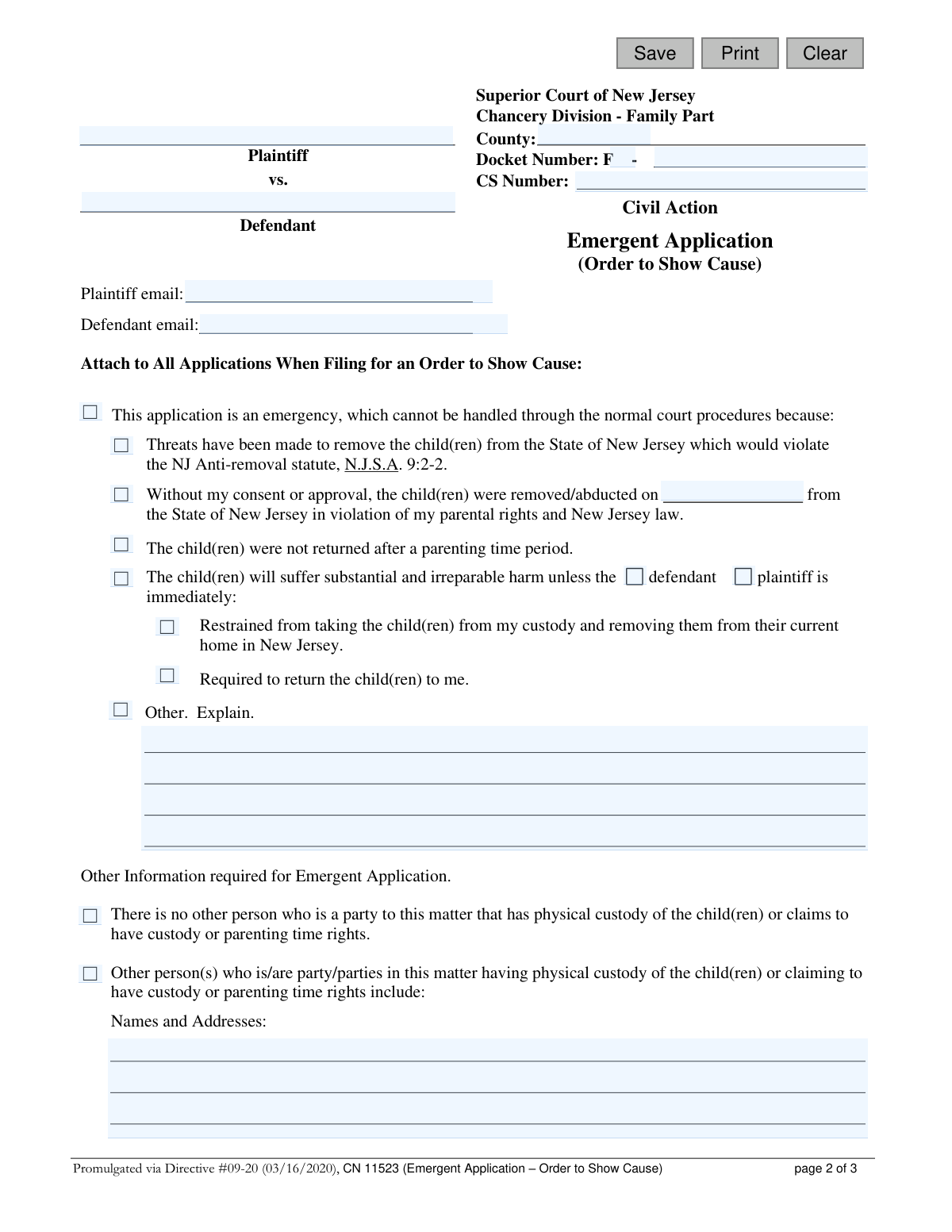
This form, officially known as CN 11523, is a legal document filed with the Superior Court of New Jersey's Family Part to request an urgent hearing, called an Order to Show Cause. It is used in situations where there is a risk of immediate and irreparable harm, such as child abduction, threats of removal from the state, or other emergencies requiring a judge's immediate intervention. Today, this form can be filled out quickly and accurately using AI-powered services like Instafill.ai, which can also convert non-fillable PDF versions into interactive fillable forms.
CN 11523 is part of the
New Jersey forms category on Instafill.
Our AI automatically handles information lookup, data retrieval, formatting, and form filling.
It takes less than a minute to fill out CN 11523 using our AI form filling.
Securely upload your data. Information is encrypted in transit and deleted immediately after the form is filled out.
Form specifications
| Form name: | New Jersey Emergent Application (Order to Show Cause) |
| Number of fields: | 41 |
| Number of pages: | 1 |
| Language: | English |
Instafill Demo: How to fill out PDF forms in seconds with AI
How to Fill Out CN 11523 Online for Free in 2026
Are you looking to fill out a CN 11523 form online quickly and accurately? Instafill.ai offers the #1 AI-powered PDF filling software of 2026, allowing you to complete your CN 11523 form in just 37 seconds or less.
Follow these steps to fill out your CN 11523 form online using Instafill.ai:
- 1 Navigate to Instafill.ai and upload or select the New Jersey Emergent Application (Order to Show Cause) form.
- 2 Provide the case information, including the county, docket number (if one exists), and the full names and email addresses for the Plaintiff and Defendant.
- 3 Check the appropriate boxes to specify the nature of the emergency, such as threats to remove a child, violation of parental rights, or failure to return a child after parenting time.
- 4 If 'Other' is selected or more detail is needed, write a clear and concise explanation of the emergent situation and the specific harm that will occur.
- 5 Detail any other parties who have or claim to have custody or parenting time rights.
- 6 Explain the immediate and irreparable harm you or the child(ren) will suffer if the court does not grant your request.
- 7 Carefully review all the information you've provided, then digitally sign and date the certification statement to attest to the truthfulness of your application before downloading for filing.
Our AI-powered system ensures each field is filled out correctly, reducing errors and saving you time.
Why Choose Instafill.ai for Your Fillable CN 11523 Form?
Speed
Complete your CN 11523 in as little as 37 seconds.
Up-to-Date
Always use the latest 2026 CN 11523 form version.
Cost-effective
No need to hire expensive lawyers.
Accuracy
Our AI performs 10 compliance checks to ensure your form is error-free.
Security
Your personal information is protected with bank-level encryption.
Frequently Asked Questions About Form CN 11523
This form is used to request an emergency court hearing to prevent immediate and irreparable harm to a child's health, safety, or welfare. Examples include requests for emergency custody or to prevent a child from being unlawfully removed from New Jersey.
Only a judge can review your application and determine if an emergency hearing is necessary. The court has the discretion to grant or deny your request based on the information you provide.
No, the form explicitly states that non-payment of child support is not a valid reason for an emergent hearing. However, non-payment of spousal support that could lead to an immediate eviction may be considered.
Irreparable harm is damage that cannot be corrected, compensated, or undone later. On this form, it refers to situations like child abduction, threats to remove a child from the state, or other circumstances that put a child in immediate danger.
For a new case (no prior docket number), you must file an 'Initial Application' along with this emergent form. If you are reopening a case with an existing docket number, you must complete the 'Application to Modify a Court Order' instead.
You must provide the plaintiff and defendant's names and emails, the county, and docket number if applicable. You also need to clearly explain the emergency, why it requires immediate action, and what harm will occur if your request is not granted.
Depending on your case, you may need to attach an 'Initial Application/Cross Application' for new cases or an 'Application to Modify a Court Order' for existing cases. You should also use the 'Additional Information form' to further explain your emergency.
Once submitted, your application will be reviewed by a judge who will decide if the situation qualifies for an emergency hearing. You will be notified of the judge's decision.
Yes, services like Instafill.ai use AI to accurately auto-fill form fields, which can save you time and help reduce errors. This is particularly useful for complex legal forms with repetitive information.
You can use a service like Instafill.ai to upload the PDF and complete it online. The platform allows you to type directly into the fields, save your progress, and ensure all required sections are filled out correctly.
If you have a non-fillable or 'flat' PDF, you can upload it to a service like Instafill.ai. Their technology can convert it into an interactive, fillable form that you can easily complete on your computer.
By signing the certification, you are legally swearing that all statements you have made are true. Be aware that if you willfully provide false information, you can be subject to punishment.
Compliance CN 11523
Validation Checks by Instafill.ai
1
Ensures County is Specified
Validates that the 'County' field is not empty. This is critical for routing the legal document to the correct Superior Court jurisdiction within New Jersey. A missing county would make the filing impossible to process and would lead to immediate rejection.
2
Docket Number Format Validation
Checks that the 'Docket Number' field follows the required court format, such as 'F[D/M/V]-#######-##'. This ensures the application can be correctly associated with a new or existing case file in the court's system. An incorrectly formatted number could lead to misfiling or the inability to locate the case.
3
Plaintiff and Defendant Name Completeness
Verifies that both the 'Plaintiff' and 'Defendant' name fields are filled out. These names are the primary identifiers for the parties involved in the legal action. Failure to provide both names would render the application legally deficient and prevent the court from processing it.
4
Valid Email Address Format
Checks that the values entered in the 'Plaintiff email' and 'Defendant email' fields are in a valid email format (e.g., '[email protected]'). This is important for ensuring that official court communications can be delivered electronically. An invalid format could result in missed notifications and deadlines.
5
Requires at Least One Emergency Justification
Ensures that the user has checked at least one of the primary boxes explaining why the situation is an emergency (e.g., 'Threats have been made...', 'child(ren) were removed/abducted...', etc.). The entire purpose of the form is to request an emergent hearing, so a justification is mandatory. The form cannot be submitted without specifying the nature of the emergency.
6
Conditional Abduction Date Requirement
Validates that if the checkbox for 'child(ren) were removed/abducted' is selected, the corresponding date field must be filled with a valid, past date. This provides a critical piece of evidence for the court to consider. A missing or invalid date weakens the claim and may cause the application to be deemed incomplete.
7
Conditional Explanation for 'Other' Harm
Ensures that if the 'Other. Explain.' checkbox under the 'irreparable harm' section is selected, the corresponding text box is not empty. This forces the applicant to provide specific details for any non-standard claims of harm. Without an explanation, the 'Other' selection is meaningless and would be rejected by the court.
8
Mutually Exclusive Custody Party Selection
Validates that the user has not selected both 'There is no other person...' and 'Other person(s) who is/are party/parties...' simultaneously. These two options are logically contradictory. This check prevents ambiguity and ensures the information about other parties with custody rights is clear and consistent.
9
Conditional Details for Other Custody Parties
Verifies that if the checkbox for 'Other person(s) who is/are party/parties...' is selected, the 'Names and Addresses' text area is filled in. The court needs this information to properly notify all interested parties of the proceedings. Failure to provide these details could violate due process rights and halt the case.
10
Mandatory Irreparable Harm Narrative
Checks that the text area explaining the 'immediate and irreparable harm' that will occur if the request is not granted is filled out. This narrative is the core of the applicant's argument for an emergency order. An empty or insufficient explanation will almost certainly result in the denial of the emergent relief request.
11
Signature Date and Role Validation
Ensures that a signature date is provided, is a valid date, and is not in the future. It also validates that at least one checkbox identifying the signer's role (e.g., Plaintiff, Defendant) is selected. This is required to attest to the truthfulness of the application and establish who is making the certification.
12
Conditional Complaint Type Selection
Validates that if the checkbox 'A complaint for...' is checked, at least one of the sub-options ('support', 'parenting time', 'custody') is also selected. This specifies the underlying legal action being filed alongside the emergent application. Without this detail, the filing is incomplete and the court does not know what type of case to open.
Common Mistakes in Completing CN 11523
Applicants often fail to provide a detailed, factual account in the section explaining the 'immediate and irreparable harm.' This happens due to emotional distress or a misunderstanding of the legal standard, leading them to write vague or conclusory statements. A weak justification is the most common reason for a judge to deny an emergent hearing, delaying critical protection. To avoid this, provide specific facts, dates, and examples of the harm that will occur if the court does not intervene immediately.
Many individuals file an Order to Show Cause for issues the court does not consider emergent, such as non-payment of child support, which is explicitly excluded in the instructions. This mistake stems from not carefully reading the form's introductory guidance on what constitutes an emergency. Filing for a non-emergent reason results in an automatic denial of the emergent hearing, wasting time and filing fees. Always confirm your situation aligns with the examples provided, such as risk of child abduction or immediate threat to a child's welfare.
The instructions clearly state that this application must be filed with other forms, such as an 'Initial Application' for new cases or an 'Application to Modify' for existing cases. People often overlook this requirement, submitting only the emergent application. This results in an incomplete filing that the court clerk will reject, causing significant delays in getting before a judge. To prevent this, create a checklist of all required documents mentioned in the instructions for your specific situation (new vs. reopen) before submission.
When reopening a case, filers frequently enter the docket number incorrectly, omitting the prefix (e.g., 'FD', 'FM'), using the wrong format, or leaving it blank entirely. This data entry error can prevent the clerk from locating the existing case file, leading to rejection or misfiling of the emergent application. It is crucial to copy the docket number exactly as it appears on previous court orders. AI-powered form fillers like Instafill.ai can help by storing and correctly formatting case information for future use.
Forgetting to sign and date the certification on page 3, or failing to check the correct box (e.g., Plaintiff, Defendant), is a simple but critical error. Under stress, people can easily overlook this final step, which legally invalidates the entire application. An unsigned form is not a valid certification of truth and will be immediately rejected by the court. Always perform a final review of the document, paying special attention to the signature block before filing.
The form provides an 'Other. Explain.' checkbox for situations not explicitly listed. A common mistake is to check this box but provide a one-word answer or leave the explanation field blank. This gives the judge no information to evaluate the unique emergency circumstances of your case. If you select 'Other,' you must provide a clear, concise, and compelling explanation of the situation to justify the need for an emergent hearing.
The form provides two distinct sets of instructions: one for 'New Cases' and one for 'Reopen Cases.' Applicants can get confused and follow the wrong set of steps, such as filling out a 'new complaint' form when they already have an existing docket number. This procedural error leads to the filing being rejected by the court clerk, forcing the applicant to start over and lose valuable time. Carefully determine if you have a prior docket number with the same parties before you begin.
Filers, especially those without legal representation, can become confused about who is the 'Plaintiff' (the person filing) and who is the 'Defendant' (the person responding). This can lead to entering names in the wrong fields at the top of the form or checking the wrong box in the signature section. Such errors create confusion in the court record and may require correction, delaying the process. Double-check that your name is listed as the Plaintiff and the other party is listed as the Defendant.
Entering an incorrect or outdated email address for either the plaintiff or the defendant is a frequent data entry error. Since courts increasingly rely on email for official notices, scheduling, and serving documents, a wrong address can cause critical communications to be missed. This can lead to missed deadlines or even a failure to properly notify the other party of the hearing. AI form-filling tools like Instafill.ai can help prevent this by saving and auto-populating correct contact information, ensuring accuracy.
In the section detailing how a child will suffer irreparable harm, the form asks the filer to specify whether the 'defendant' or 'plaintiff' needs to be restrained or required to act. Applicants sometimes forget to check either box, leaving it ambiguous who the requested order should apply to. This ambiguity can weaken the application or require the judge to seek clarification, delaying the issuance of an emergency order. Always clearly indicate which party's actions necessitate the court's immediate intervention.
Saved over 80 hours a year
“I was never sure if my IRS forms like W-9 were filled correctly. Now, I can complete the forms accurately without any external help.”
Kevin Martin Green
Your data stays secure with advanced protection from Instafill and our subprocessors

Robust compliance program
Transparent business model
You’re not the product. You always know where your data is and what it is processed for.
ISO 27001, HIPAA, and GDPR
Our subprocesses adhere to multiple compliance standards, including but not limited to ISO 27001, HIPAA, and GDPR.
Security & privacy by design
We consider security and privacy from the initial design phase of any new service or functionality. It’s not an afterthought, it’s built-in, including support for two-factor authentication (2FA) to further protect your account.
Fill out CN 11523 with Instafill.ai
Worried about filling PDFs wrong? Instafill securely fills new-jersey-emergent-application-order-to-show-cause forms, ensuring each field is accurate.