Yes! You can use AI to fill out New Jersey Judiciary Confidential Juvenile Plea Form
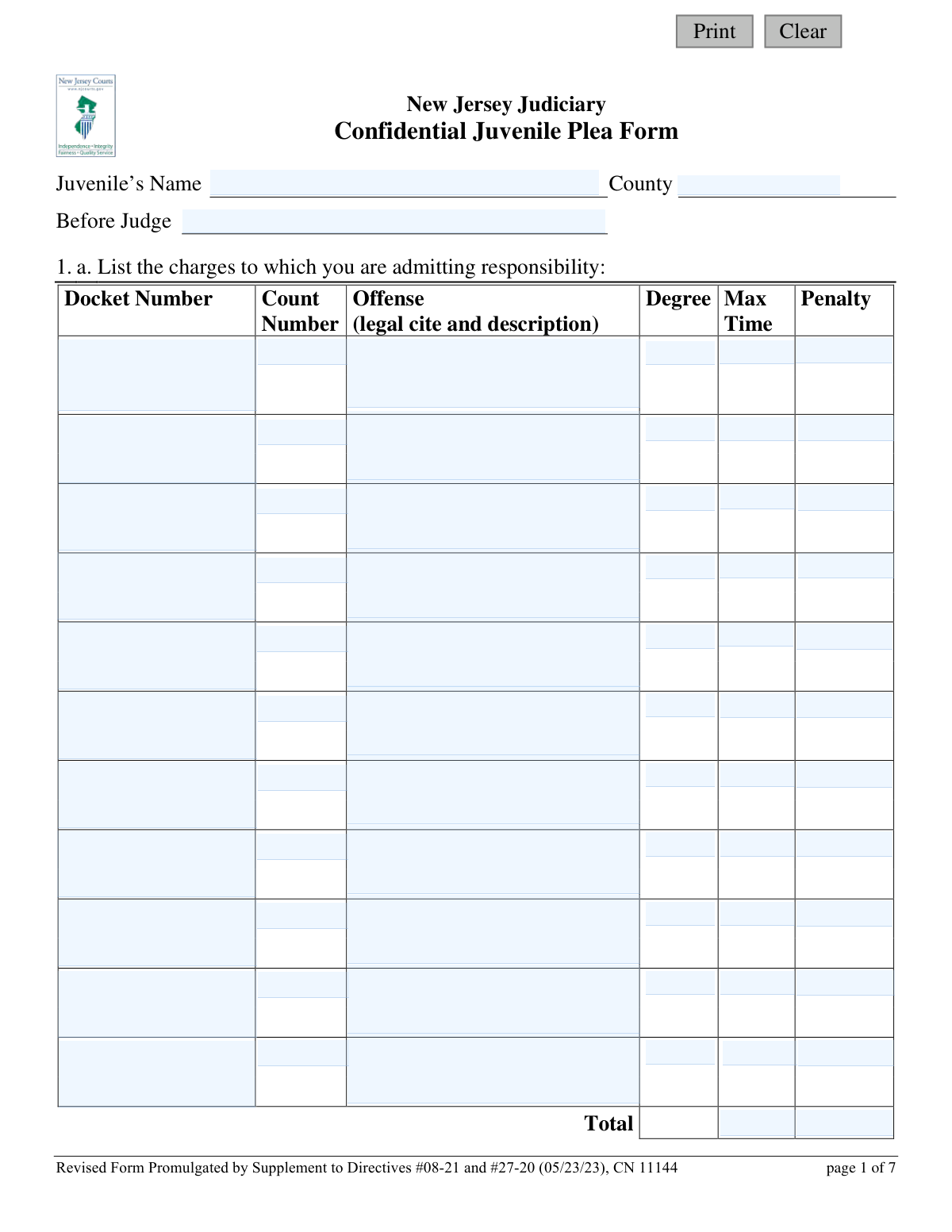
This is the official New Jersey Judiciary form used when a juvenile enters a plea agreement in court. It documents the charges the juvenile is admitting to, the rights they are waiving (such as the right to a trial), and their understanding of the potential consequences, including incarceration, fines, and other penalties. Completing this form accurately is a critical step in the juvenile justice process. Today, this form can be filled out quickly and accurately using AI-powered services like Instafill.ai, which can also convert non-fillable PDF versions into interactive fillable forms.
CN 11144 is part of the
New Jersey forms category on Instafill.
Our AI automatically handles information lookup, data retrieval, formatting, and form filling.
It takes less than a minute to fill out CN 11144 using our AI form filling.
Securely upload your data. Information is encrypted in transit and deleted immediately after the form is filled out.
Form specifications
| Form name: | New Jersey Judiciary Confidential Juvenile Plea Form |
| Number of fields: | 210 |
| Number of pages: | 1 |
| Language: | English |
Instafill Demo: How to fill out PDF forms in seconds with AI
How to Fill Out CN 11144 Online for Free in 2026
Are you looking to fill out a CN 11144 form online quickly and accurately? Instafill.ai offers the #1 AI-powered PDF filling software of 2026, allowing you to complete your CN 11144 form in just 37 seconds or less.
Follow these steps to fill out your CN 11144 form online using Instafill.ai:
- 1 Navigate to Instafill.ai and upload or select the Confidential Juvenile Plea Form.
- 2 Use the AI assistant to automatically populate initial information such as the juvenile's name, county, and the presiding judge's name.
- 3 Carefully enter the details of the plea agreement, including the specific charges, docket numbers, and any charges the prosecutor has agreed to dismiss.
- 4 With the guidance of a legal representative, review and answer the series of yes/no questions to confirm understanding of the rights being waived, potential penalties, and immigration consequences.
- 5 Detail any specific disposition recommendations, restitution amounts, and other promises made as part of the plea deal.
- 6 Review the entire completed form with your attorney for accuracy before the juvenile, defense attorney, prosecutor, and parent/guardian apply their electronic signatures.
- 7 Download, save, and print the finalized form for submission to the court and for your personal records.
Our AI-powered system ensures each field is filled out correctly, reducing errors and saving you time.
Why Choose Instafill.ai for Your Fillable CN 11144 Form?
Speed
Complete your CN 11144 in as little as 37 seconds.
Up-to-Date
Always use the latest 2026 CN 11144 form version.
Cost-effective
No need to hire expensive lawyers.
Accuracy
Our AI performs 10 compliance checks to ensure your form is error-free.
Security
Your personal information is protected with bank-level encryption.
Frequently Asked Questions About Form CN 11144
This form is used in the New Jersey Judiciary system when a juvenile agrees to admit responsibility for one or more offenses. It documents the juvenile's understanding of the charges, the rights they are giving up, and the terms of their plea agreement.
The form must be completed with the assistance of a defense attorney. It requires signatures from the juvenile, their defense attorney, the prosecutor, and the juvenile's parent or legal guardian.
By admitting responsibility, you are waiving your constitutional rights to a trial, to have the state prove the charges beyond a reasonable doubt, and to confront witnesses against you. This section ensures you understand exactly which rights you are no longer exercising.
According to Section 15, if the judge decides to impose a sentence more severe than the one recommended, you have the right to take back your plea. If you do, anything you said in relation to the plea cannot be used against you at a trial.
An extended term is a period of incarceration that goes beyond the standard maximum time allowed for the offense. The prosecutor would seek this for specific legal reasons, which must be explained to you.
Yes, if you are adjudicated delinquent for an offense that would be a crime of the first, second, third, or fourth degree for an adult, you will be required to provide a DNA sample, fingerprints, and be photographed.
The ICJ is an agreement between states that governs the supervision of juveniles on probation who move from one state to another. It can impact your ability to travel, attend school out-of-state, and may impose other requirements depending on the state you move to.
You must be advised of the potential immigration consequences of your plea, such as deportation. Section 14 confirms that you have been notified of these risks and have been given the opportunity to seek legal advice on your immigration status.
You will need the docket number, count number, the legal citation and description of the offense, its degree, and the maximum penalty. Your defense attorney will provide you with this specific information from the plea offer.
If you have a non-fillable PDF, you can use a service like Instafill.ai. It can convert flat PDFs into interactive, fillable forms so you can easily type your information into the fields.
Yes, services like Instafill.ai use AI to auto-fill form fields accurately and save time. However, it is critical that you and your attorney review the entire form for accuracy before signing.
To fill this form out online, you can upload it to a platform like Instafill.ai. The service will make the document interactive, allowing you to type your answers, save your progress, and download the completed form.
As stated in Section 7, admitting responsibility for a new offense may result in a violation of your current probation. This could lead to additional penalties related to your prior case, which you should discuss with your attorney.
Yes, a parent or guardian must be present (in person or by phone) when the form is explained to you. They are required to sign the last page to certify their presence and understanding.
Compliance CN 11144
Validation Checks by Instafill.ai
1
Header Information Completeness
Ensures that the 'Juvenile’s Name', 'County', and 'Before Judge' fields at the top of the form are all filled out. This information is essential for identifying the case and the parties involved. A submission will be rejected if any of these core identification fields are missing.
2
Charge Admittance Minimum Requirement
Validates that at least one full charge is listed in section 1.a. If a 'Docket Number' is entered for a charge, the corresponding 'Offense', 'Degree', and 'Max Time' fields for that row must also be completed. This check ensures the plea form clearly states what the juvenile is admitting responsibility for.
3
Extended Term Conditional Logic
Checks the responses related to an extended term in section 1.c. If the 'Yes' box is checked, the system verifies that the 'amount of extended term' and 'reason for it' fields are filled, and that questions 1.d and 1.e are answered. If 'No' is checked, these dependent fields must be empty.
4
Probation/Parole Conditional Logic
Validates the logic in section 7. If question 7.a ('Are you presently on probation or parole?') is answered 'Yes', then questions 7.b and 7.c must be answered. If 7.a is answered 'No', questions 7.b and 7.c should be disabled or marked as not applicable, preventing contradictory information.
5
Restitution Amount Validation
Verifies the restitution information in section 13.a. If the 'Yes' box is checked, the associated amount field ('q13Amt') must contain a valid, positive numerical value. This ensures that an agreed-upon restitution amount is properly recorded and is not left blank or filled with non-numeric text.
6
Mandatory Penalties Description Requirement
Checks section 10.b for consistency. If the 'Yes' box is checked, indicating the juvenile understands they are admitting to an offense with mandatory penalties, the corresponding text box ('q10bDesc') must not be empty. This ensures the specific offenses and penalties are explicitly listed as required.
7
Understanding of Rights Completeness
Ensures all sub-questions in section 4 ('Do you understand that by admitting responsibility you are giving up certain rights?') are answered. Each of the questions from 4.a to 4.f must have a 'Yes' or 'No' response to confirm the juvenile has been informed of and acknowledged each specific right they are waiving.
8
Immigration Consequences Acknowledgment
Validates that questions 14.a and 14.b, regarding immigration consequences, are both answered. A 'No' response to either question would likely invalidate the plea, so the system should flag such a response for immediate review. This check is critical for ensuring compliance with legal requirements for non-citizen defendants.
9
Signature and Date Completeness
Verifies that all required signature and date fields at the end of the form are completed. This includes the Juvenile, Defense Attorney, Prosecutor, and Parent/Guardian signatures and their corresponding dates. A missing signature or date can render the entire plea agreement invalid.
10
Date Format and Validity
Checks that all date fields on the form ('sigJuvDt', 'sigAttyDt', etc.) are entered in a valid format (e.g., MM/DD/YYYY). The validation also ensures that the entered date is not in the future. This maintains data integrity and the legal soundness of the document's execution date.
11
Parent/Guardian Name Presence
Ensures the parent or guardian's name is filled into the certification statement on page 7. The statement begins 'I, (parent/guardian) was present...', and this field ('parentName') must be completed to properly identify the adult who was present. Failure to complete this invalidates the parental certification.
12
Docket Number Format
Validates that all 'Docket Number' fields in sections 1.a and 1.b adhere to the expected format for the New Jersey Judiciary. This prevents data entry errors and ensures that the case can be correctly identified and tracked within the court system. An incorrectly formatted docket number could lead to processing delays or misfiling.
13
Dismissed Charges Row Completeness
Ensures that if any information is entered into a row in section 1.b ('List any charges the prosecutor has agreed to recommend for dismissal'), that entire row is completed. If a docket number is provided, the corresponding count, offense, and degree must also be provided to create a complete record of the dismissed charges.
14
Sexual Offense Question Exclusive Choice
Validates that for question 5.e ('Do you understand that if you accept responsibility for a sexual offense...'), exactly one choice among 'NA', 'Yes', or 'No' is selected. This prevents ambiguity by ensuring the user does not skip the question or select multiple conflicting answers.
Common Mistakes in Completing CN 11144
Users often make transcription errors when entering complex legal information in Section 1.a, such as docket numbers, count numbers, and specific legal citations. This happens due to the detailed nature of the information and the stress of the situation. An incorrect entry could lead to the juvenile admitting responsibility for the wrong offense, causing significant legal complications and delays.
A critical error is listing charges in the wrong table, confusing those being admitted (Section 1.a) with those the prosecutor is dismissing (Section 1.b). This mistake can have catastrophic consequences, potentially resulting in an admission of guilt for an offense that should have been dropped. To avoid this, meticulously review the official plea agreement with an attorney and populate each table with extreme care.
The form contains several questions with conditional logic, such as 1.c, 7.a, and 8.a, which instruct the user to skip sections if their answer is 'No'. People often rush and answer follow-up questions unnecessarily or fail to provide required details when they answer 'Yes'. This creates a contradictory or incomplete form that will be flagged for correction, delaying the plea process.
Sections 2 through 5 contain a long series of 'Yes/No' questions about waiving fundamental legal rights. It is common for individuals to check 'Yes' to all questions without fully understanding the rights they are giving up, such as the right to trial or to cross-examine witnesses. This can lead to a plea that is not truly knowing or voluntary, which could be grounds for a future legal challenge. Each point must be discussed with a defense attorney before answering.
The questions in Section 5.d regarding the Interstate Compact for Juveniles are legally dense and often misunderstood. A family may not realize that by checking 'Yes', they are acknowledging rules that could severely restrict the juvenile's ability to move, travel, or attend school out of state, or even subject them to another state's sex offender registry. The consequences of violating these rules are severe, so it is vital to seek clarification from an attorney on each point.
In Section 13.a, users may check 'Yes' to indicate they agree to pay restitution but then forget to fill in the specific dollar amount in the space provided. This omission creates an ambiguous and unenforceable agreement. It can lead to future disputes and require additional court hearings to determine the final amount, delaying case closure.
The form explicitly references other documents that must be included, such as the 'Notification of Right to Seek Legal Advice Regarding Immigration Status Consequences Form' (Section 14.a) or a written plea offer (Section 12). Forgetting to attach these required documents is a common procedural error. This will cause the court clerk to reject the entire submission as incomplete, halting the process until all paperwork is present.
The final page requires a parent or guardian's signature, date, and their written name in the attestation clause. This section is sometimes missed, or the name is not filled in, which invalidates the form. Because this is a juvenile plea form, the parent's documented presence and consent are a strict legal requirement, and its absence will cause immediate rejection of the plea.
This form is often distributed as a non-fillable PDF, requiring it to be printed and completed by hand. Poor handwriting can render critical information like names, docket numbers, and attorney details unreadable. This leads to data entry errors by court staff, potential rejection of the form, and the creation of an inaccurate legal record. Using a tool like Instafill.ai can convert the form into a digitally fillable version, ensuring all entries are clean, legible, and accurate.
Sections 10.a and 12 ask for the specific disposition recommendations and any other promises made as part of the plea. Users sometimes enter vague phrases like 'as discussed' or leave it blank, assuming the verbal agreement is sufficient. This creates a record that doesn't reflect the full agreement, leading to potential misunderstandings about the sentence or probation conditions later on. All terms should be explicitly listed or the full written offer must be attached.
Saved over 80 hours a year
“I was never sure if my IRS forms like W-9 were filled correctly. Now, I can complete the forms accurately without any external help.”
Kevin Martin Green
Your data stays secure with advanced protection from Instafill and our subprocessors

Robust compliance program
Transparent business model
You’re not the product. You always know where your data is and what it is processed for.
ISO 27001, HIPAA, and GDPR
Our subprocesses adhere to multiple compliance standards, including but not limited to ISO 27001, HIPAA, and GDPR.
Security & privacy by design
We consider security and privacy from the initial design phase of any new service or functionality. It’s not an afterthought, it’s built-in, including support for two-factor authentication (2FA) to further protect your account.
Fill out CN 11144 with Instafill.ai
Worried about filling PDFs wrong? Instafill securely fills new-jersey-judiciary-confidential-juvenile-plea-form forms, ensuring each field is accurate.