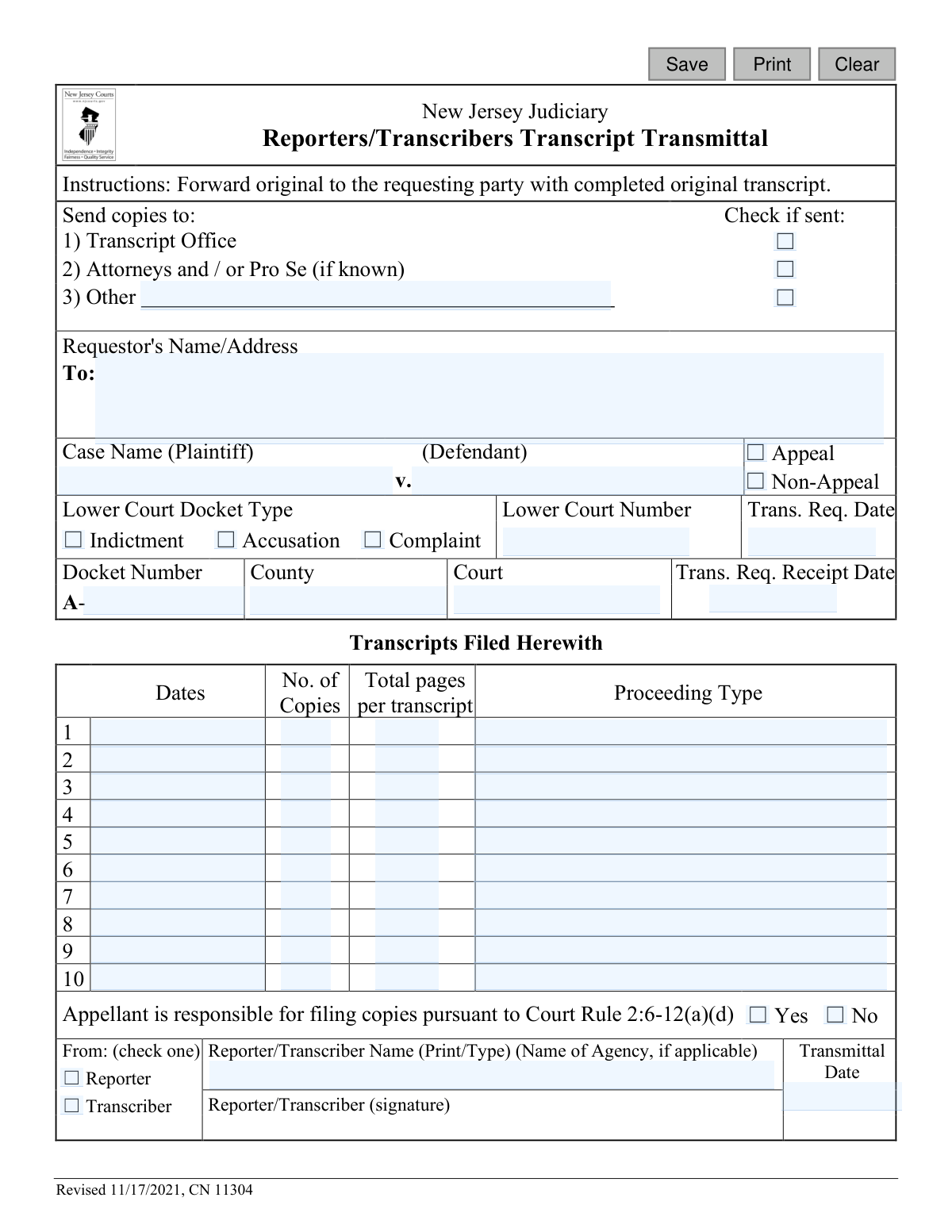
Yes! You can use AI to fill out New Jersey Judiciary Reporters/Transcribers Transcript Transmittal (CN 11304)

This form is an official document from the New Jersey Judiciary used by court reporters and transcribers as a cover sheet when sending completed court transcripts. It serves to document the details of the case, the specific transcripts being transmitted, and confirms distribution to the requesting party, the transcript office, and other relevant parties. Today, this form can be filled out quickly and accurately using AI-powered services like Instafill.ai, which can also convert non-fillable PDF versions into interactive fillable forms.
Transcript Transmittal (CN 11304) is part of the New Jersey forms category on Instafill.
Our AI automatically handles information lookup, data retrieval, formatting, and form filling.
It takes less than a minute to fill out Transcript Transmittal (CN 11304) using our AI form filling.
Securely upload your data. Information is encrypted in transit and deleted immediately after the form is filled out.

Form specifications

Form name: New Jersey Judiciary Reporters/Transcribers Transcript Transmittal (CN 11304)
Number of fields: 67
Number of pages: 1
Language: English
main-image

Instafill Demo: How to fill out PDF forms in seconds with AI

How to Fill Out Transcript Transmittal (CN 11304) Online for Free in 2026

Are you looking to fill out a TRANSCRIPT TRANSMITTAL (CN 11304) form online quickly and accurately? Instafill.ai offers the #1 AI-powered PDF filling software of 2026, allowing you to complete your TRANSCRIPT TRANSMITTAL (CN 11304) form in just 37 seconds or less.
Follow these steps to fill out your TRANSCRIPT TRANSMITTAL (CN 11304) form online using Instafill.ai:
  1. 1 Navigate to Instafill.ai and upload or select the NJ Judiciary Transcript Transmittal form.
  2. 2 Use the AI assistant to input the requestor's name and address, and the case details such as plaintiff/defendant names, docket numbers, and court information.
  3. 3 Specify the details for each transcript being sent, including the date, number of copies, total pages, and proceeding type.
  4. 4 Indicate where copies have been sent by checking the appropriate boxes for the Transcript Office, attorneys, or others.
  5. 5 Provide your information as the reporter or transcriber, including your name and the transmittal date.
  6. 6 Review all the auto-filled information for accuracy, make any necessary corrections, and then e-sign the document.
  7. 7 Download, print, or securely share the completed Transcript Transmittal form directly from the platform.

Our AI-powered system ensures each field is filled out correctly, reducing errors and saving you time.

Why Choose Instafill.ai for Your Fillable Transcript Transmittal (CN 11304) Form?

Speed

Complete your Transcript Transmittal (CN 11304) in as little as 37 seconds.

Up-to-Date

Always use the latest 2026 Transcript Transmittal (CN 11304) form version.

Cost-effective

No need to hire expensive lawyers.

Accuracy

Our AI performs 10 compliance checks to ensure your form is error-free.

Security

Your personal information is protected with bank-level encryption.

Frequently Asked Questions About Form Transcript Transmittal (CN 11304)

This form serves as a cover sheet that accompanies a completed court transcript. It is used by court reporters and transcribers to document which transcripts are being sent, who is receiving them, and for which legal case.

The court reporter or transcriber who prepared the official court transcript is responsible for completing, signing, and distributing this form along with the transcript.

Forward the original form with the original transcript to the person who requested it. You must also send copies to the Transcript Office and all attorneys or pro se parties, checking the corresponding boxes on the form to confirm.

This information should be on the original transcript request you received. If you cannot find it, contact the court clerk or the requesting party for the correct case and docket numbers.

The form provides numbered rows to list up to 10 different transcripts. For each proceeding, enter its date, the number of copies, total pages, and the proceeding type (e.g., 'Motion Hearing', 'Trial').

An 'Appeal' transcript is for a case being reviewed by a higher court and has specific filing rules. A 'Non-Appeal' transcript is requested for any other reason, such as for a personal record or use in the current court.

This is a notification for appeal cases, confirming that the appellant (the party filing the appeal) is legally required to file the necessary transcript copies with the court. You should check 'Yes' or 'No' based on the case status.

The 'Transmittal Date' is the date you are physically sending or delivering the completed transcript and this transmittal form to all required parties.

Yes, the form requires the signature of the reporter or transcriber to certify that the information is accurate and the transcripts have been sent. A printed name is also required.

Yes, services like Instafill.ai use AI to auto-fill form fields accurately using your saved case data, which helps save time and prevent common errors.

To fill this form online, upload the PDF to Instafill.ai. The platform will make the fields interactive, allowing you to type your information, or it can auto-fill the details for you.

You can use a service like Instafill.ai to make it fillable. Simply upload the flat PDF, and the tool will convert it into an interactive form that you can complete and save digitally.

Compliance Transcript Transmittal (CN 11304)
Validation Checks by Instafill.ai

1
Validate Transmittal Date Presence and Format
Checks that the 'Transmittal Date' (sigDt) field is not empty and contains a valid date, such as in MM/DD/YYYY format. This date is crucial for establishing the official timeline for when the transcript was sent. If the date is missing or invalid, the system should reject the submission and prompt the user for a valid entry.
2
Ensure Reporter or Transcriber is Selected
Verifies that one of the two radio button options, 'Reporter' or 'Transcriber' (repTrans), has been selected. This is essential for identifying the source of the transcript and for any follow-up communication or payment. A failed validation would require the user to make a selection before the form can be submitted.
3
Validate Reporter/Transcriber Name is Provided
Ensures the 'Reporter/Transcriber Name' (sigName) field is not empty. This field provides a clear, legible identification of the individual or agency responsible for the transcript's accuracy and completion. Submissions with an empty name field should be blocked to ensure accountability and proper record-keeping.
4
Validate Case Name Fields for Completeness
Checks that both the Plaintiff ('plaName') and Defendant ('defName') fields are populated. The full case name is a primary identifier for the legal proceeding. A submission lacking either name would be incomplete and could lead to significant delays or misfiling, so the user must be prompted to fill in both.
5
Validate Docket Number Format for Appeals
If the 'Appeal' checkbox is selected, this validation ensures the 'Docket Number' (docketNum) field is not empty and follows the expected format, starting with 'A-'. This format is a key identifier for appellate cases within the court system. An invalid or missing docket number for an appeal would prevent proper routing and filing.
6
Logical Date Sequence Check
Verifies the chronological order of key dates: Request Date (reqDt), Receipt Date (recptDt), and Transmittal Date (sigDt). The receipt date must be on or after the request date, and the transmittal date must be on or after the receipt date. This check prevents logical impossibilities in the timeline and ensures data integrity.
7
At Least One Transcript Entry Required
Confirms that at least the first row of the 'Transcripts Filed Herewith' grid is fully completed. A transmittal form without any listed transcripts is invalid. The validation should check that 'Dates' (transDt), 'No. of Copies' (transCopy), 'Total pages' (transPgs), and 'Proceeding Type' (transType) for the first entry are all populated.
8
Transcript Row Data Integrity
For each of the 10 transcript rows, if any single field (e.g., 'Dates') is filled, all other fields in that same row ('No. of Copies', 'Total pages', 'Proceeding Type') must also be filled. This prevents incomplete entries and ensures each listed transcript has all its required metadata. The system should highlight the incomplete row for correction.
9
Numeric Fields Must Be Positive Integers
Ensures that the 'No. of Copies' (transCopy) and 'Total pages' (transPgs) fields in all populated transcript rows contain only positive integers. These fields represent physical counts and cannot be zero, negative, or contain text. An error message should guide the user to enter a valid whole number.
10
Conditional 'Other' Recipient Description
Checks that if the 'Other' checkbox (sentOther) for copy recipients is marked, the corresponding description field is not empty. This ensures that the 'Other' recipient is clearly identified for proper distribution. If the box is checked but the field is blank, the user should be prompted to provide a description or uncheck the box.
11
Validate Requestor Name and Address
Verifies that the 'Requestor's Name/Address' (reqName) field is not empty. This information is critical for identifying who initiated the request and where the original transcript should be sent. The form cannot be processed without knowing the destination, so this field must be mandatory.
12
Appeal Status Selection is Mandatory
Ensures that one of the case status options, 'Appeal' or 'Non-Appeal', is selected. This is a fundamental piece of information that dictates how the case is handled and what rules may apply, such as appellant responsibility for filing. The user must be forced to choose one before proceeding.
13
Validate Lower Court Number Presence
Checks that the 'Lower Court Number' (crtNum) field is populated. This number, along with the docket type and county, is essential for uniquely identifying the original case file from which the transcript is derived. A missing court number would make it difficult to locate the source record and should halt submission.
14
Validate Transcript Proceeding Date
Validates that all populated 'Dates' fields in the transcript grid (transDt, transDt2, etc.) contain a valid date and that the date is in the past. The date represents the day of the proceeding and cannot be a future date. This ensures the logical consistency and accuracy of the record.

Common Mistakes in Completing Transcript Transmittal (CN 11304)

Improperly Formatting Case Name

Users often enter the full case name, such as 'Plaintiff v. Defendant', into a single field or reverse the party names. This mistake complicates automated data entry and can lead to search errors within the court's filing system. To prevent this, carefully enter the plaintiff's name in the first designated box and the defendant's name in the second. AI-powered tools like Instafill.ai can help by intelligently parsing and placing the correct names in their respective fields.

Confusing Lower Court and Appellate Docket Numbers

The form requires both a 'Lower Court Number' and an appellate 'Docket Number' (prefixed with 'A-'). People frequently enter the same number in both fields, transpose them, or make typos. An incorrect docket number is a critical error that can cause the transcript to be misfiled or lost, delaying the legal process. Always double-check the source documents for each distinct number before entry.

Interchanging Transcript Request and Receipt Dates

It is common to mistakenly enter the same date for both the 'Trans. Req. Date' (when the request was made) and the 'Trans. Req. Receipt Date' (when the transcriber received it). This error skews the official record of turnaround time and can affect compliance audits. To avoid this, refer to the original request for the first date and your own intake logs for the second date. Using a form-filling tool can help flag inconsistencies between date fields.

Omitting or Providing Vague Transcript Details

In the 'Transcripts Filed Herewith' table, transcribers may fail to list all proceeding dates, enter incorrect page counts, or use ambiguous 'Proceeding Type' descriptions like 'Hearing'. This forces the recipient to seek clarification, causing billing disputes and processing delays. Ensure each proceeding is listed on a separate line with its specific date, accurate page count, and a clear description like 'Sentencing' or 'Trial Testimony of Jane Doe'.

Neglecting to Check Copy Distribution Boxes

The checkboxes at the top of the form, used to confirm that copies were sent to the 'Transcript Office', 'Attorneys', and 'Other' parties, are frequently overlooked. This omission leaves no official record of distribution, prompting follow-up inquiries from the court and delaying case progress. To avoid this, make it a final step to review and check all appropriate boxes before sending the form. Since this form is a non-fillable PDF, a tool like Instafill.ai can convert it into a fillable version, making checkboxes easier to manage.

Failing to Specify Appeal or Non-Appeal Status

Overlooking the 'Appeal' vs. 'Non-Appeal' checkbox is a simple but consequential error. This status determines which court rules, deadlines, and handling procedures apply to the transcript. An incorrect or missing selection can result in the transcript being improperly routed, potentially jeopardizing appeal timelines. Always verify the case status and check the correct box.

Omitting Agency Name When Applicable

Transcribers working for an agency sometimes forget to include the agency's name, listing only their own. This leads to confusion in billing and communication, as payments and official queries may be misdirected to the individual instead of the responsible company. If you are affiliated with a transcription agency, always ensure its full name is entered in the 'Name of Agency' field.

Submitting an Unsigned or Undated Form

In the rush to complete paperwork, the transcriber's signature or the 'Transmittal Date' can be easily missed. An unsigned or undated form is considered invalid and will be rejected by the court, requiring a corrected resubmission. This delays the official filing of the transcript and can impact case deadlines. Using a tool like Instafill.ai can help by highlighting required signature and date fields before submission.

Incorrectly Identifying the Lower Court Docket Type

The form asks the filer to specify the lower court's charging document: 'Indictment', 'Accusation', or 'Complaint'. A transcriber who is not intimately familiar with the case's origins might guess or leave this section blank. This can cause administrative errors in how the transcript is cataloged. It is crucial to verify the correct document type from the case file to ensure accurate record-keeping.
Saved over 80 hours a year

“I was never sure if my IRS forms like W-9 were filled correctly. Now, I can complete the forms accurately without any external help.”

Kevin Martin Green

Your data stays secure with advanced protection from Instafill and our subprocessors

Robust compliance program

Transparent business model

You’re not the product. You always know where your data is and what it is processed for.

ISO 27001, HIPAA, and GDPR

Our subprocesses adhere to multiple compliance standards, including but not limited to ISO 27001, HIPAA, and GDPR.

Security & privacy by design

We consider security and privacy from the initial design phase of any new service or functionality. It’s not an afterthought, it’s built-in, including support for two-factor authentication (2FA) to further protect your account.

Fill out Transcript Transmittal (CN 11304) with Instafill.ai

Worried about filling PDFs wrong? Instafill securely fills new-jersey-judiciary-reporterstranscribers-transcript-transmittal-cn-11304 forms, ensuring each field is accurate.