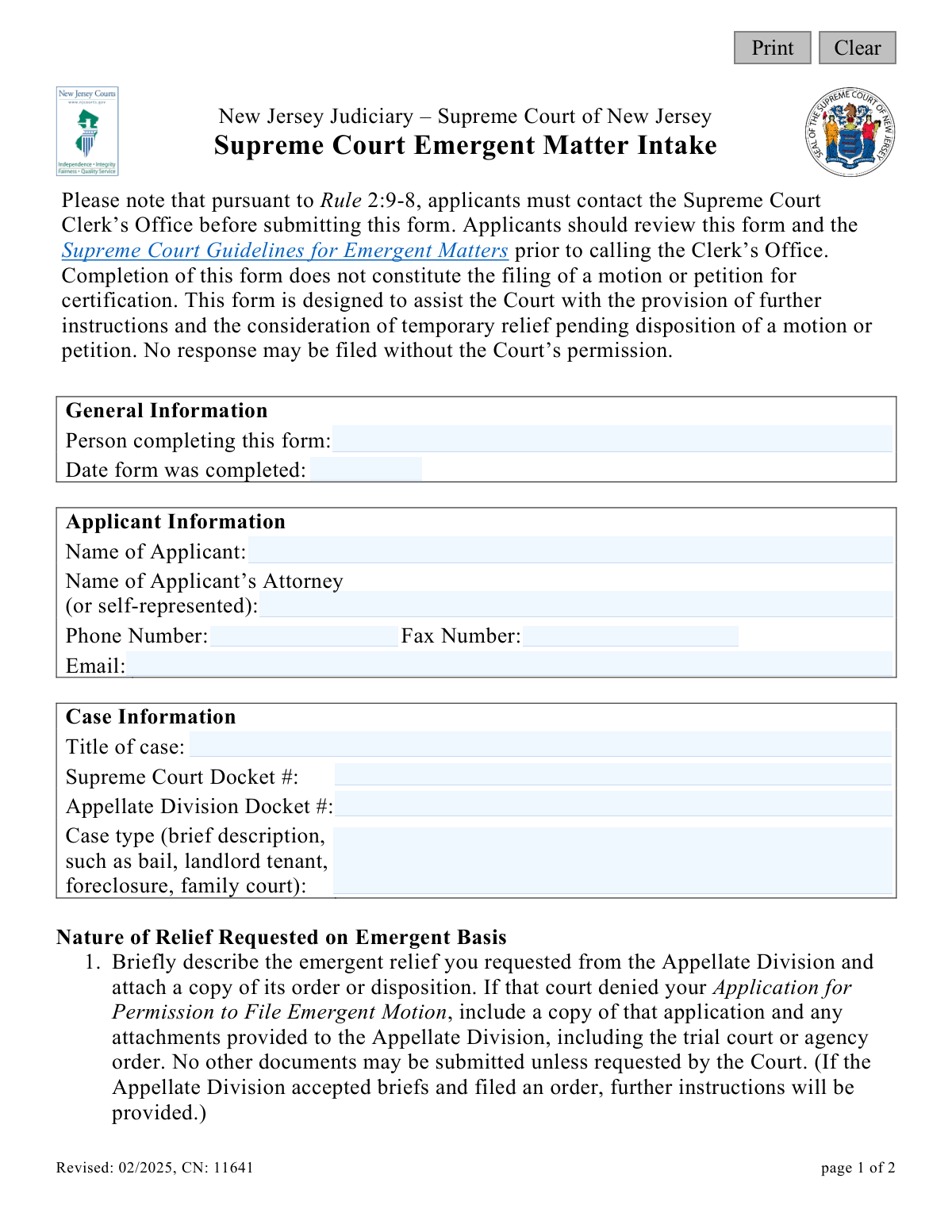
Yes! You can use AI to fill out New Jersey Judiciary Supreme Court Emergent Matter Intake

The Supreme Court Emergent Matter Intake form (CN 11641) is a document used by the New Jersey Judiciary to process urgent legal matters requiring immediate attention from the Supreme Court. It serves as a preliminary step for applicants to outline their case, the relief sought, and to demonstrate that they have exhausted options in lower courts. This form is critical for initiating the process of seeking temporary relief or other urgent judicial intervention, and today it can be filled out quickly and accurately using AI-powered services like Instafill.ai, which can also convert non-fillable PDF versions into interactive fillable forms.
CN 11641 is part of the New Jersey forms category on Instafill.
Our AI automatically handles information lookup, data retrieval, formatting, and form filling.
It takes less than a minute to fill out CN 11641 using our AI form filling.
Securely upload your data. Information is encrypted in transit and deleted immediately after the form is filled out.

Form specifications

Form name: New Jersey Judiciary Supreme Court Emergent Matter Intake
Number of fields: 17
Number of pages: 1
Language: English
main-image

Instafill Demo: How to fill out PDF forms in seconds with AI

How to Fill Out CN 11641 Online for Free in 2026

Are you looking to fill out a CN 11641 form online quickly and accurately? Instafill.ai offers the #1 AI-powered PDF filling software of 2026, allowing you to complete your CN 11641 form in just 37 seconds or less.
Follow these steps to fill out your CN 11641 form online using Instafill.ai:
  1. 1 Navigate to Instafill.ai and upload or select the Supreme Court Emergent Matter Intake form.
  2. 2 Use the AI assistant to fill in the 'General Information' section, including the name of the person completing the form and the date.
  3. 3 Enter the 'Applicant Information,' providing the applicant's name, attorney details, and contact information like phone number and email.
  4. 4 Complete the 'Case Information' section with the case title, Supreme Court and Appellate Division docket numbers, and a brief description of the case type.
  5. 5 In the 'Nature of Relief Requested' sections, describe the emergent relief previously requested from the Appellate Division and the relief now being sought from the Supreme Court.
  6. 6 Confirm that you have served all other parties and attached a copy of the Appellate Division's order or disposition as required.
  7. 7 Review all entered information for accuracy, then use the platform to finalize, download, or print the completed form for submission to the Clerk's Office.

Our AI-powered system ensures each field is filled out correctly, reducing errors and saving you time.

Why Choose Instafill.ai for Your Fillable CN 11641 Form?

Speed

Complete your CN 11641 in as little as 37 seconds.

Up-to-Date

Always use the latest 2026 CN 11641 form version.

Cost-effective

No need to hire expensive lawyers.

Accuracy

Our AI performs 10 compliance checks to ensure your form is error-free.

Security

Your personal information is protected with bank-level encryption.

Frequently Asked Questions About Form CN 11641

This form is used to request urgent, temporary relief from the New Jersey Supreme Court. It is an initial intake step that helps the Court gather information and provide further instructions, not the formal motion itself.

This form should be completed by individuals or their attorneys who are seeking immediate relief from the Supreme Court, typically after their request for emergent relief was denied by the Appellate Division.

Yes, you must contact the Supreme Court Clerk’s Office before submitting this form. The form states that applicants should also review the Supreme Court Guidelines for Emergent Matters prior to calling.

No, completing this form does not constitute the filing of a motion or petition for certification. It is an intake form designed to help the Court assess the situation and provide instructions for any next steps.

You must attach a copy of the Appellate Division's order or disposition. If that court denied your application to file an emergent motion, you must also include a copy of that application and any attachments you provided to the Appellate Division.

No, the form explicitly states that no other documents may be submitted besides the required Appellate Division orders and applications. The Court will request additional information if it is needed.

You will need the official title of the case, the Supreme Court and Appellate Division docket numbers, and a brief description of the case type, such as bail, landlord tenant, or family court.

You must serve a copy of the completed form and all its attachments to all other attorneys, self-represented parties, and the trial judge or agency involved in your case.

The Court will review your intake form to consider providing temporary relief and will issue further instructions. The opposing party is not permitted to file a response unless the Court specifically grants them permission.

In the section asking for the relief you are seeking from the Supreme Court, you can simply write 'same as above' if it is identical to the relief you described requesting from the Appellate Division.

Yes, services like Instafill.ai use AI to help you fill out forms like this one quickly and accurately. AI can auto-fill fields with your information, reducing time spent on paperwork and minimizing errors.

You can use a service like Instafill.ai to upload the form and fill it out directly in your web browser. The platform makes it easy to enter your information, add required attachments, and prepare the document for submission.

If you have a non-fillable or 'flat' PDF, you can upload it to Instafill.ai. The service uses AI to convert it into an interactive, fillable form that you can complete and save online.

Compliance CN 11641
Validation Checks by Instafill.ai

1
Date Form Completed is Valid
This check ensures that the 'Date form was completed' field contains a valid date in a recognized format (e.g., MM/DD/YYYY). It also verifies that the date is not in the future. This is important for establishing an accurate timeline for the emergent matter intake, and failure to provide a valid, current-or-past date would prevent submission until corrected.
2
Applicant Name is Provided
Validates that the 'Name of Applicant' field is not empty. The applicant is the primary party to the action, and their identity is fundamental for case processing and record-keeping. An empty field would make it impossible to identify the party seeking relief, so the form submission will be blocked until a name is entered.
3
Attorney or Self-Representation Status is Declared
This check ensures the 'Name of Applicant’s Attorney' field is not blank. Per the form's instruction '(or self-represented)', this field must contain either the attorney's name or a clear indication of self-representation (e.g., 'Pro Se' or 'Self-Represented'). This is critical for determining the point of contact for all official communications; failure to complete this field will halt the submission.
4
Applicant Phone Number Format
Verifies that the 'Phone Number' field is not empty and conforms to a standard North American phone number format (e.g., XXX-XXX-XXXX or (XXX) XXX-XXXX). A valid phone number is essential for the Clerk's Office to make urgent contact with the applicant or their attorney. An invalid format will trigger an error, requiring the user to correct the entry before proceeding.
5
Applicant Email Address Format
Ensures the 'Email' field contains a string that follows the standard email address format (e.g., [email protected]). Email is a primary method for official correspondence, document service, and instructions from the court. An invalid email address would lead to communication failures, so the system will reject submissions with a malformed entry.
6
Case Title is Complete
This validation confirms that the 'Title of case' field has been filled out. The case title is the official identifier of the legal matter and is required for docketing and associating the emergent request with the correct case file. The form cannot be processed without this fundamental piece of information.
7
Appellate Division Docket Number is Provided and Formatted
Checks that the 'Appellate Division Docket #' field is not empty and matches the expected format for New Jersey Judiciary docket numbers. Since the matter is emergent from the Appellate Division, this number is the primary key for tracking the case's prior history. An omission or incorrect format would prevent the Clerk's Office from locating the necessary records, thus blocking submission.
8
Case Type Description is Provided
Validates that the 'Case type' field contains a text description and is not left blank. This brief summary helps court staff quickly understand the subject matter of the dispute (e.g., bail, foreclosure) and route the emergent matter appropriately. A missing description would delay processing, so the field is mandatory.
9
Description of Appellate Division Relief is Complete
Ensures that the text area describing the relief requested from the Appellate Division is not empty. This context is crucial for the Supreme Court to understand the history of the emergent application and the lower court's decision. The submission will be considered incomplete and rejected if this section is left blank.
10
Description of Supreme Court Relief is Complete
Verifies that the text area describing the relief sought from the Supreme Court is not empty. While the user can enter 'same as above', the field must contain some text to confirm what is being asked of the Court. An empty field creates ambiguity and will prevent the form from being submitted.
11
Service of Documents is Affirmed
This check validates that the 'Have you served them all?' question has been answered, and specifically that 'Yes' has been selected. The form states that simultaneous service is a mandatory requirement ('You must...'). A 'No' answer or no selection at all indicates a failure to comply with procedural rules, which could be grounds for immediate rejection of the intake form.
12
Fax Number Format Validation
This validation applies only if the optional 'Fax Number' field is filled out. If a value is entered, it checks that the number conforms to a standard phone number format. This prevents the entry of malformed data into the system, ensuring that if a fax number is on record, it is a usable one.

Common Mistakes in Completing CN 11641

Failing to Contact the Clerk's Office Before Submission

The form explicitly states that pursuant to Rule 2:9-8, applicants must contact the Supreme Court Clerk’s Office before submitting the form. This step is often missed by filers in a rush, leading to the form being rejected or improperly processed. To avoid this, always read all instructions at the top of a form and complete any prerequisite actions, like making a required phone call, before you begin filling it out.

Incorrect or Incomplete Appellate Division Docket Number

Applicants often mistype, transpose numbers, or confuse the Appellate Division docket number with the trial court number. Since this number is the primary identifier for the case's prior history, an error can cause significant delays in locating the file and processing the emergent request. Double-check the number against the Appellate Division's order, and consider using a tool like Instafill.ai, which can help ensure data is entered in the correct format and validated for accuracy.

Submitting Improper or Unauthorized Attachments

The instructions are very specific, requiring only the Appellate Division's order or the application for an emergent motion and its attachments. Filers often mistakenly include additional briefs, exhibits, or other documents, which violates the rule and can lead to the entire submission being rejected. Carefully attach only the specified documents to avoid immediate dismissal of your intake form.

Inaccurate Certification of Service

An applicant might check 'Yes' to having served all parties before the action is actually completed, or they may forget to serve the trial judge or agency. This is a false certification to the Court and can result in sanctions or the denial of the application. Always complete the service requirement for all listed parties *before* checking the box and submitting the form.

Misunderstanding the Form's Purpose

People frequently mistake this intake form for the actual motion for relief, leading them to write lengthy legal arguments in the description boxes. This form is only for intake, providing instructions, and considering temporary relief; filing it does not constitute a formal motion. Understanding this distinction ensures you provide the brief, concise information the Court is requesting at this preliminary stage.

Ambiguous 'Self-Represented' Status

When an applicant is self-represented (pro se), they may leave the 'Name of Applicant’s Attorney' field blank. This can create ambiguity for the clerk's office. To avoid confusion, applicants should clearly write 'Self-Represented' or 'Pro Se' in this field to affirmatively state their representation status.

Providing Unmonitored Contact Information

For an emergent matter, the Court needs to be able to contact the filer immediately, but people sometimes provide an email or phone number that isn't checked frequently. This can cause you to miss critical instructions or deadlines from the Court, jeopardizing your case. Always provide a direct phone number and a primary email address that you monitor constantly for time-sensitive communications.

Inconsistent Case Title

Filers may use a shorthand or slightly different version of the case title than what appears on official court documents. This inconsistency can cause filing errors and delays as clerks try to match the intake form to the correct case. To prevent this, copy the 'Title of case' exactly as it appears on the order from the Appellate Division.

Vague 'Case Type' Description

The form provides specific examples for the 'Case type' field (e.g., bail, landlord tenant, foreclosure), but applicants often write overly broad terms like 'civil' or 'appeal'. This lack of specificity forces the clerk's office to spend extra time determining the nature of the case. Following the provided examples helps ensure your matter is routed and understood correctly from the start.

Failing to Attach Required Orders

The most critical error in the 'Nature of Relief' section is failing to attach a copy of the Appellate Division's order or disposition as required. This document is essential for the Supreme Court to understand the case's posture and the relief being sought. If the form is a non-fillable PDF, a tool like Instafill.ai can convert it into a fillable version and help manage the process of attaching required documents.
Saved over 80 hours a year

“I was never sure if my IRS forms like W-9 were filled correctly. Now, I can complete the forms accurately without any external help.”

Kevin Martin Green

Your data stays secure with advanced protection from Instafill and our subprocessors

Robust compliance program

Transparent business model

You’re not the product. You always know where your data is and what it is processed for.

ISO 27001, HIPAA, and GDPR

Our subprocesses adhere to multiple compliance standards, including but not limited to ISO 27001, HIPAA, and GDPR.

Security & privacy by design

We consider security and privacy from the initial design phase of any new service or functionality. It’s not an afterthought, it’s built-in, including support for two-factor authentication (2FA) to further protect your account.

Fill out CN 11641 with Instafill.ai

Worried about filling PDFs wrong? Instafill securely fills new-jersey-judiciary-supreme-court-emergent-matter-intake forms, ensuring each field is accurate.