Yes! You can use AI to fill out Notice of Termination of Protective Order in Criminal Proceeding (CLETS-CANCEL)

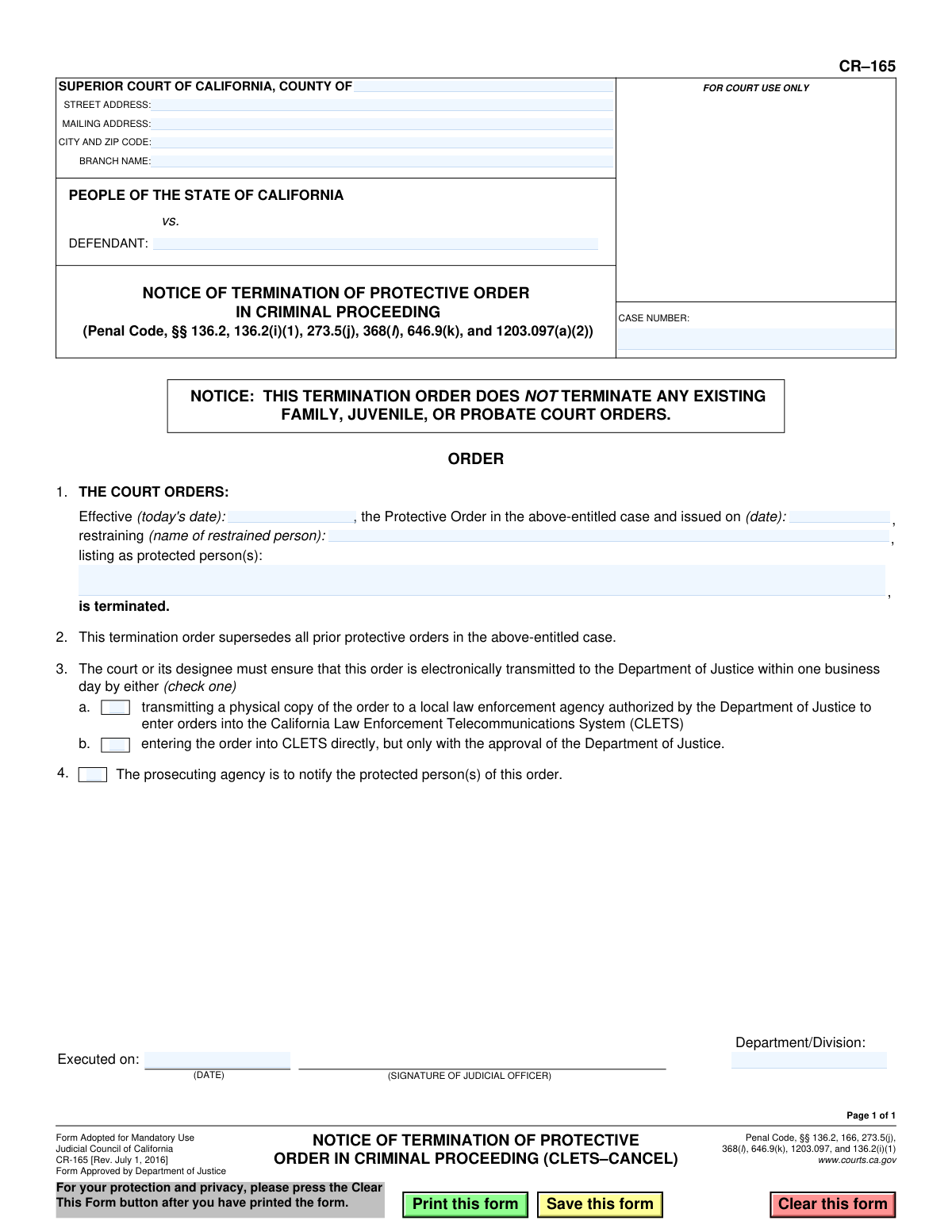
CR-165 is a mandatory Judicial Council of California form used by the court to formally terminate a protective order previously issued in a criminal proceeding. It serves as the official court order ending the restraints and directs law enforcement to remove the order from the California Law Enforcement Telecommunications System (CLETS). Today, this form can be filled out quickly and accurately using AI-powered services like Instafill.ai, which can also convert non-fillable PDF versions into interactive fillable forms.
CR-165 is part of the California court forms category on Instafill.
Our AI automatically handles information lookup, data retrieval, formatting, and form filling.
It takes less than a minute to fill out CR-165 using our AI form filling.
Securely upload your data. Information is encrypted in transit and deleted immediately after the form is filled out.

Form specifications

Form name: Notice of Termination of Protective Order in Criminal Proceeding (CLETS-CANCEL)
Number of fields: 20
Number of pages: 1
Language: English
main-image

Instafill Demo: How to fill out PDF forms in seconds with AI

How to Fill Out CR-165 Online for Free in 2026

Are you looking to fill out a CR-165 form online quickly and accurately? Instafill.ai offers the #1 AI-powered PDF filling software of 2026, allowing you to complete your CR-165 form in just 37 seconds or less.
Follow these steps to fill out your CR-165 form online using Instafill.ai:
  1. 1 Navigate to Instafill.ai and upload the CR-165 form or select it from the template library.
  2. 2 Provide the court and case information, including the county, court address, case number, and defendant's name.
  3. 3 Enter the details of the protective order being terminated, such as the original issue date.
  4. 4 List the full name of the restrained person and all protected persons as they appeared on the original order.
  5. 5 Indicate the effective date of the termination, which is typically the date the form is signed.
  6. 6 The judicial officer will select the method for transmitting the order to the Department of Justice for CLETS update, then sign and date the form.
  7. 7 Review all AI-populated fields for accuracy before the judicial officer executes the order and it is filed with the court.

Our AI-powered system ensures each field is filled out correctly, reducing errors and saving you time.

Why Choose Instafill.ai for Your Fillable CR-165 Form?

Speed

Complete your CR-165 in as little as 37 seconds.

Up-to-Date

Always use the latest 2026 CR-165 form version.

Cost-effective

No need to hire expensive lawyers.

Accuracy

Our AI performs 10 compliance checks to ensure your form is error-free.

Security

Your personal information is protected with bank-level encryption.

Frequently Asked Questions About Form CR-165

Form CR-165 is a court order used to officially terminate a protective order that was issued in a criminal case. It also serves as a notice to law enforcement to remove the original protective order from the California Law Enforcement Telecommunications System (CLETS).

This form is an official court order that is completed by court staff or attorneys involved in the case. However, it is only made effective once it is signed by a judicial officer, such as a judge.

No, this is very important. This form ONLY terminates the specific protective order from the criminal case listed on the form. It does not affect any other restraining orders you may have from a family, juvenile, or probate court.

CLETS is a statewide database used by California law enforcement. Canceling the order in CLETS is crucial because it removes the active protective order from the system, ensuring the restrained person is no longer subject to arrest for violating an order that has been terminated.

According to Section 4 of the form, the court orders the prosecuting agency, typically the District Attorney's office, to notify the protected person(s) that the order has been terminated.

To properly fill out the form, you need the court case number, the full name of the defendant (restrained person), the names of all protected persons, and the exact date the original protective order was issued.

After the judge signs the order, the court clerk ensures it is transmitted to the Department of Justice within one business day to be removed from the CLETS database. The prosecuting agency is then tasked with notifying the protected individuals.

The 'restrained person' is the defendant in the criminal case who was subject to the protective order. The 'protected person(s)' are the victim(s) or witness(es) who were being protected by that order.

This date is listed on the original protective order itself (e.g., Form CR-160). It can also be found by reviewing the official court file and minute orders for the criminal case.

Yes, services like Instafill.ai can help legal professionals and court staff fill out this form. AI can accurately auto-fill repetitive information like case numbers, names, and court details, which saves time and reduces the risk of errors.

Simply upload the CR-165 PDF to the Instafill.ai platform. The AI will make the fields interactive, allowing you to quickly populate the form by connecting a data source or entering the information once for automatic placement in all the correct fields.

If you have a flat or non-fillable PDF, you can use a tool like Instafill.ai. It can analyze the document and convert it into a fully interactive, fillable form online, so you can easily type in the required information before printing.

These checkboxes indicate how the court will notify law enforcement to cancel the order. The court checks 2a if it sends a physical copy to a local agency for entry into CLETS, or 2b if the court has approval to transmit the cancellation directly to the Department of Justice's system.

Compliance CR-165
Validation Checks by Instafill.ai

1
Mandatory Case Number
Ensures the 'CASE NUMBER' field (CaseNumber_ft) is not empty. The case number is the unique identifier for the legal proceeding and is essential for correctly filing the termination and linking it to the original protective order. Without a valid case number, the termination cannot be processed and will be rejected by the court clerk.
2
Defendant and Restrained Person Name Consistency
Verifies that the 'DEFENDANT' name in the header (HeaderDefendant_ft) matches the 'restrained person' name in section 1 (FillText34). This is a critical logical check to ensure the correct individual's protective order is being terminated. A mismatch could lead to the wrong order being canceled or the termination being legally invalid.
3
Mandatory Protected Person Name
Checks that the 'protected person(s)' field (FillText42) is not blank. The identity of the protected person is a fundamental component of the protective order. Failing to list who was protected makes it impossible to verify which order is being terminated and to notify the correct individuals.
4
Valid Original Order Issue Date
Validates that the date the original protective order was issued, specified in section 1 (FillText30), is a valid and properly formatted date (e.g., MM/DD/YYYY). This date is required to identify the specific order being terminated. An invalid or missing date will prevent the system from finding the correct record in CLETS and will result in processing failure.
5
Valid Termination Execution Date
Ensures the 'Executed on' date (ExecutedDate_dt) is a complete and valid date. This date signifies when the judicial officer signed the termination, making it legally effective. An invalid or missing date makes the order's effective date ambiguous and legally unenforceable.
6
Logical Date Sequence
Performs a logical check to ensure the 'Executed on' date (ExecutedDate_dt) is on or after the original protective order's issue date (FillText30). It is logically impossible to terminate an order before it was created. This validation prevents data entry errors that would render the document nonsensical and invalid.
7
Exclusive CLETS Transmission Method Selection
Verifies that exactly one of the two checkboxes in section 2 (petitioner_cb) is selected to indicate the CLETS transmission method. The form mandates a choice for how the order is sent to the Department of Justice. Selecting none or both options will halt processing, as the clerk will not know how to proceed with the required electronic notification.
8
Mandatory Court County
Checks that the 'COUNTY OF' field (CrtCounty_ft) in the court information header is filled. The county is required to establish the correct jurisdiction of the court issuing the termination. Without this information, the form cannot be correctly routed or filed, and its legal authority is unclear.
9
Mandatory Defendant Name
Ensures the 'DEFENDANT' field in the header (HeaderDefendant_ft) is populated. The defendant's name is a primary identifier for the case, along with the case number. Leaving this field blank would make it difficult to cross-reference the case and could lead to filing errors.
10
Mandatory Restrained Person Name
Validates that the name of the 'restrained person' in section 1 (FillText34) is provided. This field explicitly identifies the individual whose obligations under a protective order are being terminated. The termination is invalid without clearly identifying this person.
11
Court Location Completeness
Verifies that the court's location is adequately specified by checking for data in the 'CITY AND ZIP CODE' (CityZip_ft) and at least one of the address fields (Street_ft or MailingAdd_ft). This information is crucial for identifying the specific courthouse that issued the order. Incomplete address information can cause confusion and processing delays.
12
Department/Division Specification
Checks if the 'Department/Division' field (TextField8) is populated. This information helps in routing the document to the correct department within a large court system, ensuring it is handled by the appropriate personnel. While sometimes considered optional, its absence can slow down internal processing.

Common Mistakes in Completing CR-165

Entering an Incorrect or Incomplete Case Number

The case number is the primary identifier for the legal proceeding. People often make typos, transpose digits, or omit parts of the case number, causing the form to be rejected or filed under the wrong case. This delays the termination of the protective order in law enforcement systems. Always double-check the case number against official court documents before submission.

Confusing the 'Effective Date' and 'Original Order Date'

Section 1 requires two distinct dates: the date the termination becomes effective and the date the original protective order was issued. A common error is to enter the same date in both fields or to reverse them. This mistake can prevent law enforcement from identifying the correct order to remove from the California Law Enforcement Telecommunications System (CLETS), causing it to remain active.

Misspelling or Omitting Names of Involved Parties

The names of the restrained person and all protected persons must be spelled exactly as they appear on the original court order. Using nicknames, initials, or making spelling errors can cause a mismatch in the system, leading to the termination being rejected. This failure to update the record means the protective order could be wrongfully enforced.

Failing to Select the CLETS Transmission Method

Section 2 requires the court to indicate how the termination notice will be sent to the Department of Justice for entry into CLETS. Overlooking this checkbox creates a procedural halt, as it's unclear who is responsible for the data transmission. This inaction directly delays the removal of the protective order from the statewide law enforcement database.

Providing Incomplete Court Information

The form's header requires the full details of the court, including the county, specific branch name, and address. Filers sometimes omit the branch name or provide a generic P.O. Box instead of a street address. This can lead to the document being misrouted or delayed in processing by the court clerk's office.

Inconsistent Naming of the Defendant/Restrained Person

The defendant's name in the case caption at the top of the form must perfectly match the 'name of restrained person' listed in Section 1. Users may inadvertently use a full legal name in one field and a more common name in the other. This discrepancy creates ambiguity and can cause the form to be flagged for correction, delaying the termination process.

Using Ambiguous or Incorrect Date Formats

Legal documents require clear, unambiguous dates, typically in MM/DD/YYYY format. Users sometimes enter dates in a non-standard way (e.g., 01.05.24) or use formats that could be misinterpreted (e.g., 5/1/2024 could be May 1st or January 5th depending on locale). Such errors can lead to incorrect data entry into court systems, affecting the official record of when the order was terminated.

Omitting the Original Protective Order's Issuance Date

In Section 1, the field for the date the original protective order was issued is critical for identifying the specific order to be terminated. People may not have this information handy and leave it blank. Without this date, the court and law enforcement cannot be certain which order to cancel, especially if multiple orders exist, leading to rejection or significant delays.

Submitting a Form with Illegible Handwriting

If the form is a non-fillable PDF that is printed and completed by hand, poor handwriting can render names, dates, and case numbers unreadable. This forces court staff to guess at the information, leading to critical data entry errors or rejection of the document. AI-powered tools like Instafill.ai can convert flat PDFs into fillable forms to ensure all entries are perfectly legible.

Misunderstanding the Form's Limited Scope

The form clearly states it does not terminate orders from Family, Juvenile, or Probate court. A party might mistakenly believe this document cancels all legal restrictions between the individuals. This misunderstanding can lead to the unintentional violation of other valid court orders, which carries severe legal consequences, including potential arrest.
Saved over 80 hours a year

“I was never sure if my IRS forms like W-9 were filled correctly. Now, I can complete the forms accurately without any external help.”

Kevin Martin Green

Your data stays secure with advanced protection from Instafill and our subprocessors

Robust compliance program

Transparent business model

You’re not the product. You always know where your data is and what it is processed for.

ISO 27001, HIPAA, and GDPR

Our subprocesses adhere to multiple compliance standards, including but not limited to ISO 27001, HIPAA, and GDPR.

Security & privacy by design

We consider security and privacy from the initial design phase of any new service or functionality. It’s not an afterthought, it’s built-in, including support for two-factor authentication (2FA) to further protect your account.

Fill out CR-165 with Instafill.ai

Worried about filling PDFs wrong? Instafill securely fills notice-of-termination-of-protective-order-in-criminal-proceeding-clets-cancel forms, ensuring each field is accurate.