Yes! You can use AI to fill out Notice to Client/Pro Se Party Pursuant to R. 4:23-5(a)(1) - Appendix II-A
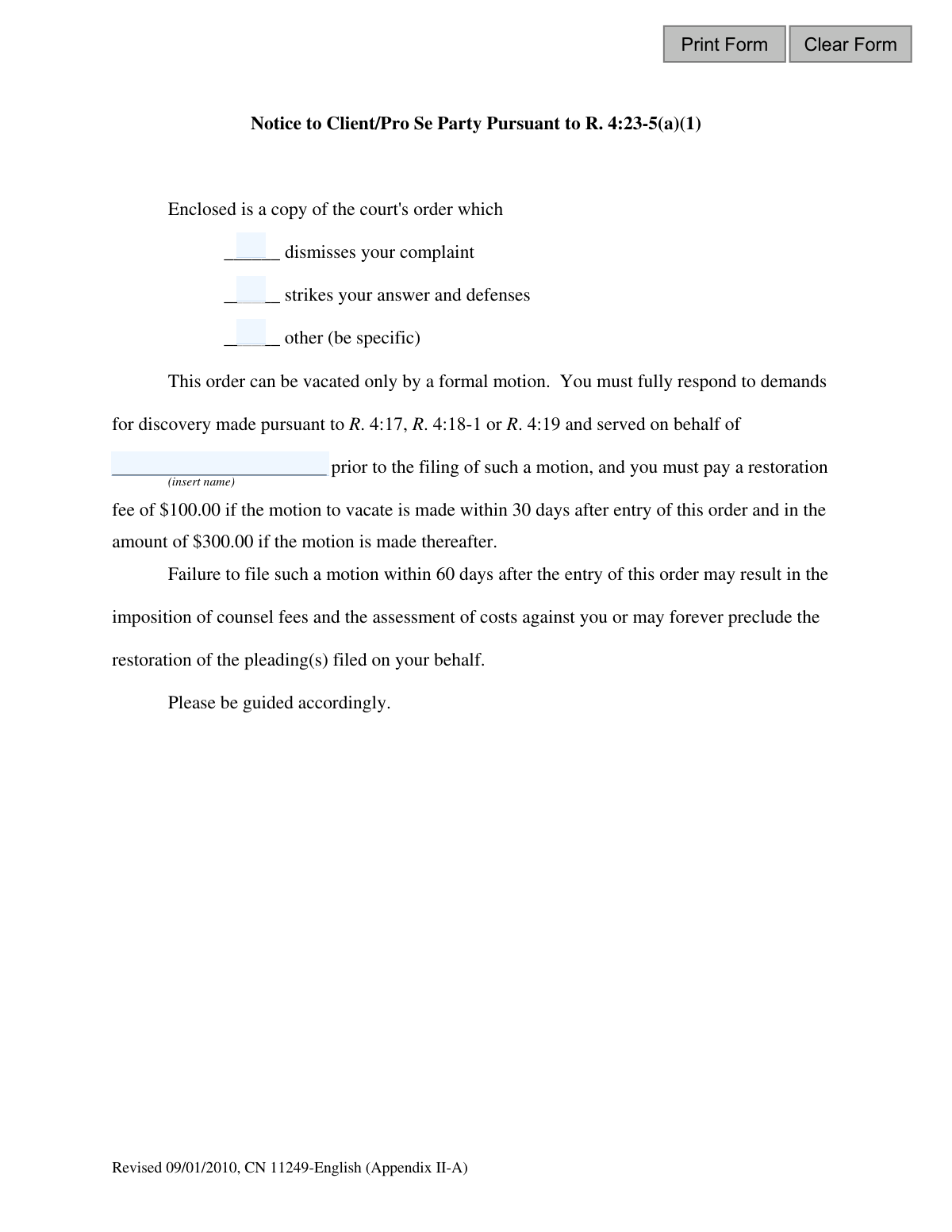
This form is a formal notification required under New Jersey Court Rule 4:23-5(a)(1). It is sent by an attorney to their client or to an opposing party representing themselves (pro se) to inform them that a court has dismissed their complaint or stricken their answer due to a failure to respond to discovery requests. The notice details the steps and fees required to vacate the court's order and restore the case. Today, this form can be filled out quickly and accurately using AI-powered services like Instafill.ai, which can also convert non-fillable PDF versions into interactive fillable forms.
Appendix II-A is part of the
New Jersey forms category on Instafill.
Our AI automatically handles information lookup, data retrieval, formatting, and form filling.
It takes less than a minute to fill out Appendix II-A using our AI form filling.
Securely upload your data. Information is encrypted in transit and deleted immediately after the form is filled out.
Form specifications
| Form name: | Notice to Client/Pro Se Party Pursuant to R. 4:23-5(a)(1) - Appendix II-A |
| Number of fields: | 6 |
| Number of pages: | 1 |
| Language: | English |
Instafill Demo: How to fill out PDF forms in seconds with AI
How to Fill Out Appendix II-A Online for Free in 2026
Are you looking to fill out a APPENDIX II-A form online quickly and accurately? Instafill.ai offers the #1 AI-powered PDF filling software of 2026, allowing you to complete your APPENDIX II-A form in just 37 seconds or less.
Follow these steps to fill out your APPENDIX II-A form online using Instafill.ai:
- 1 Navigate to Instafill.ai and upload the 'Notice to Client/Pro Se Party' form or select it from the template library.
- 2 Use the AI assistant to identify the recipient (Client or Pro Se Party) and the details of the enclosed court order.
- 3 Check the appropriate box to specify the court's action, such as dismissing a complaint or striking an answer.
- 4 Enter the name of the party on whose behalf the discovery demands were originally served.
- 5 Review all the auto-filled information, including names and the specific court action, to ensure complete accuracy.
- 6 Download, print, or electronically send the completed notice to be served on the client or pro se party as required by court rules.
Our AI-powered system ensures each field is filled out correctly, reducing errors and saving you time.
Why Choose Instafill.ai for Your Fillable Appendix II-A Form?
Speed
Complete your Appendix II-A in as little as 37 seconds.
Up-to-Date
Always use the latest 2026 Appendix II-A form version.
Cost-effective
No need to hire expensive lawyers.
Accuracy
Our AI performs 10 compliance checks to ensure your form is error-free.
Security
Your personal information is protected with bank-level encryption.
Frequently Asked Questions About Form Appendix II-A
This is a formal legal notice informing you that a court order has been issued against you for failing to provide required information, known as 'discovery,' in your lawsuit. This order negatively impacts your case, such as by dismissing your complaint or striking your defense.
You received this because you or your attorney did not respond to a demand for information (discovery) from the other party in your case. As a result, the court has taken action against you.
If your complaint is dismissed, your lawsuit is thrown out. If your answer is stricken, your defense is removed, which can quickly lead to a default judgment against you.
You must immediately provide complete and accurate responses to the outstanding discovery requests from the other party. You cannot fix the situation without first providing this information.
After providing the missing discovery, you must file a formal 'motion to vacate' with the court. You will also need to pay a restoration fee as part of this process.
The fee is $100 if you file your motion to vacate within 30 days of the order. If you file after 30 days, the fee increases to $300.
Failing to file a motion within 60 days can have severe consequences. The court may order you to pay the other side's attorney fees, and you could permanently lose the ability to restore your case, likely resulting in losing the lawsuit.
You must provide full responses to the specific discovery demands mentioned in the notice, which could be answers to questions (Interrogatories) or requested documents. These are the items you previously failed to provide.
Your lawyer may have sent this to you to formally notify you of the urgent situation and the need for your cooperation in providing the missing discovery information. Contact your attorney immediately to discuss the next steps.
No, you should never ignore this notice. Doing so will almost certainly result in the permanent dismissal of your case or a judgment being entered against you.
Yes, while you must provide the discovery answers yourself, AI services like Instafill.ai can help prepare the necessary legal forms, like the 'motion to vacate'. AI can auto-fill your case information accurately, saving time and reducing errors.
You can upload the blank motion form to Instafill.ai, and its AI will identify all the fields. You then provide your information once, and the tool automatically populates the motion and any other related court documents.
Instafill.ai can solve this. Simply upload the flat, non-fillable PDF, and the platform will convert it into an interactive, fillable form that you can complete and download easily.
Compliance Appendix II-A
Validation Checks by Instafill.ai
1
Ensures a Court Order Action is Selected
This validation confirms that at least one of the checkboxes ('dismisses your complaint', 'strikes your answer and defenses', or 'other') has been selected. It is critical to specify the action taken by the court for the notice to be legally sufficient and informative. If no action is selected, the form submission will be rejected as incomplete.
2
Requires Specifics if 'Other' Action is Chosen
This check ensures that if the 'other' checkbox is selected, the corresponding text field for specifics is not empty. The form explicitly states '(be specific)', making this detail mandatory for clarifying the court's action. Failure to provide a description when 'other' is checked will result in a validation error, preventing submission until the specific action is described.
3
Ensures 'Other' is Checked if a Description is Provided
This validation enforces logical consistency by requiring the 'other' checkbox to be selected if any text is entered into the associated description field. This prevents orphaned data where a description is provided without the corresponding option being formally selected. If text is present in the description field but the 'other' box is not checked, the user will be prompted to correct the selection.
4
Validates Presence of the Responding Party's Name
This check verifies that the 'name' field, which identifies the party on whose behalf discovery was served, is not left blank. This name is essential for the recipient to know who to respond to, and its absence makes the notice incomplete and potentially invalid. A submission with an empty name field will be blocked.
5
Validates the Format of the Party's Name
This validation inspects the 'name' field for invalid characters, such as most symbols or emojis, that are not typically part of a person's or legal entity's name. This ensures data quality and proper rendering in legal documents and systems. An entry containing disallowed characters will trigger an error, requiring the user to correct the name.
6
Enforces Minimum Length for the Party's Name
This check ensures that the entered name consists of at least two characters. This helps prevent accidental or nonsensical entries like a single initial or character. A name that is too short is likely an error and will cause the validation to fail, prompting the user for a more complete name.
7
Enforces Maximum Length for the Party's Name
This validation restricts the length of the 'name' field to a reasonable maximum, such as 100 characters. This serves to prevent data entry errors, malicious input, and ensures the name will fit within standardized document layouts. Submissions with excessively long names will be rejected.
8
Prevents Fields from Containing Only Whitespace
This check ensures that required text fields, such as the 'name' and the 'other' description, do not consist solely of spaces, tabs, or line breaks. Such entries are functionally empty and must be treated as incomplete to maintain data integrity. The system will trim leading/trailing whitespace and then check if the field is empty, rejecting the submission if it is.
9
Enforces Minimum Length for 'Other' Description
When the 'other' action is selected, this validation ensures the accompanying description meets a minimum length, for example, 10 characters. This encourages a truly specific and meaningful explanation as required by the form, rather than a vague or single-word entry. A description that is too brief will be flagged as insufficient.
10
Verifies Correct Form Version is Used
This system-level check validates that the data being submitted corresponds to the expected form version, identified by 'Revised 09/01/2010, CN 11249-English'. This is crucial for ensuring that the data aligns with the correct legal rules and processing logic associated with that specific version. A mismatch could lead to processing errors or legal insufficiencies, so the submission would be rejected.
11
Prohibits Numeric Characters in the Party's Name
This validation rule specifically disallows the use of digits (0-9) within the 'name' field. While some business names contain numbers, for a legal notice of this type, it serves as a strong sanity check against data entry errors. If a number is detected, the system will prompt the user to verify and correct the name, assuming it's a typo.
12
Ensures Only One Court Order Action is Selected
This validation enforces a business rule that only one of the three court order actions can be selected at a time. Although they may be presented as checkboxes, the legal context may imply they are mutually exclusive. This check prevents ambiguity about the court's order, ensuring the notice is clear and singular in its statement. If more than one option is selected, the form will return an error.
Common Mistakes in Completing Appendix II-A
A sender may fill in the party's name but forget to check any of the boxes that specify the court's action (e.g., 'dismisses your complaint'). This omission makes the notice fundamentally defective, as it fails to inform the recipient of the specific consequence of their failure to provide discovery. The notice would be considered invalid, causing delays and requiring it to be re-issued correctly.
This form specifies a precise court action, and checking the wrong box misinforms the recipient about the legal status of their case. For example, checking 'dismisses your complaint' for a defendant who has filed an answer, not a complaint, causes significant confusion. This error can lead to the recipient taking incorrect responsive actions and may invalidate the notice. Always double-check the court order to ensure the correct box is marked.
The form requires the name of the party who served the discovery demands, but users often mistakenly enter the recipient's name, their own law firm's name, or another incorrect entity. This error creates ambiguity about who is owed the discovery responses, potentially delaying case resolution or invalidating the notice. Using a tool like Instafill.ai can help prevent this by storing and accurately auto-filling correct party names, ensuring consistency.
The form provides an 'other' option for unique court actions not covered by the standard choices. A common mistake is to check the 'other' box but fail to provide a specific description of the court's action in the space provided. This renders the notice incomplete and confusing, and it could be challenged as defective, forcing the sender to start the process over.
Even when the 'other' field is filled out, the description may be too vague, such as 'discovery issues' instead of the specific action from the court order, like 'strikes Defendant's First Affirmative Defense.' This ambiguity can render the notice ineffective and lead to legal challenges, requiring the sender to issue a corrected notice and restarting the procedural clock.
The notice begins by stating, 'Enclosed is a copy of the court's order...' A critical error is sending this notice without attaching the actual order it refers to. Without the order, the recipient cannot verify the court's action or understand its full context, making the notice incomplete and potentially invalidating the service. Always ensure the corresponding court order is attached before sending.
A client or pro se party receiving this notice may panic, believing their case is permanently over. They might not understand that the order can be vacated by filing a motion, responding to discovery, and paying a fee within a specific timeframe. This misunderstanding can lead them to abandon their case when they actually have a clear, time-sensitive window to fix the issue.
The notice explicitly outlines a timeline for action and escalating restoration fees ($100 within 30 days, $300 thereafter). Recipients often misread or ignore these crucial details. Missing the 60-day final deadline to file a motion can result in the permanent dismissal of their case or striking of their answer, with little to no chance of restoration.
This form is marked with a revision date ('Revised 09/01/2010'), and court forms are updated periodically. Using an outdated version may lead to rejection by the court clerk or a successful challenge by the opposing party, as it may not contain the currently required legal language. Always verify on the judiciary's website that you are using the most current version of any legal form.
When this form is filled out by hand, poor handwriting in the party name field or the 'other' description can make the notice unreadable and ambiguous. This can lead to disputes over the notice's validity and cause unnecessary delays. To avoid this, it is best to type the information. Since many court forms are non-fillable PDFs, an AI tool like Instafill.ai can convert the document into a fillable version, ensuring all entries are perfectly legible.
Saved over 80 hours a year
“I was never sure if my IRS forms like W-9 were filled correctly. Now, I can complete the forms accurately without any external help.”
Kevin Martin Green
Your data stays secure with advanced protection from Instafill and our subprocessors

Robust compliance program
Transparent business model
You’re not the product. You always know where your data is and what it is processed for.
ISO 27001, HIPAA, and GDPR
Our subprocesses adhere to multiple compliance standards, including but not limited to ISO 27001, HIPAA, and GDPR.
Security & privacy by design
We consider security and privacy from the initial design phase of any new service or functionality. It’s not an afterthought, it’s built-in, including support for two-factor authentication (2FA) to further protect your account.
Fill out Appendix II-A with Instafill.ai
Worried about filling PDFs wrong? Instafill securely fills notice-to-clientpro-se-party-pursuant-to-r-423-5a1-appendix-ii-a forms, ensuring each field is accurate.