Yes! You can use AI to fill out Notice to Client/Pro Se Party Pursuant to R. 4:23-5(a)(2) - Appendix II-B

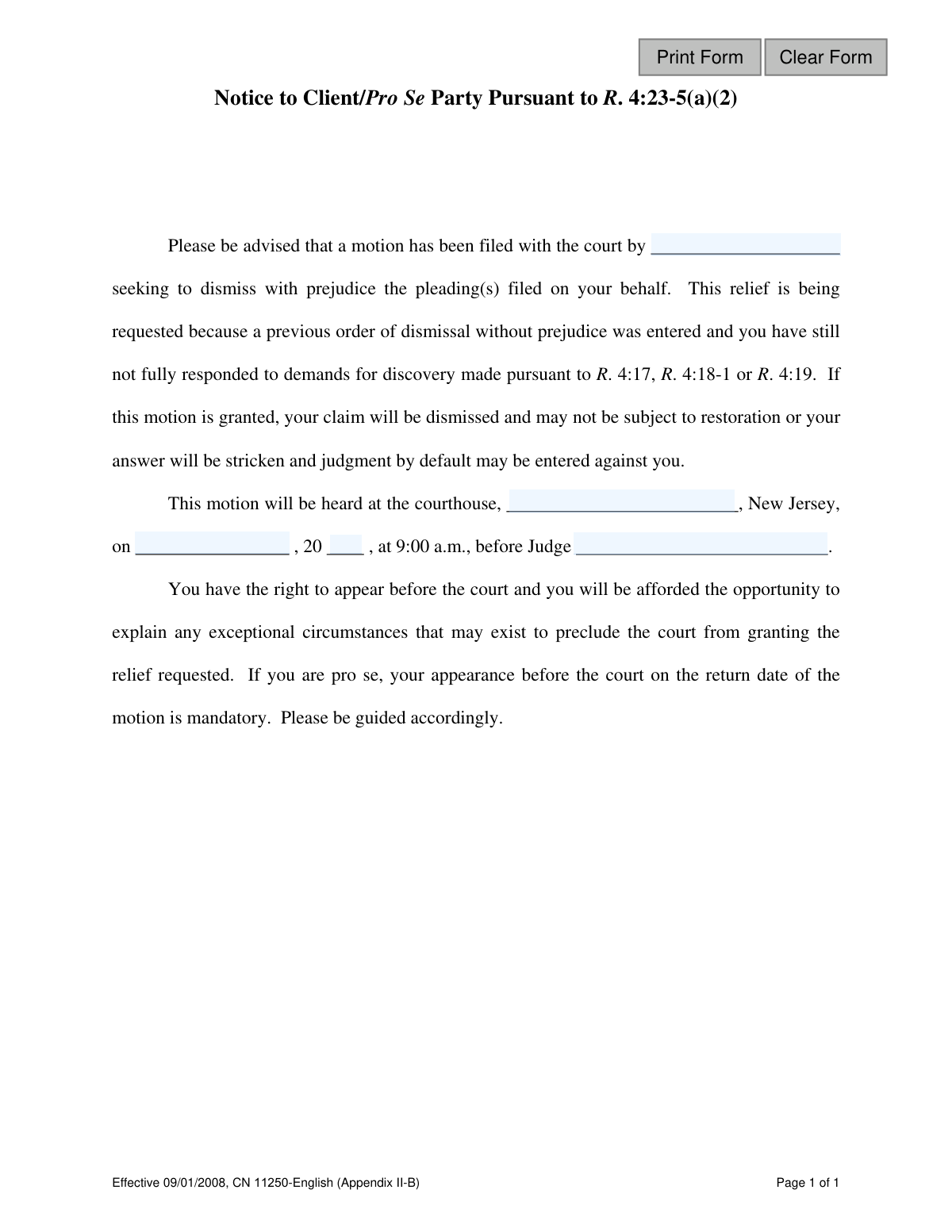
The 'Notice to Client/Pro Se Party Pursuant to R. 4:23-5(a)(2) - Appendix II-B' is a critical legal document used in New Jersey civil litigation. It serves as a final warning that a party's case is at risk of being permanently dismissed (with prejudice) for not responding to discovery demands after a prior dismissal order. This notice is crucial as it mandates a court appearance for pro se litigants and requires an immediate response to avoid a final, adverse judgment. Today, this form can be filled out quickly and accurately using AI-powered services like Instafill.ai, which can also convert non-fillable PDF versions into interactive fillable forms.
Appendix II-B is part of the New Jersey forms category on Instafill.
Our AI automatically handles information lookup, data retrieval, formatting, and form filling.
It takes less than a minute to fill out Appendix II-B using our AI form filling.
Securely upload your data. Information is encrypted in transit and deleted immediately after the form is filled out.

Form specifications

Form name: Notice to Client/Pro Se Party Pursuant to R. 4:23-5(a)(2) - Appendix II-B
Number of fields: 7
Number of pages: 1
Language: English
main-image

Instafill Demo: How to fill out PDF forms in seconds with AI

How to Fill Out Appendix II-B Online for Free in 2026

Are you looking to fill out a APPENDIX II-B form online quickly and accurately? Instafill.ai offers the #1 AI-powered PDF filling software of 2026, allowing you to complete your APPENDIX II-B form in just 37 seconds or less.
Follow these steps to fill out your APPENDIX II-B form online using Instafill.ai:
  1. 1 Navigate to Instafill.ai and upload or select the 'Notice to Client/Pro Se Party - Appendix II-B' form.
  2. 2 Use the AI assistant to identify the fillable fields, such as the name of the moving party, courthouse, hearing date, and judge's name.
  3. 3 Enter the name of the attorney or party who is filing the motion to dismiss.
  4. 4 Input the full address of the courthouse where the motion will be heard.
  5. 5 Carefully enter the scheduled hearing date and the name of the presiding judge.
  6. 6 Review all entered information for complete accuracy to ensure compliance with court rules.
  7. 7 Securely download, print, or e-file the completed notice for service on the client/pro se party and filing with the court.

Our AI-powered system ensures each field is filled out correctly, reducing errors and saving you time.

Why Choose Instafill.ai for Your Fillable Appendix II-B Form?

Speed

Complete your Appendix II-B in as little as 37 seconds.

Up-to-Date

Always use the latest 2026 Appendix II-B form version.

Cost-effective

No need to hire expensive lawyers.

Accuracy

Our AI performs 10 compliance checks to ensure your form is error-free.

Security

Your personal information is protected with bank-level encryption.

Frequently Asked Questions About Form Appendix II-B

This is a serious legal notice informing you that the opposing party in your lawsuit has asked the court to permanently dismiss your case because you have not provided required information, even after a previous warning.

You received this because a court order previously dismissed your case 'without prejudice' for failing to respond to discovery demands, and you have still not provided the requested information or documents.

This is a final and permanent dismissal of your case. If granted, you will lose your right to pursue your claim and will not be able to file it again.

The attorney or party who is filing the motion to dismiss your case fills out this form. You are the recipient of this notice, not the one who completes it.

You must take immediate action. If you have an attorney, contact them right away. If you are representing yourself ('pro se'), you must appear in court on the date listed.

Yes, if you are a 'pro se' party (representing yourself), the form states that your appearance in court on the return date of the motion is mandatory.

If you ignore this notice, the court will likely grant the motion. This means your claim will be permanently dismissed, or if you are the defendant, a default judgment may be entered against you.

Discovery is the formal process in a lawsuit where parties exchange information, such as answers to written questions (R. 4:17) or requests for documents (R. 4:18-1). This notice means you have failed to comply with these requests.

Exceptional circumstances are extraordinary reasons beyond your control that prevented you from providing the discovery information. You will have the opportunity to present these reasons to the judge to argue against the dismissal.

The party sending the notice fills in the name of who is seeking the dismissal, the courthouse address, the specific date and time of the hearing, and the name of the presiding judge.

Yes, the party sending the notice can use services like Instafill.ai. AI can accurately auto-fill form fields like court information and party names, which saves time and helps prevent errors.

The sender would upload the form's PDF to the Instafill.ai platform. The AI would automatically make the fields fillable, and they could then type in the hearing details or use auto-fill to complete it quickly.

If the sender has a 'flat' or non-fillable PDF, they can upload it to a service like Instafill.ai. The platform's technology can convert it into an interactive, fillable form that can be completed and saved digitally.

Compliance Appendix II-B
Validation Checks by Instafill.ai

1
Required Filing Party Name
This validation ensures that the name of the party filing the motion (Text1) is not empty. This information is critical for the recipient to understand who is taking legal action against them. A submission without this name would render the notice legally deficient and invalid.
2
Required Courthouse Location
This check verifies that the courthouse location field (Text2) has been filled in. The recipient must know the exact physical location of the hearing to attend. An empty field would make it impossible for the client or pro se party to appear, potentially resulting in an unfair default judgment.
3
Required Hearing Date
This validation confirms that the hearing date, specifically the month and day (Text3), is provided. Without a specific date, the notice fails its primary purpose of informing the recipient when they must appear in court. This is a fundamental requirement for a valid legal notice.
4
Required Hearing Year
This check ensures that the two-digit year for the hearing (Text4) is entered. This field is essential for constructing the full, unambiguous date of the court appearance. An omission would create critical uncertainty and could invalidate the entire notice.
5
Required Judge's Name
This validation verifies that the name of the presiding judge (Text5) has been entered. Knowing the judge is important for legal preparation, context, and ensuring the notice is directed to the correct courtroom. An empty field makes the notice incomplete and unprofessional.
6
Valid Future Hearing Date
This check combines the date (Text3) and year (Text4) fields to form a full date and validates that this date is in the future. A court hearing cannot be scheduled for a past date, so this logical check prevents clerical errors that would make the notice nonsensical and invalid. If the date is not in the future, the submission should be rejected.
7
Valid Calendar Date Logic
This validation ensures the combination of the day/month (Text3) and year (Text4) fields results in a real calendar date. For example, it would flag an entry like 'April 31' or 'February 30' as invalid. This prevents the creation of a notice with an impossible date, which would cause confusion and could be legally challenged.
8
Numeric Two-Digit Year Format
This check ensures the hearing year field (Text4) contains exactly two numeric digits (e.g., '25'). This maintains data consistency and prevents invalid entries like '2025' or non-numeric text like 'ab'. This strict format is necessary for the system to correctly parse and construct the full date.
9
Reasonable Year Value
This validation checks that the two-digit year (Text4) is within a reasonable range, such as the current year or up to 5 years in the future. This helps catch significant typographical errors, like entering '94' instead of '24', which would schedule the hearing decades in the past. An unreasonable year value should trigger a warning or error.
10
Plausible Name Content for Filing Party
This check validates that the filing party name field (Text1) contains plausible text, such as alphabetic characters, and is not composed solely of numbers or symbols. This helps ensure a legitimate person or entity name is entered, improving data quality and preventing nonsensical entries like '12345' or '---'.
11
Plausible Name Content for Judge
This validation verifies that the judge's name field (Text5) contains plausible text, primarily alphabetic characters, and not just random symbols or numbers. This ensures the data is meaningful and represents a person's name, which is critical for the document's validity and professionalism. Entries like '!@#$%' would be rejected.
12
Character Length Limit on All Fields
This check imposes a reasonable maximum character length on all text input fields (Text1-Text5). This prevents data entry errors, potential buffer overflow issues, and ensures the final document does not have formatting or layout problems caused by excessively long text. For example, a judge's name should not be 500 characters long.

Common Mistakes in Completing Appendix II-B

Entering the Incorrect Movant Name

This error occurs when the filer confuses the parties and lists their own client or the wrong entity as the one filing the motion. The consequences are significant, as it renders the notice legally defective and confusing to the recipient, potentially causing the motion to be rejected and leading to delays. To avoid this, carefully review the original motion document to confirm the exact name of the party seeking the dismissal.

Providing an Ambiguous Courthouse Location

Filers often enter just a city name or an informal location instead of the full, official courthouse address or county seat. This ambiguity can cause the client or pro se party to go to the wrong building, miss their mandatory court appearance, and face a default judgment. Always use the complete and official courthouse name and city as specified in the case documents or on the New Jersey Courts website.

Inputting an Incorrect Hearing Date

Simple typographical errors, such as transposing numbers or writing the wrong month, are common when entering the hearing date. An incorrect date is a critical failure, as it will cause the client or pro se party to miss the hearing, likely resulting in their case being dismissed with prejudice. To prevent this, meticulously double-check the date against the court's official notice and use a clear, unambiguous format like 'Month Day' (e.g., 'July 15').

Misspelling the Judge's Name

The judge's name is often misspelled or entered without the proper title (e.g., J.S.C.), which can happen due to haste or unfamiliarity. While less critical than a wrong date, it appears unprofessional and can cause confusion and delays for the recipient when trying to locate the correct courtroom on the hearing day. Always verify the judge's full name and spelling from the official court docket.

Leaving Critical Fields Blank

In a rush, it's easy to overlook one of the blanks for the movant, courthouse, date, or judge. An incomplete notice is legally insufficient and will be rejected by the court, invalidating the service and delaying the legal process. Before finalizing, perform a thorough review to ensure every single field is accurately filled; AI-powered tools like Instafill.ai can help by flagging empty required fields.

Using Illegible Handwriting

When a form is only available as a non-fillable PDF, it must be printed and completed by hand, often resulting in illegible handwriting. If the court clerk or recipient cannot clearly read the date, location, or names, they may misinterpret the information, leading to missed deadlines and adverse rulings. To avoid this, print clearly in block letters or use a service like Instafill.ai, which can convert flat PDFs into digitally fillable forms for perfect clarity.

Using an Incorrect Date Format

The form has separate fields for the month/day and the last two digits of the year ('on _____, 20__'). A common mistake is to write the full date in the first blank or use a numerical format (MM/DD/YYYY) that doesn't fit the layout. This creates a confusing and improperly executed document, which may be rejected. Follow the form's structure precisely by entering the month and day in the first blank and only the two-digit year in the second.

Failing to Serve the Correct Party

This notice must be sent to the 'Client/Pro Se Party,' not their attorney (if they have one) or another party. This mistake happens from misunderstanding the specific notice requirements of Rule 4:23-5(a)(2). Improper service invalidates the notice, meaning the court cannot grant the motion, which wastes time and resources and may require the entire process to be restarted.

Altering the Pre-filled Hearing Time

The form specifies a hearing time of '9:00 a.m.', which is often a standard time for these types of motions. A user might mistakenly 'correct' this time based on their own calendar, creating a discrepancy with the official court schedule. This can cause the recipient to miss the hearing, so you should never alter pre-filled information unless explicitly directed by a court order.

Using the Wrong Version of the Notice Form

The New Jersey Court Rules have multiple, similar-looking notice forms for discovery-related dismissals (e.g., Appendix II-A for dismissal *without* prejudice). Using the wrong form provides incorrect legal information to the recipient about the severity and finality of the motion. This procedural error can invalidate the motion entirely, so always confirm you are using the correct Appendix (in this case, II-B) for the specific relief sought.
Saved over 80 hours a year

“I was never sure if my IRS forms like W-9 were filled correctly. Now, I can complete the forms accurately without any external help.”

Kevin Martin Green

Your data stays secure with advanced protection from Instafill and our subprocessors

Robust compliance program

Transparent business model

You’re not the product. You always know where your data is and what it is processed for.

ISO 27001, HIPAA, and GDPR

Our subprocesses adhere to multiple compliance standards, including but not limited to ISO 27001, HIPAA, and GDPR.

Security & privacy by design

We consider security and privacy from the initial design phase of any new service or functionality. It’s not an afterthought, it’s built-in, including support for two-factor authentication (2FA) to further protect your account.

Fill out Appendix II-B with Instafill.ai

Worried about filling PDFs wrong? Instafill securely fills notice-to-clientpro-se-party-pursuant-to-r-423-5a2-appendix-ii-b forms, ensuring each field is accurate.