Yes! You can use AI to fill out Notification of Right to Seek Legal Advice on Immigration Status Consequences
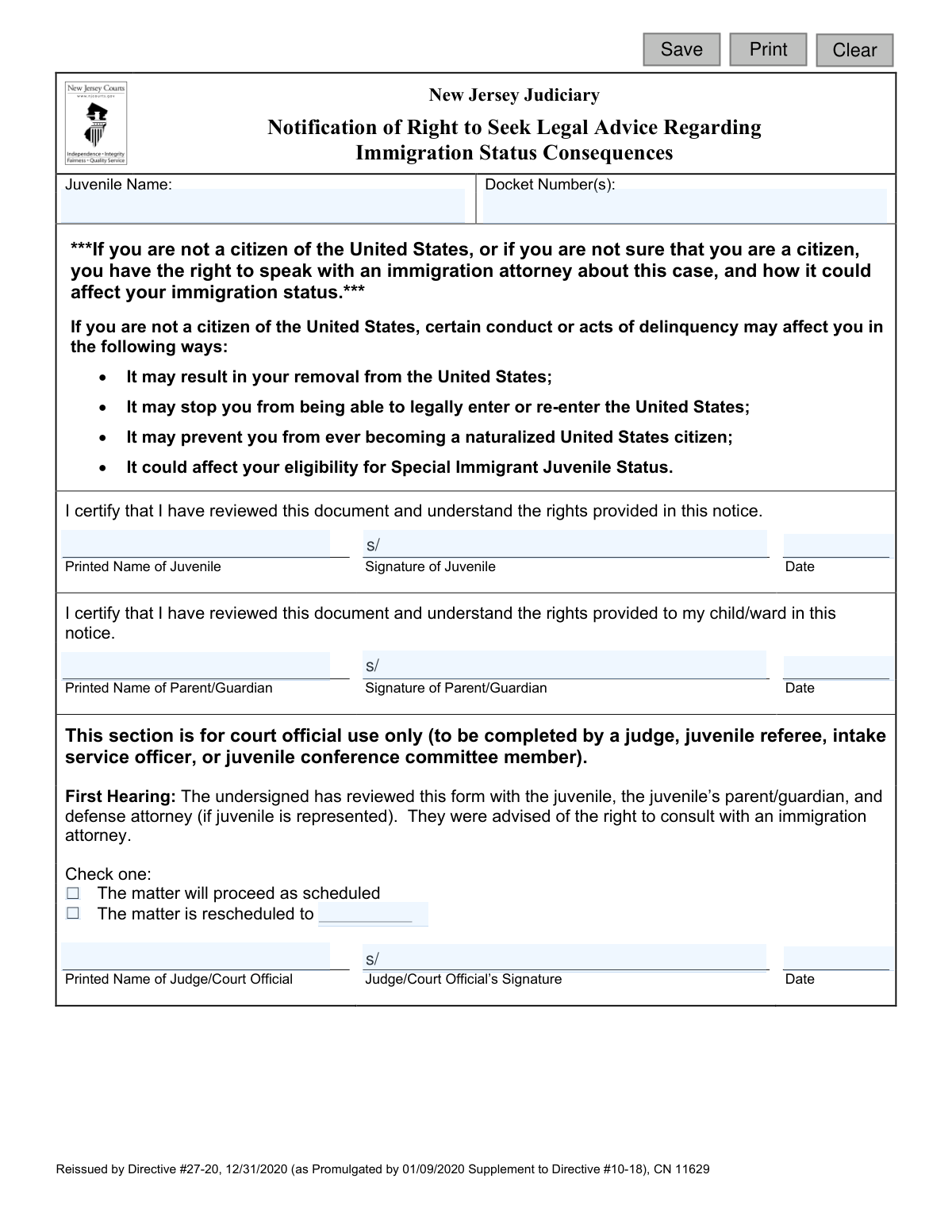
This form, officially titled 'Notification of Right to Seek Legal Advice on Immigration Status Consequences' (CN 11629), is used by the New Jersey Judiciary to inform a juvenile and their parent/guardian about the potential immigration consequences of a delinquency case. It ensures they are aware of their right to consult with an immigration attorney regarding how the case could affect their status, including potential removal, inadmissibility, or ineligibility for naturalization. Today, this form can be filled out quickly and accurately using AI-powered services like Instafill.ai, which can also convert non-fillable PDF versions into interactive fillable forms.
CN 11629 is part of the
New Jersey forms category on Instafill.
Our AI automatically handles information lookup, data retrieval, formatting, and form filling.
It takes less than a minute to fill out CN 11629 using our AI form filling.
Securely upload your data. Information is encrypted in transit and deleted immediately after the form is filled out.
Form specifications
| Form name: | Notification of Right to Seek Legal Advice on Immigration Status Consequences |
| Number of fields: | 17 |
| Number of pages: | 1 |
| Language: | English |
Instafill Demo: How to fill out PDF forms in seconds with AI
How to Fill Out CN 11629 Online for Free in 2026
Are you looking to fill out a CN 11629 form online quickly and accurately? Instafill.ai offers the #1 AI-powered PDF filling software of 2026, allowing you to complete your CN 11629 form in just 37 seconds or less.
Follow these steps to fill out your CN 11629 form online using Instafill.ai:
- 1 Navigate to Instafill.ai and upload or select the 'Notification of Right to Seek Legal Advice on Immigration Status Consequences' form.
- 2 Use the AI tool to automatically populate the juvenile's name and docket number(s) in the appropriate fields.
- 3 Carefully review the pre-filled information and the notification text with the juvenile and their parent/guardian.
- 4 The juvenile provides their printed name, signature, and the date in the designated section to certify they have reviewed the document.
- 5 The parent or guardian provides their printed name, signature, and the date to certify their understanding.
- 6 The court official completes the final section, marking the hearing status, and provides their name, signature, and the date.
- 7 Securely save, print, or submit the completed digital form as required by the court's procedures.
Our AI-powered system ensures each field is filled out correctly, reducing errors and saving you time.
Why Choose Instafill.ai for Your Fillable CN 11629 Form?
Speed
Complete your CN 11629 in as little as 37 seconds.
Up-to-Date
Always use the latest 2026 CN 11629 form version.
Cost-effective
No need to hire expensive lawyers.
Accuracy
Our AI performs 10 compliance checks to ensure your form is error-free.
Security
Your personal information is protected with bank-level encryption.
Frequently Asked Questions About Form CN 11629
This form is used by the New Jersey Judiciary to officially inform a juvenile who is not a U.S. citizen that their case could have serious consequences for their immigration status and that they have the right to consult an immigration attorney.
The juvenile named in the case, their parent or legal guardian, and a court official (like a judge or intake officer) must all sign this form. The signatures certify that everyone understands the rights and potential consequences discussed.
You will need to provide the juvenile's name and the court docket number(s). The juvenile and their parent/guardian must also print their names, sign, and date the form in the designated sections.
The form warns that a delinquency finding could result in your removal from the U.S., prevent you from legally re-entering the country, stop you from becoming a U.S. citizen, or negatively affect your eligibility for Special Immigrant Juvenile Status.
Yes, the form explicitly states that if you are not a citizen or if you are unsure of your citizenship status, you have the right to speak with an immigration attorney. It is crucial to understand the potential risks.
This form is typically reviewed and signed during a court hearing, as noted in the 'First Hearing' section. A court official will go over the form with you and your parent/guardian before you sign.
After you sign, the court official will decide whether to proceed with the hearing or reschedule it, potentially to give you time to consult an immigration attorney. The signed form then becomes part of your official court record.
No, signing the form only acknowledges that you have been informed of your right to seek legal advice. It does not obligate you to hire an attorney, though it is highly recommended if you have immigration concerns.
Your parent or guardian's signature certifies that they have also reviewed the document and understand the rights being provided to you. This ensures that a responsible adult is aware of the serious potential consequences.
Yes, services like Instafill.ai use AI to accurately auto-fill form fields like your name and docket number, which can save time and help avoid mistakes. You will still need to print the form for physical signatures.
Simply upload the PDF to the Instafill.ai platform, and its AI will make the fields interactive. You can then type your information directly into the form, download it, and print it for signing.
If you have a non-fillable or 'flat' PDF, you can use a service like Instafill.ai to instantly convert it into an interactive, fillable form. This allows you to type your information neatly before printing.
That section is reserved for the judge or court officer to complete during your hearing. They will use it to document that the form was reviewed with you and to indicate whether your case is proceeding as scheduled or being rescheduled.
If you are confused about any part of the form, you should ask the judge, your defense attorney, or the court official for clarification before you sign. It is very important that you fully understand your rights and the document's contents.
Compliance CN 11629
Validation Checks by Instafill.ai
1
Ensures Juvenile Name is Provided
This check verifies that the 'Juvenile Name' field (juvName) is not empty. The juvenile's name is a primary identifier for the legal document and is essential for associating the notification with the correct individual. If this field is left blank, the form submission will be rejected with a message requiring the name to be entered.
2
Validates Docket Number Presence and Format
This validation ensures the 'Docket Number(s)' field (docketNums) is not empty and conforms to a standard format (e.g., alphanumeric with hyphens). The docket number is the unique identifier for the court case, and its accuracy is critical for correct filing and record-keeping. An invalid or missing docket number would prevent the form from being linked to the case file.
3
Confirms Juvenile Signature is Captured
This check verifies that the 'Signature of Juvenile' field (sigJuv) contains a signature. The juvenile's signature is legal proof that they have received and understood the notification of their rights. A missing signature invalidates the purpose of the form, so submission is blocked until a signature is provided.
4
Validates Juvenile Signature Date
This validation ensures the date next to the juvenile's signature (juvSigDt) is a valid, properly formatted date that is not in the future. This date establishes when the notification was acknowledged. An invalid or future date would compromise the legal timeline of the case, so the system will require a valid, present or past date.
5
Confirms Parent/Guardian Signature is Captured
This check verifies that the 'Signature of Parent/Guardian' field (sigParent) is not empty. The parent or guardian's signature certifies that they have also reviewed and understood the rights provided to their child/ward. This is a required component for proceedings involving a minor, and the form is incomplete without it.
6
Validates Parent/Guardian Signature Date
This validation ensures the date next to the parent's signature (parentSigDt) is a valid, properly formatted date that is not in the future. For logical consistency, this date should typically match the juvenile's signature date, as both parties usually sign during the same hearing. The system will flag any invalid date formats or future dates.
7
Ensures Court Official's Printed Name is Provided
This check verifies that the 'Printed Name of Judge/Court Official' field (officialName) is filled out. This identifies the specific official who administered the notification and reviewed the form with the family. Without this information, there is no official record of who performed this crucial step, so the field is mandatory for submission.
8
Validates Court Official Signature Date Logic
This validation ensures the 'Date' for the court official's signature (officialSigDt) is a valid date that is on or after the juvenile's and parent's signature dates. The official signs to certify that the review has already occurred. A date preceding the other signatures would be logically incorrect and would be rejected.
9
Requires Selection of Matter Status
This check ensures that one of the two checkboxes for matter status ('The matter will proceed as scheduled' or 'The matter is rescheduled') is selected. This decision is a direct outcome of the hearing and must be recorded to determine the next steps in the case. The form cannot be finalized until a status is chosen.
10
Conditional Requirement for Reschedule Date
This validation enforces a conditional rule: the 'rescheduled to' date field (matterDt) must be filled out if, and only if, the 'The matter is rescheduled' checkbox is selected. If the matter is proceeding as scheduled, this date field should be empty. This prevents data entry errors and ensures clarity on case scheduling.
11
Validates Future Date for Rescheduled Matter
If a reschedule date (matterDt) is entered, this check ensures it is a valid date that occurs in the future. Scheduling a hearing for a past date is a logical impossibility and a data entry error. The system will reject any past or present dates entered in this field to ensure proper scheduling.
12
Ensures All Required Signatures are Present
This is a final completeness check to verify that all three signature fields (sigJuv, sigParent, sigOfficial) are filled before the form can be saved as a final record. The form serves as a three-way certification between the juvenile, parent, and the court. Missing any one of these signatures renders the document incomplete and legally insufficient.
Common Mistakes in Completing CN 11629
This error often occurs from a simple typo or misreading the number from other court documents. An incorrect docket number is a critical failure, as it prevents the form from being filed with the correct juvenile case, leading to significant administrative delays and potential legal complications. To avoid this, carefully cross-reference the docket number with official court paperwork and double-check each digit before submitting.
When names are handwritten unclearly, court clerks may enter them incorrectly into the system, causing record-keeping errors and difficulty in locating the document later. This can delay the case if the court cannot confirm the identity of the signers. Always use clear, capital block letters for printed names. If the form is a non-fillable PDF, tools like Instafill.ai can convert it into a fillable version, allowing you to type information for perfect legibility.
A juvenile or parent may write a common nickname (e.g., 'Alex' instead of 'Alexander') on the 'Printed Name' line. This creates a mismatch with official court records, which use full legal names, complicating the process of linking the form to the correct individual's case file. Always print the full legal name as it appears on birth certificates, state IDs, or other official court documents to ensure accuracy.
Individuals often mistakenly place their cursive signature on the line designated for their printed name, or vice-versa. This fails to meet the form's requirement for both a legible printed name for identification and a legal signature for validation. The form may be rejected by the court clerk, requiring it to be filled out again. Pay close attention to the labels 'Printed Name' and 'Signature' to ensure you write in the correct space.
People may enter the date in a non-standard format (like DD-MM-YYYY), or accidentally write the wrong day or year. An incorrect date can create legal ambiguity about when the notification was officially acknowledged, potentially complicating the case timeline. Always use the standard U.S. format (MM/DD/YYYY) and verify it is the current date of signing. AI form-filling tools like Instafill.ai can help by automatically inserting the current date in the correct format.
In a rush, it's common for either the juvenile or the parent to miss a signature or date field. An incomplete form is legally invalid and cannot be accepted by the court, which will halt progress in the case until a properly completed form is submitted. To prevent this, do a final review of the entire document, checking that every required line for both the juvenile and parent/guardian has been filled before submission.
A parent may sign on behalf of their child, believing it's permissible, or the juvenile may sign for the parent. However, the form requires separate, personal acknowledgment from both individuals to be legally valid. A signature from the wrong person invalidates that section and will cause the court to reject the form. Ensure the juvenile signs their own section and the parent/guardian signs theirs.
Applicants sometimes overlook the heading and mistakenly write in the bottom section of the form reserved for the judge or court official. This can cause confusion for court staff and may require a new, clean form to be completed, wasting time for everyone involved. Avoid this by carefully reading all instructions and headings, and only completing the sections clearly designated for the juvenile and parent/guardian.
Due to the legal nature of the document, some individuals fear that signing it is an admission of wrongdoing or a waiver of their rights. This misunderstanding can lead to hesitation or refusal to sign, which delays the legal process as the court must document that the notification was provided. It's crucial to understand that signing this form only certifies that you have received and reviewed the notice about your right to seek immigration legal advice.
Saved over 80 hours a year
“I was never sure if my IRS forms like W-9 were filled correctly. Now, I can complete the forms accurately without any external help.”
Kevin Martin Green
Your data stays secure with advanced protection from Instafill and our subprocessors

Robust compliance program
Transparent business model
You’re not the product. You always know where your data is and what it is processed for.
ISO 27001, HIPAA, and GDPR
Our subprocesses adhere to multiple compliance standards, including but not limited to ISO 27001, HIPAA, and GDPR.
Security & privacy by design
We consider security and privacy from the initial design phase of any new service or functionality. It’s not an afterthought, it’s built-in, including support for two-factor authentication (2FA) to further protect your account.
Fill out CN 11629 with Instafill.ai
Worried about filling PDFs wrong? Instafill securely fills notification-of-right-to-seek-legal-advice-on-immigration-status-consequences forms, ensuring each field is accurate.