Yes! You can use AI to fill out Order for Registration/Enforcement of Out-of-State Custody/Parenting Time/Visitation Order

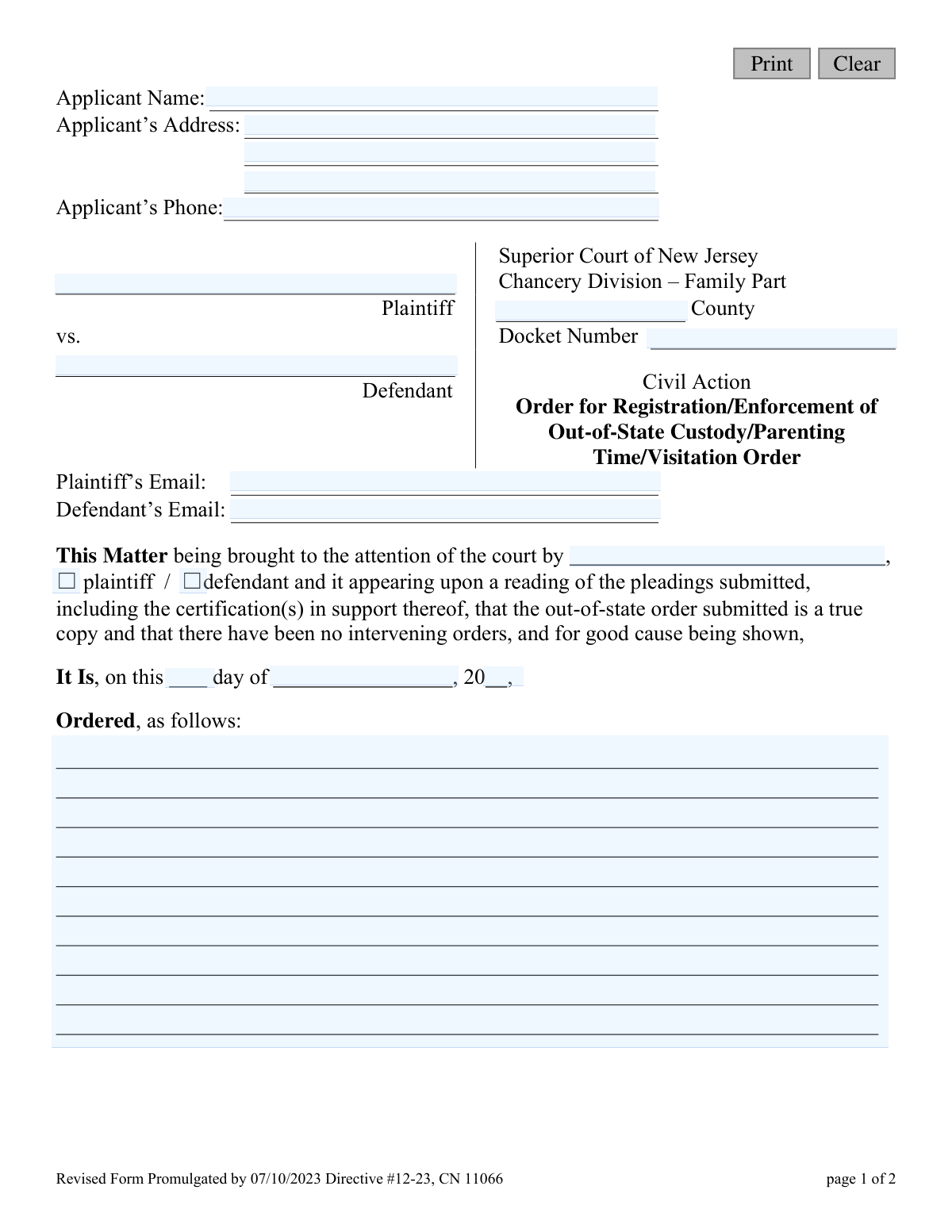
This form is a legal order issued by the Superior Court of New Jersey, Chancery Division – Family Part, to formally register and enforce a child custody, parenting time, or visitation order that was originally issued in another state. It confirms the validity of the out-of-state order and allows New Jersey courts to enforce its terms. Today, this form can be filled out quickly and accurately using AI-powered services like Instafill.ai, which can also convert non-fillable PDF versions into interactive fillable forms.
CN 11066 is part of the New Jersey forms category on Instafill.
Our AI automatically handles information lookup, data retrieval, formatting, and form filling.
It takes less than a minute to fill out CN 11066 using our AI form filling.
Securely upload your data. Information is encrypted in transit and deleted immediately after the form is filled out.

Form specifications

Form name: Order for Registration/Enforcement of Out-of-State Custody/Parenting Time/Visitation Order
Number of fields: 24
Number of pages: 1
Language: English
main-image

Instafill Demo: How to fill out PDF forms in seconds with AI

How to Fill Out CN 11066 Online for Free in 2026

Are you looking to fill out a CN 11066 form online quickly and accurately? Instafill.ai offers the #1 AI-powered PDF filling software of 2026, allowing you to complete your CN 11066 form in just 37 seconds or less.
Follow these steps to fill out your CN 11066 form online using Instafill.ai:
  1. 1 Navigate to Instafill.ai and upload the Order for Registration/Enforcement of Out-of-State Custody/Parenting Time/Visitation Order form.
  2. 2 Provide the applicant's name and contact information, as well as the names of the plaintiff and defendant.
  3. 3 Enter the case details, including the county, docket number, and the party bringing the matter to the court.
  4. 4 Specify the details of the out-of-state order being registered, certifying that it is a true copy and no other orders have superseded it.
  5. 5 Clearly state the specific actions or enforcements being ordered by the court in the provided space.
  6. 6 Review all the information populated by the AI for accuracy, ensuring all names, dates, and case details are correct.
  7. 7 Download the completed form, ready for the judge's signature and filing with the Superior Court of New Jersey.

Our AI-powered system ensures each field is filled out correctly, reducing errors and saving you time.

Why Choose Instafill.ai for Your Fillable CN 11066 Form?

Speed

Complete your CN 11066 in as little as 37 seconds.

Up-to-Date

Always use the latest 2026 CN 11066 form version.

Cost-effective

No need to hire expensive lawyers.

Accuracy

Our AI performs 10 compliance checks to ensure your form is error-free.

Security

Your personal information is protected with bank-level encryption.

Frequently Asked Questions About Form CN 11066

This form is used to ask a New Jersey court to officially recognize (register) and enforce a custody, parenting time, or visitation order that was originally issued by a court in another state. This makes the out-of-state order legally binding and enforceable in New Jersey.

A parent or guardian who has a custody or parenting time order from another state and needs it to be recognized or enforced in New Jersey should file this form. You can be either the plaintiff or the defendant from the original case.

You must submit a true and correct copy of the out-of-state custody order you want to register. You will also need to include supporting pleadings and a certification confirming the order is a true copy and that no newer orders exist.

The Plaintiff and Defendant should be the same parties as named in the original out-of-state custody case. You will identify yourself as the 'applicant' and check the box indicating whether you were the original plaintiff or defendant.

This means the out-of-state order you are submitting is the most recent, legally valid court order regarding custody. If a court has issued a more recent order that changes or replaces the one you are submitting, you cannot use this form for the older order.

You should leave this section blank, as it will be completed and signed by the judge. The judge will write the specific terms of the court's order for registering or enforcing your out-of-state custody arrangement.

You must file this form with the Superior Court of New Jersey, Chancery Division – Family Part, in the appropriate county. This is typically the county where the child resides or where one of the parties lives.

You must make a diligent effort to find this information, as the court needs it to provide proper notice to the other party. If you cannot find it after a thorough search, you may need to file a separate motion with the court explaining your efforts and asking for guidance.

Registration is the official process of having the New Jersey court recognize your out-of-state order. Enforcement is the action taken by the court, after registration, to make sure the other party complies with the terms of that order.

Processing times can vary significantly depending on the court's caseload and the specifics of your case. After filing, the court will review your documents and, if everything is in order, a judge will sign the order.

Yes, services like Instafill.ai use AI to help you accurately auto-fill form fields, which can save time and reduce errors. The AI can pull your information and place it in the correct fields like your name, address, and case details.

You can use a service like Instafill.ai to easily fill out this form online. Simply upload the PDF, and the platform will make it interactive, allowing you to type your information directly into the fields before printing for submission.

If you have a non-fillable or 'flat' PDF, you can use a tool like Instafill.ai to convert it into an interactive, fillable form. This allows you to type your answers neatly instead of having to print and fill it out by hand.

Compliance CN 11066
Validation Checks by Instafill.ai

1
Docket Number Format Validation
Checks if the `docketNum` field conforms to the New Jersey Family Part docket number format, typically 'FM-XX-XXXXXX-YY'. This is critical for correctly filing and retrieving the document within the court's case management system. A mismatch can lead to misfiling, rejection of the order, or significant processing delays.
2
Required Party Identification
Ensures that both the `plaName` (Plaintiff) and `defName` (Defendant) fields are filled and are not identical. These names are fundamental to the legal document, identifying the primary parties involved in the custody case. Failure to provide distinct names for both parties would render the order legally incomplete and unenforceable.
3
Valid New Jersey County
Validates that the `typeCnty` field contains one of the 21 official counties of New Jersey. This ensures the order is filed in the correct jurisdiction and can be processed by the appropriate county court. An invalid county name would cause routing errors and prevent the case from being docketed correctly.
4
Applicant Phone Number Format
Verifies that the `applPhone` field contains a number in a valid 10-digit US phone number format (e.g., XXX-XXX-XXXX or (XXX) XXX-XXXX). A correctly formatted phone number is essential for the court or other parties to contact the applicant if necessary. Incorrect formats can prevent communication and cause processing delays.
5
Email Address Structure Validation
Checks that the `plaEmail` and `defEmail` fields, if provided, follow the standard email address format, such as '[email protected]'. Valid email addresses are crucial for electronic service and communication as permitted by court rules. An invalid format would cause communication failures and could lead to missed notifications or procedural defects.
6
Complete and Valid Order Date
Ensures that the `orderDtDay`, `orderDtMnth`, and `orderDtYr` fields are all filled and collectively form a valid calendar date that is not in the future. The date of the order is a critical piece of information for establishing when the order becomes effective. An incomplete, invalid, or future date makes the order's timeline ambiguous and legally questionable.
7
Filing Party Specification
Validates that the `partyName` field is completed and that one of the corresponding `partyType` checkboxes ('plaintiff' or 'defendant') is selected. This clarifies which party initiated the action to register or enforce the order. Missing this information creates ambiguity about the procedural posture of the filing and could lead to its rejection.
8
Filing Party Consistency Check
Performs a logical check to ensure the name entered in `partyName` matches the name in either `plaName` or `defName`, corresponding to the selected `partyType` checkbox. For example, if 'plaintiff' is checked, `partyName` must match `plaName`. This prevents clerical errors and ensures the record accurately reflects who brought the matter before the court.
9
Applicant Address Completeness
Verifies that the applicant's name (`applName`) and at least the first line of their address (`applAddrLine1`) are provided. This information is required for official records and for mailing physical copies of notices or orders. An incomplete address would prevent official correspondence and could invalidate the filing.
10
Judge's Signature Date Logic
Validates that the `sigJdgDt` is a valid calendar date and is not set to a date in the future. The signature date finalizes the order, and it cannot logically occur in the future. This check prevents data entry errors that would compromise the document's authenticity and legal standing.
11
Order Details Presence
Checks that the `orderDetails` text area, which contains the specific rulings of the judge, is not empty. This section is the core of the order, detailing what is being ordered by the court. An empty order is meaningless, cannot be enforced, and would be rejected.
12
Judge's Name Presence
Ensures the `sigJdgName` field, representing the printed name of the Judge of the Superior Court (J.S.C.), is filled out. The judge's name is a required element for authenticating the order and confirming its judicial authority. An order without a judge's name is invalid.

Common Mistakes in Completing CN 11066

Entering an Incorrect or Incomplete Docket Number

The docket number is the unique identifier for your case, and even a small typo can lead to your filing being rejected or associated with the wrong case. People often mistype numbers, omit leading zeros, or forget prefixes/suffixes. This error causes significant processing delays and requires refiling. Always double-check the docket number against official court documents before submission.

Incorrectly Identifying Plaintiff and Defendant

It is common for filers to confuse the roles of Plaintiff (the person who originally filed the case) and Defendant. Reversing these names on the form creates legal confusion, can invalidate the order, and will likely require correction and refiling. To prevent this, carefully reference the original complaint or most recent court order to confirm who is the Plaintiff and who is the Defendant.

Failing to Attach a True Copy of the Out-of-State Order

This form's primary purpose is to register an existing order from another state, and it explicitly requires a 'true copy' to be submitted with it. A frequent and critical mistake is forgetting to attach this document. Without the out-of-state order, the court has nothing to register or enforce, and the application will be denied, wasting time and filing fees.

Using Nicknames or Inconsistent Party Names

Legal documents demand precision, requiring the full, legal names of all parties as they appear on prior court records (e.g., 'Jennifer Ann Smith' not 'Jenny Smith'). Using nicknames, initials, or different versions of a name creates ambiguity and can lead to challenges with enforcement down the line. Ensure all names for the Plaintiff, Defendant, and Applicant are spelled correctly and consistently.

Filing in the Wrong New Jersey County

The form must be filed in the correct Superior Court County, which is typically where the child resides. Applicants sometimes file in the county they live in, even if the child lives elsewhere, or in the county of the original out-of-state order. Filing in the wrong venue will cause the case to be rejected or transferred, leading to significant delays.

Neglecting to Identify the Filing Party

The form requires the person submitting it to check a box indicating whether they are the 'plaintiff' or 'defendant'. It's a simple step that is easily overlooked in the rush to complete the paperwork. Forgetting to check this box can confuse court staff and delay processing, as they may need to follow up to clarify who filed the document.

Incorrectly Signing on the Judge's Signature Line

The signature line at the bottom of the order, marked 'J.S.C.', is reserved exclusively for the Judge. A self-represented litigant may mistakenly sign in this space, which invalidates the proposed order and requires a new one to be submitted. The applicant should only sign on separate certification or affidavit pages, never on the judge's signature line.

Misunderstanding the 'No Intervening Orders' Clause

The form contains a certification that there have been 'no intervening orders' since the out-of-state order was issued. Filers may not realize that this includes any formal modifications, however minor, made by any court. Incorrectly certifying this can be seen as misleading the court and may result in sanctions or a denial of the registration.

Providing Inaccurate or Outdated Contact Information

Entering a mistyped email, an old phone number, or an incorrect address is a very common error. This mistake can prevent you from receiving crucial notices from the court or the opposing party, potentially causing you to miss deadlines or hearings. AI-powered form filling tools like Instafill.ai can help prevent these errors by automatically validating and formatting contact data correctly.

Submitting an Illegible Hand-Filled Form

This form is often distributed as a non-fillable PDF, forcing users to print and complete it by hand. Illegible handwriting can cause court clerks to misread names, docket numbers, or addresses, leading to data entry errors or outright rejection of the form. To avoid this, it is best to use a fillable version. If one is not available, a tool like Instafill.ai can convert the flat PDF into a fillable form to ensure all entries are typed and perfectly clear.
Saved over 80 hours a year

“I was never sure if my IRS forms like W-9 were filled correctly. Now, I can complete the forms accurately without any external help.”

Kevin Martin Green

Your data stays secure with advanced protection from Instafill and our subprocessors

Robust compliance program

Transparent business model

You’re not the product. You always know where your data is and what it is processed for.

ISO 27001, HIPAA, and GDPR

Our subprocesses adhere to multiple compliance standards, including but not limited to ISO 27001, HIPAA, and GDPR.

Security & privacy by design

We consider security and privacy from the initial design phase of any new service or functionality. It’s not an afterthought, it’s built-in, including support for two-factor authentication (2FA) to further protect your account.

Fill out CN 11066 with Instafill.ai

Worried about filling PDFs wrong? Instafill securely fills order-for-registrationenforcement-of-out-of-state-custodyparenting-timevisitation-order forms, ensuring each field is accurate.