Yes! You can use AI to fill out Petition for Extreme Risk Protective Order (ERPO)

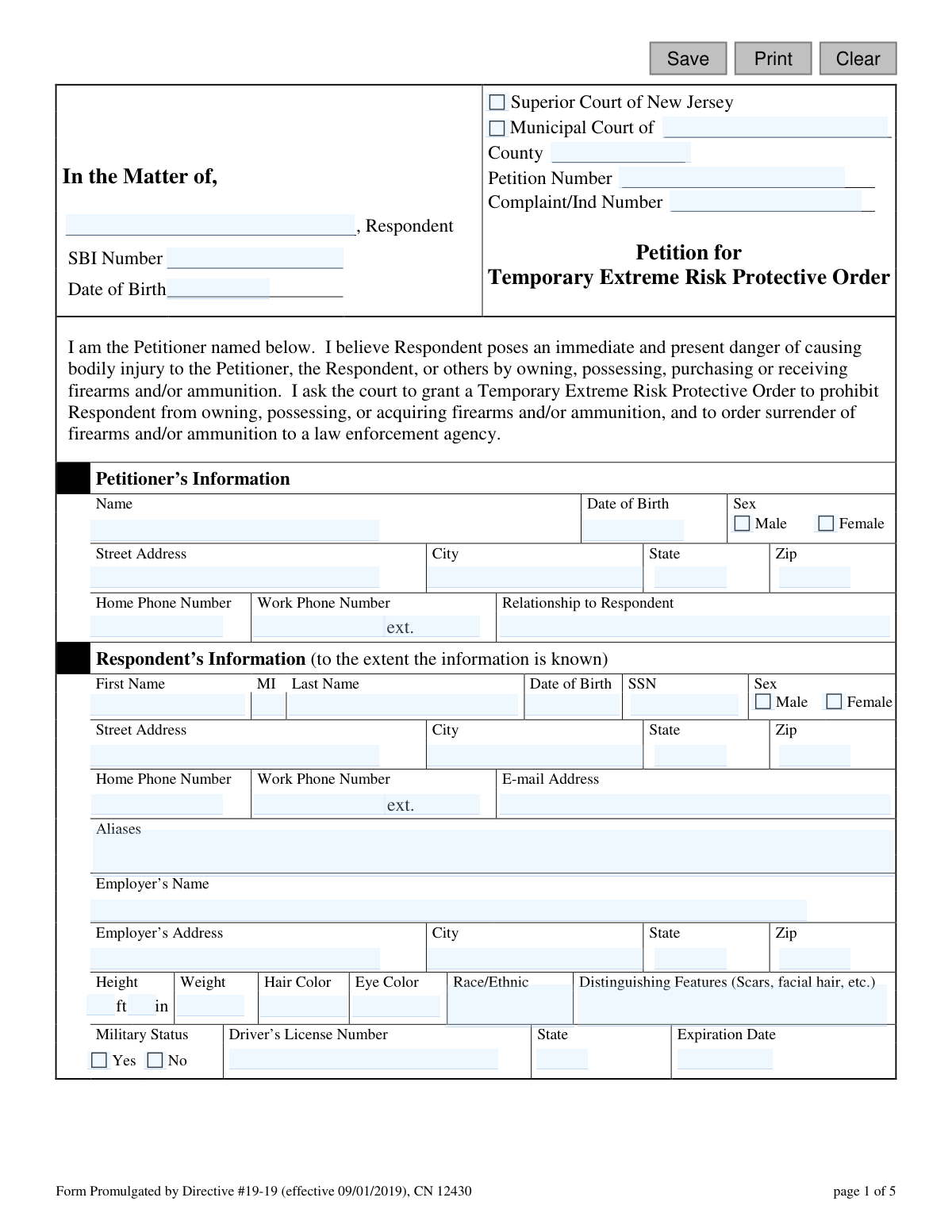
This form, officially known as the Petition for Extreme Risk Protective Order (ERPO), is a legal document filed in the Superior Court of New Jersey to request a court order prohibiting a person (the respondent) from possessing or acquiring firearms because they pose an immediate danger of causing bodily injury. The petitioner must provide detailed information about the respondent and the specific reasons for believing they are a risk, such as threats of violence, mental health history, or prior offenses. Today, this form can be filled out quickly and accurately using AI-powered services like Instafill.ai, which can also convert non-fillable PDF versions into interactive fillable forms.
ERPO / CN 12430 is part of the New Jersey forms category on Instafill.
Our AI automatically handles information lookup, data retrieval, formatting, and form filling.
It takes less than a minute to fill out ERPO / CN 12430 using our AI form filling.
Securely upload your data. Information is encrypted in transit and deleted immediately after the form is filled out.

Form specifications

Form name: Petition for Extreme Risk Protective Order (ERPO)
Number of fields: 122
Number of pages: 1
Language: English
main-image

Instafill Demo: How to fill out PDF forms in seconds with AI

How to Fill Out ERPO / CN 12430 Online for Free in 2026

Are you looking to fill out a ERPO / CN 12430 form online quickly and accurately? Instafill.ai offers the #1 AI-powered PDF filling software of 2026, allowing you to complete your ERPO / CN 12430 form in just 37 seconds or less.
Follow these steps to fill out your ERPO / CN 12430 form online using Instafill.ai:
  1. 1 Navigate to Instafill.ai and upload or select the Petition for Extreme Risk Protective Order (ERPO) form.
  2. 2 Provide your personal details as the Petitioner, including your name, contact information, and your relationship to the Respondent.
  3. 3 Enter all known information about the Respondent, such as their name, date of birth, address, physical description, and any known aliases.
  4. 4 Carefully check the boxes and provide detailed explanations for all conditions that apply, outlining why the Respondent poses an immediate and present danger.
  5. 5 List all firearms and ammunition the Respondent is known to possess, including the type, description, quantity, and location.
  6. 6 Answer the questions regarding the Respondent's firearm permits and ID cards.
  7. 7 Review all the information populated by the AI for accuracy, then certify the statements by signing and dating the petition before filing it with the appropriate court.

Our AI-powered system ensures each field is filled out correctly, reducing errors and saving you time.

Why Choose Instafill.ai for Your Fillable ERPO / CN 12430 Form?

Speed

Complete your ERPO / CN 12430 in as little as 37 seconds.

Up-to-Date

Always use the latest 2026 ERPO / CN 12430 form version.

Cost-effective

No need to hire expensive lawyers.

Accuracy

Our AI performs 10 compliance checks to ensure your form is error-free.

Security

Your personal information is protected with bank-level encryption.

Frequently Asked Questions About Form ERPO / CN 12430

This form is used to ask a New Jersey court to issue a Temporary Extreme Risk Protective Order (ERPO). This order temporarily prohibits a person from owning, possessing, or purchasing firearms and ammunition because they pose an immediate danger to themselves or others.

A person who believes someone (the respondent) poses an immediate and present danger of causing bodily injury with a firearm can file this petition. You will need to state your relationship to the respondent on the form.

You should provide as much information as you know, including the respondent's name, date of birth, address, physical description, and any known aliases. Providing more details helps the court and law enforcement, but you should fill it out to the best of your ability.

It is okay if you do not know all of the respondent's personal information. The form specifies to provide information 'to the extent the information is known,' so simply fill in the details you have and leave the unknown fields blank.

On pages 2-4, you must provide detailed explanations for why you believe the person is a danger. This includes any history of violence, threats, substance abuse, mental health issues, or recent acquisition of weapons.

Provide any information you have about firearms the respondent may own, including the type, number, and location. If you are unsure about specifics or whether they have firearm permits, you can check the 'Unknown' box in that section.

Yes, if you have supporting documents like police reports, threatening messages, photos, or past court orders, you should submit them with your petition. Be sure to describe these documents in the 'Supporting documentation' section on page 4.

This petition should be filed with the Superior Court of New Jersey or your local Municipal Court. Contact your local court clerk's office for specific instructions on filing procedures.

A judge will review your petition to decide if there is enough evidence to issue a temporary order. If granted, a hearing will be scheduled shortly after to determine if a Final Extreme Risk Protective Order is necessary.

By signing the certification, you are swearing under penalty of law that the statements you made are true. Willfully providing false information on this petition is a punishable offense.

Yes, services like Instafill.ai use AI to help you accurately auto-fill form fields, which can save time and reduce the chance of errors. This is especially useful for entering information that is repeated in multiple sections.

To use Instafill.ai, upload the PDF of the ERPO petition to their website. The AI will make the form fillable online, and you can input your information once to have it automatically populate all the required fields.

If you have a non-fillable or 'flat' PDF, you can use a service like Instafill.ai. Their platform can convert the document into an interactive, fillable form so you can type your answers directly into the fields before printing.

Compliance ERPO / CN 12430
Validation Checks by Instafill.ai

1
Petitioner Information Completeness
This check ensures that all required fields in the 'Petitioner’s Information' section are filled out, including Name, Date of Birth, Sex, full Address, and Relationship to Respondent. This information is critical for court records, communication, and establishing the petitioner's legal standing. If any of these fields are missing, the form submission will be rejected with a prompt to complete the required information.
2
Respondent Minimum Identification
Validates that at least the respondent's full name (First and Last) is provided. While much of the respondent's information is 'to the extent known,' a name is the minimum required data to initiate a legal proceeding. Without a name, the petition is invalid and cannot be served or acted upon by the court.
3
At Least One Justification Provided
This validation ensures that the petitioner has selected at least one of the checkboxes on pages 2-4 detailing the respondent's history or behavior. The entire basis of the petition rests on these justifications. If no conditions are selected, the petition lacks a legal cause of action and will be considered incomplete.
4
Conditional Explanation Requirement
This is a logical check that runs if a justification checkbox (e.g., 'has any history of threats or acts of violence') is selected. It verifies that the corresponding 'Explain' text area is not empty. A simple checkmark is insufficient; the court requires a detailed narrative to evaluate the claim's credibility and urgency.
5
Petitioner Date of Birth Validity
This check validates that the Petitioner's Date of Birth (petDob) is a valid date and that the calculated age is 18 years or older. This is important to confirm the petitioner has the legal capacity to file such a petition. If the date is invalid or the petitioner is a minor, the system should flag the entry for review or rejection.
6
Respondent Date of Birth Plausibility
This check validates that the Respondent's Date of Birth (respDob), if provided, is a plausible date. It ensures the date is not in the future and not in the distant past (e.g., more than 120 years ago). This helps maintain data integrity and prevents clerical errors that could complicate identity verification.
7
Phone Number Format
Verifies that all phone number fields (petPhHome, petPhWork, respPhHome, respPhWork) adhere to a standard 10-digit format (e.g., NNN-NNN-NNNN). Correctly formatted phone numbers are essential for law enforcement and court officials to contact the parties involved. An invalid format will trigger an error message prompting the user to correct the entry.
8
ZIP Code Format
Ensures that all ZIP code fields (petAddrZip, respAddrZip, empAddrZip) are in a valid 5-digit or 9-digit (ZIP+4) format. Accurate ZIP codes are crucial for mail delivery of official notices and for correctly routing the petition within the justice system. An incorrect format will prevent submission until corrected.
9
Respondent Height and Weight Logic
This check validates that the respondent's height and weight are within reasonable human ranges. It ensures the 'feet' (respHgtFt) and 'inches' (respHgtIn) are numeric, with inches being less than 12. This prevents typographical errors (e.g., entering '60' for inches) and ensures the descriptive data is plausible and useful for identification purposes.
10
Driver's License Expiration Date Logic
Validates that the 'Expiration Date' (respLicEx) for the respondent's driver's license is a valid calendar date. While the date can be in the past or future, this check prevents nonsensical entries like '02/30/2024'. This ensures the integrity of the identification data provided.
11
Petitioner Signature Date Requirement
This validation confirms that the 'Signature of Petitioner' date (sigDtPet) is filled out with a valid, current, or very recent date. The signature date legally attests to when the petitioner certified the statements as true. A missing or invalid date can render the certification, and thus the entire petition, legally void.
12
Assistant Signature Logic
This check ensures that if the 'I was assisted in the completion of this petition by' field (assistName) is filled out, the corresponding assistant's signature date (sigDtAssist) is also provided. This is important for transparency and accountability, documenting who helped the petitioner. An incomplete entry would be flagged for correction.
13
Respondent SSN Format
This check validates that if a Social Security Number (respSsn) is entered, it follows the standard XXX-XX-XXXX format. While not always required, a correctly formatted SSN is a critical and unique identifier for background checks and record-keeping. An improperly formatted number would be rejected to ensure data quality.
14
Mandatory Relationship to Respondent
This check ensures the 'Relationship to Respondent' field (petRelResp) is not empty. The petitioner's relationship is a key factor in establishing their legal standing to file an ERPO in many jurisdictions. Failure to provide this information may result in the petition being immediately rejected as the petitioner's right to file cannot be determined.

Common Mistakes in Completing ERPO / CN 12430

Providing Vague or Conclusory Explanations

Petitioners often write general statements like 'He is a danger' or 'She has a history of violence' without providing specific facts. The court requires detailed, factual accounts of events, including dates, locations, specific actions, and direct quotes if possible, to assess the level of risk. A petition with vague claims is likely to be denied for lack of evidence, delaying crucial protective measures.

Omitting Respondent's Identifying Information

While some information about the respondent may be unknown, petitioners frequently leave critical fields like Date of Birth, physical description, or potential addresses blank when the information could be found. Missing data can severely hamper law enforcement's ability to positively identify, locate, and serve the respondent with the order. It is crucial to fill out the 'Respondent's Information' section as completely as possible to ensure the order can be enforced effectively.

Checking a Box Without Providing a Required Explanation

The form's structure requires that for every risk factor box checked on pages 2-4, a detailed explanation must be provided in the space below. A common error is to check a box, such as 'has any history of threats or acts of violence,' but then leave the corresponding explanation field empty. An allegation without a supporting narrative holds little to no weight and will likely be disregarded by the judge, weakening the overall petition.

Failing to Detail Known Firearms

On page 5, petitioners may know the respondent possesses firearms but only provide a general statement or leave the table blank. This section is critical for officer safety and the effective removal of weapons. Petitioners should list every known detail, including the type (handgun, rifle), description, quantity, and suspected location, as this information directly informs the law enforcement seizure process.

Substituting Feelings for Factual Allegations

Petitions are often filled with subjective fears, such as 'I feel like he's going to snap,' instead of objective, observable facts. While the fear is valid, the court needs to see the behavior that caused it, like 'On Tuesday, he punched a hole in the wall and said he was going to snap.' Focusing on concrete actions, behaviors, and statements provides the court with the factual basis needed to grant the order.

Using Incorrect or Inconsistent Data Formats

Data entry fields such as 'Date of Birth,' 'Driver's License Number,' and phone numbers are often filled with inconsistent or incorrect formats (e.g., 'Jan 5 1980' instead of 01/05/1980). These formatting errors can lead to data rejection by court systems or processing delays. Using an AI-powered tool like Instafill.ai can help prevent these mistakes by automatically formatting data correctly as it's entered.

Forgetting to Sign and Date the Certification

Forgetting to sign and date the certification on the final page is a simple but critical mistake that renders the entire petition invalid. The court cannot process an unsigned document, leading to an automatic rejection and a significant, potentially dangerous, delay in obtaining the protective order. Always double-check the last page to ensure the signature and date fields are completed.

Failing to Reference or Attach Supporting Documentation

The form includes a section to list supporting documentation, but petitioners often forget to mention or provide crucial evidence like threatening text messages, photos of property damage, or related police reports. Failing to attach and describe this evidence means the court cannot consider it, significantly weakening the petition. All relevant evidence should be organized, referenced in the appropriate section, and submitted with the form.

Inaccurate or Incomplete Physical Description

Errors or omissions in the respondent's physical description—such as incorrect height and weight, outdated hair color, or missing distinguishing features like scars and tattoos—can create confusion for law enforcement. A precise and detailed description is vital for officers to correctly identify the respondent when serving the order. Inaccuracies can lead to delays or, in worst-case scenarios, misidentification.

Assuming the Form is Electronically Fillable

This form is promulgated as a non-fillable PDF, meaning petitioners often have to print it and fill it out by hand, leading to illegible handwriting and data entry errors. This can cause significant processing delays or rejection by the court clerk. AI tools like Instafill.ai can convert such non-fillable PDFs into interactive, fillable forms, ensuring all entries are clear, legible, and properly formatted.
Saved over 80 hours a year

“I was never sure if my IRS forms like W-9 were filled correctly. Now, I can complete the forms accurately without any external help.”

Kevin Martin Green

Your data stays secure with advanced protection from Instafill and our subprocessors

Robust compliance program

Transparent business model

You’re not the product. You always know where your data is and what it is processed for.

ISO 27001, HIPAA, and GDPR

Our subprocesses adhere to multiple compliance standards, including but not limited to ISO 27001, HIPAA, and GDPR.

Security & privacy by design

We consider security and privacy from the initial design phase of any new service or functionality. It’s not an afterthought, it’s built-in, including support for two-factor authentication (2FA) to further protect your account.

Fill out ERPO / CN 12430 with Instafill.ai

Worried about filling PDFs wrong? Instafill securely fills petition-for-extreme-risk-protective-order-erpo forms, ensuring each field is accurate.