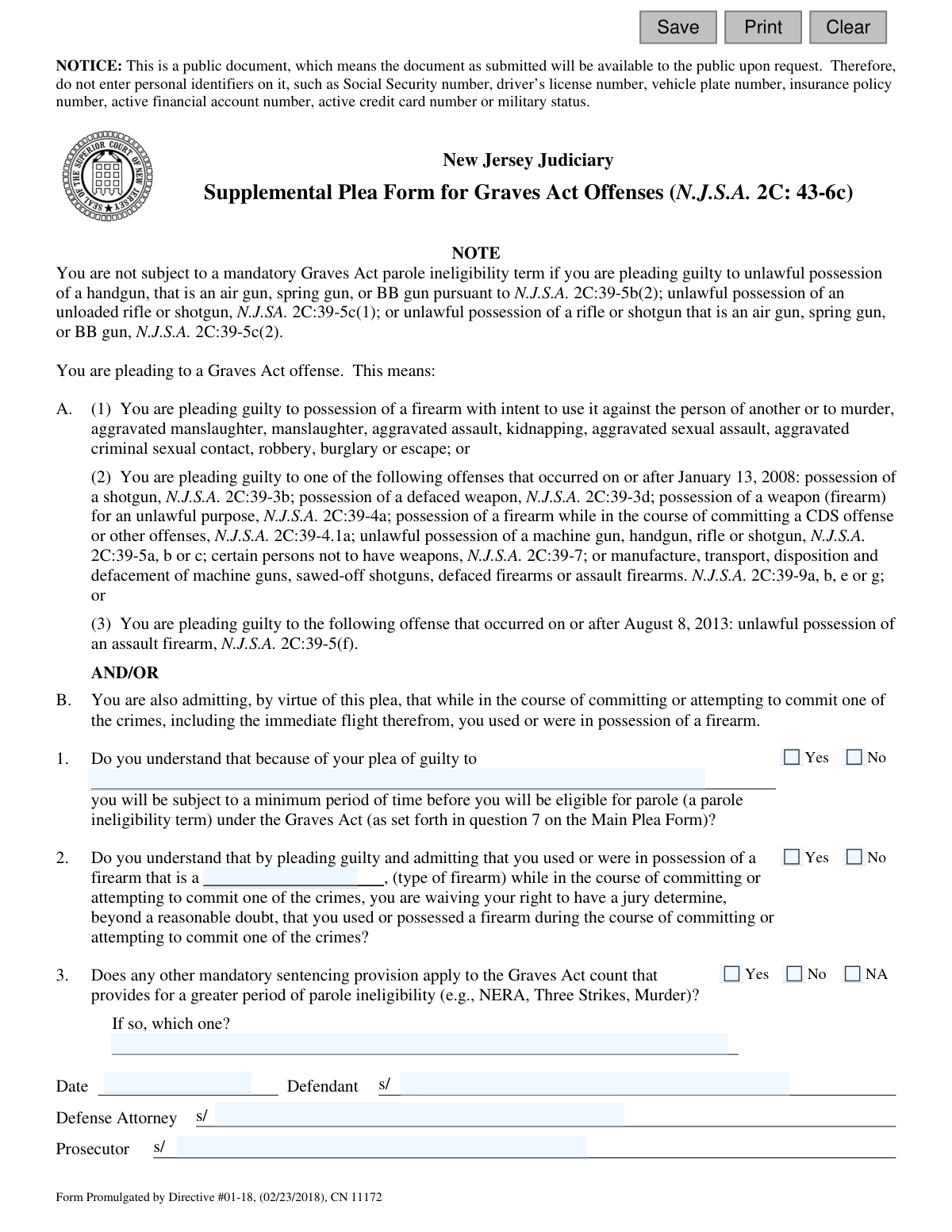
Yes! You can use AI to fill out Plea-11 Supplemental Plea Form for Graves Act Offenses (N.J.S.A. 2C: 43-6c)
The Plea-11 is a supplemental legal document used in the New Jersey Judiciary system for defendants pleading guilty to offenses falling under the Graves Act, which mandates minimum prison terms for certain firearm-related crimes. It ensures the defendant understands the specific consequences of their plea, including mandatory parole ineligibility terms. Today, this form can be filled out quickly and accurately using AI-powered services like Instafill.ai, which can also convert non-fillable PDF versions into interactive fillable forms.
Plea-11 is part of the
New Jersey forms category on Instafill.
Our AI automatically handles information lookup, data retrieval, formatting, and form filling.
It takes less than a minute to fill out Plea-11 using our AI form filling.
Securely upload your data. Information is encrypted in transit and deleted immediately after the form is filled out.
Form specifications
| Form name: | Plea-11 Supplemental Plea Form for Graves Act Offenses (N.J.S.A. 2C: 43-6c) |
| Number of fields: | 17 |
| Number of pages: | 1 |
| Language: | English |
Instafill Demo: How to fill out PDF forms in seconds with AI
How to Fill Out Plea-11 Online for Free in 2026
Are you looking to fill out a PLEA-11 form online quickly and accurately? Instafill.ai offers the #1 AI-powered PDF filling software of 2026, allowing you to complete your PLEA-11 form in just 37 seconds or less.
Follow these steps to fill out your PLEA-11 form online using Instafill.ai:
- 1 Navigate to Instafill.ai and upload or select the New Jersey Plea-11 form.
- 2 Use the AI assistant to identify and map the form fields, such as the charge description, firearm type, and signature lines.
- 3 In consultation with legal counsel, carefully enter the specific charge and the type of firearm involved in the offense.
- 4 Answer the 'Yes/No' questions to formally acknowledge your understanding of the Graves Act's parole ineligibility terms and the waiver of your right to a jury determination on firearm possession.
- 5 Indicate if any other mandatory sentencing provisions apply and specify which one.
- 6 Review the entire completed form with your defense attorney to ensure all information is accurate before the defendant, defense attorney, and prosecutor apply their signatures.
- 7 Securely download, print, or share the finalized form for official submission to the court.
Our AI-powered system ensures each field is filled out correctly, reducing errors and saving you time.
Why Choose Instafill.ai for Your Fillable Plea-11 Form?
Speed
Complete your Plea-11 in as little as 37 seconds.
Up-to-Date
Always use the latest 2026 Plea-11 form version.
Cost-effective
No need to hire expensive lawyers.
Accuracy
Our AI performs 10 compliance checks to ensure your form is error-free.
Security
Your personal information is protected with bank-level encryption.
Frequently Asked Questions About Form Plea-11
This form is used when a defendant pleads guilty to a Graves Act offense in New Jersey. It ensures the defendant understands the mandatory minimum sentence and parole ineligibility term associated with certain firearm crimes.
This form must be completed by any defendant who is pleading guilty to a qualifying Graves Act offense. It is signed by the defendant, their defense attorney, and the prosecutor as part of the plea agreement.
A Graves Act offense is a specific crime involving the use or possession of a firearm, as defined by New Jersey law N.J.S.A. 2C:43-6c. The form lists the specific offenses, such as possession of a weapon for an unlawful purpose or robbery with a firearm.
This is a mandatory minimum portion of a prison sentence that you must serve before you can be considered for parole. By signing this form, you are acknowledging that you understand this consequence of your guilty plea.
Do not enter personal identifiers like your Social Security number, driver's license number, or active financial account numbers. The form is a public document, and this measure is to protect your privacy.
You are waiving your right to have a jury determine beyond a reasonable doubt that you used or possessed a firearm during the crime. By pleading guilty, you are admitting this fact to the court.
No, the form notes exceptions for certain offenses, such as unlawful possession of an air gun, spring gun, BB gun, or an unloaded rifle or shotgun under specific statutes.
This question checks if another sentencing law, like the No Early Release Act (NERA), applies to your case and imposes a longer period of parole ineligibility than the Graves Act alone.
Once signed by you, your attorney, and the prosecutor, the form becomes part of the official court record for your plea. The judge will use it to confirm your understanding of the plea's consequences before accepting it.
Yes, services like Instafill.ai use AI to auto-fill form fields accurately and save time. However, it is crucial to review the completed form with your defense attorney before signing.
You can use a service like Instafill.ai to upload the PDF and fill it out electronically. This allows you to type directly into the fields, ensuring the information is clear and legible before printing for signatures.
Tools like Instafill.ai can convert flat, non-fillable PDFs into interactive, fillable forms. Simply upload your document, and the service will automatically make the fields editable for you.
You will need to specify the charge you are pleading guilty to, the type of firearm involved, and indicate if any other sentencing provisions apply. Your attorney will guide you in completing these sections accurately.
Compliance Plea-11
Validation Checks by Instafill.ai
1
Charge Description Completion
Ensures the text field describing the specific Graves Act offense in question 1 is filled out. This is a critical piece of information that defines the context of the plea. A submission without the charge description is incomplete and legally insufficient, and the form should be rejected.
2
Question 1 Understanding Affirmation
Validates that the defendant has checked 'Yes' for question 1, confirming they understand the parole ineligibility consequences. A 'No' response indicates a lack of understanding, which invalidates the plea agreement. The form cannot be accepted unless the defendant explicitly affirms their understanding.
3
Firearm Type Specification
Checks that the type of firearm involved in the offense is specified in the text field for question 2. This detail is a material fact of the plea agreement under the Graves Act. Failure to specify the firearm type makes the plea factually incomplete and could lead to legal challenges later.
4
Question 2 Jury Waiver Affirmation
Validates that the defendant has checked 'Yes' for question 2, confirming they are waiving their right to a jury determination on the firearm possession fact. A 'No' response would contradict the purpose of the plea form. The form is only valid if the defendant agrees to waive this right.
5
Question 3 Mandatory Sentencing Response
Ensures that one of the options ('Yes', 'No', or 'NA') for question 3 has been selected. This question clarifies whether other sentencing provisions apply, which is crucial for determining the final sentence. An unanswered question creates ambiguity and makes the form incomplete.
6
Conditional Sentencing Provision Description
Performs a logical check on the field related to question 3. If 'Yes' is selected for question 3, this validation ensures the corresponding text field specifying the other provision is not empty. Conversely, if 'No' or 'NA' is selected, it ensures the text field is empty to prevent contradictory information.
7
Signature Date Presence
Verifies that the date field has been filled out. The signature date is essential for establishing the official record of when the plea agreement was executed by all parties. A missing date can call the timeliness and validity of the document into question.
8
Signature Date Format and Validity
Ensures the signature date is entered in a valid format (e.g., MM/DD/YYYY) and is not a future date. An invalid format prevents proper data processing and record-keeping. A future date is logically impossible and would invalidate the signature, so the form must be rejected.
9
Defendant Signature Presence
Checks that the defendant's name is entered on the corresponding signature line. The defendant's signature is the most critical element, signifying their voluntary agreement to the plea and its terms. A missing defendant signature renders the entire form null and void.
10
Defense Attorney Signature Presence
Verifies that the defense attorney's name is entered on their signature line. This signature confirms that the defendant received legal counsel regarding the plea, a key constitutional safeguard. The absence of this signature could be grounds to challenge the validity of the plea.
11
Prosecutor Signature Presence
Ensures the prosecutor's name is entered on the appropriate signature line. The prosecutor's signature indicates the state's consent to the terms of the plea agreement. Without it, there is no binding agreement between the defendant and the state.
12
Prohibition of Personal Identifiers
Scans all text input fields to detect and prevent the submission of personal identifiers as explicitly warned in the form's notice (e.g., SSN, driver's license number). This is a critical privacy and security measure to protect the defendant's data since the document is public. If such information is found, the submission must be blocked with a clear warning to the user.
Common Mistakes in Completing Plea-11
The form explicitly warns users not to include personal identifiers like Social Security or driver's license numbers because it is a public document. People often fill out forms on autopilot and include this information out of habit, risking public exposure of their sensitive data. To avoid this, carefully read all notices on the form and consciously omit any information marked as a personal identifier.
In Question 1, the field for the charge being pled to is often filled with a vague or colloquial description rather than the precise statutory offense. This creates legal ambiguity and can be grounds for challenging the plea's validity later. To prevent this, the full, formal charge name and its corresponding statutory citation (e.g., 'Possession of a Weapon for an Unlawful Purpose, N.J.S.A. 2C:39-4a') must be entered exactly as it appears in the indictment.
Question 2 requires specifying the 'type of firearm,' but many people enter a generic term like 'gun' or 'handgun,' or leave it blank. This is insufficient for a legal record, as the specific characteristics of the firearm can be a critical fact in the case. Always provide a detailed description, including the make, model, and caliber if known (e.g., 'Glock 19 9mm handgun'), to ensure the record is clear and accurate.
The form contains several questions that require a 'Yes' or 'No' response to confirm the defendant's understanding and admissions. A common mistake is overlooking these checkboxes, leaving them blank. An incomplete form can be rejected by the court, as it fails to create a clear record that the defendant has knowingly waived their rights, causing delays in the plea process.
Answering 'No' to Question 1 or 2, which ask if the defendant understands the consequences of the plea and admits to possessing a firearm, directly contradicts the purpose of the form. This critical error indicates a lack of understanding or an invalid plea, which will almost certainly cause a judge to reject the plea agreement. The answers to these questions must be 'Yes' to affirm the defendant's admissions.
Question 3 asks about other mandatory sentencing provisions (e.g., NERA, Three Strikes). This is a complex legal question that defendants or even attorneys can answer incorrectly without careful review. Answering 'No' or 'NA' when a stricter provision applies has severe consequences, as it fails to acknowledge a longer, legally required period of parole ineligibility, potentially invalidating the plea.
When answering 'Yes' to Question 3, it is mandatory to specify which other sentencing provision applies in the provided text field. A frequent oversight is checking 'Yes' but leaving the explanation field blank. This omission makes the form incomplete and requires clarification in court, delaying the proceedings until the record is corrected.
The date is a crucial element of any legal document, as it establishes the timeline of events and when the agreement was executed. Forgetting to enter the date next to the signatures is a simple but common mistake that can cause administrative and filing issues. Always ensure the correct date is entered when the form is signed by all parties.
A plea form is not legally binding until it is signed by the defendant, defense attorney, and prosecutor. Given that the document is handled by multiple parties, it is common for one or more signatures to be missed. An unsigned or partially signed form will be rejected by the court, halting the entire plea process until it is properly executed.
If this form is provided as a non-fillable PDF, it must be printed and completed by hand, often leading to illegible entries for critical information like charges and firearm types. Ambiguous handwriting can lead to data entry errors when docketed and potential legal challenges down the line. AI-powered tools like Instafill.ai can convert such flat PDFs into digitally fillable forms, ensuring all information is typed clearly and accurately.
Saved over 80 hours a year
“I was never sure if my IRS forms like W-9 were filled correctly. Now, I can complete the forms accurately without any external help.”
Kevin Martin Green
Your data stays secure with advanced protection from Instafill and our subprocessors

Robust compliance program
Transparent business model
You’re not the product. You always know where your data is and what it is processed for.
ISO 27001, HIPAA, and GDPR
Our subprocesses adhere to multiple compliance standards, including but not limited to ISO 27001, HIPAA, and GDPR.
Security & privacy by design
We consider security and privacy from the initial design phase of any new service or functionality. It’s not an afterthought, it’s built-in, including support for two-factor authentication (2FA) to further protect your account.
Fill out Plea-11 with Instafill.ai
Worried about filling PDFs wrong? Instafill securely fills plea-11-supplemental-plea-form-for-graves-act-offenses-njsa-2c-43-6c forms, ensuring each field is accurate.