Yes! You can use AI to fill out Protective Order for Guardian ad Litem (GAL) Report
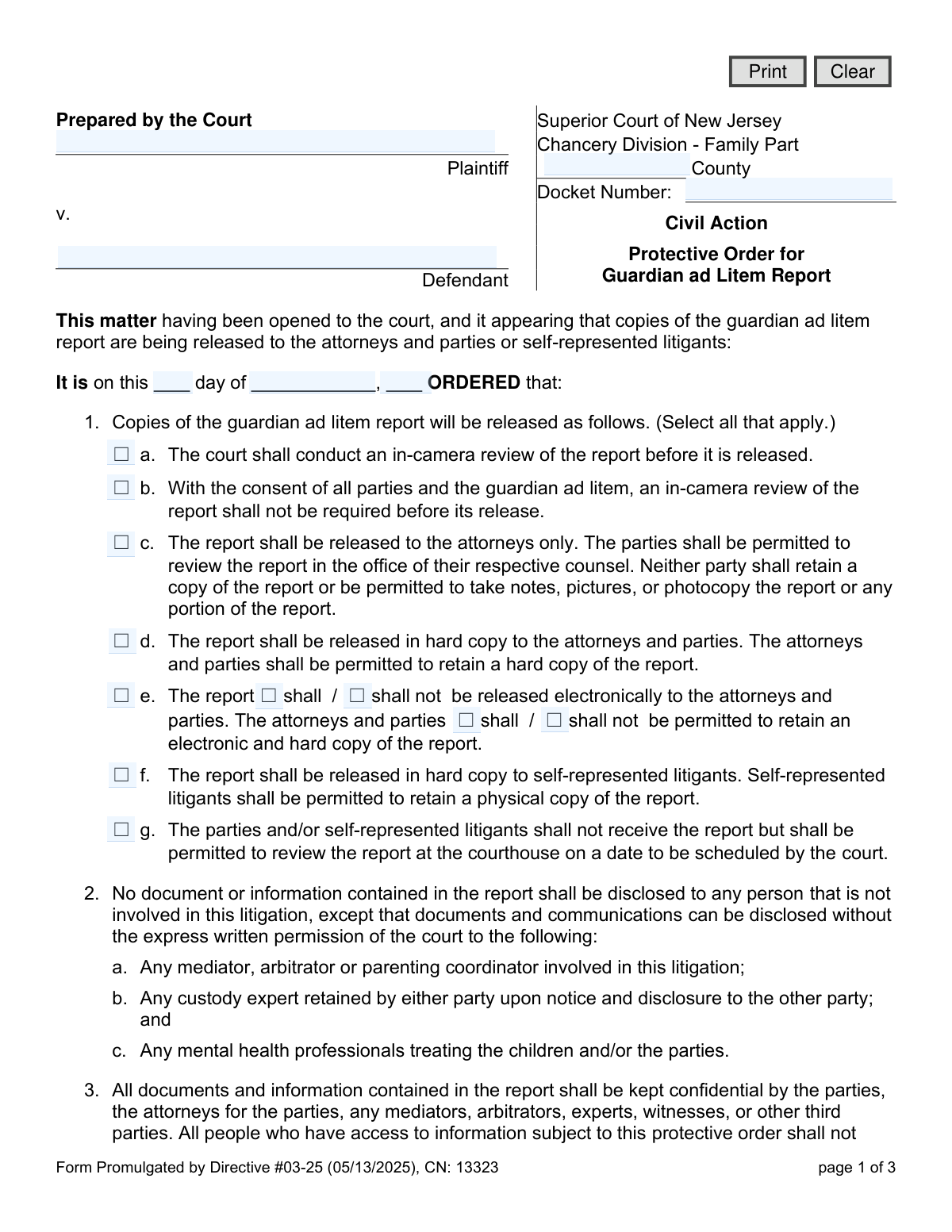
This document is a court order issued by the Superior Court of New Jersey, Chancery Division - Family Part, to establish rules for handling a confidential Guardian ad Litem (GAL) report. It specifies who can access the report, how it can be reviewed, and prohibits its disclosure to unauthorized individuals, including the children involved, to protect sensitive information. Today, this form can be filled out quickly and accurately using AI-powered services like Instafill.ai, which can also convert non-fillable PDF versions into interactive fillable forms.
CN 13323 is part of the
New Jersey forms category on Instafill.
Our AI automatically handles information lookup, data retrieval, formatting, and form filling.
It takes less than a minute to fill out CN 13323 using our AI form filling.
Securely upload your data. Information is encrypted in transit and deleted immediately after the form is filled out.
Form specifications
| Form name: | Protective Order for Guardian ad Litem (GAL) Report |
| Number of fields: | 28 |
| Number of pages: | 1 |
| Language: | English |
Instafill Demo: How to fill out PDF forms in seconds with AI
How to Fill Out CN 13323 Online for Free in 2026
Are you looking to fill out a CN 13323 form online quickly and accurately? Instafill.ai offers the #1 AI-powered PDF filling software of 2026, allowing you to complete your CN 13323 form in just 37 seconds or less.
Follow these steps to fill out your CN 13323 form online using Instafill.ai:
- 1 Navigate to Instafill.ai and upload or select the 'Protective Order for Guardian ad Litem (GAL) Report' form.
- 2 Use the AI assistant to input the case details, including Plaintiff and Defendant names, the County, and the Docket Number.
- 3 Follow the prompts to select the appropriate checkboxes in Section 1, detailing how the GAL report will be released to attorneys and parties.
- 4 Review the standard confidentiality clauses and, if necessary, add any specific additional orders in the space provided in Section 10.
- 5 Indicate the final disposition of the report upon case completion by selecting the correct option in Section 9 (e.g., destroy, return, or retain).
- 6 Once all information is entered and reviewed for accuracy, the form is ready for the judge's signature and date to make it an official court order.
- 7 Download, print, or securely share the completed protective order for filing with the court and distribution to all relevant parties.
Our AI-powered system ensures each field is filled out correctly, reducing errors and saving you time.
Why Choose Instafill.ai for Your Fillable CN 13323 Form?
Speed
Complete your CN 13323 in as little as 37 seconds.
Up-to-Date
Always use the latest 2026 CN 13323 form version.
Cost-effective
No need to hire expensive lawyers.
Accuracy
Our AI performs 10 compliance checks to ensure your form is error-free.
Security
Your personal information is protected with bank-level encryption.
Frequently Asked Questions About Form CN 13323
This is a court order that establishes strict rules for how a Guardian ad Litem's (GAL) report can be accessed, shared, and used. Its primary goal is to protect the confidential information within the report, particularly concerning children involved in a family court case.
Everyone who receives or reviews the GAL report must follow the order's rules. This includes the plaintiff, defendant, their attorneys, and any specified third parties like mediators, arbitrators, or experts.
It depends on the judge's decision, which will be marked in Section 1 of the order. You may be allowed to retain a hard copy, or you might only be permitted to review it at your attorney's office without taking a copy.
An 'in-camera review' means the judge will privately examine the GAL report in their chambers before it is released to anyone. This is done to determine if any information should be redacted or withheld to protect the best interests of the child.
You can only disclose the report to individuals specified in the order, such as your attorney, a mediator, or a retained custody expert. Sharing it with anyone not listed, like friends or other family members, is a violation of the court order.
No, you are strictly forbidden from discussing, revealing, or disclosing the report or its contents to the child or children involved. Doing so is a serious violation of this court order.
If you use the information in the report for any purpose not authorized by the court, you will be in violation of a court order. This can lead to sanctions at the court's discretion.
Section 9 of the order will specify what to do with the report once the matter is resolved. The court may order it to be destroyed, returned to a specific person, or retained by you, but you will still be bound by its confidentiality rules.
The terms of this order survive the disposition of your case and remain valid and binding indefinitely. The confidentiality requirements can only be changed by a future court order.
You are required to give your new attorney a copy of this Protective Order. The order's terms will be binding on them and will remain in full force and effect.
While this specific form is a court order prepared by a judge, AI services like Instafill.ai are extremely useful for filling out other legal forms you may need for your case. These tools auto-fill your information, which saves time and helps prevent errors.
Simply upload your form to the Instafill.ai platform, and its AI will identify the fields and fill them in using your securely saved information. You can then review the completed form, make any necessary edits, and download it.
If you have a non-fillable or 'flat' PDF, you can use a service like Instafill.ai to convert it into an interactive, fillable form. This allows you to easily type your information directly into the document on your computer.
Compliance CN 13323
Validation Checks by Instafill.ai
1
Ensures Plaintiff Name is Provided
This check verifies that the 'Plaintiff' field is not empty. A plaintiff's name is a fundamental component of any legal case filing and is required for proper identification and record-keeping. If this field is left blank, the form submission will be rejected, and the user will be prompted to enter the plaintiff's full name.
2
Ensures Defendant Name is Provided
This check verifies that the 'Defendant' field is not empty. The defendant's name is essential for identifying all parties involved in the civil action and ensuring the order is correctly applied. A missing defendant name will cause the validation to fail, preventing submission until the name is provided.
3
Validates Docket Number Format
This validation ensures the 'Docket Number' field is not only filled but also adheres to the standard New Jersey Family Part format, which typically begins with 'FM-' followed by county and case identifiers. This is critical for linking the protective order to the correct case file within the court's system. An incorrectly formatted docket number could lead to misfiling and legal delays, so submission will be blocked until the format is corrected.
4
Verifies County is Provided
This check confirms that the 'County' field has been filled in. The county is a required piece of information that specifies the jurisdiction of the Superior Court handling the case. Without the county, the document cannot be correctly routed or filed, so the form cannot be submitted until a county is entered.
5
Confirms Order Date is a Valid Date
This validation checks that the day, month, and year entered for the order date form a real calendar date (e.g., it prevents entries like 'April 31'). An invalid date makes the order legally ambiguous and unenforceable. The system will reject the submission and require the user to correct the date before proceeding.
6
Ensures Selection of a Report Release Method
This check verifies that at least one checkbox is selected in Section 1, which details how the GAL report will be released. It is mandatory to specify the release conditions to ensure all parties understand the protocol and to make the order enforceable. If no option from 1.a through 1.g is selected, the form is considered incomplete and submission will be blocked.
7
Validates Completeness of Electronic Release Options (Section 1.e)
This rule ensures that if the checkbox for Section 1.e (electronic release) is selected, both of the required sub-selections are also made. The user must specify whether the report 'shall/shall not' be released electronically AND whether parties 'shall/shall not' be permitted to retain a copy. Failing to specify both leaves the order ambiguous, so the validation will fail until both choices are made.
8
Enforces Mutually Exclusive Disposition Selection (Section 9)
This validation ensures that only one option is selected in Section 9 for the report's disposition (Destroyed, Returned, or Retained). These actions are mutually exclusive, and selecting more than one creates a logical contradiction in the court order. The system will display an error and require the user to select only one disposition method.
9
Requires Name for Report Return (Section 9.b)
This check is triggered if the user selects option 9.b, 'Returned to...'. It verifies that the corresponding text field for the recipient's name is filled out. Without a recipient's name, the instruction is incomplete and cannot be executed, so the form submission will be prevented until the name is provided.
10
Validates Signature Date is a Valid Date
This check ensures the 'Date' field in the signature section is a valid calendar date. The signature date is crucial as it marks when the order becomes effective. An invalid or nonsensical date would compromise the document's legal standing, so the system will reject the submission until a valid date is entered.
11
Verifies Logical Date Sequence
This validation compares the 'Order Date' (at the top of the form) with the 'Signature Date' (at the bottom). It ensures the Signature Date is on or after the Order Date, as an order cannot be signed before it is officially dated. This check prevents logical impossibilities and ensures the document's timeline is coherent, flagging an error if the signature date precedes the order date.
12
Validates County Against Official NJ List
This check compares the entry in the 'County' field against a predefined list of the 21 official counties in New Jersey. This prevents misspellings or the entry of invalid locations, ensuring the form is filed in the correct jurisdiction. If the entry does not match an official county name, the user will be prompted to correct it.
13
Checks for Distinct Plaintiff and Defendant Names
This validation verifies that the name entered for the 'Plaintiff' is different from the name entered for the 'Defendant'. While identical names can occur in rare legal situations, it is more often an indication of a data entry error. This check serves as a soft warning, prompting the user to confirm the accuracy of the names if they are the same.
14
Ensures Order Year is Within a Plausible Range
This validation checks that the year entered in the 'Order Date' is reasonable and not a clear error (e.g., 1950 or 2099). The year should typically be the current year or a year in the very recent past. This check helps catch significant typos and ensures the document's temporal context is correct, preventing submission if the year is outside a logical range.
Common Mistakes in Completing CN 13323
Users often mistype the docket number, omit the 'FM' prefix, or use an incorrect format. This is a critical error as it can lead to the order being rejected by the court clerk, significant filing delays, or the document being filed in the wrong case entirely. Always double-check the docket number against official court documents for accuracy. AI-powered tools like Instafill.ai can help prevent this by validating the format and cross-referencing case data.
In Section 1, the instruction is to 'Select all that apply,' but some options are mutually exclusive. A frequent mistake is selecting both option 'c' (release to attorneys only) and option 'd' (release to attorneys and parties), which creates a direct contradiction. This ambiguity forces the court to guess the parties' intent or reject the proposed order, causing delays. Carefully review and select only the options that logically work together to reflect the agreed-upon terms.
Section 1(e) contains two internal choices: whether the report 'shall / shall not' be released electronically and whether parties 'shall / shall not' be permitted to retain it. Filers often check the main box for 1(e) but forget to select one or both of the required nested options. This leaves the order's instructions on electronic copies unclear and unenforceable, potentially leading to future disputes over digital access and retention.
Failing to select an option in Section 9 ('Upon disposition of this matter, the report shall be...') is a common oversight. This section dictates whether the confidential report is destroyed, returned, or retained under the protective order's terms after the case ends. Leaving this section blank creates legal uncertainty and can lead to violations of the order's confidentiality requirements in the future.
When filers select option 9(b), which states the report will be 'Returned to...', they frequently forget to fill in the name of the person or entity who will receive it. This makes the directive impossible to execute, as no one knows where to send the report. If this option is chosen, the name of the specific recipient (e.g., the Guardian ad Litem's office, the court) must be clearly written on the line provided.
The large blank space in Section 10 ('It is FURTHER ORDERED that:') is intended for specific, clear, and enforceable provisions. A mistake is to either leave it blank when custom terms are needed or to write statements that are too vague or legally meaningless (e.g., 'Parties will cooperate'). Any text added here must be a precise and actionable command that a judge can enforce if violated.
Typographical errors in the Plaintiff and Defendant names are frequent and can have serious consequences, creating legal ambiguity about who is bound by the order. This may require a corrected order to be filed, wasting time and resources. It is essential to use the full, correct legal names as they appear on the initial complaint and all other official court filings. Since this form is a non-fillable PDF, tools like Instafill.ai can convert it into a fillable version and help populate these fields accurately from a case file.
Parties or their attorneys preparing this form as a proposed order often mistakenly fill in the date line near the top ('It is on this ___ day of ___'). This date is reserved for the judge to enter on the day the order is officially signed and entered into the court record. This field should always be left blank when submitting a proposed order to the court.
A surprisingly common error is submitting the form without checking any of the boxes in Section 1, which details how the GAL report will be released. The entire purpose of the order is to define these terms. An order submitted without any selection in Section 1 is fundamentally incomplete and ineffective, and will be returned by the court, requiring a corrected version to be submitted.
The form provides distinct options for parties with attorneys (e.g., 1c, 1d) and for self-represented litigants (1f, 1g). A mistake occurs when a party who is representing themself selects an 'attorneys only' option, or when an attorney selects a 'self-represented' option for their client. It is crucial to accurately identify the representation status of each party and choose the corresponding release provision to ensure the order is correct and practical.
Saved over 80 hours a year
“I was never sure if my IRS forms like W-9 were filled correctly. Now, I can complete the forms accurately without any external help.”
Kevin Martin Green
Your data stays secure with advanced protection from Instafill and our subprocessors

Robust compliance program
Transparent business model
You’re not the product. You always know where your data is and what it is processed for.
ISO 27001, HIPAA, and GDPR
Our subprocesses adhere to multiple compliance standards, including but not limited to ISO 27001, HIPAA, and GDPR.
Security & privacy by design
We consider security and privacy from the initial design phase of any new service or functionality. It’s not an afterthought, it’s built-in, including support for two-factor authentication (2FA) to further protect your account.
Fill out CN 13323 with Instafill.ai
Worried about filling PDFs wrong? Instafill securely fills protective-order-for-guardian-ad-litem-gal-report forms, ensuring each field is accurate.