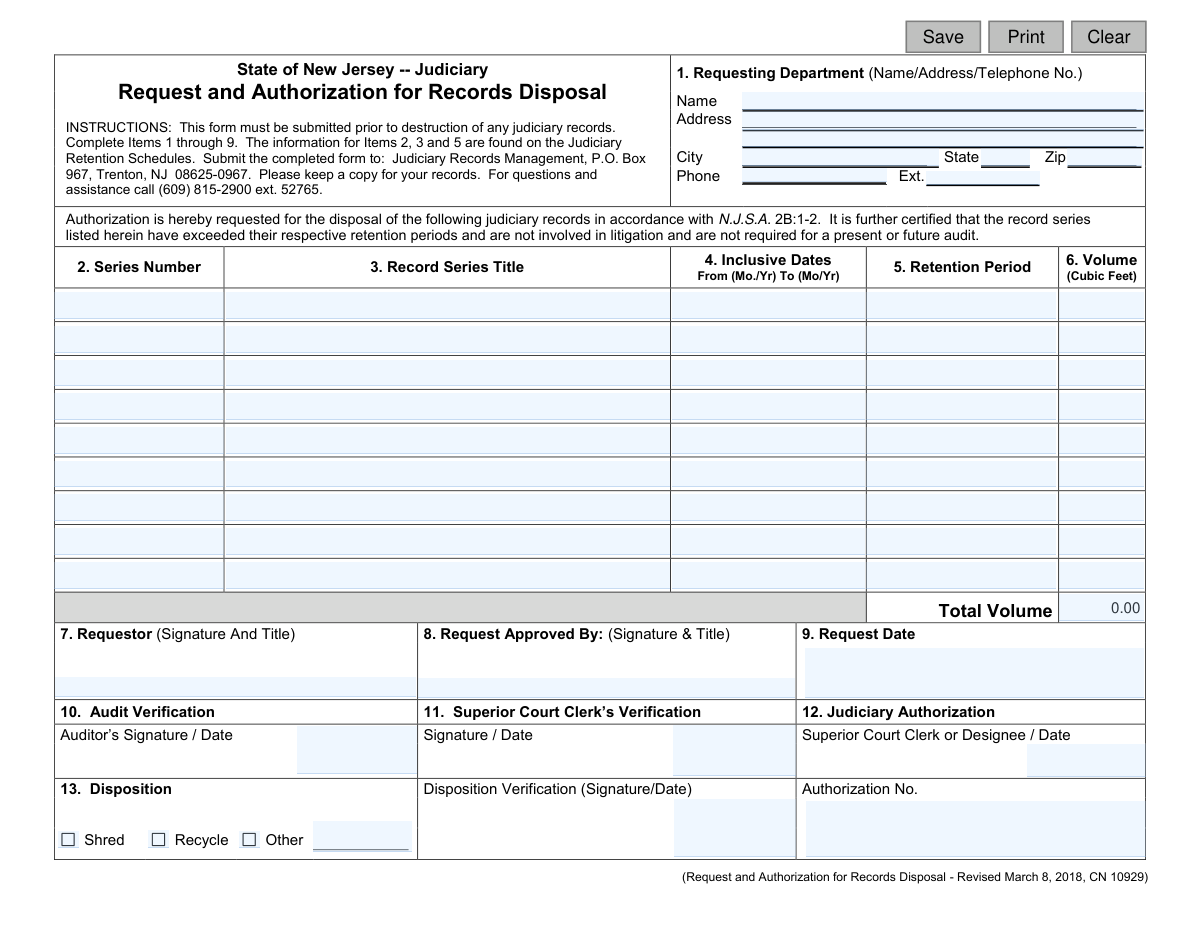
Yes! You can use AI to fill out Request and Authorization for Records Disposal
This form is an official document for the State of New Jersey Judiciary, used by departments to request and receive authorization for the disposal of judiciary records. It certifies that the records have exceeded their retention periods as per the Judiciary Retention Schedules and are not involved in any current litigation or audits. Today, this form can be filled out quickly and accurately using AI-powered services like Instafill.ai, which can also convert non-fillable PDF versions into interactive fillable forms.
CN 10929 is part of the
New Jersey forms category on Instafill.
Our AI automatically handles information lookup, data retrieval, formatting, and form filling.
It takes less than a minute to fill out CN 10929 using our AI form filling.
Securely upload your data. Information is encrypted in transit and deleted immediately after the form is filled out.
Form specifications
| Form name: | Request and Authorization for Records Disposal |
| Number of fields: | 78 |
| Number of pages: | 1 |
| Language: | English |
Instafill Demo: How to fill out PDF forms in seconds with AI
How to Fill Out CN 10929 Online for Free in 2026
Are you looking to fill out a CN 10929 form online quickly and accurately? Instafill.ai offers the #1 AI-powered PDF filling software of 2026, allowing you to complete your CN 10929 form in just 37 seconds or less.
Follow these steps to fill out your CN 10929 form online using Instafill.ai:
- 1 Navigate to Instafill.ai and upload or select the Request and Authorization for Records Disposal form.
- 2 Use the AI assistant to input the requesting department's name, address, and phone number in Section 1.
- 3 In the main table (Sections 2-6), list each record series for disposal, providing the series number, title, inclusive dates, retention period, and volume in cubic feet.
- 4 Provide the signature, title, and date of the requestor in Sections 7 and 9.
- 5 Route the form for necessary approvals, including the approving authority (Section 8), Audit Verification (Section 10), and Superior Court Clerk's Verification (Section 11).
- 6 Once authorization is granted and the records are disposed of, complete the Disposition section (13) with the method, signature, and date.
- 7 Review all AI-populated information for accuracy before submitting the completed form to the Judiciary Records Management office.
Our AI-powered system ensures each field is filled out correctly, reducing errors and saving you time.
Why Choose Instafill.ai for Your Fillable CN 10929 Form?
Speed
Complete your CN 10929 in as little as 37 seconds.
Up-to-Date
Always use the latest 2026 CN 10929 form version.
Cost-effective
No need to hire expensive lawyers.
Accuracy
Our AI performs 10 compliance checks to ensure your form is error-free.
Security
Your personal information is protected with bank-level encryption.
Frequently Asked Questions About Form CN 10929
This form is used by New Jersey Judiciary departments to formally request permission to destroy official records that have met their required retention period. It ensures that records are disposed of in accordance with state law and judiciary policy.
Any department within the New Jersey Judiciary that wishes to dispose of official records must complete and submit this form for authorization before any destruction takes place.
This information is located on the official Judiciary Retention Schedules. You must consult these schedules to accurately complete items 2, 3, and 5 on the form.
By signing, you certify that the records have exceeded their retention period, are not involved in any litigation, and are not required for an audit. This is a critical step to ensure compliance before destruction.
No, you must wait until you receive full authorization, indicated by signatures in items 10, 11, and 12. Submitting the form is only the first step in the request process.
A standard records storage box is typically considered 1 cubic foot. To calculate the volume, simply count the number of standard boxes for each record series you are disposing of.
Submit the completed form to Judiciary Records Management, P.O. Box 967, Trenton, NJ 08625-0967. The form instructions advise you to keep a copy for your own records.
After receiving all necessary signatures, you may proceed with the disposition method noted in Item 13 (Shred, Recycle, etc.). You must then complete the 'Disposition Verification' field with a signature and date.
For questions and assistance with this form, you can call Judiciary Records Management at (609) 815-2900 ext. 52765.
Yes, services like Instafill.ai use AI to accurately auto-fill form fields from your existing data, which can save you significant time and help prevent errors.
You can use a service like Instafill.ai to complete this form digitally. Simply upload the PDF, and the platform will make it interactive, allowing you to type directly into the fields.
If you have a non-fillable or 'flat' PDF, you can upload it to Instafill.ai. The service will automatically convert it into an interactive, fillable form that you can complete on your computer.
This signature should be from a supervisor or department head who has the authority to approve the records disposal request on behalf of the requesting department, before it is submitted for official authorization.
Compliance CN 10929
Validation Checks by Instafill.ai
1
Requesting Department Information Completeness
Checks that the requesting department's name, full address (street, city, state, zip), and phone number are all provided in Item 1. This information is essential for identifying the origin of the request and for any necessary follow-up communication. Failure to provide complete information will prevent the form from being submitted, as the request cannot be processed without knowing who sent it.
2
At Least One Record Series Entry
Confirms that at least one complete record series row (Items 2 through 6) has been filled out. A disposal request is meaningless without specifying at least one record series to be destroyed. This check prevents the submission of empty or incomplete requests, ensuring the form serves its intended purpose.
3
Inclusive Dates Chronological Order
Verifies that for each record series listed, the 'To' date (4EndDt) is the same as or later than the 'From' date (4StartDt). This is a logical consistency check to ensure the date range is valid and not nonsensical. A request with an inverted date range would be rejected as it represents an impossible time period for a record series.
4
Inclusive Dates Format (Mo./Yr)
Ensures that all 'From' and 'To' dates (4StartDt, 4EndDt) are entered in the specified 'Mo./Yr' format, for example, '03/2024'. This standardization is critical for consistent data processing and for accurately calculating if the retention period has been met. Submissions with incorrect date formats will be flagged for correction.
5
Total Volume Calculation Accuracy
This validation checks that the value in the 'Total Volume' field is the correct sum of all individual 'Volume (Cubic Feet)' entries (6Volume). This serves as a cross-check to prevent mathematical errors and ensures the total volume of records for disposal is reported accurately. If the sum does not match the total, an error will be displayed, requiring the user to correct the values before proceeding.
6
Record Series Row Completeness
For any record series row that has been started (i.e., at least one field in the row is filled), this check ensures all fields in that row (Series Number, Title, From/To Dates, Retention Period, Volume) are also filled. This prevents incomplete data entries which would make it impossible to verify the disposal authorization for that specific series. The user will be prompted to complete the row or clear it entirely.
7
Retention Period Exceeded Verification
This is a critical logical check that verifies the records are eligible for disposal based on the certification statement. It would ideally compare the 'To' date plus the 'Retention Period' against the current date to confirm the retention period has been exceeded. This validation is essential for legal compliance, and failure would mean the records cannot be legally destroyed yet.
8
Request Date Validity
Validates that the 'Request Date' (9ReqDt) is a valid, properly formatted date and is not set to a future date. The request date establishes the official start of the disposal process and is used for auditing and tracking purposes. An invalid or future date would compromise the integrity of the form's timeline and will be rejected.
9
Conditional Requirement for 'Disposition Other'
Checks that if the 'Disposition' method (13Disposition) is selected as 'Other', the corresponding text field (13DispositionOther) must contain a description. This ensures that alternative disposal methods are clearly specified and not left ambiguous. An empty 'Other' description field will result in a validation error, forcing the user to specify the method.
10
ZIP Code Format Validation
Validates that the ZIP code entered in the '1ReqAddrZip' field is a standard 5-digit or 9-digit (ZIP+4) format. Correct formatting is crucial for mail delivery and data integrity, ensuring that any physical correspondence reaches the correct location. An invalid format will trigger an error message prompting the user to correct the entry before submission.
11
Phone Number Format
Validates that the '1ReqPhone' field contains a valid 10-digit US phone number, allowing for common formats like (XXX) XXX-XXXX or XXX-XXX-XXXX. A valid phone number is crucial for contacting the requesting department if there are any questions or issues with the disposal request. An improperly formatted number will trigger an error, requiring correction.
12
Numeric Volume Field Validation
Ensures that all volume fields (6Volume and TotalVolume) contain only valid numeric characters and at most one decimal point. This is fundamental for performing the 'Total Volume Calculation Accuracy' check and for maintaining data quality for reporting purposes. Non-numeric entries will be flagged as errors.
Common Mistakes in Completing CN 10929
Users often enter incorrect Series Numbers, Titles, or Retention Periods in Items 2, 3, and 5. This happens when referencing an outdated Judiciary Retention Schedule or making a transcription error. An incorrect entry will cause the request to be rejected, as the authorization is tied to the official schedule. Always verify you are using the most current version of the Judiciary Retention Schedules before filling out these fields.
A critical error is incorrectly determining that a record series has exceeded its retention period. Users must compare the 'Inclusive Dates' (Item 4) against the 'Retention Period' (Item 5) to confirm eligibility for disposal. Destroying records prematurely is a serious compliance violation with potential legal and audit consequences, so calculations must be double-checked for accuracy.
The certification statement above the record details is a legally binding declaration. A common mistake is for the requestor to sign off without thoroughly verifying that the records are not involved in current litigation or required for an audit. This oversight can lead to significant legal penalties and administrative problems if the records are destroyed and later found to be needed.
The form requires both a signature and a title for the 'Requestor' (Item 7) and the 'Request Approved By' (Item 8). Forgetting to include a title, or submitting the form without one or both signatures, will render it invalid. The form will be returned, delaying the entire disposal process until it is properly completed and re-submitted.
Requestors sometimes complete their portion of the form and submit it directly, bypassing the required internal approval signature in Item 8. This section must be signed by an authorized individual within the department before the form is sent to Judiciary Records Management. Submitting without this approval signature will result in an automatic rejection of the request.
Item 4 specifically requests dates in a 'Mo./Yr' format. A frequent error is entering dates in a different format, such as MM/DD/YYYY, or only providing the year. This inconsistency requires manual correction by the processing office and can lead to delays or data entry errors. AI-powered tools like Instafill.ai can help prevent this by automatically formatting dates correctly.
In Item 1, users may omit crucial contact information like the full department name, zip code, or a direct phone extension. If the records management office has questions or needs to report a problem with the request, incomplete information makes it difficult to contact the right person. This can significantly delay the approval process while they try to track down the requestor.
A simple arithmetic error when summing the 'Volume' column (Item 6) to get the 'Total Volume' is a common mistake. An inaccurate total can cause logistical issues for the disposal vendor, who plans resources based on this figure. It's important to carefully add all volume entries to ensure the total is correct before submission.
Applicants sometimes mistakenly fill out sections 10 through 13, which are clearly marked for 'Audit Verification', 'Superior Court Clerk’s Verification', and 'Judiciary Authorization'. Writing in these fields can cause confusion, disrupt the established workflow, and slow down the review process. These sections should always be left blank by the requesting department.
If the form is a non-fillable PDF, users may print it and complete it by hand. Illegible handwriting for critical data like series numbers, dates, or names can lead to processing errors or outright rejection of the form. To avoid this, it is best to use a tool like Instafill.ai, which can convert a flat PDF into a digitally fillable version, ensuring all entries are clear, legible, and professional.
Saved over 80 hours a year
“I was never sure if my IRS forms like W-9 were filled correctly. Now, I can complete the forms accurately without any external help.”
Kevin Martin Green
Your data stays secure with advanced protection from Instafill and our subprocessors

Robust compliance program
Transparent business model
You’re not the product. You always know where your data is and what it is processed for.
ISO 27001, HIPAA, and GDPR
Our subprocesses adhere to multiple compliance standards, including but not limited to ISO 27001, HIPAA, and GDPR.
Security & privacy by design
We consider security and privacy from the initial design phase of any new service or functionality. It’s not an afterthought, it’s built-in, including support for two-factor authentication (2FA) to further protect your account.
Fill out CN 10929 with Instafill.ai
Worried about filling PDFs wrong? Instafill securely fills request-and-authorization-for-records-disposal forms, ensuring each field is accurate.