Yes! You can use AI to fill out State Equalization Table - School Aid Complaint

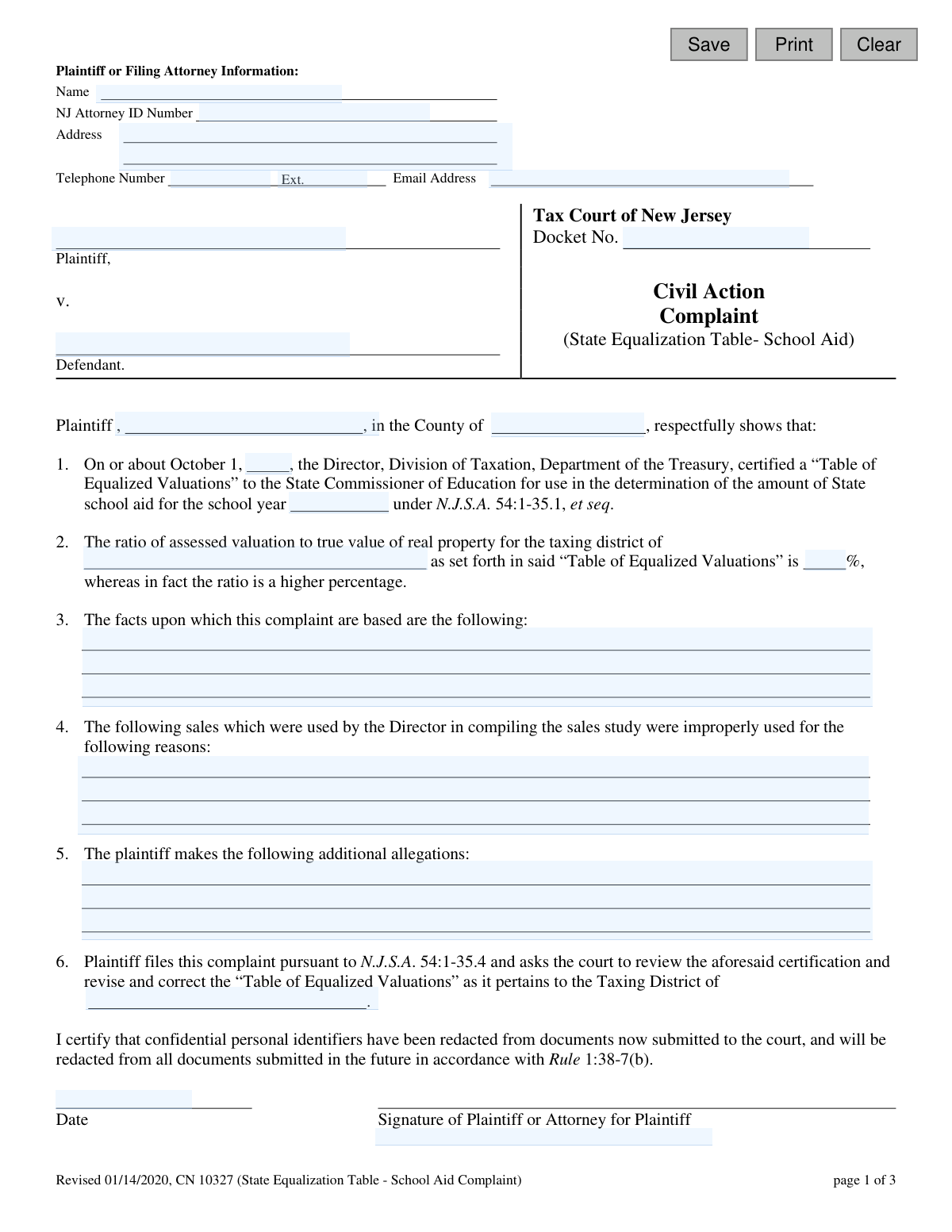
Form CN 10327, the State Equalization Table - School Aid Complaint, is a formal complaint filed with the Tax Court of New Jersey. It is used by a plaintiff to dispute the 'Table of Equalized Valuations' certified by the Director of the Division of Taxation, which affects the allocation of state school aid. Filing this complaint is a crucial step for a taxing district to seek a review and correction of what it believes to be an inaccurate property valuation ratio. Today, this form can be filled out quickly and accurately using AI-powered services like Instafill.ai, which can also convert non-fillable PDF versions into interactive fillable forms.
CN 10327 is part of the New Jersey forms category on Instafill.
Our AI automatically handles information lookup, data retrieval, formatting, and form filling.
It takes less than a minute to fill out CN 10327 using our AI form filling.
Securely upload your data. Information is encrypted in transit and deleted immediately after the form is filled out.

Form specifications

Form name: State Equalization Table - School Aid Complaint
Number of fields: 32
Number of pages: 1
Language: English
main-image

Instafill Demo: How to fill out PDF forms in seconds with AI

How to Fill Out CN 10327 Online for Free in 2026

Are you looking to fill out a CN 10327 form online quickly and accurately? Instafill.ai offers the #1 AI-powered PDF filling software of 2026, allowing you to complete your CN 10327 form in just 37 seconds or less.
Follow these steps to fill out your CN 10327 form online using Instafill.ai:
  1. 1 Navigate to an AI-powered form-filling service like Instafill.ai and upload or select the State Equalization Table - School Aid Complaint (CN 10327).
  2. 2 Provide your information as the plaintiff or filing attorney, including name, NJ Attorney ID number, address, and contact details.
  3. 3 Enter the case details in the main body of the complaint, such as the defendant's name, the county, and the relevant school year.
  4. 4 Clearly state the basis for the complaint in sections 3, 4, and 5, detailing the disputed valuation ratio, the facts supporting your claim, and any sales you believe were improperly used.
  5. 5 Complete the certification statement and the Proof of Service section, indicating the date and method of service to the Director of the Division of Taxation and the Attorney General.
  6. 6 Carefully review all entered information for accuracy, then date and sign the complaint in the designated areas before filing with the Tax Court.

Our AI-powered system ensures each field is filled out correctly, reducing errors and saving you time.

Why Choose Instafill.ai for Your Fillable CN 10327 Form?

Speed

Complete your CN 10327 in as little as 37 seconds.

Up-to-Date

Always use the latest 2026 CN 10327 form version.

Cost-effective

No need to hire expensive lawyers.

Accuracy

Our AI performs 10 compliance checks to ensure your form is error-free.

Security

Your personal information is protected with bank-level encryption.

Frequently Asked Questions About Form CN 10327

This form is a legal complaint filed in the Tax Court of New Jersey to challenge the state's 'Table of Equalized Valuations.' It is used when a taxing district believes its property value ratio is incorrect, which directly impacts the amount of state school aid it receives.

This form is filled out by a plaintiff, which is typically a New Jersey taxing district (such as a municipality), or an attorney representing the district. The defendant in this action is the Director of the Division of Taxation.

The primary reason to file this complaint is the belief that the official ratio of assessed valuation to true value for your taxing district is incorrect and should be a higher percentage. This correction can affect the calculation for state school aid.

In this section, you must provide the specific evidence and factual basis for your claim. This could include your own analysis of property sales, appraisal data, or other documentation that contradicts the state's findings.

You should list specific property sales that the Director of Taxation used in the state's study that you believe are invalid. For each sale, you must explain why it was improperly used, such as it not being an arm's-length transaction or involving a distressed seller.

No, the form itself states that its use is optional. However, any complaint you file must set forth the claim for relief, a statement of facts, and conform to the rules of the court.

The complaint is filed with the Tax Court of New Jersey. You must also complete the 'Proof of Service' section, confirming that you have sent a copy to both the Director of the Division of Taxation and the Attorney General of New Jersey.

Redacting means you must remove or black out sensitive information like Social Security numbers, driver's license numbers, and active financial account numbers from all documents before filing them with the court.

Before you begin, you should have the official 'Table of Equalized Valuations,' the specific ratio assigned to your district, and all evidence supporting your claim, including your analysis of property sales data.

The form does not specify a deadline, but you must file your complaint according to the timeline established in New Jersey state law (N.J.S.A. 54:1-35.4). It is critical to consult the statute or an attorney to ensure you file on time.

Yes, services like Instafill.ai use AI to auto-fill form fields accurately and save time. This can help reduce errors and streamline the process of preparing the complaint for filing.

You can use a service like Instafill.ai to upload the PDF form, fill it out interactively on your computer, and then download the completed document for printing, signing, and filing.

If you have a flat, non-fillable PDF, a service like Instafill.ai can convert it into an interactive, fillable form. This allows you to easily type your information directly into the fields.

Compliance CN 10327
Validation Checks by Instafill.ai

1
Validates Attorney Email Format
This check ensures that the value entered in the 'attyEmail' field is a valid email address format (e.g., '[email protected]'). A valid email is crucial for the court and opposing parties to send case-related communications and notifications electronically. If the format is invalid, the user will be prompted to correct the email address before submission is allowed.
2
Ensures Factual Basis for Complaint is Provided
This validation confirms that the 'factsReasons' text area is not empty. The complaint's legal standing depends on a clear statement of facts supporting the claim. An empty submission would be legally insufficient, so this check prevents the filing of an incomplete and invalid complaint.
3
Verifies Consistency of Taxing District Name
This check compares the values entered into the 'taxDistrict' field (paragraph 2) and the 'taxDistrict2' field (paragraph 6) to ensure they are identical. It is critical that the complaint consistently identifies the single taxing district being challenged to avoid ambiguity and potential dismissal. A mismatch will trigger an error requiring the user to correct the names to match.
4
Validates Valuation Ratio Percentage Format
This check ensures the 'valuPercent' field contains a valid positive number, as it represents a percentage. The input should be numeric and within a logical range (e.g., greater than 0). This prevents non-numeric or nonsensical data from being entered, which would invalidate the core claim about the property value ratio.
5
Checks Logical Sequence of Certification and School Year
This validation ensures the 'schoolYr' is logically subsequent to the certification year 'dtYear'. The certification on October 1 of a given year pertains to state school aid for the following school year (e.g., an October 1, 2023 date corresponds to the 2024-2025 school year). An illogical sequence would be factually incorrect and could undermine the complaint's basis.
6
Validates Proof of Service Date Logic
This check verifies that the service dates ('ProofSvcDt1' and 'ProofSvcDt2') are on or before the Proof of Service signature date ('sigDt2'). It is logically impossible to certify that service was completed on a future date. This validation ensures the chronological integrity of the legal certification process.
7
Ensures Selection of Service Method
This validation confirms that for both the Director of the Division of Taxation and the Attorney General, a service method ('personally' or 'by registered or certified mail') has been selected. Proper service is a jurisdictional requirement, and failure to specify the method makes the Proof of Service incomplete. The form cannot be submitted until both selections are made.
8
Validates NJ Attorney ID Number Format
This check verifies that the 'attyID' field, if filled, conforms to the specific format for New Jersey Attorney ID numbers. This ensures proper identification of the filing attorney within the state's bar records, which is essential for verifying their authority to practice. An incorrectly formatted ID could cause processing delays or rejection.
9
Ensures Plaintiff/Attorney Name is Provided
This check ensures the 'attyName' field is not left blank. The name of the filer is the most basic and critical piece of identifying information on a legal document. Without it, the complaint has no identifiable origin and is invalid.
10
Validates School Year Format
This check ensures the 'schoolYr' field follows a consistent format, such as 'YYYY-YYYY' (e.g., '2024-2025'). A standardized format prevents ambiguity and ensures the record is clear about which school aid year is being contested. An incorrect format will prompt the user for correction.
11
Verifies Complaint Signature Date is Present
This validation confirms that the 'sigDt' field associated with the primary signature is filled out. The signature date is legally significant, marking the date the complaint was formally attested to and establishing a timeline for filing and service. A missing date would render the certification incomplete.
12
Ensures County of Plaintiff is Specified
This check verifies that the 'typeCounty' field in the first paragraph of the complaint is not empty. Specifying the county is necessary for establishing context and is a required element of the formal statement. Failure to provide the county results in an incomplete and improperly drafted complaint.
13
Validates US Phone Number Format
This check ensures the 'attyPh' field contains a valid 10-digit US phone number, allowing for common formats like (XXX) XXX-XXXX or XXX-XXX-XXXX. A valid contact number is essential for court staff or other parties to be able to reach the filer. An invalid number would hinder communication and cause potential delays.

Common Mistakes in Completing CN 10327

Incomplete or Incorrect Proof of Service

Filers often forget to complete the 'Proof of Service' section on page 3, failing to enter the date of service, check the method of service, or sign the certification. This is a critical error as improper service can lead to the complaint being dismissed for procedural failure. To avoid this, double-check that you have served both the Director of the Division of Taxation and the Attorney General, recorded the dates, selected the service method, and signed the certification.

Vague or Unsupported Factual Basis

In Section 3, filers may state conclusions without providing the specific facts the complaint is based on. A statement like 'the valuation is wrong' is insufficient; the court needs detailed evidence, such as analysis of property classes, appraisal data, or statistical discrepancies. A weak factual basis can lead to the complaint being dismissed for failure to state a claim. Always provide clear, detailed, and verifiable facts supporting your claim.

Including Confidential Personal Identifiers

Despite explicit warnings on page 2, filers sometimes include confidential information like Social Security or driver's license numbers in their narrative sections or attachments. This violates Court Rule 1:38-7 and creates a security risk, and the court will not redact it for you. Before filing, meticulously review all documents to ensure all confidential identifiers have been removed or redacted.

Forgetting the Redaction Certification Signature

The certification on page 1, stating that confidential identifiers have been redacted, is a mandatory declaration that is often overlooked. Filers may miss signing or dating this specific line, which can lead to the document being rejected by the court clerk. Always ensure you sign and date this certification to affirm your compliance with court rules before submitting the complaint.

Mismatching Dates and School Year

In Section 1, it is common to enter an incorrect certification year or mismatch it with the corresponding school aid year. This creates ambiguity and undermines the complaint's accuracy, potentially causing processing delays or requiring an amendment. Carefully verify that the 'October 1, [year]' date and the '[school year]' align with the specific 'Table of Equalized Valuations' you are challenging.

Failing to Specify Improper Sales Data

Section 4 asks for specific sales that were improperly used by the Director, but filers often leave it blank or provide a generic statement. This section is an opportunity to provide concrete evidence to support the complaint. Failing to list specific sales with reasons for their improper inclusion (e.g., non-arm's length transaction, incorrect property type) significantly weakens the argument that the state's sales study was flawed.

Incorrect or Missing NJ Attorney ID

Attorneys filing the form may enter their NJ Attorney ID number incorrectly, transpose digits, or forget it entirely. This ID is crucial for the court to verify the attorney's standing and for proper case management. An incorrect ID can cause filing delays and administrative issues. AI-powered form filling tools like Instafill.ai can help by storing and accurately populating this type of recurring information.

Inconsistent Naming of the Taxing District

Filers sometimes use different names, abbreviations, or spellings for the taxing district in Section 2 and Section 6. This inconsistency can create legal ambiguity about which municipality's valuation is being challenged. To prevent this, use the full, official name of the taxing district in all relevant fields. Using a tool like Instafill.ai can ensure consistency by auto-filling repeated fields after the first entry.

Incorrectly Identifying Plaintiff and Defendant

A fundamental mistake is incorrectly naming the parties. The Plaintiff is the entity filing the complaint (e.g., 'Borough of Example'), not an individual's name unless they are self-represented, and the Defendant is typically the 'Director, Division of Taxation'. Misidentifying the parties can result in the complaint being rejected or requiring a motion to amend the caption, causing unnecessary delays and costs.

Leaving Contact Information Blank or Unreadable

Filers may omit their email address or phone number, or provide handwritten information that is illegible. The court and opposing counsel rely on this information for all official communication, including scheduling and notices. Missing or unreadable contact details can lead to missed deadlines and critical communications. Since this form is a non-fillable PDF, a tool like Instafill.ai can convert it into a fillable version, ensuring all contact information is typed, legible, and complete.
Saved over 80 hours a year

“I was never sure if my IRS forms like W-9 were filled correctly. Now, I can complete the forms accurately without any external help.”

Kevin Martin Green

Your data stays secure with advanced protection from Instafill and our subprocessors

Robust compliance program

Transparent business model

You’re not the product. You always know where your data is and what it is processed for.

ISO 27001, HIPAA, and GDPR

Our subprocesses adhere to multiple compliance standards, including but not limited to ISO 27001, HIPAA, and GDPR.

Security & privacy by design

We consider security and privacy from the initial design phase of any new service or functionality. It’s not an afterthought, it’s built-in, including support for two-factor authentication (2FA) to further protect your account.

Fill out CN 10327 with Instafill.ai

Worried about filling PDFs wrong? Instafill securely fills state-equalization-table-school-aid-complaint forms, ensuring each field is accurate.