Yes! You can use AI to fill out Stipulation of Settlement - Added / Added Omitted (CN 11404)

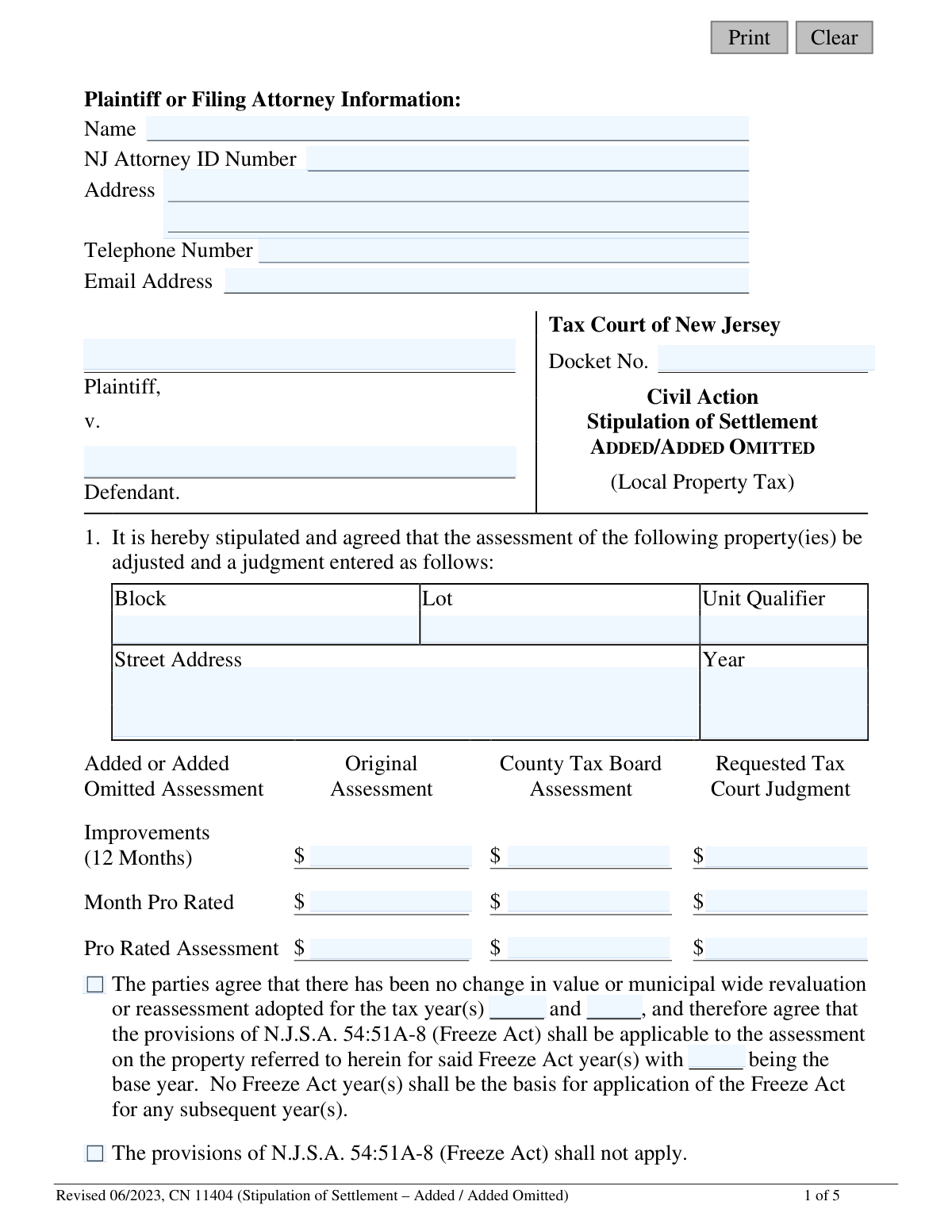
Form CN 11404, the Stipulation of Settlement for Added/Added Omitted assessments, is a legal document filed in the Tax Court of New Jersey. It is used by a taxpayer (plaintiff) and the taxing district (defendant) to officially record a settlement regarding the assessed value of property that was newly added or previously omitted from the tax rolls. This agreement avoids a formal trial by stipulating the adjusted assessment, which is then entered as a court judgment. Today, this form can be filled out quickly and accurately using AI-powered services like Instafill.ai, which can also convert non-fillable PDF versions into interactive fillable forms.
CN 11404 is part of the New Jersey forms category on Instafill.
Our AI automatically handles information lookup, data retrieval, formatting, and form filling.
It takes less than a minute to fill out CN 11404 using our AI form filling.
Securely upload your data. Information is encrypted in transit and deleted immediately after the form is filled out.

Form specifications

Form name: Stipulation of Settlement - Added / Added Omitted (CN 11404)
Number of fields: 76
Number of pages: 1
Language: English
main-image

Instafill Demo: How to fill out PDF forms in seconds with AI

How to Fill Out CN 11404 Online for Free in 2026

Are you looking to fill out a CN 11404 form online quickly and accurately? Instafill.ai offers the #1 AI-powered PDF filling software of 2026, allowing you to complete your CN 11404 form in just 37 seconds or less.
Follow these steps to fill out your CN 11404 form online using Instafill.ai:
  1. 1 Navigate to Instafill.ai and upload or select the Stipulation of Settlement - Added / Added Omitted (CN 11404) form.
  2. 2 Provide the Plaintiff or Filing Attorney's information, the Tax Court Docket Number, and the names of the Plaintiff and Defendant.
  3. 3 Enter the specific details for each property involved in the settlement, including Block, Lot, Unit, Qualifier, and Street Address.
  4. 4 Input the financial figures for the assessment, including the Original Assessment, County Tax Board Assessment, and the final Requested Tax Court Judgment.
  5. 5 Indicate whether the provisions of the Freeze Act (N.J.S.A. 54:51A-8) will apply to the settlement for subsequent tax years.
  6. 6 Review all the information populated by the AI for accuracy, ensuring all calculations and property details are correct.
  7. 7 Electronically or manually sign and date the form, then file it with the New Jersey Tax Court as required.

Our AI-powered system ensures each field is filled out correctly, reducing errors and saving you time.

Why Choose Instafill.ai for Your Fillable CN 11404 Form?

Speed

Complete your CN 11404 in as little as 37 seconds.

Up-to-Date

Always use the latest 2026 CN 11404 form version.

Cost-effective

No need to hire expensive lawyers.

Accuracy

Our AI performs 10 compliance checks to ensure your form is error-free.

Security

Your personal information is protected with bank-level encryption.

Frequently Asked Questions About Form CN 11404

This form is used to document a settlement agreement between a taxpayer and a taxing district regarding an Added or Added Omitted property tax assessment. It allows both parties to agree on a new assessment value and have a judgment entered by the New Jersey Tax Court without a full trial.

The form must be completed and signed by both the plaintiff (or their attorney) and the attorney for the defendant (the taxing district). If a taxpayer is representing themselves (pro se), they can sign the form on their own behalf.

An Added Assessment is a tax on a new structure or improvement completed after the annual October 1 assessment date. An Added Omitted assessment is a tax on property that was previously overlooked and omitted from the tax rolls.

The Freeze Act (N.J.S.A. 54:51A-8) can lock in the settled assessment value for two subsequent tax years, preventing increases during that time. You must check the appropriate box to indicate whether both parties agree to apply the Freeze Act as part of the settlement.

You need to enter the 'Original Assessment' from the municipality, the 'County Tax Board Assessment' if applicable, and the new agreed-upon 'Requested Tax Court Judgment'. These values must be specified for both the full 12-month improvement value and the pro-rated assessment amount.

If your settlement includes multiple properties, you must use the 'Additional Properties Schedule' provided on pages 3 and 4 of the form. You can attach additional schedules if necessary to list all properties covered by the agreement.

Attorneys are required to file the document electronically via the NJ eCourts system. Self-represented litigants have the option to file through eCourts or mail the signed hard copy to the Tax Court Management Office in Trenton.

No, you are not required to have an attorney. If you represent yourself, you can sign the form and simply write 'pro se' after your signature.

Once filed, a Tax Court judge will review the settlement to ensure it is fair and lawful. If approved, the court will issue a judgment based on the terms agreed upon in the stipulation.

Yes, services like Instafill.ai use AI to accurately auto-fill form fields, which can save you time and help prevent errors. However, the actual settlement terms must be negotiated and agreed upon by both parties before filling out the form.

You can upload the form to Instafill.ai, which will make it fillable online. You can then type your information directly into the fields and use the AI-powered autofill feature to complete it quickly before printing for signatures.

If you have a non-fillable or 'flat' PDF, you can use a service like Instafill.ai. It can convert the document into an interactive, fillable form that you can easily complete on your computer.

You will need the Tax Court Docket Number, the property's Block, Lot, and address, and the specific assessment values that have been agreed upon for the settlement. You will also need the contact information for the plaintiff and the defendant's attorney.

Compliance CN 11404
Validation Checks by Instafill.ai

1
Docket Number Format and Presence
This check ensures the 'Docket No.' field is not empty and follows the format required by the Tax Court of New Jersey. A valid docket number is crucial for associating the settlement with the correct case file. If the format is incorrect or the field is empty, the submission will be rejected to prevent misfiling.
2
NJ Attorney ID Validation
Validates that the 'NJ Attorney ID Number' field contains a properly formatted, existing attorney identification number. This is important for verifying the credentials and identity of the filing attorney. An invalid ID could indicate a data entry error or an unauthorized filing, leading to rejection until corrected.
3
Plaintiff/Attorney Information Completeness
Verifies that all fields in the 'Plaintiff or Filing Attorney Information' section (Name, NJ Attorney ID, Address, Telephone, Email) are filled out. Complete contact information is essential for the court to communicate regarding the stipulation. A failure in this check would prompt the user to complete all required fields before submission.
4
Email Address Format
Ensures the 'Email Address' field contains a string that conforms to a standard email format (e.g., '[email protected]'). This prevents data entry errors and ensures that electronic communications from the court will be successfully delivered. An invalid format would trigger an error message asking the user to correct the email address.
5
At Least One Property Listed
Checks that at least one property has been entered, either on the first page or on an 'Additional Properties Schedule'. A stipulation of settlement for property tax must relate to at least one property. If no property details (Block, Lot, Address) are provided, the form is considered incomplete and cannot be processed.
6
Assessment Value Numeric Format
This validation confirms that all assessment fields (e.g., 'Original Assessment', 'Requested Tax Court Judgment') contain only valid, non-negative numeric currency values. This is critical for maintaining data integrity and ensuring accurate financial recording. Any non-numeric characters or negative values would cause the validation to fail, requiring the user to correct the entry.
7
Pro-Rated Month Range
Validates that the 'Month Pro Rated' field is an integer between 1 and 12. This field is used for pro-rated assessment calculations and must correspond to a valid month. An entry outside this range would lead to incorrect calculations and must be corrected before submission.
8
Freeze Act Year Logic
If the Freeze Act checkbox is checked, this validation ensures that the 'base year' and at least one 'Freeze Act year' are provided. It also checks for logical consistency, such as the Freeze Act years being subsequent to the base year. This enforces the specific legal requirements for applying the Freeze Act and prevents ambiguous or invalid requests.
9
Freeze Act Application Contradiction
Ensures that the user has not selected both 'Freeze Act shall be applicable' and 'Freeze Act shall not apply' checkboxes. It also checks that if 'shall not apply' is selected, the Freeze Act year fields are empty. This prevents the submission of contradictory information that would make the stipulation legally unclear and require manual intervention.
10
Signature and Date Completeness
Verifies that both the 'Signature of Plaintiff or Attorney' and 'Signature of Attorney for Defendant' fields are accompanied by a corresponding signature date. A legal agreement requires both a signature and a date to be considered properly executed. A missing date for a provided signature will result in a validation failure.
11
Signature Date Chronology
Checks that the signature dates provided are not in the future. The date of signing must be on or before the date of submission to be legally valid. A future date would be flagged as an error, requiring the user to enter a valid date.
12
Additional Properties Docket Number Match
If an 'Additional Properties Schedule' is used, this check ensures the Docket Number on that schedule matches the Docket Number on the first page of the form. This is critical for ensuring all pages of a multi-property settlement are correctly associated with a single case file. A mismatch would cause a rejection to prevent fragmentation of the legal document.
13
Plaintiff and Defendant Name Requirement
This validation ensures that the 'Plaintiff' and 'Defendant' name fields are not empty. These names are fundamental to identifying the parties involved in the civil action and are essential for the legal validity of the settlement document. The form cannot be processed without this core information.
14
Year Field Format Validation
Verifies that all fields intended for a year (e.g., 'Year' for the property, 'base year' for Freeze Act) contain a valid 4-digit year. This maintains data consistency and prevents errors from typos like '23' instead of '2023'. An invalid entry would prompt the user for correction.

Common Mistakes in Completing CN 11404

Missing or Incorrect Docket Number

Filers often forget to enter the Tax Court Docket Number or mistype it. This number is the primary identifier for the case, and its absence or inaccuracy can lead to significant processing delays or the outright rejection of the stipulation. To avoid this, always double-check the docket number against official court correspondence and ensure it is present on the main form and all attached schedules.

Incorrect Property Identification

Entering the wrong Block, Lot, or Qualifier is a frequent error that can cause the settlement to be applied to the incorrect property. This often happens due to simple typos or referencing outdated tax records. The consequences can be severe, requiring legal action to correct. Always verify property details with the most recent municipal tax map and assessment records before filling out the form.

Improperly Completing the Freeze Act Section

Users often make mistakes in the Freeze Act section, such as checking the box to apply it but failing to enter the applicable tax years and the base year. Another common error is ignoring the signature date requirement mentioned in Note 7, which can invalidate the Freeze Act application for a subsequent year. This results in the loss of tax assessment stability for the intended years, forcing a new appeal.

Miscalculating Pro-Rated Assessments

The form requires calculating pro-rated assessment values based on the number of months, which is a common source of mathematical errors. An incorrect calculation leads to a flawed stipulation and an incorrect judgment amount, which will likely be caught and rejected by the court. To prevent this, carefully re-check all calculations; AI-powered tools like Instafill.ai can perform these calculations automatically to ensure accuracy.

Failing to Use Required Schedules

When a settlement involves multiple properties or condominium units, filers sometimes try to cram all the information onto the first page instead of using the proper attachments. The form explicitly requires using the 'Additional Properties Schedule' (Note 4) and attaching a 'Condominium Schedule' (Note 5). Failure to do so results in an incomplete filing that will be returned for correction, delaying the settlement.

Incomplete or Invalid Signature and Date Information

A stipulation is not valid without the signatures of all required parties and the corresponding dates. People may forget a signature or, crucially, enter a date that invalidates a portion of the agreement, such as dating the form before October 1st when attempting to apply the Freeze Act for the following year. This can render the entire settlement unenforceable until corrected and re-signed.

Omitting Required Plaintiff or Attorney Details

The top section of the form requires complete contact information for the filing party, including the NJ Attorney ID number for lawyers. Omitting any of this information, such as an email address or phone number, can slow down the process as the court clerk will have difficulty communicating any issues with the filing. Using a tool like Instafill.ai can prevent this by saving and auto-populating this recurring information.

Inconsistent Data Across Assessment Columns

Filers may enter conflicting financial data between the 'Original Assessment', 'County Tax Board Assessment', and 'Requested Tax Court Judgment' columns. The figures should tell a clear and logical story of the assessment history and the agreed-upon settlement value. Inconsistencies suggest a mistake or misunderstanding and will cause the court to question the validity of the settlement, leading to rejection.

Omitting the Docket Number on Additional Property Schedules

When using the 'Additional Properties Schedule' for settlements involving multiple lots, it is easy to forget to write the Docket Number at the top of each supplemental page. If these pages become separated, they cannot be matched to the correct case file, rendering the filing incomplete. AI form-filling tools like Instafill.ai can help avoid this by automatically populating the docket number across all pages of the document.

Errors by Self-Represented (Pro Se) Litigants

Taxpayers representing themselves often miss procedural nuances, such as failing to write 'pro se' after their signature as indicated in Note 2. They may also be confused about legal terms or who should sign as the 'Attorney for Defendant' (the municipal attorney). Since this form is often a non-fillable PDF, it can be difficult to complete cleanly; a tool like Instafill.ai can convert it into an easy-to-use fillable version, guiding the user and reducing errors.
Saved over 80 hours a year

“I was never sure if my IRS forms like W-9 were filled correctly. Now, I can complete the forms accurately without any external help.”

Kevin Martin Green

Your data stays secure with advanced protection from Instafill and our subprocessors

Robust compliance program

Transparent business model

You’re not the product. You always know where your data is and what it is processed for.

ISO 27001, HIPAA, and GDPR

Our subprocesses adhere to multiple compliance standards, including but not limited to ISO 27001, HIPAA, and GDPR.

Security & privacy by design

We consider security and privacy from the initial design phase of any new service or functionality. It’s not an afterthought, it’s built-in, including support for two-factor authentication (2FA) to further protect your account.

Fill out CN 11404 with Instafill.ai

Worried about filling PDFs wrong? Instafill securely fills stipulation-of-settlement-added-added-omitted-cn-11404 forms, ensuring each field is accurate.