Yes! You can use AI to fill out Tax Court - Order to Correct Data - eCourts

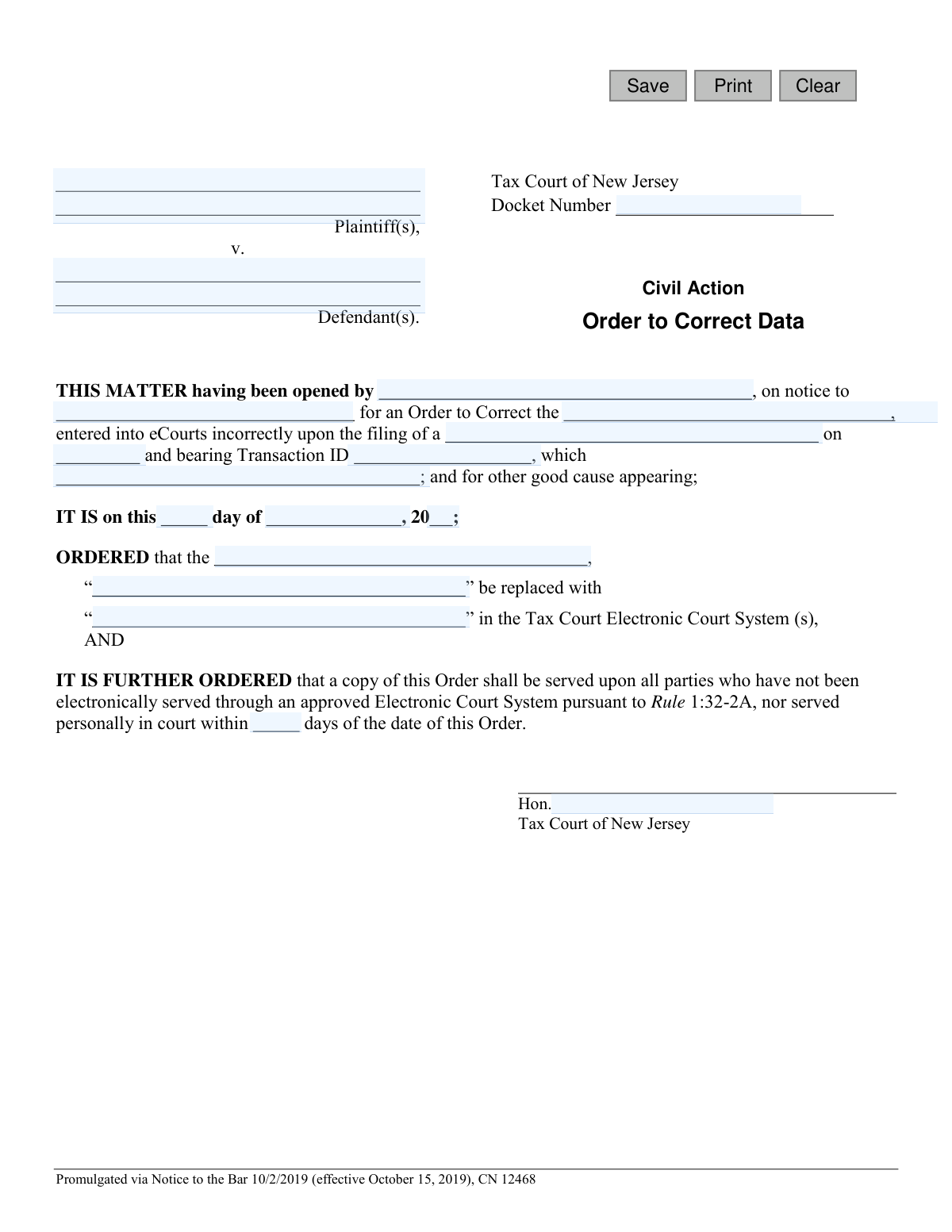
This form is a formal court order used within the Tax Court of New Jersey to rectify errors in the electronic court filing system, eCourts. It is essential for maintaining the integrity and accuracy of court records by officially documenting the incorrect data and specifying the correct information that should replace it. Today, this form can be filled out quickly and accurately using AI-powered services like Instafill.ai, which can also convert non-fillable PDF versions into interactive fillable forms.
Order to Correct Data is part of the New Jersey forms category on Instafill.
Our AI automatically handles information lookup, data retrieval, formatting, and form filling.
It takes less than a minute to fill out Order to Correct Data using our AI form filling.
Securely upload your data. Information is encrypted in transit and deleted immediately after the form is filled out.

Form specifications

Form name: Tax Court - Order to Correct Data - eCourts
Number of fields: 21
Number of pages: 1
Language: English
main-image

Instafill Demo: How to fill out PDF forms in seconds with AI

How to Fill Out Order to Correct Data Online for Free in 2026

Are you looking to fill out a ORDER TO CORRECT DATA form online quickly and accurately? Instafill.ai offers the #1 AI-powered PDF filling software of 2026, allowing you to complete your ORDER TO CORRECT DATA form in just 37 seconds or less.
Follow these steps to fill out your ORDER TO CORRECT DATA form online using Instafill.ai:
  1. 1 Navigate to Instafill.ai and upload or select the 'Tax Court - Order to Correct Data' form.
  2. 2 Use the AI assistant to input the case information, including the Docket Number, Plaintiff(s), and Defendant(s).
  3. 3 Provide details about the party opening the matter and the original document that was filed incorrectly, including its filing date and Transaction ID.
  4. 4 Clearly state the specific data that was entered incorrectly into the eCourts system in the designated field.
  5. 5 Enter the correct data that should replace the erroneous information.
  6. 6 Review all the information auto-filled by the AI for accuracy, make any necessary corrections, and prepare the document for submission to the court.

Our AI-powered system ensures each field is filled out correctly, reducing errors and saving you time.

Why Choose Instafill.ai for Your Fillable Order to Correct Data Form?

Speed

Complete your Order to Correct Data in as little as 37 seconds.

Up-to-Date

Always use the latest 2026 Order to Correct Data form version.

Cost-effective

No need to hire expensive lawyers.

Accuracy

Our AI performs 10 compliance checks to ensure your form is error-free.

Security

Your personal information is protected with bank-level encryption.

Frequently Asked Questions About Form Order to Correct Data

This form is a proposed court order used to ask a New Jersey Tax Court judge to correct information that was entered incorrectly into the eCourts system during a previous electronic filing.

A party in a Tax Court case, or their attorney, who discovers an error in the court's electronic record of their case should prepare this form for a judge's review and signature.

You will need the case docket number, plaintiff and defendant names, the date and Transaction ID of the incorrect filing, and the specific data that needs to be corrected.

The Transaction ID is generated by the eCourts system when a document is filed. It can be found on the filing confirmation notice or within the electronic case jacket for the specific document that was filed incorrectly.

In the 'ORDERED' section, you must identify the type of data (e.g., 'Plaintiff's Name'), then provide the exact incorrect entry and the exact correct entry that should replace it.

This clause requires you to send a copy of the signed order to all other parties in the case who are not automatically served through the eCourts system. The judge will specify the timeframe for this service.

As a proposed order, this form is typically submitted to the judge assigned to your case for their review and signature, following the court's specific procedures for submitting proposed orders.

This form is intended to correct data entry errors in the eCourts system, such as a misspelled name, an incorrect document description, or a wrong filing date captured in the system.

No, you should leave the date of the order ('IT IS on this day of...') and the judge's signature line blank. The court will complete these sections when the judge signs the order.

After the judge signs the order, the court clerk will update the eCourts system with the corrected information. You must then serve a copy of the signed order on the other parties as directed.

Yes, services like Instafill.ai use AI to accurately auto-fill form fields from your case files, which saves time and helps prevent manual data entry mistakes.

You can upload the form to the Instafill.ai platform, and its AI will identify all the fields for you. You can then input your information online, download the completed form, and print it for submission.

Instafill.ai can convert flat, non-fillable PDFs into interactive, fillable forms. Simply upload your PDF to the platform, and it will become an easy-to-complete digital document.

Compliance Order to Correct Data
Validation Checks by Instafill.ai

1
Validates Docket Number Format
Checks if the 'docketNo' field follows the standard New Jersey Tax Court docket number format. This ensures data integrity and allows for correct case lookups within the court's system. An invalid format could lead to the order being filed against the wrong case or being rejected by the clerk.
2
Ensures Plaintiff Name is Provided
Verifies that the 'plaName' field is not empty. The plaintiff is a primary party to the case, and their name is essential for identifying the legal matter. A missing plaintiff name would make the order legally deficient and un-fileable.
3
Ensures Defendant Name is Provided
Verifies that the 'defName' field is not empty. The defendant is a primary party to the case, and their name is crucial for identifying the legal matter. An order without a defendant is incomplete and cannot be processed by the court.
4
Validates Filing Date is a Valid Past or Present Date
Checks that the 'fileDt' is a valid calendar date and is not a future date. The filing date refers to a past event (the incorrect filing), so it must be on or before the current date. An invalid or future date would make the context of the correction order nonsensical and lead to rejection.
5
Validates Order Date is a Coherent and Valid Date
Ensures that the combination of 'orderDay', 'orderMo', and 'orderYr' forms a valid calendar date (e.g., not February 30). This date signifies when the judge signed the order, making it legally effective. An impossible date would invalidate the order and require correction before it can be entered into the system.
6
Ensures Transaction ID is Provided
Confirms that the 'transId' field is filled out. The Transaction ID is a unique identifier for the original electronic filing that contained the error, making it critical for locating and correcting the specific record in the eCourts system. Without this ID, court clerks cannot efficiently find the entry that needs to be fixed.
7
Ensures All Correction Data Fields are Complete
Validates that the 'dataDesc', 'dataIncorrect', and 'dataCorrect' fields are all populated. To perform a correction, the system needs to know what type of data is being changed, what the old value was, and what the new value should be. Missing any of this information makes the order ambiguous and impossible to execute.
8
Verifies Corrected Data Differs from Incorrect Data
Checks that the value entered in 'dataCorrect' is different from the value in 'dataIncorrect'. Filing an order to correct data to the exact same value is illogical and wastes court resources. This check prevents pointless submissions and prompts the user to verify their entries.
9
Validates Service Days is a Positive Integer
Ensures the 'servedDays' field contains a positive whole number. This field specifies the deadline for serving the order on parties, which is a legal requirement. A non-numeric or negative value would create an unenforceable and invalid deadline, jeopardizing the legal process.
10
Ensures Filer and Noticed Party Names are Provided
Verifies that both the 'firmName' (who opened the matter) and 'partyName' (who was on notice) fields are completed. This information is crucial for the case record, establishing who initiated the request for correction and who was formally notified. Omitting these details creates an incomplete legal record.
11
Validates Order Year is a Four-Digit Year
Checks that the 'orderYr' field is a four-digit number (e.g., 2024). This standard format prevents ambiguity (e.g., '24' vs '2024') and ensures data consistency within the court's electronic system. An invalid year format could lead to data entry errors and incorrect sorting of court orders.
12
Ensures Basis for Correction is Described
Validates that the 'basisDesc' field, which explains the reason for the correction, is not empty. This justification is part of the legal record and explains why the court is issuing the order. A missing basis would make the order incomplete and could be grounds for rejection by the court clerk.
13
Ensures Judge's Name is Provided
Verifies that the 'sigJudge' field, representing the name of the presiding judge, is filled in. An order from the court is not valid without the authority of a judge. A missing judge's name would render the document legally ineffective and it would be rejected upon submission.
14
Ensures Original Document Description is Provided
Checks that the 'docDesc' field, which identifies the type of document filed incorrectly (e.g., 'Complaint'), is not empty. This context is essential for court clerks to understand the nature of the original filing and the correction being made. Without this information, processing the order can be delayed or done incorrectly.

Common Mistakes in Completing Order to Correct Data

Incorrect or Incomplete Docket Number

Filers often enter the docket number with typos, transposed digits, or omit the required prefix/suffix. This is a critical error because the docket number is the primary identifier for the case file. An incorrect number will cause the order to be rejected or, worse, filed in the wrong case, leading to significant delays and requiring further corrective action. Always double-check the docket number against official court notices and use copy-paste from the electronic record when possible.

Mismatch Between 'Incorrect Data' and System Record

This mistake occurs when the text entered into the 'dataIncorrect' field does not exactly match the erroneous data in the eCourts system. Filers may type from memory or inadvertently fix a typo when entering the 'incorrect' version. This prevents the system from finding the data that needs to be corrected, rendering the order ineffective and forcing a rejection. To avoid this, you must copy and paste the data directly from the eCourts system into this field to ensure a perfect match.

Missing or Invalid Transaction ID

The Transaction ID is a unique identifier for the specific electronic filing that contained the error. Filers often forget to include it or make a typo when entering it. Without this specific ID, the court clerk cannot easily locate the exact transaction to correct, especially in a case with a long history. This omission is a common reason for rejection, so it's crucial to find the ID on the original filing confirmation and enter it carefully.

Vague Description of Data Field to be Corrected

Filers may use ambiguous terms like 'the name' or 'the address' in the 'dataDesc' field, assuming the context is obvious. However, court clerks require absolute clarity to avoid correcting the wrong information. An unclear description will lead to the order being rejected for ambiguity. Be highly specific, for example, by writing 'The street name in the subject property address' instead of just 'property address'.

Inconsistent Plaintiff or Defendant Names

Using abbreviations, alternate spellings, or incomplete names for the plaintiff or defendant that do not match the official case caption is a frequent error. For instance, writing 'Corp.' instead of 'Corporation'. This creates legal ambiguity and can cause the document to be rejected for failing to conform to the official case record. Always copy the party names exactly as they appear on the original complaint or other formal court documents.

Omitting the Basis for the Correction

The form includes a space ('which [basisDesc]') to explain why the error occurred, which filers sometimes leave blank. The judge needs this context, such as 'was entered due to a typographical error,' to understand the reason for the order and approve it. Leaving this blank can result in the judge refusing to sign the order, requiring a complete refiling. Always provide a brief, clear explanation for the error.

Entering Information in the Judge's Section

Inexperienced filers sometimes mistakenly fill out the date fields ('orderDay', 'orderMo', 'orderYr') or write on the judge's signature line. These sections are reserved exclusively for the court. Filling them in is improper procedure and will result in the document being rejected. Filers must leave the entire portion of the order beginning with 'IT IS on this day of...' completely blank.

Unclear Description of the Original Document

When specifying the document that contains the error ('docDesc'), filers might use a generic term like 'the filing'. This is insufficient, as a case may contain numerous filings like complaints, motions, and certifications. The clerk needs to know the exact document title to find the error. Failure to provide the specific document name, such as 'Plaintiff's Initial Complaint' or 'Case Information Statement,' will cause delays and rejection.

Using an Incorrect Filing Date

The 'fileDt' field requires the exact date the erroneous document was filed with the court, not the date it was created or signed. People often enter the wrong date from memory. This date, along with the Transaction ID, is used to locate the specific record. An incorrect date can hinder the clerk's search and delay the correction process. Always verify the filing date from the eCourts confirmation receipt.

Forgetting to Specify the Service Timeframe

The form requires the filer to specify the number of days ('servedDays') within which the order must be served on parties not receiving electronic service. Filers often overlook this field, leaving it blank. An incomplete order cannot be processed by the court and will be rejected. You must enter a reasonable number of days, such as 7 or 14, to ensure the order is complete and enforceable.
Saved over 80 hours a year

“I was never sure if my IRS forms like W-9 were filled correctly. Now, I can complete the forms accurately without any external help.”

Kevin Martin Green

Your data stays secure with advanced protection from Instafill and our subprocessors

Robust compliance program

Transparent business model

You’re not the product. You always know where your data is and what it is processed for.

ISO 27001, HIPAA, and GDPR

Our subprocesses adhere to multiple compliance standards, including but not limited to ISO 27001, HIPAA, and GDPR.

Security & privacy by design

We consider security and privacy from the initial design phase of any new service or functionality. It’s not an afterthought, it’s built-in, including support for two-factor authentication (2FA) to further protect your account.

Fill out Order to Correct Data with Instafill.ai

Worried about filling PDFs wrong? Instafill securely fills tax-court-order-to-correct-data-ecourts forms, ensuring each field is accurate.