Yes! You can use AI to fill out Tax Court - Order to Correct Data in eCourts
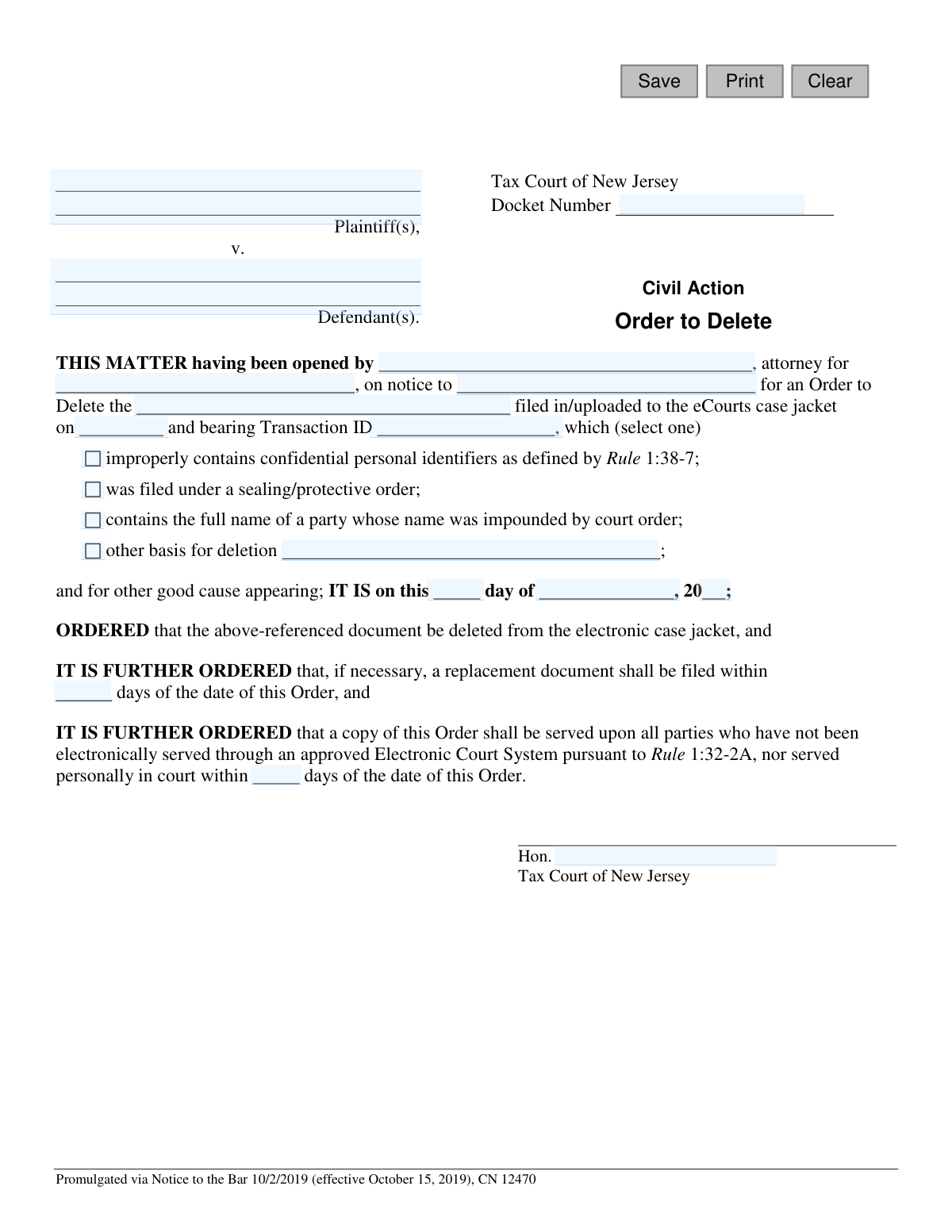
This form is an official court order for the Tax Court of New Jersey, used to request the deletion of a document from the eCourts electronic case jacket. It is crucial for correcting filing errors, removing documents with confidential personal identifiers, or enforcing sealing orders to maintain the integrity and privacy of court records. Today, this form can be filled out quickly and accurately using AI-powered services like Instafill.ai, which can also convert non-fillable PDF versions into interactive fillable forms.
NJ Tax Court Order to Correct Data (CN 12470) is part of the
New Jersey forms category on Instafill.
Our AI automatically handles information lookup, data retrieval, formatting, and form filling.
It takes less than a minute to fill out NJ Tax Court Order to Correct Data (CN 12470) using our AI form filling.
Securely upload your data. Information is encrypted in transit and deleted immediately after the form is filled out.
Form specifications
| Form name: | Tax Court - Order to Correct Data in eCourts |
| Number of fields: | 23 |
| Number of pages: | 1 |
| Language: | English |
Instafill Demo: How to fill out PDF forms in seconds with AI
How to Fill Out NJ Tax Court Order to Correct Data (CN 12470) Online for Free in 2026
Are you looking to fill out a NJ TAX COURT ORDER TO CORRECT DATA (CN 12470) form online quickly and accurately? Instafill.ai offers the #1 AI-powered PDF filling software of 2026, allowing you to complete your NJ TAX COURT ORDER TO CORRECT DATA (CN 12470) form in just 37 seconds or less.
Follow these steps to fill out your NJ TAX COURT ORDER TO CORRECT DATA (CN 12470) form online using Instafill.ai:
- 1 Navigate to Instafill.ai and upload or select the 'Order to Correct Data in eCourts' form.
- 2 Enter the case information, including the Docket Number, Plaintiff(s), and Defendant(s) names.
- 3 Provide the name of the attorney and the party they represent who is opening the matter.
- 4 Specify the exact document to be deleted by entering its description, filing date, and Transaction ID.
- 5 Select the appropriate reason for the deletion, such as the inclusion of confidential identifiers or another specified basis.
- 6 Indicate the number of days for filing a replacement document and for serving the order, if applicable.
- 7 Review all entered information for complete accuracy before the order is submitted for a judge's signature and filed with the court.
Our AI-powered system ensures each field is filled out correctly, reducing errors and saving you time.
Why Choose Instafill.ai for Your Fillable NJ Tax Court Order to Correct Data (CN 12470) Form?
Speed
Complete your NJ Tax Court Order to Correct Data (CN 12470) in as little as 37 seconds.
Up-to-Date
Always use the latest 2026 NJ Tax Court Order to Correct Data (CN 12470) form version.
Cost-effective
No need to hire expensive lawyers.
Accuracy
Our AI performs 10 compliance checks to ensure your form is error-free.
Security
Your personal information is protected with bank-level encryption.
Frequently Asked Questions About Form NJ Tax Court Order to Correct Data (CN 12470)
This form is used to formally request that a judge in the New Jersey Tax Court order the deletion of a specific document from the electronic case file (eCourts).
An attorney representing a plaintiff or defendant in a Tax Court case usually prepares this form to correct a filing error made in the eCourts system.
Valid reasons include the document containing confidential personal identifiers (like a Social Security number), violating a sealing order, or being filed for a party whose name is protected by the court.
The Transaction ID is a unique number assigned to your document when it was uploaded to eCourts. You can find this ID in your filing confirmation or by looking at the case history in the eCourts system.
These are sensitive pieces of information like Social Security numbers, driver's license numbers, bank account numbers, and full dates of birth that must be redacted from public court filings.
A judge will review the request. If granted, the judge will sign the order, which legally authorizes the court clerk to delete the specified document from the electronic case jacket.
If the original document was necessary for the case but just contained an error, the judge will likely order you to file a corrected, or 'replacement', document within a set number of days.
The Docket Number is the unique identification number for your court case. It is printed on all official notices and documents related to your case.
Serving the order means you must officially deliver a copy to all other parties in the lawsuit, ensuring they are formally notified of the judge's decision to delete the document.
Yes, services like Instafill.ai use AI to help you accurately auto-fill form fields with your saved information, which saves time and helps prevent errors.
You can upload the form to the Instafill.ai platform, which will make the fields interactive. You can then fill them out online or use the AI to auto-fill information from your profile.
If you have a non-fillable PDF, you can use a tool like Instafill.ai. It can convert flat PDFs into interactive, fillable forms that you can complete on your computer.
This space is for unique reasons not listed, such as if a document was accidentally uploaded to the wrong case file or if it contains irrelevant and scandalous material.
Compliance NJ Tax Court Order to Correct Data (CN 12470)
Validation Checks by Instafill.ai
1
Docket Number Presence and Format
Checks that the 'Docket Number' field is not empty and conforms to the expected format for the New Jersey Tax Court. This number is the primary identifier for the case, and an incorrect or missing number would prevent the order from being associated with the correct case file, leading to rejection or misfiling.
2
Required Case Party Identification
Validates that both the 'Plaintiff(s)' and 'Defendant(s)' fields are filled out. An order must clearly identify the primary parties to the legal action to be valid. Failure to provide this information makes the order legally ambiguous and unenforceable, leading to immediate rejection by the court clerk.
3
Filing Attorney and Client Completeness
Ensures that the name of the attorney's firm and the client they represent are both provided in the 'THIS MATTER having been opened by...' section. This information is critical for establishing who is making the request and on whose behalf. It provides a clear record of action and accountability, and its absence would halt processing.
4
Complete Document Identification
Verifies that the 'Document Description', 'Filing Date', and 'Transaction ID' are all completed. These three pieces of information are required to uniquely and unambiguously identify the specific document to be deleted from the case jacket. If any part is missing, there is a high risk of deleting the wrong document or being unable to locate the correct one.
5
Valid and Historical Filing Date
Checks that the 'Filing Date' is a valid calendar date (e.g., MM/DD/YYYY) and is not a date in the future. A document's filing date must be in the past or the present day. This validation prevents data entry errors and ensures the logical integrity of the request, as a document cannot be scheduled for deletion before it has been filed.
6
Mandatory Reason for Deletion
Confirms that at least one of the checkbox options explaining the reason for deletion has been selected. The court requires a legal basis for deleting a filed document, such as containing confidential identifiers or being filed under a sealing order. An order submitted without a stated reason will be considered incomplete and will be rejected.
7
Conditional 'Other Basis' Description
This validation ensures that if the 'other basis for deletion' option is selected, the corresponding text field must contain an explanation. This prevents users from selecting 'other' without providing the necessary justification required by the court. A submission with 'other' selected but no description is incomplete and will be returned for correction.
8
Valid Order Date Composition
Validates that the 'day', 'month', and 'year' fields for the order date combine to form a valid calendar date. This date signifies when the order was officially made by the judge. An invalid date (e.g., February 30) or a future date would render the order legally void and cause processing to fail.
9
Positive Integer for Replacement Deadline
Checks that the value entered in the 'replacement document shall be filed within [X] days' field is a positive integer. This deadline must be a clear, actionable number of days. Entering zero, a negative number, or text would create an ambiguous or impossible deadline, making that part of the order unenforceable.
10
Positive Integer for Service Deadline
Ensures the value in the 'served upon all parties within [X] days' field is a positive integer. Similar to the replacement deadline, this ensures a clear and enforceable timeframe for serving the order. An invalid entry would create confusion and potential due process issues, leading to rejection.
11
Presiding Judge Name Requirement
Verifies that the 'Hon.' field for the judge's name is not empty. An order from the court is not official or legally binding until it is signed or otherwise endorsed by a judge. A form submitted without a judge's name is merely a draft and has no legal effect.
12
Transaction ID Format Validation
Checks if the 'Transaction ID' matches the expected system format, which is typically a specific-length alphanumeric string. This validation acts as a safeguard against typos and ensures the ID entered corresponds to a real transaction in the eCourts system. An invalid format suggests a data entry error that could prevent the system from finding the document.
Common Mistakes in Completing NJ Tax Court Order to Correct Data (CN 12470)
Users often mistype the docket number or use an incorrect format, which is the primary identifier for the case. This happens due to simple data entry errors or not having the official case file on hand. An incorrect docket number will cause the order to be rejected by the court clerk or, worse, filed in the wrong case, leading to significant delays in removing the sensitive information.
Filers frequently use vague terms like 'the motion' or 'plaintiff's letter' in the 'docDesc' field instead of a precise title and context. This ambiguity forces the court clerk to guess which document needs to be deleted, risking the deletion of the wrong file or the rejection of the order altogether. Always use the full, exact title of the document as it appears in the eCourts system to ensure accuracy.
The Transaction ID is a unique identifier assigned to every document uploaded to eCourts, yet it is often missing from these orders. Filers may not know where to find it or underestimate its importance. Without this ID, it is difficult for the court to locate the exact document with certainty, which can lead to the denial of the request until the specific ID is provided.
The form requires listing all parties who were given notice of the request for this order, but filers sometimes forget to include opposing counsel or other relevant parties. This is a critical procedural error that can violate due process requirements. An order granted without proper notice to all parties may be challenged and vacated, nullifying the entire effort.
Mistakes in the case caption, such as misspelling names or reversing the Plaintiff and Defendant roles, are common and reflect poorly on the filer. These errors usually happen when filling out the form in a hurry without referencing the official case caption. Such inaccuracies can lead to confusion and potential rejection of the filing, as the caption must match the court's records exactly.
The order includes fields for specifying deadlines, such as the number of days to file a replacement document ('numDays') or serve the order ('servedDays'). Filers often leave these fields blank, creating an incomplete and unenforceable order. It is the filer's responsibility to propose reasonable timeframes, and failing to do so requires the judge to guess, or results in the form being returned for completion.
The form provides specific legal reasons for deletion, such as a violation of Rule 1:38-7. Users may misunderstand these legal standards or fail to provide a clear and sufficient explanation when selecting 'other basis for deletion'. If the court does not see a valid legal justification for the request, the order will be denied, and the problematic document will remain in the public case jacket.
Due to haste or oversight, filers may submit the form with one or more fields left empty. A partially completed legal document is unprofessional and will be rejected by the court clerk, causing delays. Since this form is a non-fillable PDF, it's easy to miss a field. Using a tool like Instafill.ai can convert the document into a smart, fillable form, guiding the user through each required field to prevent incomplete submissions.
The date the document was originally filed ('fileDt') is a key piece of information for locating it, but filers often enter the wrong date from memory or by looking at a draft version. An incorrect date, combined with a vague description, makes it nearly impossible for court staff to identify the correct document. Always verify the filing date from the official eCourts record or filing confirmation to avoid rejection.
The line 'THIS MATTER having been opened by...' requires the name of the attorney and the party they represent, but is sometimes left blank. This omission makes it unclear who is requesting the court's action, which is a fatal flaw in any legal motion. The court must know the source of the request, and failure to provide this information will result in an immediate rejection of the proposed order.
Saved over 80 hours a year
“I was never sure if my IRS forms like W-9 were filled correctly. Now, I can complete the forms accurately without any external help.”
Kevin Martin Green
Your data stays secure with advanced protection from Instafill and our subprocessors

Robust compliance program
Transparent business model
You’re not the product. You always know where your data is and what it is processed for.
ISO 27001, HIPAA, and GDPR
Our subprocesses adhere to multiple compliance standards, including but not limited to ISO 27001, HIPAA, and GDPR.
Security & privacy by design
We consider security and privacy from the initial design phase of any new service or functionality. It’s not an afterthought, it’s built-in, including support for two-factor authentication (2FA) to further protect your account.
Fill out NJ Tax Court Order to Correct Data (CN 12470) with Instafill.ai
Worried about filling PDFs wrong? Instafill securely fills tax-court-order-to-correct-data-in-ecourts forms, ensuring each field is accurate.