Yes! You can use AI to fill out Tenant Case Information Statement (TCIS)

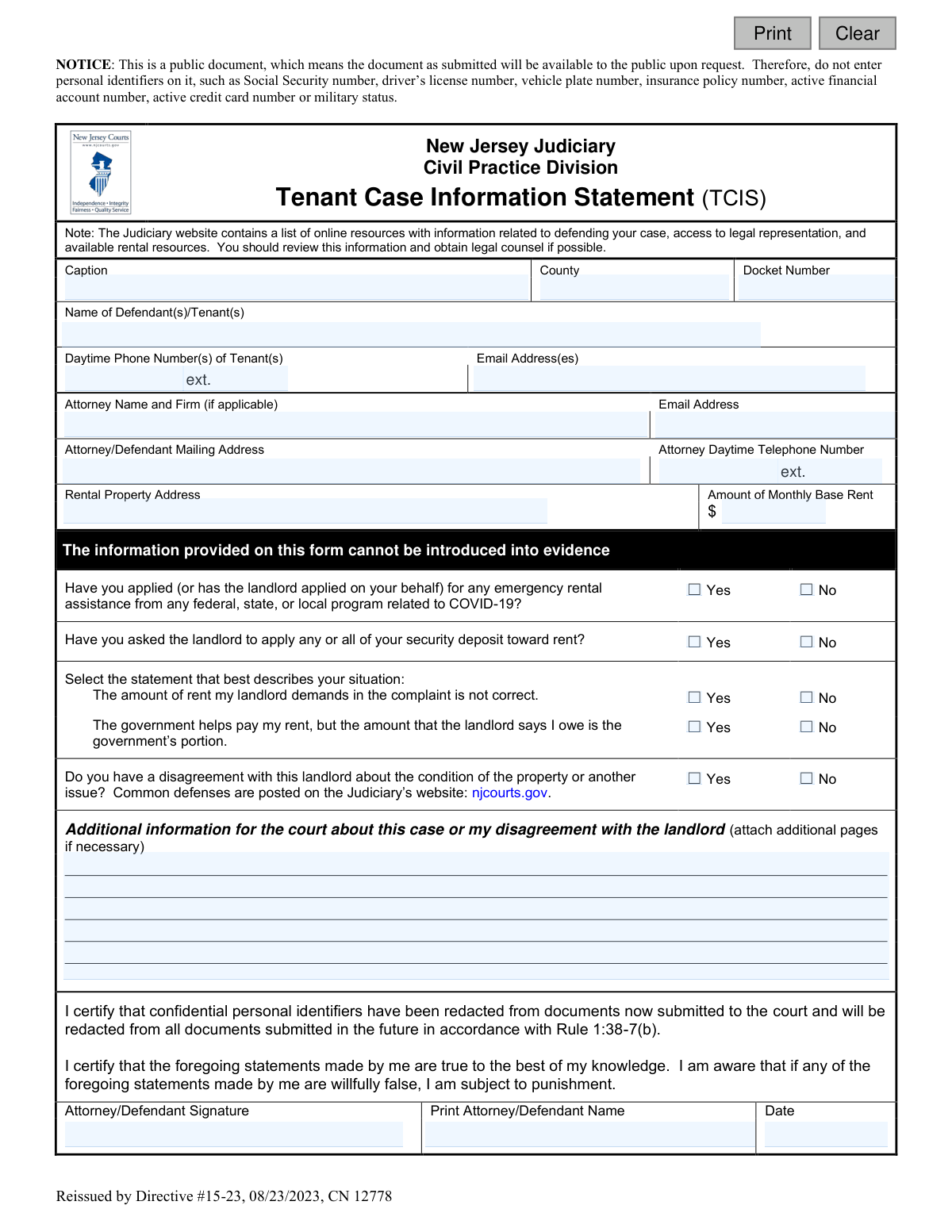
The Tenant Case Information Statement (TCIS) is a public document filed with the New Jersey Judiciary by tenants involved in a legal dispute with their landlord. It gathers essential details about the case, including tenant information, rent amounts, disputes over rent or property conditions, and any applications for rental assistance. This statement is crucial for presenting the tenant's perspective to the court. Today, this form can be filled out quickly and accurately using AI-powered services like Instafill.ai, which can also convert non-fillable PDF versions into interactive fillable forms.
TCIS is part of the New Jersey forms category on Instafill.
Our AI automatically handles information lookup, data retrieval, formatting, and form filling.
It takes less than a minute to fill out TCIS using our AI form filling.
Securely upload your data. Information is encrypted in transit and deleted immediately after the form is filled out.

Form specifications

Form name: Tenant Case Information Statement (TCIS)
Number of fields: 30
Number of pages: 1
Language: English
main-image

Instafill Demo: How to fill out PDF forms in seconds with AI

How to Fill Out TCIS Online for Free in 2026

Are you looking to fill out a TCIS form online quickly and accurately? Instafill.ai offers the #1 AI-powered PDF filling software of 2026, allowing you to complete your TCIS form in just 37 seconds or less.
Follow these steps to fill out your TCIS form online using Instafill.ai:
  1. 1 Navigate to Instafill.ai and upload the Tenant Case Information Statement (TCIS) form or select it from their library.
  2. 2 Provide your case details, including the caption, county, docket number, and your personal contact information.
  3. 3 Enter the rental property address and the amount of your monthly base rent.
  4. 4 Answer the series of yes/no questions regarding rental assistance applications, security deposit use, and disagreements about the rent amount or property condition.
  5. 5 Use the provided space to detail any additional information or explain your disagreements with the landlord.
  6. 6 Review all the information automatically populated by the AI to ensure accuracy and completeness.
  7. 7 Electronically sign and date the form to certify its truthfulness, then download the completed document for filing with the court.

Our AI-powered system ensures each field is filled out correctly, reducing errors and saving you time.

Why Choose Instafill.ai for Your Fillable TCIS Form?

Speed

Complete your TCIS in as little as 37 seconds.

Up-to-Date

Always use the latest 2026 TCIS form version.

Cost-effective

No need to hire expensive lawyers.

Accuracy

Our AI performs 10 compliance checks to ensure your form is error-free.

Security

Your personal information is protected with bank-level encryption.

Frequently Asked Questions About Form TCIS

The TCIS is a form for tenants in New Jersey to provide the court with important information about their case with their landlord, including details about rent disputes, rental assistance, and property conditions.

Tenants who are involved in a court case with their landlord, typically an eviction case, should fill out this form to present their side of the situation to the New Jersey Judiciary.

You must not include any personal identifiers to protect your privacy. This includes your Social Security number, driver’s license number, bank account numbers, or active credit card numbers.

The docket number is the unique number assigned to your court case. You can find it on the legal documents you received from the court, such as the summons or complaint.

Use this section to briefly explain any 'Yes' answers you provided, such as why you believe the rent amount is incorrect or to describe the specific disagreements you have with your landlord about the property.

Check 'Yes' for the question, 'The amount of rent my landlord demands in the complaint is not correct.' You can then use the 'Additional information' section to briefly explain the discrepancy.

Yes, you can indicate this by checking 'Yes' for the question about having a disagreement with the landlord about the property's condition and providing a brief explanation in the space provided.

While you are not required to have an attorney to complete the TCIS, the form itself recommends obtaining legal counsel if possible to help you understand your rights and defenses.

The court will use the information on your TCIS to better understand the details of your case before your hearing. It provides the judge with a summary of your position in the dispute.

You should submit this form to the court handling your case. Check the instructions provided with your court summons or on the New Jersey Judiciary website for specific submission details and deadlines.

Yes, services like Instafill.ai use AI to help you accurately auto-fill form fields from your existing documents, which can save you time and reduce errors.

You can use a service like Instafill.ai to upload the TCIS form. It will allow you to fill it out on your computer, tablet, or phone, and then download, print, or share the completed document.

If you have a non-fillable or 'flat' PDF, you can upload it to a platform like Instafill.ai. The service can convert it into an interactive, fillable form that you can complete easily online.

Compliance TCIS
Validation Checks by Instafill.ai

1
Docket Number Format Validation
Verifies the Docket Number field follows the standard New Jersey Judiciary format, which typically includes a prefix like 'LT', numbers, and a year identifier. This is crucial for ensuring the submitted document is correctly filed and associated with the proper case in the court's system. An incorrectly formatted docket number will lead to filing rejection or processing delays.
2
Core Case Information Completeness
Ensures that the most critical identifying fields, including Tenant Name(s), Rental Property Address, and County, are not empty. This information is the absolute minimum required to identify the parties and jurisdiction of the case. A submission lacking any of these core details is fundamentally incomplete and cannot be processed by the court.
3
Signature Date Validity
Checks that the Date field next to the signature is a valid, properly formatted date and is not a date in the future. The signature date establishes when the attestations on the form were made, which is legally significant. An invalid or future date would call the document's validity into question and likely cause it to be rejected.
4
Contact Phone Number Format
Validates that the tenant's and attorney's phone number fields contain a valid 10-digit phone number, allowing for common formatting. Accurate contact information is essential for the court and other parties to communicate regarding hearings and other case matters. An invalid number prevents communication and can negatively impact the tenant's case.
5
Contact Email Address Format
Ensures any provided email addresses for the tenant or attorney adhere to the standard '[email protected]' format. As court communications are increasingly electronic, a valid email is critical for receiving notices, filings, and other important documents. An invalid email address would lead to missed communications and deadlines.
6
Monthly Rent Amount Is a Valid Number
Verifies that the 'Amount of Monthly Base Rent' field contains only a positive numerical value. This amount is a key piece of data in a landlord-tenant dispute. Entering non-numeric text or a negative number would be invalid data that prevents the court from understanding the financial context of the dispute.
7
Prohibited Personal Identifiers Scan
Scans free-text fields, particularly the 'Additional information' section, for patterns resembling Social Security numbers, driver's license numbers, or bank account numbers. The form explicitly warns against including this information, and this check helps enforce that rule to protect the filer's privacy and comply with Court Rule 1:38-7(b). A warning should be shown to the user if such data is detected.
8
Mandatory Yes/No Question Completion
Confirms that a selection of either 'Yes' or 'No' has been made for all the checkbox questions on the form (e.g., 'Have you applied for any emergency rental assistance?'). These questions are designed to quickly provide the court with critical context about the case. Failure to answer them leaves ambiguity and may require the court to reject the form for being incomplete.
9
Conditional Explanation for Disagreement
This is a logical check that requires the 'Additional information' text field to be filled out if the user answers 'Yes' to the question 'Do you have a disagreement with this landlord about the condition of the property or another issue?'. A 'Yes' answer without a corresponding explanation is not actionable for the court. This validation ensures that any asserted disagreement is substantiated with details.
10
Attorney Information Completeness
If an attorney's name is entered, this validation verifies that the attorney's email address and phone number are also provided. When a party is represented by counsel, it is imperative that the court has complete and accurate contact information for that attorney. Missing contact details for a listed attorney would halt communication and delay proceedings.
11
Signature Block Requirement
Ensures that the 'Print Attorney/Defendant Name' and 'Date' fields are both completed, as they are part of the legally required signature block. The printed name clarifies the signature, and the date authenticates it. A submission without a complete signature block is not considered properly executed and will be rejected.
12
Signatory Name Consistency
Validates that the name entered in the 'Print Attorney/Defendant Name' field reasonably matches either the 'Name of Defendant(s)/Tenant(s)' or the 'Attorney Name' fields. This check helps confirm that the person signing the document is a recognized party to the case or their legal representative. A mismatch could indicate an unauthorized signature, invalidating the document.

Common Mistakes in Completing TCIS

Including Confidential Personal Identifiers

The form explicitly warns against including personal identifiers like Social Security or driver's license numbers because it is a public document. People often miss this notice in their haste and include sensitive data, exposing themselves to identity theft. To avoid this, carefully read all notices and double-check the entire form to ensure no confidential information is present before submission.

Omitting or Incorrectly Entering the Docket Number

The Docket Number is the unique identifier for your court case, and it is essential for the court to link your form to the correct file. Tenants often leave this blank or enter it incorrectly because they don't know where to find it on the summons or complaint they received. An incorrect or missing docket number can cause significant delays or result in the court not reviewing your information before the hearing.

Incorrectly Filling Out the 'Caption' Field

The 'Caption' refers to the official title of the case (e.g., 'Landlord Name v. Tenant Name'). Many tenants are unfamiliar with this legal term and may incorrectly enter just their own name or leave it blank. This can cause confusion and processing delays. You should copy the case caption exactly as it appears on the complaint or summons you received from the landlord or court.

Confusing 'Monthly Base Rent' with Total Amount Owed

This field asks for the 'Amount of Monthly Base Rent,' not the total amount the landlord claims you owe. Tenants frequently make the mistake of entering the total past-due balance from the complaint, which misrepresents the core rental agreement. This can weaken your position if you are disputing the total amount. Always enter only your standard, recurring monthly rent amount, excluding any late fees or other charges.

Forgetting to Sign or Date the Form

An unsigned or undated form is legally invalid and will be rejected by the court clerk. This is a simple but very common oversight that occurs when people are stressed or rushing to submit paperwork. Failing to sign means your statement is not certified, and the court cannot consider it, potentially causing you to lose the opportunity to present your side of the story. Always perform a final review, paying special attention to the signature and date lines.

Providing Unreliable Contact Information

Tenants sometimes provide a phone number they rarely answer or an email address they don't check, thinking it's just a formality. However, the court uses this information to send critical updates, hearing notices, and other communications. Providing unreliable contact details can lead to you missing your court date and receiving a default judgment against you. Always provide a phone number and email address that you check daily.

Misinterpreting the 'Incorrect Rent Amount' Question

When asked if 'The amount of rent my landlord demands in the complaint is not correct,' tenants may check 'No' if they agree they owe some money, even if the landlord's total is inaccurate. This is a mistake. You should check 'Yes' if you dispute any part of the total amount, such as improper late fees, uncredited payments, or other charges. Answering 'No' can be misinterpreted by the court as you agreeing with the landlord's entire financial claim.

Listing Only One Tenant When Multiple Are on the Lease

The form asks for the 'Name of Defendant(s)/Tenant(s),' implying all tenants named in the lawsuit should be listed. Often, only the tenant filling out the form will list their own name. This is incomplete and can create procedural issues, as the court needs to know that all named defendants are represented by the filing. Ensure the names of all tenants listed on the lease and the court complaint are included.

Submitting an Illegible Handwritten Form

If the form is a non-fillable PDF, tenants may print it and fill it out by hand. Poor handwriting can make critical information like names, addresses, and the docket number impossible for court staff to read, leading to rejection or data entry errors. To prevent this, it's best to use a fillable version. AI-powered tools like Instafill.ai can convert flat PDFs into fillable forms, ensuring all your entries are clear, legible, and correctly formatted.

Providing Vague or Emotional Explanations

In the 'Additional information' section, tenants often write long, emotional narratives that are not focused on the legal facts of the case. While the situation may be stressful, the court needs clear, concise, and factual points about your disagreement (e.g., 'The landlord has not repaired the broken heater since I notified them in writing on January 15th'). Avoid rants or personal attacks and stick to a factual summary of the issues to make your statement more effective.

Confusion in Attorney Section for Self-Represented Tenants

Tenants representing themselves ('pro se') are often confused by the attorney information fields and may leave them blank or mistakenly enter their own name again. This can cause minor processing confusion. The proper procedure is to leave these fields blank or write 'N/A' or 'Pro Se.' The form is designed to accommodate both represented and self-represented parties.
Saved over 80 hours a year

“I was never sure if my IRS forms like W-9 were filled correctly. Now, I can complete the forms accurately without any external help.”

Kevin Martin Green

Your data stays secure with advanced protection from Instafill and our subprocessors

Robust compliance program

Transparent business model

You’re not the product. You always know where your data is and what it is processed for.

ISO 27001, HIPAA, and GDPR

Our subprocesses adhere to multiple compliance standards, including but not limited to ISO 27001, HIPAA, and GDPR.

Security & privacy by design

We consider security and privacy from the initial design phase of any new service or functionality. It’s not an afterthought, it’s built-in, including support for two-factor authentication (2FA) to further protect your account.

Fill out TCIS with Instafill.ai

Worried about filling PDFs wrong? Instafill securely fills tenant-case-information-statement-tcis forms, ensuring each field is accurate.