Yes! You can use AI to fill out Uniform Commercial Arbitration Memorandum - Appendix XXII-B
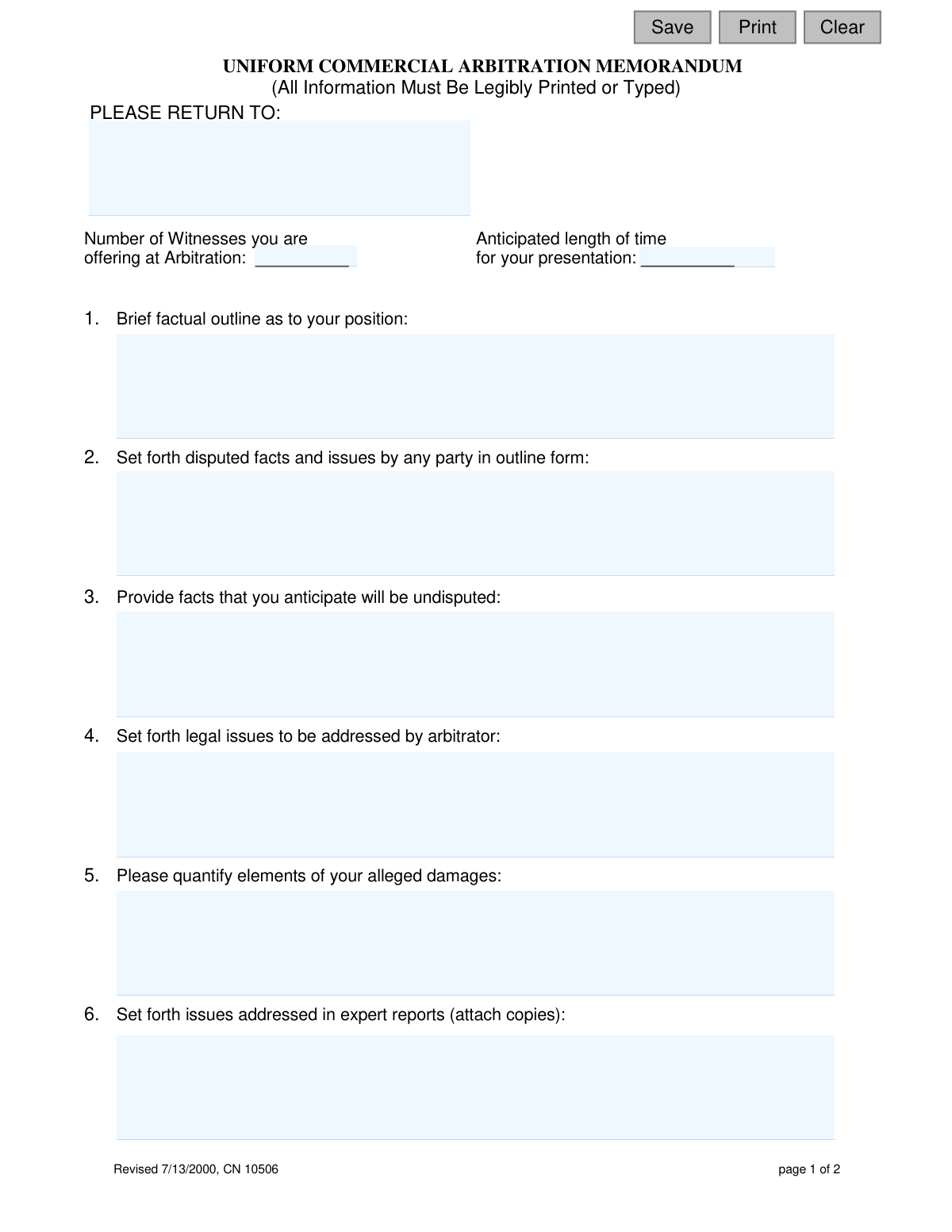
The Uniform Commercial Arbitration Memorandum, designated as Appendix XXII-B, is a legal document used to prepare for commercial arbitration proceedings. It requires parties to provide a factual outline, list disputed and undisputed facts, detail legal issues, quantify damages, and describe defenses to streamline the arbitration process. Today, this form can be filled out quickly and accurately using AI-powered services like Instafill.ai, which can also convert non-fillable PDF versions into interactive fillable forms.
Appendix XXII-B is part of the
New Jersey forms category on Instafill.
Our AI automatically handles information lookup, data retrieval, formatting, and form filling.
It takes less than a minute to fill out Appendix XXII-B using our AI form filling.
Securely upload your data. Information is encrypted in transit and deleted immediately after the form is filled out.
Form specifications
| Form name: | Uniform Commercial Arbitration Memorandum - Appendix XXII-B |
| Number of fields: | 23 |
| Number of pages: | 1 |
| Language: | English |
Instafill Demo: How to fill out PDF forms in seconds with AI
How to Fill Out Appendix XXII-B Online for Free in 2026
Are you looking to fill out a APPENDIX XXII-B form online quickly and accurately? Instafill.ai offers the #1 AI-powered PDF filling software of 2026, allowing you to complete your APPENDIX XXII-B form in just 37 seconds or less.
Follow these steps to fill out your APPENDIX XXII-B form online using Instafill.ai:
- 1 Navigate to Instafill.ai and upload or select the Uniform Commercial Arbitration Memorandum (Appendix XXII-B).
- 2 Use the AI assistant to input your case information, including a brief factual outline, disputed facts, and undisputed facts.
- 3 Clearly define the legal issues for the arbitrator and provide a quantified breakdown of your alleged damages.
- 4 Detail any expert reports, discuss mitigation of damages, and describe the basis for your defenses in the appropriate sections.
- 5 Answer the procedural questions regarding service of parties, defaults, and any required special expertise for the arbitrator.
- 6 Carefully review all the information populated by the AI to ensure it is complete and accurately reflects your position.
- 7 Electronically sign and date the certification, then download the completed form to serve on all adversaries as required.
Our AI-powered system ensures each field is filled out correctly, reducing errors and saving you time.
Why Choose Instafill.ai for Your Fillable Appendix XXII-B Form?
Speed
Complete your Appendix XXII-B in as little as 37 seconds.
Up-to-Date
Always use the latest 2026 Appendix XXII-B form version.
Cost-effective
No need to hire expensive lawyers.
Accuracy
Our AI performs 10 compliance checks to ensure your form is error-free.
Security
Your personal information is protected with bank-level encryption.
Frequently Asked Questions About Form Appendix XXII-B
This form is used to prepare for a commercial arbitration hearing by providing the arbitrator with a summary of your case. It outlines your factual position, disputed issues, legal arguments, and claimed damages to help streamline the process.
This form must be completed by the attorney representing a party in the arbitration. If a party is representing themselves (pro se), they are responsible for filling it out.
The completed form should be sent to the address listed in the 'PLEASE RETURN TO' section at the top of page one. If this section is blank, you should contact the arbitration administrator or the court for the correct submission address.
Disputed facts are points of disagreement between the parties that the arbitrator must decide on. Undisputed facts are the details that all parties involved in the case agree are true.
This requires you to provide a detailed breakdown of the monetary compensation you are seeking. You should list each component of your claim (e.g., repair costs, lost income) and the specific dollar amount for each.
Yes, Section 6 states that you must attach copies of any expert reports that you will be referencing or relying on in the arbitration.
No, the note at the bottom of the form explicitly states that information provided on it cannot be used for evidentiary purposes in any trial of the matter.
In Section 12, you should specify any special expertise required, such as familiarity with a particular industry (e.g., construction, finance) or a specific technical discipline.
In this section, you should describe the reasonable steps you took to minimize your financial losses after the incident that led to the dispute occurred.
By signing the form, you are confirming the information is accurate and that you have sent a copy to the opposing party or their attorney, as required by Rule 4:21A-4.
Yes, services like Instafill.ai can use AI to help you accurately auto-fill form fields with your information, saving time and helping to prevent errors.
You can use a service like Instafill.ai to upload the PDF document. The platform allows you to fill out all the fields electronically, after which you can save, download, or print the completed form.
If you have a non-fillable or 'flat' PDF, you can upload it to a platform like Instafill.ai. It can convert the document into an interactive, fillable form that you can easily complete on your computer.
Compliance Appendix XXII-B
Validation Checks by Instafill.ai
1
Witness Count Format
Ensures the 'Number of Witnesses' field contains a valid, non-negative integer. This is important for scheduling and resource allocation for the arbitration hearing. If the validation fails, the user will be prompted to enter a whole number (e.g., 0, 1, 5).
2
Presentation Time Validity
Validates that the 'Anticipated length of time for your presentation' field contains a plausible time duration (e.g., '2 hours', '90 minutes'). This information is critical for the arbitrator to manage the hearing schedule effectively. An invalid or empty entry would prevent proper time allocation and could disrupt the proceedings.
3
Factual Outline Completeness
Checks that the 'Brief factual outline as to your position' (factsOutlineDesc) field is not empty. This section is the core of the memorandum, providing the arbitrator with a summary of the case. Failure to complete this field would render the form useless and result in a rejection of the submission.
4
Damages Quantification Requirement
Verifies that the 'Please quantify elements of your alleged damages' (issuesDamagesDesc) field is filled out. The arbitrator needs a clear, itemized breakdown of damages to make an informed decision. A submission without this information is incomplete and may be returned for clarification.
5
Party Service Status Selection
Ensures that a selection ('Yes' or 'No') is made for the 'Have all parties been served' (partiesServed) question. This is a critical procedural check to ensure due process has been followed. The form cannot be processed without this mandatory information.
6
Party Default Status Selection
Confirms that a selection ('Yes' or 'No') is made for the 'Are any parties in default?' (partiesDefault) question. This information is essential for the arbitrator to understand the status of all involved parties. An unanswered question will halt the submission process.
7
Conditional Unserved/Defaulted Party Listing
This is a logical check that verifies the 'List any unserved and/or defaulted parties' (partiesUnservedDesc) field is not empty if the answer to 'Have all parties been served' is 'No' or the answer to 'Are any parties in default?' is 'Yes'. This ensures that the specific parties with status issues are clearly identified for the arbitrator. If the condition is met but the field is empty, the user will be required to provide the names.
8
Conditional Arbitrator Expertise Specification
Validates that if the user indicates that special expertise is required by the arbitrator, the corresponding description field (arbitratorExpertiseDesc) is filled out. This ensures that if a specific need is identified, it is properly defined, allowing for the appointment of a suitable arbitrator. An empty description after a 'Yes' response would trigger a validation error.
9
Signature and Printed Name Requirement
Checks that the signature block, including the signature (sigLitigant) and the printed/typed name, is completed. The signature certifies the accuracy and completeness of the information provided, making it legally binding for the purposes of the arbitration. A missing signature invalidates the entire memorandum.
10
Certification Date Format and Logic
Ensures the 'Date' (certDt) field contains a valid date in an accepted format (e.g., MM/DD/YYYY) and that the date is not in the future. The date authenticates when the certification was made. An invalid format or a future date would be rejected to ensure the integrity of the document's timeline.
11
Attorney Representation Identification
Validates that the 'Attorney for' (partyAtty) field is completed if the form is signed by an attorney. This is crucial for identifying which party the legal counsel represents. If the signatory is an attorney, leaving this field blank would cause confusion and lead to a validation failure.
12
Return Address Completeness
Verifies that the 'PLEASE RETURN TO' (arbitrationReturnto) section is filled with what appears to be a complete address. This information is essential for all official correspondence related to the arbitration. An incomplete or missing address would prevent the court or other parties from sending necessary documents, causing significant delays.
13
Legal Issues Completeness
Ensures the 'Set forth legal issues to be addressed by arbitrator' (issuesArbitratorDesc) field is not empty. This section defines the legal scope of the arbitration and guides the arbitrator's focus. Submitting the form without this information would leave the core legal questions undefined, making the memorandum incomplete.
14
Defense Basis Description Requirement
Checks that the 'Describe the basis for the defenses you assert to the complaint and/or counterclaim' (issuesBasisDesc) field is populated. This section is fundamental for the opposing party and the arbitrator to understand the arguments being made against the claim. An empty field would indicate an incomplete defense position and fail validation.
Common Mistakes in Completing Appendix XXII-B
In section 5, filers often provide vague statements like 'significant damages' or 'to be determined' instead of a detailed, itemized breakdown. This happens due to a lack of preparation or uncertainty about the final figures. Failing to quantify damages undermines the claim's credibility and makes it difficult for the arbitrator to assess the case's value. To avoid this, clearly list each element of your alleged damages with a specific dollar amount for each.
A frequent procedural error is referencing expert reports in section 6 but failing to attach copies to the submission. This oversight can render the expert's findings inadmissible or cause significant delays as parties scramble to provide the missing documents. Always create a checklist and double-check that all referenced attachments are included with the final memorandum before submission.
Users often create confusion by providing conflicting answers in sections 9, 10, and 11. For example, they might check 'No' for 'Have all parties been served?' but then leave section 11, which asks for a list of unserved parties, completely blank. This forces court staff to seek clarification and can delay the arbitration scheduling. Using a tool like Instafill.ai can help by using conditional logic to prompt for required information based on previous answers.
In section 1, instead of a 'brief factual outline,' many filers submit a long, narrative-style argument that is difficult to follow. This happens when they try to argue their case instead of simply stating the core facts in a structured way. A verbose or disorganized outline can frustrate the arbitrator and obscure the key points of the position. It is crucial to present a concise, chronological, and neutral summary of the events in outline or bullet-point form.
Filers frequently leave section 12 blank, even when the case involves highly technical or industry-specific issues like construction defects or software disputes. This oversight risks having an arbitrator assigned who lacks the necessary subject-matter expertise, potentially leading to a misunderstanding of critical issues. Always consider if specialized knowledge would be beneficial and, if so, clearly specify the required discipline or industry.
In section 4, which asks for 'legal issues to be addressed,' filers often state their desired outcome (e.g., 'the defendant was negligent') rather than framing a precise legal question for the arbitrator to answer. This fails to properly guide the arbitrator's focus and shows a misunderstanding of the task. To avoid this, frame the issues as neutral questions, such as 'Did the defendant breach their duty of care under the terms of the contract?'
A surprising number of forms are submitted with a missing signature, an incorrect date, or an illegible handwritten name without a typed or printed version below it. This can invalidate the certification and cause the document to be rejected, requiring resubmission. Since this form is a non-fillable PDF, tools like Instafill.ai can convert it into a fillable version, allowing you to type your name and other details clearly before printing for signature, reducing the risk of illegibility.
In section 7, many filers either ignore the 'mitigation of damages' section or incorrectly write 'N/A' without proper consideration. This is a strategic error, as it fails to proactively address a common defense and show the filer acted reasonably to minimize their losses. Failing to detail mitigation efforts can result in a reduced damages award, so you should always describe the steps taken to limit the financial impact of the incident.
When asked for the anticipated length of their presentation, people often provide a guess that is either far too short or too long. An inaccurate estimate can lead to significant scheduling problems for the arbitration, potentially causing proceedings to be cut short or run excessively over time. To avoid this, carefully plan your presentation, including the number of witnesses and evidence review, to provide a realistic and well-considered time estimate.
In section 2, filers frequently list legal conclusions instead of the specific, discrete facts that are contested by the parties. For example, writing 'The contract was breached' is a legal argument, whereas 'The defendant failed to deliver the goods on the agreed-upon date' is a disputed fact. This mistake obscures the core factual disagreements the arbitrator must resolve. Stick to a clear, point-by-point list of contested factual statements in the requested outline form.
Saved over 80 hours a year
“I was never sure if my IRS forms like W-9 were filled correctly. Now, I can complete the forms accurately without any external help.”
Kevin Martin Green
Your data stays secure with advanced protection from Instafill and our subprocessors

Robust compliance program
Transparent business model
You’re not the product. You always know where your data is and what it is processed for.
ISO 27001, HIPAA, and GDPR
Our subprocesses adhere to multiple compliance standards, including but not limited to ISO 27001, HIPAA, and GDPR.
Security & privacy by design
We consider security and privacy from the initial design phase of any new service or functionality. It’s not an afterthought, it’s built-in, including support for two-factor authentication (2FA) to further protect your account.
Fill out Appendix XXII-B with Instafill.ai
Worried about filling PDFs wrong? Instafill securely fills uniform-commercial-arbitration-memorandum-appendix-xxii-b forms, ensuring each field is accurate.