Yes! You can use AI to fill out Verified Complaint for Special Immigrant Juvenile Status (SJIS) Predicate Order

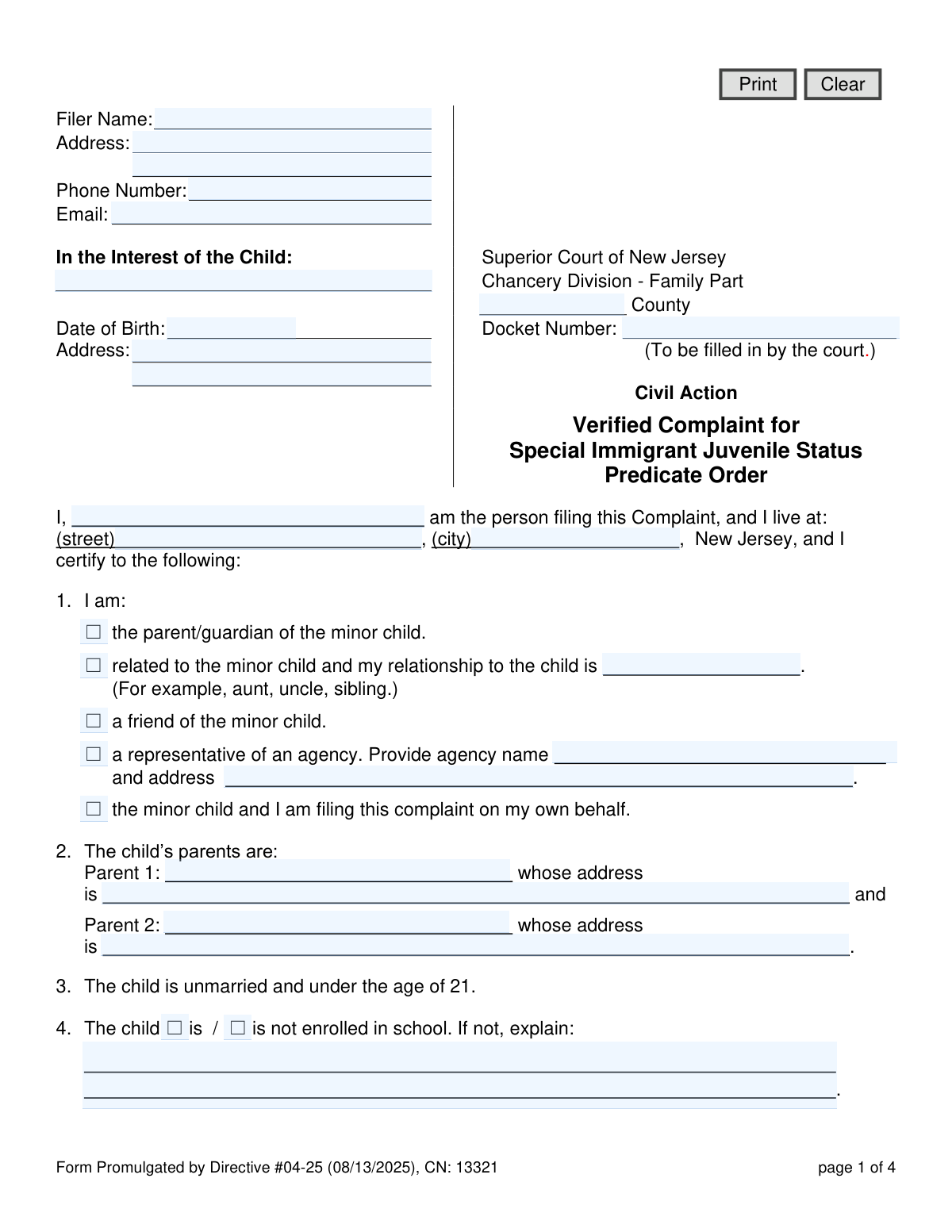
This form is a legal document filed with the Superior Court of New Jersey to initiate the process for obtaining a Special Immigrant Juvenile Status (SJIS) predicate order. It is used to ask a state court to make specific findings about a minor child, such as their dependency on the court and that reunification with one or both parents is not viable due to abuse, neglect, or abandonment. Today, this form can be filled out quickly and accurately using AI-powered services like Instafill.ai, which can also convert non-fillable PDF versions into interactive fillable forms.
NJ CN: 13321 is part of the New Jersey forms category on Instafill.
Our AI automatically handles information lookup, data retrieval, formatting, and form filling.
It takes less than a minute to fill out NJ CN: 13321 using our AI form filling.
Securely upload your data. Information is encrypted in transit and deleted immediately after the form is filled out.

Form specifications

Form name: Verified Complaint for Special Immigrant Juvenile Status (SJIS) Predicate Order
Number of fields: 71
Number of pages: 1
Language: English
main-image

Instafill Demo: How to fill out PDF forms in seconds with AI

How to Fill Out NJ CN: 13321 Online for Free in 2026

Are you looking to fill out a NJ CN: 13321 form online quickly and accurately? Instafill.ai offers the #1 AI-powered PDF filling software of 2026, allowing you to complete your NJ CN: 13321 form in just 37 seconds or less.
Follow these steps to fill out your NJ CN: 13321 form online using Instafill.ai:
  1. 1 Navigate to Instafill.ai and upload or select the 'Verified Complaint for Special Immigrant Juvenile Status (SJIS) Predicate Order' form.
  2. 2 Provide the personal details of the person filing the complaint (the petitioner) and the minor child, including names, addresses, and dates of birth.
  3. 3 Enter information about the child's parents, current custody status, and living arrangements as prompted by the AI assistant.
  4. 4 Clearly state the reasons why the child cannot be reunited with one or both parents (e.g., abuse, neglect, abandonment) and why it is not in the child's best interest to return to their home country.
  5. 5 Specify the relief you are requesting from the court, such as a custody order and the specific findings required for the SJIS predicate order.
  6. 6 Carefully review all the information auto-filled by the AI for accuracy, then electronically sign and date the certification section.
  7. 7 Download the completed, signed complaint, ready for filing with the appropriate New Jersey Superior Court.

Our AI-powered system ensures each field is filled out correctly, reducing errors and saving you time.

Why Choose Instafill.ai for Your Fillable NJ CN: 13321 Form?

Speed

Complete your NJ CN: 13321 in as little as 37 seconds.

Up-to-Date

Always use the latest 2026 NJ CN: 13321 form version.

Cost-effective

No need to hire expensive lawyers.

Accuracy

Our AI performs 10 compliance checks to ensure your form is error-free.

Security

Your personal information is protected with bank-level encryption.

Frequently Asked Questions About Form NJ CN: 13321

This form is used to petition a New Jersey state court for a 'predicate order,' which makes the legal findings necessary for a minor to apply for Special Immigrant Juvenile Status (SJIS) with the U.S. government.

The complaint can be filed by the minor child themselves, a parent/guardian, a relative (like an aunt or sibling), a friend, or a representative from an official agency. The filer must specify their relationship to the child in Section 1.

A predicate order is a required ruling from a state court that finds the child is unmarried, under 21, cannot be reunified with one or both parents due to abuse, neglect, or abandonment, and that it is not in their best interest to return to their home country.

No, this form only begins the process in state court. If the judge grants the predicate order, a separate application must then be filed with U.S. Citizenship and Immigration Services (USCIS) to request SJIS.

A complaint can still be filed for a child who is over 18, as long as they are unmarried and under the age of 21 at the time of filing. This is a key requirement noted in Section 3 of the form.

Section 2 requires the names and last known addresses for both of the child's parents. You should provide the most complete information you have.

You must check the appropriate box for abuse, neglect, abandonment, or death of a parent. You should also provide a brief description of the circumstances that prevent reunification.

This complaint must be filed with the Superior Court of New Jersey, Chancery Division - Family Part, in the county where the child lives. The court will then assign a docket number to the case.

According to Section 11, you are legally required to notify the court if any of the information you provided in the Verified Complaint changes.

Yes, services like Instafill.ai use AI to help you accurately auto-fill form fields, which saves time and reduces errors. You are still responsible for verifying that all information is true and correct before signing.

You can upload the PDF of the form to the Instafill.ai platform. It will make the document interactive, allowing you to type your answers directly into the fields before printing the completed form for submission.

You can use a service like Instafill.ai, which can convert flat, non-fillable PDFs into interactive forms. Simply upload your document, and the platform will make it possible to fill out on your computer.

Compliance NJ CN: 13321
Validation Checks by Instafill.ai

1
Confirms Child is Under 21
This check validates the child's date of birth (`minorBirthDt`) against the current date to confirm they are under the age of 21. This is a fundamental eligibility requirement for Special Immigrant Juvenile Status (SJIS). If the date indicates the child is 21 or older, the form submission should be flagged with an error, as the child does not meet the statutory age requirement.
2
Ensures Filer's Relationship is Specified When Required
This validation checks that if the filer selects 'related to the minor child' in Question 1, the corresponding text field (`filerRelMinor`) is not empty. This information is crucial for the court to understand the filer's standing and relationship to the child. A failure would prompt the user to specify their relationship (e.g., aunt, uncle, sibling).
3
Requires Agency Details for Agency Filers
This check ensures that if the filer identifies as 'a representative of an agency' in Question 1, the agency name (`q1AgencyName`) and address (`q1AgencyAddrFull`) fields are completed. This is necessary for the court to verify the agency's identity and legitimacy. If these fields are left blank, the user will be required to provide the agency's information before proceeding.
4
Mandates Explanation for Non-Enrollment in School
This validation rule is triggered if the filer indicates the child 'is not' enrolled in school in Question 4. It ensures the corresponding explanation text box (`q4Details`) is filled out. This information helps the court understand the child's circumstances and educational needs, which is relevant to a best-interest determination.
5
Verifies Selection of a Custody Status
This check ensures that the filer has selected at least one of the available options in Question 5 regarding the child's custody status and living arrangement. The child's current custody situation is a core piece of information for the court to make its findings. If no option is selected, the form cannot be submitted, and the user will be directed to complete this section.
6
Requires Docket Number for Prior Custody Orders
This validation ensures that if the filer checks 'Custody of the child was awarded...' in Question 5, the associated docket number field (`q5CustodyAwarded`) is filled. This docket number is essential for the court to retrieve and review the prior order. A failure would prevent submission until a valid docket number is entered.
7
Ensures Reason for Parental Non-Reunification is Selected
This check confirms that at least one option in Question 6 (e.g., abuse, neglect, abandonment, death) is selected to explain why the child cannot be reunited with their parent(s). This is a required finding for an SJIS predicate order. The form will be considered incomplete if this section is not filled out.
8
Validates Presence of Child's Home Country
This validation ensures the 'home country' field (`minorHomeCountry`) in Question 7 is not empty. The court must make a finding that it is not in the child's best interest to return to this specific country. Without this information, a key element of the SJIS predicate order is missing, and the form submission will fail.
9
Requires Explanation for Best Interest Arrangement
This check ensures the text field `q8Explain` in Section 8, which explains why the proposed arrangement is in the child's best interest, is not empty. This narrative is critical for the judge to understand the context and reasoning behind the request. A submission would be blocked until this explanation is provided.
10
Validates Child's Date of Birth Format
This check verifies that the child's date of birth (`minorBirthDt`) is entered in a valid format (e.g., MM/DD/YYYY) and represents a plausible date that is in the past. This prevents data entry errors and ensures the data is usable for age calculations. An invalid format or a future date would trigger an error message requiring correction.
11
Requires Language Specification for Interpreter Requests
This rule validates that if the 'spoken language interpreter required' checkbox (`interp`) is selected, the accompanying text field (`interpLang`) for specifying the language is also filled. This is critical for the court to arrange for the correct interpreter and ensure access to justice. A failure would prompt the user to enter the required language.
12
Ensures Signature Dates are Valid and Not in the Future
This check validates that the signature dates (`sigDt` and `sigCertDt`) are properly formatted and are not set to a future date. This maintains the integrity of the certification, which attests to the facts as of the date of signing. A future date would be rejected as illogical and require the user to enter the current or a past date.
13
Requires Name for New Custody Request
This validation ensures that if the filer requests a new custody order by checking option 'd' in Question 9, the name of the person to be granted custody (`q9dCustodyName`) is provided. This information is essential for the court to draft a clear and enforceable order. The form will show an error if the checkbox is selected but the name is missing.
14
Verifies Filer's Core Identifying Information
This check ensures that the filer's name (`certName`) and address (`certAddrStr`, `certAddrCity`) are not left blank. This information is mandatory for court records, communication, and establishing the identity of the person filing the complaint. An incomplete submission would be rejected, prompting the user to provide this essential data.

Common Mistakes in Completing NJ CN: 13321

Providing Incomplete or Vague Parent Information

Filers often leave the name or address fields for one or both parents in Section 2 blank, or write 'Unknown,' without further explanation. This happens when a parent is absent or their whereabouts are genuinely unknown, but courts require details on efforts made to locate them. Simply leaving the fields blank can cause the complaint to be rejected or delayed, as it provides no context for the court. To avoid this, provide as much detail as possible, and if an address is unknown, explain why and what steps were taken to find it.

Writing Vague or Insufficient Explanations

Sections 6, 7, and 8 require detailed explanations for why the child cannot be reunited with a parent and why it's not in their best interest to return to their home country. A common error is providing generic, one-sentence answers that lack specific facts about the child's situation. This weakens the legal basis for the SJIS predicate order and can lead to denial. To prevent this, provide a detailed narrative with specific examples of abuse, neglect, abandonment, or country conditions that directly impact the child.

Contradictory Information Between Sections

Filers may state one living arrangement in Section 5 ('The child’s custody status') but then request a different, conflicting outcome in Section 9 ('Therefore, the person filing this Complaint requests...'). This inconsistency confuses the court and raises questions about the filer's true intentions and the child's stability. To avoid this, carefully review the entire form after filling it out to ensure the information provided and the relief requested are consistent and logical.

Forgetting to Provide Details for Selected Options

Several sections require the filer to provide additional information after checking a box, such as specifying a relationship (Section 1), a docket number (Section 5), or a person's name (Section 9d). People often check the box but forget to fill in the corresponding text field. This omission makes the selection incomplete and requires the court to seek clarification, delaying the case. Always double-check that every selected option has its required supplementary information filled in completely.

Missing Signatures or Dates on the Certification Page

The form requires a signature and date in two places on the final page: one for the petition and one for the certification. Forgetting to sign, date, or signing in the wrong spot is a very common and critical error. An unsigned or undated complaint is legally invalid and will be immediately rejected by the court clerk, forcing the filer to start the process over. Always review the final page carefully to ensure both signature and date lines are properly completed.

Incorrectly Describing the Child's Custody Status

Section 5 presents several complex legal options regarding custody, which can be confusing for filers without legal assistance. A person might incorrectly state that custody was awarded under a docket number when no formal court order exists, or they might misunderstand the difference between living with someone and that person having legal custody. This mistake can misrepresent the child's legal situation and lead to incorrect court orders. If unsure, it is best to consult with an attorney or select the 'Other' option and describe the living situation in plain language.

Providing a Weak 'Best Interest' Justification

After selecting a desired living arrangement in Section 8, the form asks the filer to 'Explain why it is in the best interest of the child to be in this arrangement.' Many filers provide a very brief or generic answer, such as 'It is a safe home.' This is insufficient for the court, which needs specific, compelling reasons tied to the child's well-being, safety, education, and emotional stability. To avoid this, describe how the proposed arrangement specifically benefits the child compared to other alternatives.

Failing to Request a Court Interpreter When Needed

The form includes a checkbox to request a spoken language interpreter and a line to specify the language. Filers who are not fluent in English often overlook this section, assuming an interpreter will be automatically provided. Failure to request one in advance can lead to significant delays on the day of the court hearing, as the court will have to postpone the case until an interpreter can be scheduled. If you or the child require an interpreter, it is essential to check this box and clearly write the required language.

Using an Ambiguous or Incorrect Date of Birth Format

The 'Date of Birth' field for the minor is critical for establishing eligibility (under 21). Filers may use ambiguous formats like '01-02-2008,' which could be interpreted as either January 2nd or February 1st. This can lead to data entry errors and potential questions about the child's age. To prevent this, always use a clear, unambiguous format such as MM/DD/YYYY. AI-powered tools like Instafill.ai can help by automatically standardizing date formats to prevent confusion.

Filling in Fields Reserved for Court Use

The form explicitly marks the 'Docket Number' field with '(To be filled in by the court.)'. Some filers, in an attempt to be thorough, may try to write something in this box, such as 'N/A' or a previously assigned number from a different case. This can cause confusion for court clerks during intake and processing. It is crucial to leave any fields designated for official or court use completely blank.

Submitting a Document with Illegible Handwriting or Formatting

This legal document is often available as a non-fillable PDF, leading people to fill it out by hand, which can result in illegible entries. Poor handwriting can cause court staff to misinterpret names, addresses, or critical details, leading to errors in the official record and significant delays. To avoid this, use a tool like Instafill.ai that can convert the form into a fillable version, ensuring all text is clear, legible, and properly aligned within the fields.
Saved over 80 hours a year

“I was never sure if my IRS forms like W-9 were filled correctly. Now, I can complete the forms accurately without any external help.”

Kevin Martin Green

Your data stays secure with advanced protection from Instafill and our subprocessors

Robust compliance program

Transparent business model

You’re not the product. You always know where your data is and what it is processed for.

ISO 27001, HIPAA, and GDPR

Our subprocesses adhere to multiple compliance standards, including but not limited to ISO 27001, HIPAA, and GDPR.

Security & privacy by design

We consider security and privacy from the initial design phase of any new service or functionality. It’s not an afterthought, it’s built-in, including support for two-factor authentication (2FA) to further protect your account.

Fill out NJ CN: 13321 with Instafill.ai

Worried about filling PDFs wrong? Instafill securely fills verified-complaint-for-special-immigrant-juvenile-status-sjis-predicate-order forms, ensuring each field is accurate.