Yes! You can use AI to fill out Waiver of Criminal Jury Trial Pursuant to Rule 1:8-1(a)

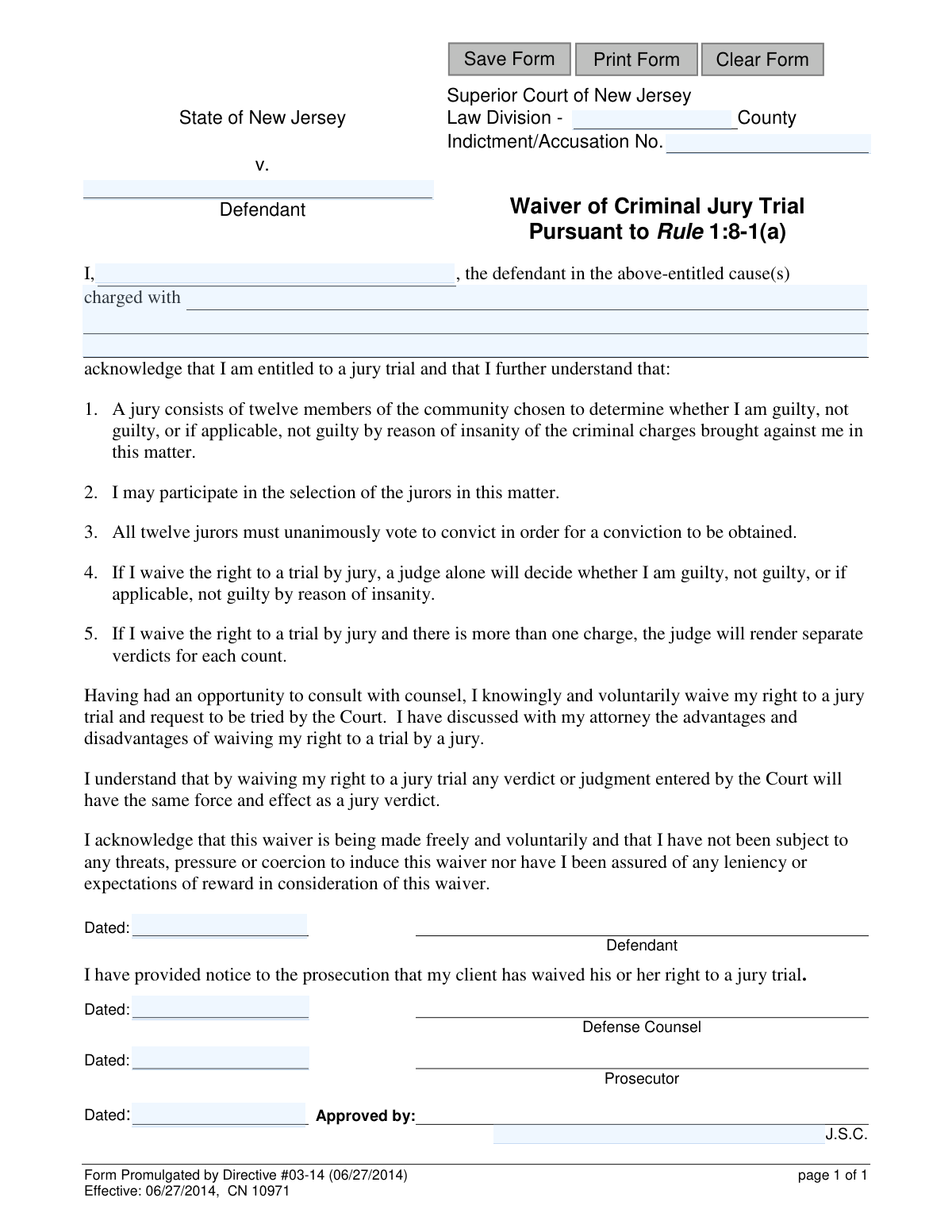
The Waiver of Criminal Jury Trial Pursuant to Rule 1:8-1(a) is a legal document used in the New Jersey Superior Court system. By signing this form, a defendant, after consulting with their attorney, knowingly and voluntarily gives up their right to have their case decided by a jury of twelve peers, opting instead for a bench trial where a judge alone will determine guilt or innocence. This is a critical step in legal proceedings that alters the trial format. Today, this form can be filled out quickly and accurately using AI-powered services like Instafill.ai, which can also convert non-fillable PDF versions into interactive fillable forms.
Directive #03-14 / CN 10971 is part of the New Jersey forms category on Instafill.
Our AI automatically handles information lookup, data retrieval, formatting, and form filling.
It takes less than a minute to fill out Directive #03-14 / CN 10971 using our AI form filling.
Securely upload your data. Information is encrypted in transit and deleted immediately after the form is filled out.

Form specifications

Form name: Waiver of Criminal Jury Trial Pursuant to Rule 1:8-1(a)
Number of fields: 13
Number of pages: 1
Language: English
main-image

Instafill Demo: How to fill out PDF forms in seconds with AI

How to Fill Out Directive #03-14 / CN 10971 Online for Free in 2026

Are you looking to fill out a DIRECTIVE #03-14 / CN 10971 form online quickly and accurately? Instafill.ai offers the #1 AI-powered PDF filling software of 2026, allowing you to complete your DIRECTIVE #03-14 / CN 10971 form in just 37 seconds or less.
Follow these steps to fill out your DIRECTIVE #03-14 / CN 10971 form online using Instafill.ai:
  1. 1 Navigate to Instafill.ai and upload or select the New Jersey Waiver of Criminal Jury Trial form.
  2. 2 Use the AI assistant to automatically fill in case details such as the County, Indictment/Accusation Number, and the full name of the defendant.
  3. 3 Enter the specific criminal charges the defendant is facing in the appropriate field.
  4. 4 The defendant must carefully review the acknowledgments and then provide their digital signature and the date.
  5. 5 Route the document to the Defense Counsel, Prosecutor, and the approving Judge for their respective signatures and dates.
  6. 6 Review all the information entered on the form for completeness and accuracy before finalizing.
  7. 7 Securely download, print, or share the completed waiver as required for court filing.

Our AI-powered system ensures each field is filled out correctly, reducing errors and saving you time.

Why Choose Instafill.ai for Your Fillable Directive #03-14 / CN 10971 Form?

Speed

Complete your Directive #03-14 / CN 10971 in as little as 37 seconds.

Up-to-Date

Always use the latest 2026 Directive #03-14 / CN 10971 form version.

Cost-effective

No need to hire expensive lawyers.

Accuracy

Our AI performs 10 compliance checks to ensure your form is error-free.

Security

Your personal information is protected with bank-level encryption.

Frequently Asked Questions About Form Directive #03-14 / CN 10971

This form is used by a defendant in a New Jersey criminal case to formally give up their right to a trial by a jury of twelve peers. By signing, the defendant requests that a judge alone will hear the case and decide the verdict.

The defendant in a criminal case fills out this form after deciding to waive their right to a jury trial. It must be signed by the defendant, their defense counsel, the prosecutor, and finally approved and signed by the judge.

In a jury trial, twelve citizens must unanimously agree on a verdict of guilty or not guilty. In a trial by the Court (a bench trial), a single judge hears the evidence and makes the final decision on their own.

You will need to provide the county of the court, the Indictment or Accusation number for your case, your full name, and a list of the charges against you.

Yes, the form requires you to acknowledge that you have had an opportunity to consult with your counsel. It is critical to discuss the advantages and disadvantages of waiving a jury trial with your attorney before making this decision.

No, you cannot be forced. The form includes a statement confirming that your waiver is made freely and voluntarily, without any threats, pressure, or promises of leniency.

Once the form is signed by you, your attorney, the prosecutor, and the judge, your right to a jury trial is officially waived. The court will then proceed to schedule a bench trial, where a judge will preside over your case.

You are giving up the right to have twelve community members decide your case, the right to participate in selecting those jurors, and the requirement that all twelve jurors must agree unanimously to convict you.

Withdrawing a waiver is difficult and not guaranteed; it requires the court's approval. You must speak to your attorney immediately if you reconsider, as they would need to file a formal motion with the court.

Yes, services like Instafill.ai use AI to accurately auto-fill form fields with your case information, which saves time and helps prevent errors. However, the legal decision to sign should only be made after consulting with your attorney.

You can upload the PDF of the form to the Instafill.ai platform. The AI will make the fields interactive, allowing you to easily type in your information before downloading the completed document for signing.

If you have a non-fillable PDF, you can use a tool like Instafill.ai. It can convert flat PDFs into interactive, fillable forms online, so you can easily complete them on your computer.

Compliance Directive #03-14 / CN 10971
Validation Checks by Instafill.ai

1
Ensures County Field is Populated
This check verifies that the 'County' field (`typeCounty`) is not empty. The county is a critical piece of information for identifying the correct jurisdiction of the Superior Court handling the case. A missing county would make the form legally ambiguous and prevent it from being filed correctly.
2
Validates County Against Official List
This check ensures the value entered in the 'County' field (`typeCounty`) matches an official list of New Jersey's 21 counties. This prevents misspellings or the entry of invalid locations, which could lead to filing errors and delays. If the county is not valid, the user should be prompted to select from a valid list or correct the entry.
3
Requires Indictment/Accusation Number
This validation confirms that the 'Indictment/Accusation No.' field (`caseDocket`) is filled out. This number is the unique identifier for the specific criminal case and is essential for linking the waiver to the correct court record. Without it, the form cannot be processed or associated with the defendant's case.
4
Verifies Defendant's Full Name is Provided
This check ensures that the 'Defendant' name field (`defNameFull`) is not left blank. The identity of the person waiving their constitutional right to a jury trial is the most fundamental piece of information on the form. A submission without the defendant's name is invalid and legally meaningless.
5
Ensures Specific Charges are Listed
This validation verifies that the 'charged with' field (`chargedWith`) contains a description of the criminal charges. The waiver is specific to the listed offenses, so this information is legally required to define the scope of the waiver. An empty or vague description would render the waiver legally insufficient and unenforceable.
6
Confirms Defendant's Signature Date is Present
This check ensures the 'Dated' field next to the Defendant's signature line (`sigDefDt`) is completed. This date documents when the defendant officially waived their right, which is a critical event in the legal proceedings. A missing date raises questions about the validity and timing of the waiver.
7
Confirms Defense Counsel's Signature Date is Present
This validation confirms the 'Dated' field for the Defense Counsel (`sigDefAttyDt`) is filled. This date serves as proof that the defendant consulted with their attorney, a key requirement for a knowing and voluntary waiver. Its absence could invalidate the waiver on the grounds of inadequate legal counsel.
8
Confirms Prosecutor's Signature Date is Present
This check verifies that the 'Dated' field for the Prosecutor (`sigProsDt`) is completed. This date acknowledges that the prosecution has been formally notified of the defendant's waiver, a required procedural step. Failure to provide this date could lead to procedural challenges and delays in the trial process.
9
Requires Approving Judge's Name
This validation ensures the 'Approved by' field for the judge's name (`sigJdgName`) is not empty. The waiver is not effective until approved by a judge, and the identity of that judge must be clearly recorded. A missing judge's name makes the approval invalid and the document unenforceable.
10
Requires Judge's Approval Date
This check confirms that the 'Dated' field for the approving judge (`sigJdgDt`) is filled out. This date marks the official point in time when the waiver becomes legally effective. Without this date, it is impossible to determine when the court sanctioned the waiver, rendering the document incomplete.
11
Validates All Date Fields for Correct Format
This check ensures that all date fields (`sigDefDt`, `sigDefAttyDt`, `sigProsDt`, `sigJdgDt`) adhere to a standard format, such as MM/DD/YYYY. Consistent and valid date formatting is crucial for accurate record-keeping and prevents data entry errors or system processing failures. An invalid format would require manual correction and could cause ambiguity.
12
Prevents Future Dates in Signature Fields
This validation prohibits the entry of any date in the future for all signature date fields. A signature date must reflect an action that has already occurred, and a future date is logically impossible. Allowing future dates would compromise the integrity of the legal document and suggest fraudulent or erroneous data entry.
13
Verifies Logical Chronology of Signature Dates
This check ensures the signature dates follow a logical sequence: the judge's approval date (`sigJdgDt`) must be on or after all other signature dates. This sequence is critical to confirm that the waiver was properly executed by the defendant and counsel before being approved by the court. An illogical order would indicate a procedural error that could invalidate the waiver.
14
Validates Date Plausibility Against Form Effective Date
This check ensures that all signature dates are on or after the form's effective date of 06/27/2014. A date prior to this would be impossible, as the form did not exist in its current version. This validation helps catch significant data entry errors or the use of an outdated form.

Common Mistakes in Completing Directive #03-14 / CN 10971

Incorrect Indictment/Accusation Number

Entering the wrong Indictment or Accusation number is a frequent error caused by typos or referencing an incorrect document. This mistake can lead to the waiver being filed with the wrong case, causing significant administrative delays and requiring refiling. To prevent this, meticulously double-check the number against the official charging document provided by the court.

Inconsistent Defendant Name

The defendant's name may be entered differently across the various fields, such as using a nickname in one spot and a full legal name in another. This creates ambiguity regarding the identity of the person waiving their rights, which can lead to the form's rejection or future legal challenges. Always use the full, official legal name as it appears on the indictment in all designated fields.

Vague or Incomplete Description of Charges

People often write a general summary of the charges, like 'drug possession,' instead of the specific, formal charges and statute numbers. An imprecise description can render the waiver invalid, as it isn't clear which specific rights are being waived, forcing the judge to reject it. You must transcribe the charges exactly as they appear on the indictment, including the statute number, description, and degree of the crime.

Missing Required Signatures

Submitting the form without the signatures of the defendant, defense counsel, and prosecutor is a critical failure. This often happens due to rushing or poor coordination, rendering the waiver legally incomplete and without effect. Before submission, use a checklist to confirm all parties have signed to avoid having the document rejected and delaying the case.

Incorrect or Mismatched Dates

The dates next to the signatures are often filled out incorrectly, post-dated, or don't align logically, raising questions about the timeline of the agreement. A judge may refuse to approve the waiver if the dates suggest procedural issues, such as a lawyer signing before their client. Ensure all parties date the form with the correct date of their signature to maintain the document's integrity.

Illegible Handwriting

Filling out a legal document with poor or rushed handwriting can make critical information like names and case numbers unreadable. This can lead to clerical errors by court staff, rejection of the form, or legal ambiguity down the line. To avoid this, print clearly in block letters or, ideally, use a digital tool to type the information. If the form is a non-fillable PDF, a service like Instafill.ai can convert it into a fillable version to ensure all text is clear and legible.

Leaving Critical Fields Blank

Forgetting to fill in essential fields like the county or the case number is a common oversight that results in an incomplete form. The court clerk cannot process the document without this key identifying information, leading to immediate rejection. Carefully review the entire form before submission, and consider using an AI-powered tool like Instafill.ai, which can help identify and ensure all required fields are completed.

Defendant Signing Without Consulting Counsel

A defendant might sign the form without their attorney's signature, despite the text confirming consultation with counsel. A judge will almost certainly reject a waiver submitted this way, as the court must ensure the waiver is knowing and voluntary, which includes the benefit of legal advice. This fundamental right cannot be waived without a clear record of consultation with a defense attorney, certified by their signature.

Failure to Notify the Prosecutor

The defense counsel may sign the form but fail to actually provide it to the prosecutor for their signature and acknowledgement. The prosecutor has a right to be notified of the waiver, and a judge will not approve it without their signature. Defense counsel must coordinate with the prosecutor to obtain their signature before submitting the completed form to the court to prevent procedural delays.

Using an Outdated Version of the Form

Individuals sometimes find and use an old version of a form from a past case or an unreliable internet source. Courts require the use of current, promulgated forms, and submitting an outdated one will lead to rejection by the clerk. Always download the latest version of any legal form directly from the official court system's website to ensure compliance.
Saved over 80 hours a year

“I was never sure if my IRS forms like W-9 were filled correctly. Now, I can complete the forms accurately without any external help.”

Kevin Martin Green

Your data stays secure with advanced protection from Instafill and our subprocessors

Robust compliance program

Transparent business model

You’re not the product. You always know where your data is and what it is processed for.

ISO 27001, HIPAA, and GDPR

Our subprocesses adhere to multiple compliance standards, including but not limited to ISO 27001, HIPAA, and GDPR.

Security & privacy by design

We consider security and privacy from the initial design phase of any new service or functionality. It’s not an afterthought, it’s built-in, including support for two-factor authentication (2FA) to further protect your account.

Fill out Directive #03-14 / CN 10971 with Instafill.ai

Worried about filling PDFs wrong? Instafill securely fills waiver-of-criminal-jury-trial-pursuant-to-rule-18-1a forms, ensuring each field is accurate.