Yes! You can use AI to fill out Writ of Possession - Appendix XI-Y
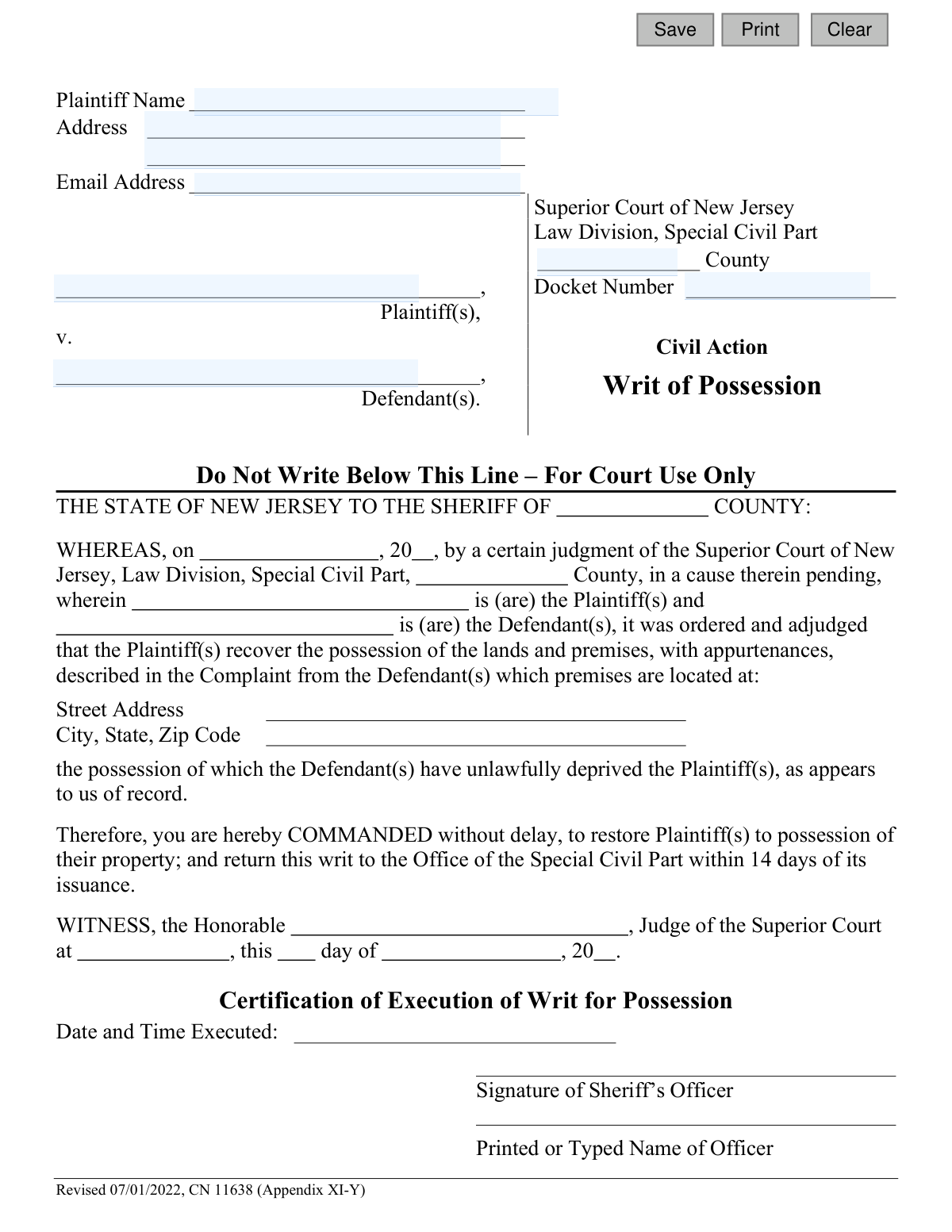
The Writ of Possession - Appendix XI-Y is a legal document issued by the Superior Court of New Jersey, Law Division, Special Civil Part. It commands the county sheriff to restore possession of a property to the plaintiff, as ordered by a court judgment against the defendant. This writ is the final step in an eviction or ejectment process, legally authorizing the removal of the current occupants. Today, this form can be filled out quickly and accurately using AI-powered services like Instafill.ai, which can also convert non-fillable PDF versions into interactive fillable forms.
Appendix XI-Y is part of the
New Jersey forms category on Instafill.
Our AI automatically handles information lookup, data retrieval, formatting, and form filling.
It takes less than a minute to fill out Appendix XI-Y using our AI form filling.
Securely upload your data. Information is encrypted in transit and deleted immediately after the form is filled out.
Form specifications
| Form name: | Writ of Possession - Appendix XI-Y |
| Number of fields: | 10 |
| Number of pages: | 1 |
| Language: | English |
Instafill Demo: How to fill out PDF forms in seconds with AI
How to Fill Out Appendix XI-Y Online for Free in 2026
Are you looking to fill out a APPENDIX XI-Y form online quickly and accurately? Instafill.ai offers the #1 AI-powered PDF filling software of 2026, allowing you to complete your APPENDIX XI-Y form in just 37 seconds or less.
Follow these steps to fill out your APPENDIX XI-Y form online using Instafill.ai:
- 1 Navigate to Instafill.ai and upload or select the 'Writ of Possession - Appendix XI-Y' form.
- 2 Use the AI assistant to automatically populate plaintiff information, including name, address, and email.
- 3 Enter the defendant's name, the court county, and the case docket number in the appropriate fields.
- 4 Clearly specify the full street address, city, state, and zip code of the property to be repossessed.
- 5 Review all auto-filled and manually entered information to ensure it perfectly matches the court's judgment.
- 6 Securely download the completed writ, ready for submission to the court for the judge's signature and issuance to the sheriff.
Our AI-powered system ensures each field is filled out correctly, reducing errors and saving you time.
Why Choose Instafill.ai for Your Fillable Appendix XI-Y Form?
Speed
Complete your Appendix XI-Y in as little as 37 seconds.
Up-to-Date
Always use the latest 2026 Appendix XI-Y form version.
Cost-effective
No need to hire expensive lawyers.
Accuracy
Our AI performs 10 compliance checks to ensure your form is error-free.
Security
Your personal information is protected with bank-level encryption.
Frequently Asked Questions About Form Appendix XI-Y
This is a court order directing the County Sheriff to remove a defendant from a property and restore possession to the plaintiff. It is used after a court has already granted a judgment for possession in favor of the plaintiff.
The plaintiff, who is the person or entity that won the court case for possession of the property, must fill out the top portion of this form.
No, this form is the final step in the eviction process. You can only file it after you have already been to court and a judge has issued a Judgment for Possession.
You will need your name and address as the plaintiff, the defendant's name, the property address, and the County and Docket Number from your original court case.
The docket number is the unique identification number for your court case. It can be found on all previous court documents related to your case, such as the complaint or the judgment.
After you submit the form, a judge signs it, and it is issued to the County Sheriff. The Sheriff is then legally commanded to restore the property to you, which typically involves a scheduled lockout.
You must file the completed form with the Clerk of the Superior Court, Law Division, Special Civil Part, in the county where the property is located and the judgment was entered.
No, you only need to fill out the top section with the plaintiff, defendant, and case details. The sections below the line labeled 'For Court Use Only' are to be completed by court personnel and the Sheriff's office.
The form states the Sheriff must act 'without delay' and return the writ within 14 days of issuance. The actual timing of the lockout will be scheduled by the Sheriff's office.
This writ means the Sheriff has been ordered to remove you from the premises. You should prepare to vacate the property immediately to avoid being forcibly removed by the Sheriff's officer.
Yes, services like Instafill.ai can use AI to help you accurately auto-fill the form fields with your case information, saving time and reducing the chance of errors.
You can use a service like Instafill.ai to upload the PDF form, fill it out electronically on your computer, and then download the completed document for printing and submission.
If you have a non-fillable or 'flat' PDF, you can use a tool like Instafill.ai. It can convert the document into an interactive, fillable form that you can easily complete online.
Compliance Appendix XI-Y
Validation Checks by Instafill.ai
1
Ensures Plaintiff Name is Provided
This validation confirms that the 'Plaintiff Name' field is not left empty. A plaintiff must be identified for the writ to be legally valid, as it specifies who is being granted possession. Failure to provide a name will prevent form submission and prompt the user to enter the required information.
2
Ensures Defendant Name is Provided
This check verifies that the 'Defendant Name' field has been filled out. The writ is an action against a specific party, and their name is essential for the document's legal standing and for the Sheriff to execute the writ correctly. The form will be rejected if the defendant's name is missing.
3
Verifies Plaintiff and Defendant are Different Parties
This logical check compares the 'Plaintiff Name' and 'Defendant Name' fields to ensure they are not identical. A person cannot file a writ of possession against themselves, so this check prevents a fundamental logical error in the filing. If the names match, an error is displayed, asking the user to review the entered names.
4
Requires Plaintiff's Full Address
This validation ensures the 'Plaintiff Address' field is not blank. The plaintiff's address is necessary for court records, correspondence, and proper identification of the parties involved. A missing address will result in a validation error, blocking submission until the address is provided.
5
Validates Plaintiff's Email Address Format
This check examines the 'Plaintiff Email Address' field, if it is filled, to ensure it conforms to a standard email format (e.g., '[email protected]'). This is important for ensuring that any electronic communications or notifications from the court are deliverable. An invalid format will trigger a warning, prompting the user to correct the email address or leave it blank.
6
Ensures Court County is Specified
This validation confirms that a county has been selected or entered in the 'County' field. The county determines the correct jurisdiction for the Superior Court, and this information is critical for filing the writ in the right location. The form cannot be processed without a specified county.
7
Confirms County is a Valid NJ Jurisdiction
This check validates the entered 'County' against the official list of New Jersey's 21 counties. Using an incorrect or misspelled county name can lead to the writ being filed in the wrong jurisdiction, causing significant delays and legal issues. If the entry is not a valid NJ county, the user will be prompted to select from a valid list or correct the entry.
8
Ensures Docket Number is Provided
This check verifies that the 'Docket Number' field is not empty. The docket number is the unique identifier for the court case and is essential for linking the writ of possession to the correct judgment. Without it, the writ is invalid and cannot be processed by the court or the sheriff.
9
Validates the Format of the Docket Number
This validation checks if the 'Docket Number' follows the standard New Jersey Special Civil Part format, typically 'XX-NNNNNN-YY' (e.g., DC-123456-22). This ensures the number is structurally correct, reducing data entry errors and helping to ensure it corresponds to a real case. A non-matching format will trigger an error and ask the user to re-enter the number correctly.
10
Checks for a Plausible Year in the Docket Number
This check examines the year portion ('YY') of the docket number to ensure it is a reasonable value, for example, not a future year and not excessively old. This helps catch typos, such as entering '32' for a 2023 case. An implausible year would flag the entry for user review to confirm its accuracy.
11
Validates Character Set for Plaintiff Name
This check ensures the 'Plaintiff Name' field contains only valid characters, such as letters, spaces, hyphens, and periods, and excludes numbers or special symbols that are not typically part of a name. This helps maintain data integrity and prevents potential issues with data processing or document generation. An entry with invalid characters would be flagged for correction.
12
Validates Character Set for Defendant Name
This validation ensures the 'Defendant Name' field is composed of valid characters appropriate for a name, similar to the plaintiff name check. It prevents the entry of random symbols or numbers, ensuring the legal document correctly and clearly identifies the defendant. This is crucial for the legal validity and execution of the writ.
Common Mistakes in Completing Appendix XI-Y
Filers often mistype the docket number or omit the required prefix (e.g., 'LT' for Landlord-Tenant cases). This happens due to simple transcription errors or not referencing the original judgment document. An incorrect docket number prevents the court clerk from linking the writ to the correct case, leading to immediate rejection and significant processing delays.
A frequent error is failing to include the specific apartment, unit, or floor number for the property. This ambiguity makes it impossible for the Sheriff to execute the writ legally, as they cannot identify the exact premises from which to remove the defendant. The writ becomes unenforceable, forcing the plaintiff to file a corrected version and restart the process.
Filers may use nicknames, abbreviations, or misspell the names of the plaintiff(s) or defendant(s). Legal documents require the full, correct legal names as they appear on the original complaint and judgment. This mistake can create legal challenges to the writ's validity and cause confusion during enforcement.
People sometimes mistakenly enter the current date instead of the date the court issued the Judgment for Possession. The writ's authority is derived from a specific judgment, so an incorrect date invalidates this legal connection. This will cause the court clerk to reject the form, requiring a new submission with the correct information.
The form contains a section clearly marked 'Do Not Write Below This Line – For Court Use Only'. Filers who ignore this instruction and write in this area will have their form rejected. These sections are reserved for official entries by the judge and the Sheriff's office.
Confusion can arise about whether to list the county of the property or the county of the court. This form requires the county where the Special Civil Part court issued the judgment. Filing the writ in the wrong county jurisdiction renders it invalid and results in rejection, wasting time and filing fees.
The form is marked with a revision date ('Revised 07/01/2022'). Courts periodically update their forms, and submitting an older version can lead to rejection. This happens when filers reuse old documents or download from unofficial sources, resulting in delays as they must refile using the current version.
When a form is filled out by hand, poor or unclear handwriting can make critical information like names, addresses, and docket numbers unreadable. This can lead to data entry errors by the clerk or misinterpretation by the Sheriff, potentially invalidating the writ or causing it to be executed incorrectly. Using a tool like Instafill.ai to convert the PDF into a fillable, typed form can prevent this issue entirely.
Leaving out details like an apartment number or correct ZIP code in the plaintiff's address section is a common oversight. An incomplete address can prevent the court or Sheriff from sending crucial correspondence, such as the executed copy of the writ or other notices. To avoid communication gaps, provide a complete and accurate mailing address.
Some filers leave the email address field blank, viewing it as optional. However, courts increasingly rely on email for faster communication, including sending deficiency notices or status updates. Omitting an email address can lead to delays in receiving important information about the case.
Saved over 80 hours a year
“I was never sure if my IRS forms like W-9 were filled correctly. Now, I can complete the forms accurately without any external help.”
Kevin Martin Green
Your data stays secure with advanced protection from Instafill and our subprocessors

Robust compliance program
Transparent business model
You’re not the product. You always know where your data is and what it is processed for.
ISO 27001, HIPAA, and GDPR
Our subprocesses adhere to multiple compliance standards, including but not limited to ISO 27001, HIPAA, and GDPR.
Security & privacy by design
We consider security and privacy from the initial design phase of any new service or functionality. It’s not an afterthought, it’s built-in, including support for two-factor authentication (2FA) to further protect your account.
Fill out Appendix XI-Y with Instafill.ai
Worried about filling PDFs wrong? Instafill securely fills writ-of-possession-appendix-xi-y forms, ensuring each field is accurate.