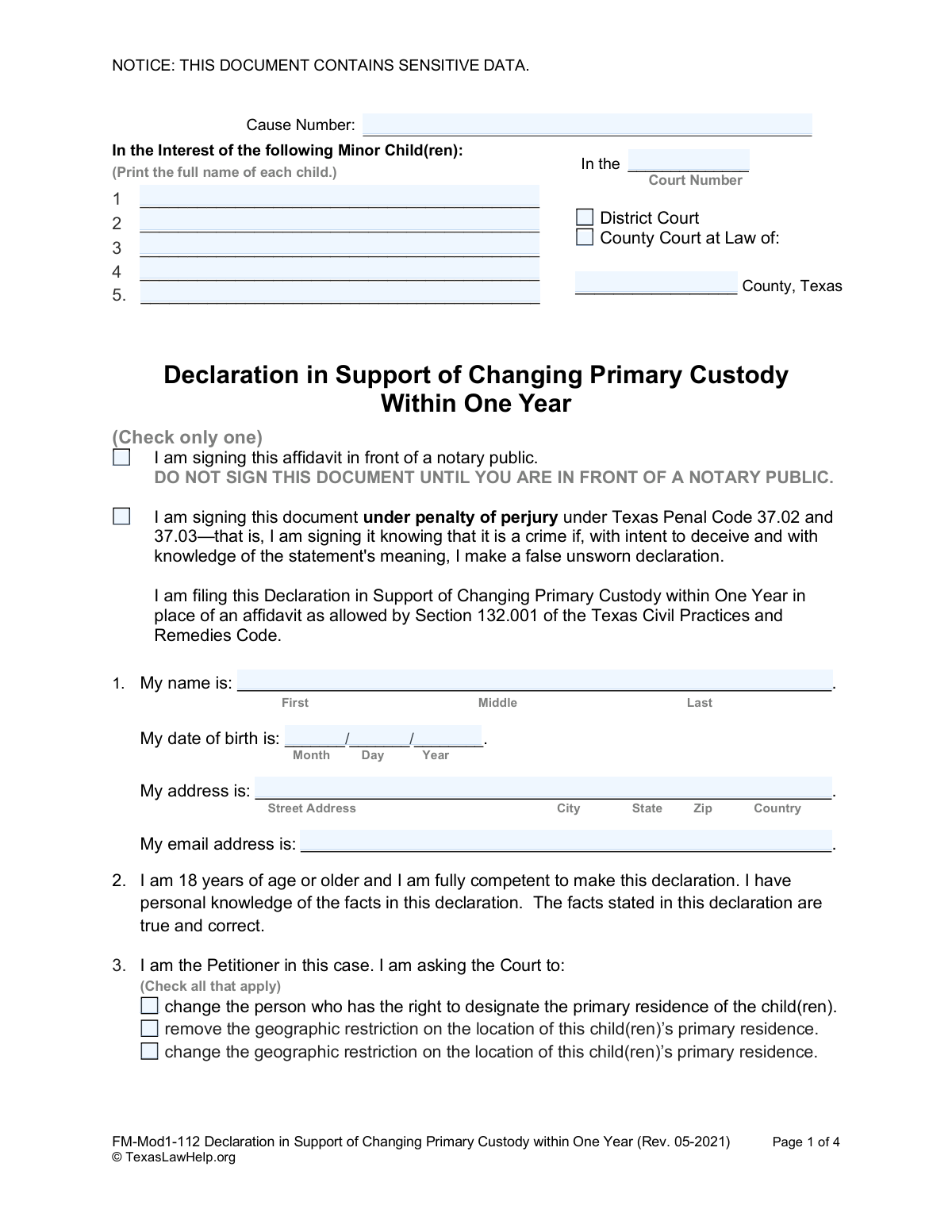
Yes! You can use AI to fill out Declaration in Support of Changing Primary Custody within One Year

This form is a legal declaration required in Texas for a parent seeking to change the primary custody of a child within one year of the existing court order. It requires the filer to state, under penalty of perjury, the specific reasons why a change is necessary, such as the child's environment being harmful or other statutory grounds being met. Today, this form can be filled out quickly and accurately using AI-powered services like Instafill.ai, which can also convert non-fillable PDF versions into interactive fillable forms.
FM-Mod1-112 is part of the child custody forms category on Instafill.
Our AI automatically handles information lookup, data retrieval, formatting, and form filling.
It takes less than a minute to fill out FM-Mod1-112 using our AI form filling.
Securely upload your data. Information is encrypted in transit and deleted immediately after the form is filled out.

Form specifications

Form name: Declaration in Support of Changing Primary Custody within One Year
Number of fields: 36
Number of pages: 1
Language: English
main-image

Instafill Demo: How to fill out PDF forms in seconds with AI

How to Fill Out FM-Mod1-112 Online for Free in 2026

Are you looking to fill out a FM-MOD1-112 form online quickly and accurately? Instafill.ai offers the #1 AI-powered PDF filling software of 2026, allowing you to complete your FM-MOD1-112 form in just 37 seconds or less.
Follow these steps to fill out your FM-MOD1-112 form online using Instafill.ai:
  1. 1 Navigate to Instafill.ai and upload or select the 'Declaration in Support of Changing Primary Custody within One Year' form.
  2. 2 Enter the court and case information, including the cause number and the county in Texas.
  3. 3 Provide the full names of the minor children involved in the custody case.
  4. 4 Fill in your personal information, including your full name, date of birth, and current address.
  5. 5 Carefully check the boxes that correspond to the legal reasons you are filing the modification, as outlined in Texas Family Code 156.102.
  6. 6 In the designated section, write a detailed, factual statement explaining the circumstances that support your request for a custody change.
  7. 7 Review the entire document for accuracy, then sign the declaration either as an unsworn declaration or in front of a notary public, as instructed on the form.

Our AI-powered system ensures each field is filled out correctly, reducing errors and saving you time.

Why Choose Instafill.ai for Your Fillable FM-Mod1-112 Form?

Speed

Complete your FM-Mod1-112 in as little as 37 seconds.

Up-to-Date

Always use the latest 2026 FM-Mod1-112 form version.

Cost-effective

No need to hire expensive lawyers.

Accuracy

Our AI performs 10 compliance checks to ensure your form is error-free.

Security

Your personal information is protected with bank-level encryption.

Frequently Asked Questions About Form FM-Mod1-112

This form is used to ask a Texas court for permission to proceed with a custody modification case less than one year after the current custody order was issued. It explains to the judge why an early change is necessary and justified under the law.

The person (the Petitioner) who is requesting to change the primary custody of a child, remove a geographic restriction, or change a geographic restriction within one year of the existing court order must complete this form.

According to the form, you must believe the change is in the child's best interest and that the other parent agrees, the other parent voluntarily gave up care for at least 6 months, or the child's current environment may cause physical or emotional harm.

You must state specific facts and details that support the reasons you checked in Section 5. The court will use this information to decide if your case can proceed, so be as clear and detailed as possible.

The form explicitly warns that the court will deny your request to change custody and will not schedule a hearing if the facts you state are not adequate to support your claims.

The Cause Number is the unique case number the court assigned to your original custody case. You can find it on all previous court documents related to your child(ren).

The form provides two options: you can sign in front of a notary, or you can sign the 'unsworn declaration' under penalty of perjury without a notary. Both are legally acceptable methods to verify your statements.

No, this declaration is a supporting document that must be filed with your main Petition to Modify the Parent-Child Relationship. It is specifically required only when filing within one year of the last order.

This is the legal right given to one parent to determine where the child lives, which may be subject to a geographic restriction.

Yes, services like Instafill.ai use AI to help you accurately auto-fill form fields with your personal information, which can save time and reduce errors.

You can use a service like Instafill.ai to fill out the form online. Simply upload the PDF, and the platform will make it an interactive, fillable form that you can complete from your computer.

If you have a non-fillable or 'flat' PDF, you can upload it to a service like Instafill.ai. Their technology can convert it into an interactive, fillable form for you to complete online.

You should have your current custody order to reference the court information and Cause Number. You should also gather any documents that support the facts you will state in Section 6, such as emails, texts, or records.

Compliance FM-Mod1-112
Validation Checks by Instafill.ai

1
At Least One Minor Child's Name Required
This validation ensures that the name of at least one minor child has been entered at the top of the form. The entire declaration is filed 'In the Interest of' the children, making their identification a fundamental requirement for the document's validity. If no child's name is provided, the form submission should be blocked as it lacks a subject.
2
Declarant Age Verification (18+)
This check calculates the declarant's age using the 'My date of birth is' field to confirm they are 18 years of age or older. Section 2 of the form requires the declarant to affirm they are of age and competent, and this validation programmatically enforces that legal requirement. If the calculated age is under 18, the submission should be prevented with an error message explaining the age requirement.
3
Mandatory Selection of Requested Change
This validation verifies that the user has selected at least one of the checkboxes in Section 3, which specifies the change being requested from the court. The purpose of the form is to petition for a change, so failing to specify the desired change makes the filing incomplete and without purpose. The user must be prompted to select an option before they can proceed.
4
Mandatory Selection of Legal Basis
This check ensures that at least one of the legal reasons listed in Section 5b has been selected. These reasons are required under Texas Family Code 156.102 to justify filing a custody change request within one year of the current order. A submission without this selection is legally insufficient and would be rejected by the court, so the form should not be submittable without it.
5
Factual Support Narrative Completeness
This validation confirms that the large text field in Section 6, which requires a statement of specific supporting facts, is not empty. The form explicitly warns that the court will deny the request without adequate facts. This check prevents the submission of a legally weak or incomplete declaration that would waste the court's and the petitioner's time.
6
Exclusive Signature Block Completion
This check ensures that the user has completed the fields for EITHER the unsworn declaration (for users without a notary) OR the notarized affidavit, but not both. This prevents ambiguity in how the document was executed. An error should be triggered if neither section is completed or if both are filled out, guiding the user to complete only one.
7
Unsworn Declaration Data Consistency
If the unsworn declaration signature block is used, this validation compares the declarant's name, date of birth, and address in that section with the information provided in Section 1. The data must be identical to ensure internal consistency and prevent errors or potential fraud. A mismatch would require the user to correct the information before submission.
8
Cause Number Presence and Format
This check verifies that the 'Cause Number' field is not empty and optionally checks it against a typical format for the jurisdiction. The Cause Number is the unique identifier for the case in the court's system, and it is essential for linking this declaration to the correct file. A missing Cause Number would make it impossible to process the document correctly.
9
Valid Date of Birth Format
This validation ensures the date entered in the 'My date of birth is' field is a real, valid calendar date (e.g., not 02/30/2000) and follows the expected MM/DD/YYYY format. Correct date formatting is crucial for accurate record-keeping and for the age verification check. An invalid date would trigger an error message prompting the user for correction.
10
Standard Email Address Format
This check verifies that the value entered in the 'My email address is' field adheres to a standard email format, containing an '@' symbol and a domain. This helps ensure the court has a valid method for electronic communication with the petitioner. An improperly formatted email address would be flagged for correction.
11
Exclusive Court Type Selection
This validation ensures the user has selected exactly one court type: either 'District Court' or 'County Court at Law'. Selecting the correct court is critical for establishing jurisdiction. The form should prevent submission if neither or both options are checked, prompting the user to make a single, definitive choice.
12
Notarized Affiant Name Consistency
If the notarized affidavit section is completed, this check verifies that the printed name of the person signing before the notary matches the declarant's name from Section 1. This confirms the identity of the person whose signature was witnessed, which is a core function of notarization. A mismatch would indicate a critical error and must be corrected.
13
Valid and Current Signature Date
This check applies to whichever signature section is completed (unsworn or notarized) and verifies the signature date is a valid calendar date that is not in the future. A legal declaration cannot be signed on a future date. This validation upholds the integrity and legal standing of the document's execution date.

Common Mistakes in Completing FM-Mod1-112

Signing in the Wrong Section or at the Wrong Time

The form has two distinct signature blocks: one for an unsworn declaration and one for a notarized affidavit. Filers frequently get confused and sign in both places, sign the notary section without a notary present, or choose the wrong option. Signing improperly can invalidate the entire document, leading to its rejection by the court clerk. Carefully read the instructions for each section and sign ONLY ONE—either the unsworn declaration section on your own or the affidavit section in the physical presence of a notary public.

Providing a Weak or Legally Insufficient Factual Basis

In Section 6, filers must provide specific, factual reasons for the custody change. A common error is to write emotional pleas or vague statements like 'it's in the child's best interest' instead of concrete examples of endangerment or changed circumstances. The court will deny the request and refuse to schedule a hearing if the facts are not adequate, wasting the filer's time and money. To prevent this, list specific dates, events, actions, and observations that directly support the legal grounds checked in Section 5.

Incorrectly Identifying the Case and Court

People often misremember or improperly transcribe the Cause Number, Court Number, or County from the original order. This happens due to rushing or not having the correct documents on hand for reference. An incorrect Cause Number can lead to the declaration being filed in the wrong case file or rejected outright, causing significant delays and requiring refiling. To avoid this, carefully copy the information directly from the most recent court order in your case.

Misunderstanding the Legal Grounds in Section 5

Section 5 requires the filer to attest to specific legal conditions that permit a custody change within one year. People may check boxes that don't apply to their situation out of desperation or a misunderstanding of legal terms like 'endangerment' or 'voluntarily given up primary care.' Selecting incorrect grounds can undermine the filer's credibility and lead to immediate dismissal of their request. It is crucial to understand the legal standard for each option before checking the box.

Failing to Select the Declaration Type

Near the top of the first page, the filer must check a box to indicate whether they are signing in front of a notary (affidavit) or under penalty of perjury (unsworn declaration). Many people overlook this small but critical step. Forgetting to check this box can lead to the document being considered incomplete and rejected by the clerk, forcing a refiling.

Submitting an Illegible Document

This form is often printed and filled out by hand, which can result in illegible handwriting. If the clerk, judge, or opposing party cannot read the names, dates, or crucial facts in Section 6, the filing may be rejected or its contents disregarded. This forces the filer to redo the paperwork, causing delays. To avoid this, print clearly in block letters or use a tool like Instafill.ai, which can convert a non-fillable PDF into a fillable version, allowing you to type your answers for maximum clarity.

Listing Incomplete or Incorrect Child Names

The form requires the full legal name of each child involved in the custody case. Filers sometimes use nicknames, omit middle names, or misspell names, which can create legal ambiguity. This can lead to confusion and require clarification or amendments later, delaying the legal process. Always use the child's full legal name as it appears on their birth certificate or the existing court order.

Providing Inconsistent Personal Information

The form asks for the filer's name and address in two different places if they choose the unsworn declaration option (Section 1 and the signature block on page 4). A common mistake is to have slight variations between these entries, such as using a middle initial in one place and the full middle name in another. Any inconsistency can raise questions about the document's authenticity and may cause processing delays. AI-powered form filling tools like Instafill.ai can help prevent this by auto-populating recurring information consistently across the document.

Omitting the Cause Number

The Cause Number is the unique identifier for the entire legal case. Filers sometimes leave this field blank, especially if they are filling out the form away from their other case documents. Without the Cause Number, the clerk's office cannot link the declaration to the correct case file, and the document will be rejected. Always have your existing court orders handy to ensure this number is filled in correctly.

Forgetting to Fill in the County

The form requires the county to be specified in multiple locations, including the court information at the top and the signature blocks at the end. People often forget to fill in the county where the case is filed or the county where they are signing the document. This omission makes the document legally incomplete and can lead to its rejection by the court clerk.
Saved over 80 hours a year

“I was never sure if my IRS forms like W-9 were filled correctly. Now, I can complete the forms accurately without any external help.”

Kevin Martin Green

Your data stays secure with advanced protection from Instafill and our subprocessors

Robust compliance program

Transparent business model

You’re not the product. You always know where your data is and what it is processed for.

ISO 27001, HIPAA, and GDPR

Our subprocesses adhere to multiple compliance standards, including but not limited to ISO 27001, HIPAA, and GDPR.

Security & privacy by design

We consider security and privacy from the initial design phase of any new service or functionality. It’s not an afterthought, it’s built-in, including support for two-factor authentication (2FA) to further protect your account.

Fill out FM-Mod1-112 with Instafill.ai

Worried about filling PDFs wrong? Instafill securely fills declaration-in-support-of-changing-primary-custody-within-one-year forms, ensuring each field is accurate.

Related forms by category

child custody forms Form 12.995(c), Safety-Focused Parenting Plan, Form FL-341(E), Child Custody and Visitation (Parenting Time) Application Attachment, Florida Supreme Court Approved Family Law Form 12.902(d), Uniform Child Custody Jurisdiction and Enforcement Act (UCCJEA) Affidavit, Florida Supreme Court Approved Family Law Form 12.941(a), Petition for Enforcement of Out-of-State Custody Decree and for Order to Pick Up Minor Child(ren), Form DV-105, Request for Child Custody and Visitation Orders (Domestic Violence Prevention), Form DV-140, Child Custody and Visitation Order (Domestic Violence Prevention), Form FL-105/GC-120, Declaration Under Uniform Child Custody Jurisdiction and Enforcement Act (UCCJEA), form-fl-105gc-120-declaration-under-uniform-child-custody-jurisdiction-and-enforcement-act-uccjea-1, Uniform Child Custody Jurisdiction Enforcement Act Affidavit, Florida Supreme Court Approved Family Law Form 12.905(a), Supplemental Petition to Modify Parental Responsibility, Visitation or Parenting Plan / Time-Sharing Schedule and Other Relief, Florida Supreme Court Approved Family Law Form 12.995(a), Parenting Plan, Form DV-305, Request to Change Child Custody and Visitation Orders (Domestic Violence Prevention), Form ICWA-030, Notice of Child Custody Proceeding for Indian Child (Indian Child Welfare Act), Form FL-260, Petition for Custody and Support of Minor Children, Form FL-270, Response to Petition for Custody and Support of Minor Children, Affidavit Regarding Minor Children (Superior Court of Arizona in Maricopa County), Joint Legal Decision-Making Education Order, Sole Legal Decision-Making Education Order, Exhibit: Out-of-State Party Declaration (Form FM-OSP-302), Standard Possession Order · + 4 more →