
Yes! You can use AI to fill out Direct Deposit Authorization Form
Don't type 62 fields by hand. Tell our AI about yourself, or upload a document you already have, and it fills every field in seconds. You check it, then download, print or sign.
The AI does the filling. You just check it.
No typing into boxes, nothing to install.
What this form asks for
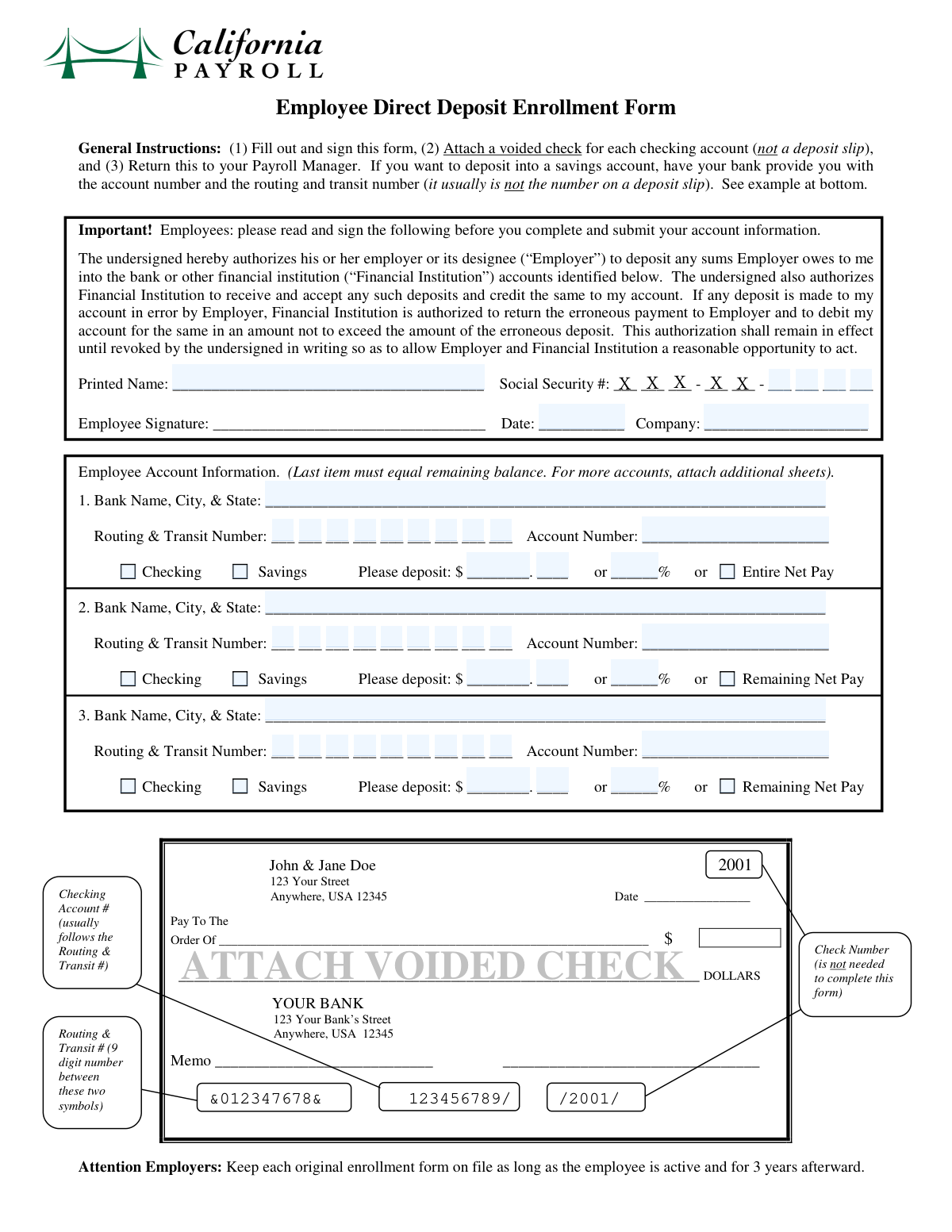
The AI fills all of it, from your answers or your documents.
The AI checks your answers before you download
12 checks built for this form, so a wrong date or a missing answer is caught before anyone else sees it.
This check verifies that the Social Security Number (SSN) consists of exactly 9 digits. It ensures that the provided number is complete and structurally valid before being processed. If the SSN is not 9 digits, the submission will be rejected to prevent errors in payroll and tax reporting.
This validation confirms that each provided bank Routing and Transit Number is exactly 9 digits long and passes the standard ABA routing number checksum algorithm. This is critical for ensuring that funds can be successfully transferred to the correct financial institution. An invalid routing number will cause the direct deposit transaction to fail.
Ensures that all mandatory personal information fields ('Printed Name', 'Social Security Number', 'Date', 'Company') are filled out. These fields are fundamental for identifying the employee and processing the form correctly. A failure on this check would halt the submission and prompt the user to complete the required information.
For each bank account listed, this check ensures that either 'Checking Account' or 'Savings Account' is selected, but not both. An account must be one or the other for processing. If neither or both are selected for an active account entry, the form is considered invalid.
For each individual bank account, this validation verifies that only one deposit allocation method is chosen (e.g., a fixed dollar amount, a percentage, or 'Remaining Net Pay'). A user cannot specify both a fixed amount and a percentage for the same account, as this creates a logical conflict. The form will be rejected if multiple allocation methods are selected for a single account.
This check validates that if the 'Entire Net Pay' option is selected for the first bank account, no information is provided for the second or third bank accounts. Selecting this option implies all funds go to one destination, making other account details redundant and potentially contradictory. If other accounts are filled in, the user will be prompted to clear them or uncheck the 'Entire Net Pay' box.
And 6 more checks
- 'Remaining Net Pay' Uniqueness
- Total Percentage Limit
- Bank Account Information Completeness
- Date Field Validity
- Deposit Cents Amount Range
- Logical Conflict with 'Remaining Net Pay'
Let AI fill out your Direct Deposit Form
No typing. Every field filled in seconds, checked, ready to sign.
How to Fill Out Direct Deposit Form Online for Free in 2026
What the AI walks you through.
- Navigate to Instafill.ai and upload or select the Direct Deposit Authorization Form to begin.
- Enter your personal details, such as your full name, Social Security Number, and company name, into the designated fields.
- Input the information for your primary bank account, including the bank name, routing number, and account number.
- Choose how your pay will be deposited into the first account, whether it's the entire net pay, a fixed amount, or a percentage.
- Optionally, add details for up to two additional bank accounts if you wish to split your paycheck, specifying the deposit amount or percentage for each.
- Carefully review all entered information, especially bank account and routing numbers, to ensure accuracy before finalizing.
- Electronically sign and date the form, then download the completed document to submit to your employer's HR or payroll department.
Common Mistakes in Completing Direct Deposit Form
The ones the AI is built to catch.
Incorrectly Entering Social Security Number
Entering an Incorrect or Invalid Routing Number
Making Contradictory Deposit Allocation Choices
Using Deposit Percentages That Don't Total 100%
Incorrectly Using the 'Remaining Net Pay' Option
Providing Both a Fixed Amount and a Percentage for One Account
Failing to Specify the Account Type
Submitting with Illegible Handwriting
Providing an Abbreviated or Incomplete Bank Name
Using an Informal or Incomplete Printed Name
Frequently Asked Questions About Direct Deposit Form
Is it really free for 7 days?
Can I fill other forms too?
How do I cancel?
How does the AI fill out Direct Deposit Form?
What happens to my information?
How complex is Direct Deposit Form to fill out?
What is the purpose of this form?
Who needs to fill out this form?
What information do I need to have ready to fill this out?
Where can I find my routing and account numbers?
Can I split my paycheck between multiple bank accounts?
Do I have to use all three bank account sections?
What is the difference between 'Entire Net Pay' and 'Remaining Net Pay'?
How long will it take for my direct deposit to start after I submit the form?
What do I do with the form after I fill it out?
Is it safe to enter my Social Security and bank account numbers on this form?
Can AI tools help me fill out this form?
How do I use Instafill.ai to fill this form online?
The PDF form I have is not fillable. What can I do?
Get your Direct Deposit Form filled out by AI
$0 today. Cancel before Nov 10 and you pay nothing.
Other forms like this one
authorization forms: Form I-765, Application for Employment Authorization, Form CMS-588, EFT Authorization Agreement, Form 8821, Tax Information Authorization, Form 8879, IRS e-file Signature Authorization, Form SSA-827, Authorization to Disclose Information, Form I-905, Application for Authorization to Issue Certification for Health Care Workers, Form G-1650, Authorization for ACH Transactions, Arizona Form 285, General Disclosure/Representation Authorization Form, Arizona Form 285-I, Individual Income Tax Disclosure/Representation Authorization Form, The Department of Medical Assistance Services Applied Behavior Analysis Preservice Service Authorization Request Form (Effective Dates of Service 09/01/2025 and after), Form CH-006: PA-BH-Res-PCS, Oregon Behavioral Health Support Program Plan of Care Authorization (Plan of Care Request for Behavioral Health Residential or Personal Care Services), Continental American Insurance Company (CAIC) / Aflac Group Critical Illness Claim Form (with Attending Physician’s Statement, HIPAA Authorization to Obtain Information, and Electronic Funds Transaction Authorization), HIPAA Authorization Form, Authorization for the Release of Protected Health Information, Form G-1450, Authorization for Credit Card Transactions, Prior Authorization (PA) Request Form – Adult Palliative Care (Alameda Alliance for Health), Alameda Alliance for Health Prior Authorization (PA) Request Form – Adult Palliative Care, Manulife Group Benefits Drug Prior Authorization Form – Mounjaro (Tirzepatide) (GL5197E), Manulife Group Benefits Drug Prior Authorization Form (Ozempic/Semaglutide) – GL5197E, Out-of-Network Pre-Authorization and Exception Request Form, Form SSA-827 (06-2024), Authorization to Disclose Information to the Social Security Administration (SSA)
direct deposit forms: Form SF 1199A, Direct Deposit Sign-Up, Authorization Agreement for Direct Deposit, Employee Direct Deposit Banking Authorization Form (RUN Powered by ADP®), Form F11182, Direct Deposit Authorization, ACH Authorization Agreement, ACH Authorization Agreement (FRM-ACH-02-20)
Let AI fill out your Direct Deposit Form
Your trial starts once a card is added. You pay nothing before Nov 10.
Our AI already knows this form, all 62 fields of it. Skip the typing: tell it about yourself, or upload what you have, and it fills the whole form in seconds.
- AI fills every field on the form, tables and checkboxes included
- No typing into boxes: answer a few questions, or upload a document you already have, an old copy of this form, a photo of a document
- The AI checks the answers; you review and change anything before you download
- Download the finished PDF, print it, or sign it online
- Encrypted, and never used to train AI
Cancel before Nov 10 and you pay nothing.
A card is needed to start the trial. Cancel in two clicks from your account.
Terms · Privacy