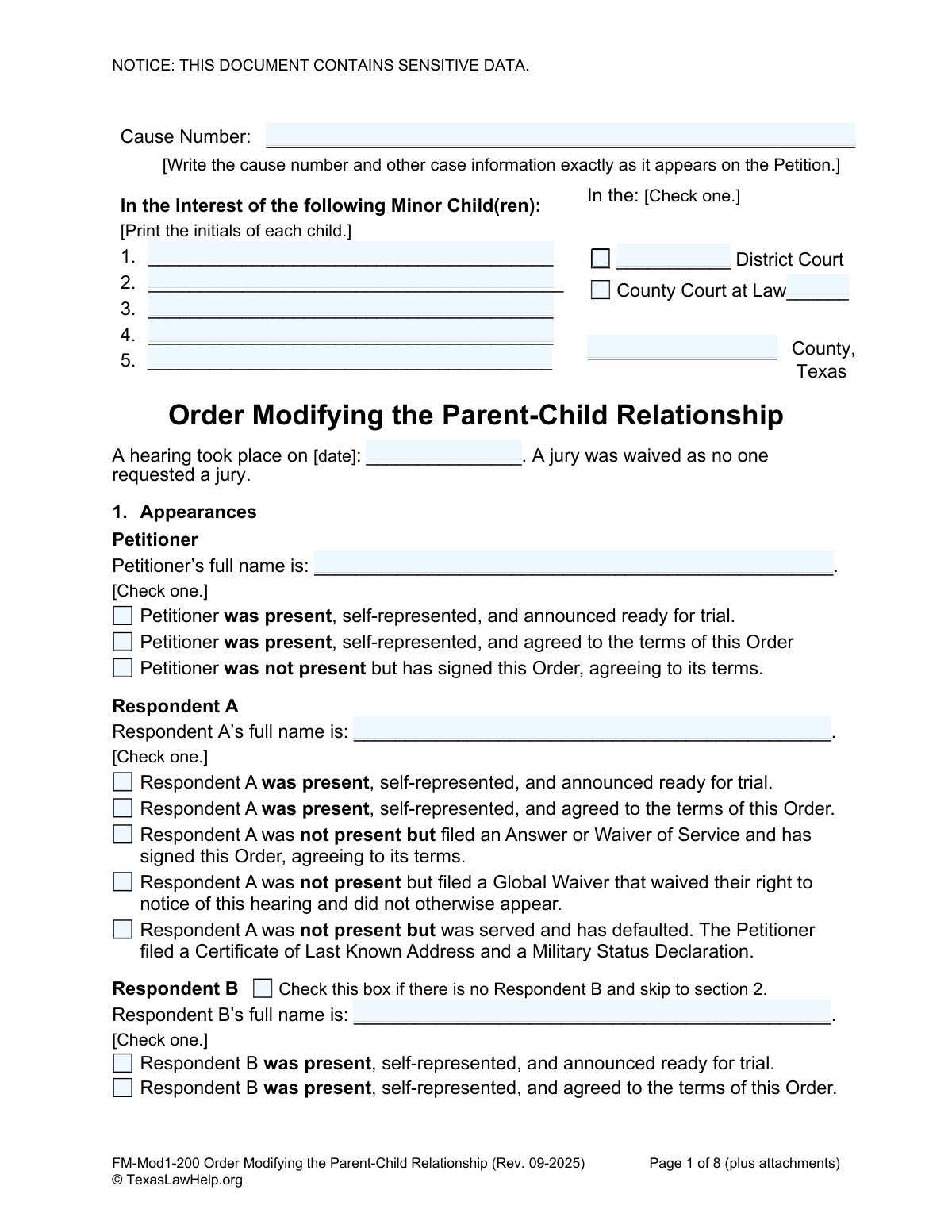
Yes! You can use AI to fill out FM-Mod1-200, Order Modifying the Parent-Child Relationship

Form FM-Mod1-200, the Order Modifying the Parent-Child Relationship, is a legal document issued by a Texas court to amend a prior court order concerning children. It is used to formalize changes to conservatorship (custody), possession and access (visitation), child support, and medical or dental support. Today, this form can be filled out quickly and accurately using AI-powered services like Instafill.ai, which can also convert non-fillable PDF versions into interactive fillable forms.
FM-Mod1-200 is part of the child custody forms category on Instafill.
Our AI automatically handles information lookup, data retrieval, formatting, and form filling.
It takes less than a minute to fill out FM-Mod1-200 using our AI form filling.
Securely upload your data. Information is encrypted in transit and deleted immediately after the form is filled out.

Form specifications

Form name: FM-Mod1-200, Order Modifying the Parent-Child Relationship
Number of fields: 139
Number of pages: 1
Language: English
main-image

Instafill Demo: How to fill out PDF forms in seconds with AI

How to Fill Out FM-Mod1-200 Online for Free in 2026

Are you looking to fill out a FM-MOD1-200 form online quickly and accurately? Instafill.ai offers the #1 AI-powered PDF filling software of 2026, allowing you to complete your FM-MOD1-200 form in just 37 seconds or less.
Follow these steps to fill out your FM-MOD1-200 form online using Instafill.ai:
  1. 1 Navigate to Instafill.ai and upload or select the 'Order Modifying the Parent-Child Relationship' form.
  2. 2 Use the AI assistant to input the case information, including the cause number, court details, and the date of the hearing.
  3. 3 Provide the full names of the petitioner and all respondents, and check the appropriate boxes to indicate their appearance status at the hearing.
  4. 4 Enter the required information for each child involved, such as their name, date of birth, and home state.
  5. 5 Specify which sections of the prior order are being modified (e.g., conservatorship, child support) and indicate which new orders are being attached.
  6. 6 Complete the personal information disclosure sections for the mother and father, including contact details and employment information, or request non-disclosure if necessary.
  7. 7 Review all entered data for accuracy before the parties and the judge sign the document to finalize the court order.

Our AI-powered system ensures each field is filled out correctly, reducing errors and saving you time.

Why Choose Instafill.ai for Your Fillable FM-Mod1-200 Form?

Speed

Complete your FM-Mod1-200 in as little as 37 seconds.

Up-to-Date

Always use the latest 2026 FM-Mod1-200 form version.

Cost-effective

No need to hire expensive lawyers.

Accuracy

Our AI performs 10 compliance checks to ensure your form is error-free.

Security

Your personal information is protected with bank-level encryption.

Frequently Asked Questions About Form FM-Mod1-200

This form is a legal document used by a Texas court to officially change a previous court order regarding child custody (conservatorship), visitation (possession), child support, or medical support. It is the final order signed by a judge that makes the new arrangements legally binding.

This form is typically prepared by one of the parties in the case (the Petitioner or Respondent) or their attorney. It is then submitted to the court for the judge's signature, which makes it an official order.

You must copy the Cause Number, court number, and county exactly as they appear on the 'Petition to Modify the Parent-Child Relationship' or other official documents from your case. This information ensures the order is filed correctly within your existing case record.

If you are changing custody, visitation, or support, you must attach the corresponding detailed order form (e.g., 'Conservatorship Order,' 'Standard Possession Order,' 'Child Support Order'). This main form acts as a cover sheet, and the attached documents contain the specific details of the new arrangements.

In the 'Appearances' section, you must check the box that accurately describes why the other party (Respondent) is not present. For example, if they were properly served with notice but did not respond or appear, you would check the box indicating they have defaulted.

Yes, Section 7 of the form allows you to ask the court to keep your address, employer, and other identifying information private. If the judge finds that disclosure could lead to harassment or harm, your information will not be shared with the other parties.

You only need to address the parts of the prior order that are being changed. For any sections not being modified, such as conservatorship or possession, you would simply check the box that says '[Item] is not modified.'

This section is a mandatory court warning ordering all parties to notify the court, the state registry, and each other of any changes to their contact and employment information. You must provide notice of a change at least 60 days in advance or within 5 days of learning about it.

Failing to obey the order for child support or possession can result in further litigation, including being held in contempt of court. Penalties may include jail time for up to six months, a fine up to $500 for each violation, and paying the other party's attorney's fees.

The form is designed for cases that may involve multiple parties. If you only have one Respondent (Respondent A), you can simply check the box at the top of the sections for Respondents B, C, and D to skip them.

Yes, services like Instafill.ai use AI to help you accurately auto-fill form fields with your information. This can save you time and help prevent common errors when completing legal documents.

You can use a service like Instafill.ai to easily complete this form on any device. Simply upload the document, and the platform will allow you to type directly into the fields, check boxes, and add signatures before printing for submission.

If you have a non-fillable or 'flat' PDF, you can use a tool like Instafill.ai to convert it into an interactive form. The service automatically identifies the fields, allowing you to type in your information easily.

Compliance FM-Mod1-200
Validation Checks by Instafill.ai

1
Validates Hearing Date Format and Plausibility
This check ensures that the 'Hearing Date' field is not empty and is formatted as a valid date (e.g., MM/DD/YYYY). It also verifies that the date is not in the future. This is critical for establishing the legal timeline of the case, and failure to provide a valid, past date would render the order legally unsound and prevent processing.
2
Ensures Exclusive Appearance Status Selection
For each party (Petitioner, Respondent A, B, etc.), this validation confirms that exactly one appearance status checkbox has been selected. Selecting multiple statuses for a single individual creates a logical contradiction regarding their presence and agreement. If more than one or zero boxes are checked for a party, the form is considered incomplete and must be corrected to accurately reflect the events of the hearing.
3
Verifies Conditional Respondent Data Entry
This check enforces the logic that if the checkbox for 'no Respondent B' (or C, or D) is marked, then all other fields for that specific respondent (full name, appearance status) must be empty. This prevents contradictory data entry and ensures the record clearly states which parties are involved in the case. A validation failure would require the user to either uncheck the box and provide the respondent's details or clear the conflicting information.
4
Confirms Case Information Completeness
This validation ensures that the essential case identifiers, including 'Cause Number', 'County', and the selected court type ('District Court' or 'County Court at Law'), are all filled out. This information is fundamental for filing the order with the correct court and linking it to the proper case file. An omission would make the document un-fileable and legally ineffective until corrected.
5
Child Information Consistency Check
This check cross-references the number of child initials listed on page 1 with the number of complete child records entered in Section 4. The counts must match to ensure that every child mentioned in the case is fully identified. A mismatch indicates either missing information or an erroneous entry, which could lead to one or more children being improperly excluded from the order's provisions.
6
Validates Child's Date of Birth and SSN
This check validates that each child's 'Date of Birth' is a valid date that occurs before the hearing date and that their 'Social Security #' follows the standard XXX-XX-XXXX format. Accurate PII is crucial for identification and for interfacing with other state and federal agencies, such as the State Case Registry. Incorrect or improperly formatted data can cause significant administrative delays and legal complications.
7
Enforces Conditional Modification Sub-Selection
For sections 6A, 6B, 6C, and 6D, if the primary 'is modified' checkbox is selected, this validation ensures a corresponding sub-option specifying the type of attached order is also checked. This logic guarantees that a declaration of modification is accompanied by the necessary legal documentation. Failure to select a sub-option would create an incomplete and unenforceable modification, requiring the user to specify which order is being attached.
8
Validates Completeness of Disclosed Party Information
In Section 7, if the option to disclose the Mother's or Father's information is selected, this check verifies that all associated fields (Name, Address, Phone, SSN, Driver's License, Employer) are filled. This information is required by Texas Family Code for the State Case Registry and for communication between parties. Incomplete disclosure would fail the validation and require the user to provide all mandatory details or select the non-disclosure option.
9
Verifies Signature and Date Congruence
This validation ensures that for every party signature present on the final page (Petitioner, Respondent A, etc.), the corresponding 'Date Signed' field is also filled out. A signature without a date is legally ambiguous as it doesn't specify when the agreement was made. The check prevents the submission of an incomplete agreement, prompting the user to provide the date for each signature.
10
Logical Check of Judgment Date vs. Hearing Date
This check confirms that the 'Date of Judgment' is on or after the 'Hearing Date'. A judgment cannot be issued before the hearing takes place, so this validation prevents a critical logical and chronological error. An invalid date sequence would be flagged for correction to maintain the legal integrity of the document's timeline.
11
Party Name Consistency Between Sections
This validation compares the 'Petitioner’s Printed Name' and 'Respondent A’s Printed Name' etc. from the signature blocks on page 8 with the corresponding 'full name' fields in Section 1. This ensures the person signing the document is the same person identified at the beginning of the order. A mismatch could indicate a serious error or potential fraud and would block the form from being finalized.
12
Validates Format of Contact Information
This check ensures that the 'E-mail Address' and phone number fields for the Mother and Father in Section 7 are in a valid format. For example, an email must contain an '@' symbol and a domain, while phone numbers should conform to a standard pattern. This is important for ensuring that the contact information required by the court for official notifications is usable and correct.
13
Ensures Prior Order Modification Details are Complete
In Section 6, this validation checks that if one or more prior orders are being modified, both the 'Title of Order' and the 'Date Order Signed by Court' fields are completed for each. These details are essential to precisely identify which existing legal orders are being changed by this new order. Missing this information would create ambiguity and could render the modification legally void.
14
Verifies Attachment Logic for Non-Parent Conservator
This check validates the logic in Section 7C. If the 'Conservatorship Order: Non-Parent(s) Appointed Conservator' option is checked in Section 6A, then the option 'Information regarding the Nonparent Managing Conservator(s) is included in the attached...' must be checked in 7C. This ensures consistency and confirms that the required identifying information for a non-parent is being provided in the correct attachment.

Common Mistakes in Completing FM-Mod1-200

Incorrect or Inconsistent Case Information

Users often mistype the Cause Number or fail to copy the court information exactly as it appears on the original Petition. This happens due to simple transcription errors or confusion about which document to reference. An incorrect Cause Number can lead to the order being rejected by the court clerk or filed in the wrong case, causing significant delays and legal complications. To avoid this, meticulously double-check the case information against the official Petition before submission.

Incorrectly Identifying Children on Page 1

The form specifically asks for only the initials of the children on the first page, but for their full names on page 3. A common error is to write the full names on page 1, which goes against the instructions and could raise privacy concerns in a public-facing document. This mistake occurs from not reading the instructions carefully. Always follow the specific field instructions to ensure compliance and protect sensitive information.

Incorrectly Documenting Party Appearances

In Section 1, filers must select the correct status for each party from several options (e.g., 'present and agreed', 'was served and has defaulted'). People often get confused about the legal distinctions or check the wrong box, which can misrepresent the proceedings. An incorrect selection has serious legal consequences, as it could invalidate the order or misstate a party's agreement or default. It is crucial to understand and accurately reflect the status of each party at the hearing.

Failing to Attach Referenced Order Documents

Sections 6A through 6D require the user to check a box indicating a modification and then attach a corresponding detailed order (e.g., 'Standard Possession Order', 'Child Support Order'). A very common and critical mistake is checking the box but forgetting to include the actual attachment. This renders the modification legally incomplete and unenforceable, as the specific terms of the new order are missing from the filing. Always create a checklist to ensure all referenced documents are physically attached before submitting.

Making Contradictory Selections for Modifications

Within a single subsection, such as 6C for Child Support, users might mistakenly check both 'is not modified' and 'is modified'. This creates a direct contradiction that makes the court's order ambiguous and invalid. This error usually stems from rushing or not reviewing the form carefully. To prevent this, review each section to ensure only one logical choice is selected, reflecting the true outcome of the hearing.

Improperly Completing Personal Information Disclosures

In Sections 7A and 7B, a person must choose between disclosing their personal information or requesting it be withheld due to safety concerns. A frequent error is to fill in all the sensitive contact and employment details and then also check the box to keep that same information confidential. This contradiction can lead to the unintentional disclosure of information or cause the form to be rejected for being unclear. Carefully choose one option and only fill out the corresponding fields.

Providing Incomplete or Incorrectly Formatted Sensitive Data

The form requires sensitive data like full Social Security Numbers and Driver's License numbers in Sections 7A and 7B. People often leave these fields partially blank, use incorrect formats (e.g., XXX-XX-1234), or make typos due to the sensitivity of the data. Incomplete or improperly formatted data can cause the filing to be rejected by the State Case Registry, which relies on this information for enforcement. AI-powered tools like Instafill.ai can help prevent this by validating data formats and ensuring all required fields are completed.

Missing Signatures or Dates

The final page requires signatures and dates from the judge and all agreeing parties. It is extremely common for one or more parties to forget to sign, sign on the wrong line, or omit the date. An order without the necessary signatures is not legally binding or valid. This oversight can halt the entire modification process, requiring the document to be recirculated for proper execution. Always perform a final review specifically for signatures before considering the document complete.

Improper Use of the 'Other Orders' Section

Section 6E, 'Other Orders,' is intended for specific, additional orders made by the court that are not covered elsewhere. A common mistake is for parties to use this free-text space to write personal notes, complaints, or requests that were not actually ordered by the judge. Such entries are legally invalid and can create confusion, potentially leading to the rejection of the entire order. This section should only be used to transcribe verbatim any additional rulings from the court.

Failing to Handle a Non-Fillable PDF

This legal form is often distributed as a flat, non-fillable PDF, forcing users to print it and fill it out by hand. This leads to illegible handwriting, mistakes that are difficult to correct, and an unprofessional appearance that can cause issues with the court clerk. Filling out a complex legal document by hand increases the likelihood of errors mentioned previously. To avoid this, tools like Instafill.ai can convert non-fillable PDFs into interactive, fillable forms, allowing for clean, typed entries and easier revisions.
Saved over 80 hours a year

“I was never sure if my IRS forms like W-9 were filled correctly. Now, I can complete the forms accurately without any external help.”

Kevin Martin Green

Your data stays secure with advanced protection from Instafill and our subprocessors

Robust compliance program

Transparent business model

You’re not the product. You always know where your data is and what it is processed for.

ISO 27001, HIPAA, and GDPR

Our subprocesses adhere to multiple compliance standards, including but not limited to ISO 27001, HIPAA, and GDPR.

Security & privacy by design

We consider security and privacy from the initial design phase of any new service or functionality. It’s not an afterthought, it’s built-in, including support for two-factor authentication (2FA) to further protect your account.

Fill out FM-Mod1-200 with Instafill.ai

Worried about filling PDFs wrong? Instafill securely fills fm-mod1-200-order-modifying-the-parent-child-relationship forms, ensuring each field is accurate.

Related forms by category

child custody forms Form 12.995(c), Safety-Focused Parenting Plan, Form FL-341(E), Child Custody and Visitation (Parenting Time) Application Attachment, Florida Supreme Court Approved Family Law Form 12.902(d), Uniform Child Custody Jurisdiction and Enforcement Act (UCCJEA) Affidavit, Florida Supreme Court Approved Family Law Form 12.941(a), Petition for Enforcement of Out-of-State Custody Decree and for Order to Pick Up Minor Child(ren), Form DV-105, Request for Child Custody and Visitation Orders (Domestic Violence Prevention), Form DV-140, Child Custody and Visitation Order (Domestic Violence Prevention), Form FL-105/GC-120, Declaration Under Uniform Child Custody Jurisdiction and Enforcement Act (UCCJEA), form-fl-105gc-120-declaration-under-uniform-child-custody-jurisdiction-and-enforcement-act-uccjea-1, Uniform Child Custody Jurisdiction Enforcement Act Affidavit, Florida Supreme Court Approved Family Law Form 12.905(a), Supplemental Petition to Modify Parental Responsibility, Visitation or Parenting Plan / Time-Sharing Schedule and Other Relief, Florida Supreme Court Approved Family Law Form 12.995(a), Parenting Plan, Form DV-305, Request to Change Child Custody and Visitation Orders (Domestic Violence Prevention), Form ICWA-030, Notice of Child Custody Proceeding for Indian Child (Indian Child Welfare Act), Form FL-260, Petition for Custody and Support of Minor Children, Form FL-270, Response to Petition for Custody and Support of Minor Children, Affidavit Regarding Minor Children (Superior Court of Arizona in Maricopa County), Joint Legal Decision-Making Education Order, Sole Legal Decision-Making Education Order, Exhibit: Out-of-State Party Declaration (Form FM-OSP-302), Standard Possession Order · + 4 more →