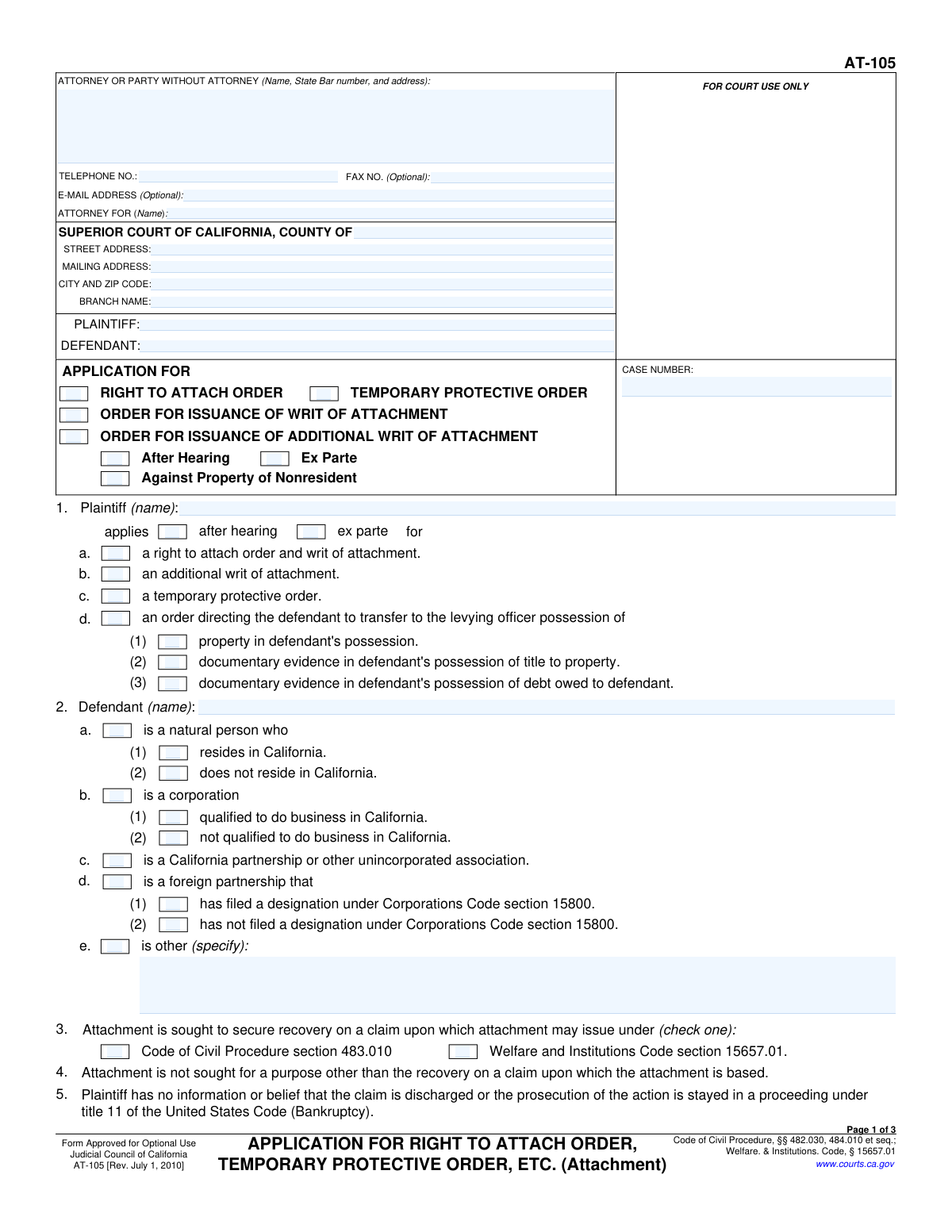
Yes! You can use AI to fill out Form AT-105, Application for Right to Attach Order, Temporary Protective Order, Etc.

Form AT-105, Application for Right to Attach Order, Temporary Protective Order, Etc., is a crucial legal document filed in California Superior Courts by a plaintiff in a civil action. Its purpose is to formally request a pre-judgment remedy to attach, or seize, a defendant's property, ensuring assets are available to satisfy a potential future judgment. This prevents the defendant from hiding or disposing of assets during the lawsuit. Today, this form can be filled out quickly and accurately using AI-powered services like Instafill.ai, which can also convert non-fillable PDF versions into interactive fillable forms.
Our AI automatically handles information lookup, data retrieval, formatting, and form filling.
It takes less than a minute to fill out AT-105 using our AI form filling.
Securely upload your data. Information is encrypted in transit and deleted immediately after the form is filled out.

Form specifications

Form name: Form AT-105, Application for Right to Attach Order, Temporary Protective Order, Etc.
Number of fields: 98
Number of pages: 3
Language: English
Categories: ACH forms
main-image

Instafill Demo: How to fill out PDF forms in seconds with AI

How to Fill Out AT-105 Online for Free in 2026

Are you looking to fill out a AT-105 form online quickly and accurately? Instafill.ai offers the #1 AI-powered PDF filling software of 2026, allowing you to complete your AT-105 form in just 37 seconds or less.
Follow these steps to fill out your AT-105 form online using Instafill.ai:
  1. 1 Navigate to Instafill.ai and upload your Form AT-105, or select it from the platform's template library.
  2. 2 Enter the court information, case number, and complete details for the plaintiff, defendant, and attorney in the designated fields.
  3. 3 Select the type of order you are applying for by checking the appropriate boxes, such as 'Right to Attach Order' or 'Temporary Protective Order'.
  4. 4 Provide the basis for the attachment, describe the defendant's entity type (e.g., natural person, corporation), and detail the claim's origin.
  5. 5 Specify the monetary amount to be secured by the attachment and describe the property to be attached, providing justification if applying for an ex parte order.
  6. 6 Complete the declaration section, if applicable, and carefully review all entered information for accuracy before dating and signing the application.
  7. 7 Download the completed, fillable Form AT-105, ready for filing with the appropriate California court.

Our AI-powered system ensures each field is filled out correctly, reducing errors and saving you time.

Why Choose Instafill.ai for Your Fillable AT-105 Form?

Speed

Complete your AT-105 in as little as 37 seconds.

Up-to-Date

Always use the latest 2026 AT-105 form version.

Cost-effective

No need to hire expensive lawyers.

Accuracy

Our AI performs 10 compliance checks to ensure your form is error-free.

Security

Your personal information is protected with bank-level encryption.

Frequently Asked Questions About Form AT-105

This form is an application used by a plaintiff in a California Superior Court case to request the court to secure a defendant's assets. It can be used to apply for a Right to Attach Order, a Temporary Protective Order, or a Writ of Attachment to ensure funds are available for a potential judgment.

This form should be completed by the plaintiff (the person or entity filing the lawsuit) or their attorney. It is used to formally request a pre-judgment remedy against the defendant's property.

Applying 'After Hearing' means your request will be decided after a scheduled court hearing where both parties can be present. Applying 'Ex Parte' is for urgent situations, requesting an immediate order without notifying the other party, which requires you to show a risk of irreparable harm.

You must specify whether the defendant is a natural person, a corporation, a partnership, or another type of entity. You will also need to indicate if they are a California resident or qualified to do business in the state, as this affects which assets can be attached.

Yes, you typically must attach documents that support your claim, such as a verified complaint or a sworn affidavit or declaration. You must check the appropriate box in section 8 to indicate how you are presenting the facts that entitle you to a judgment.

This is the total amount of money you are asking the court to secure. It should include the principal amount of your claim, and you can also add estimated court costs and allowable attorney fees by checking the corresponding boxes.

You would select this option if the court has already granted you a 'Right to Attach Order' and you now need another writ, for example, to attach different property or property located in another county. You must provide the date the original order was issued.

This legal standard means you will suffer harm that cannot be fixed by a later monetary award if the order isn't issued immediately. The form lists examples, such as the danger that the defendant will hide, devalue, or otherwise make their property unavailable to satisfy a judgment.

An undertaking is a financial guarantee, like a bond, that you post to cover potential damages to the defendant if the attachment is later found to be wrongful. You must indicate on the form whether you have already filed an undertaking and for what amount.

Yes, services like Instafill.ai use AI to accurately auto-fill form fields, which can save you time and help reduce errors. The AI can use your case information to populate fields like names, addresses, and the case number.

To fill this form online, you can upload it to the Instafill.ai platform. The AI will make the document interactive, allowing you to provide your information once and have it automatically and accurately filled in all the required fields.

If you have a non-fillable or 'flat' PDF, you can use a service like Instafill.ai to convert it into an interactive, fillable form. This allows you to easily type your information directly into the fields online before printing for submission.

You only need to complete the declaration section if you are submitting a separate sworn statement to support your application, as indicated in section 8. This is where the person making that statement (the declarant) signs under penalty of perjury.

A 'Right to Attach Order' is the court's decision that you are legally entitled to attach the defendant's property. A 'Writ of Attachment' is the subsequent court order that directs a levying officer (like a sheriff) to actually seize the specific property.

Compliance AT-105
Validation Checks by Instafill.ai

1
Case Number and Short Title Presence
This check ensures that the 'Case Number' and 'Short Title' fields in the header are not empty. These fields are critical for identifying and tracking the document within the court system. If this information is missing, the form may be rejected or misfiled, causing significant delays in the legal process.
2
Attorney or Party Telephone Number Format
Validates that the 'Telephone Number' for the attorney or party is entered in a recognizable format (e.g., (XXX) XXX-XXXX or XXXXXXXXXX). This is important for ensuring the court and other parties can make contact regarding the case. An invalid format could lead to communication failures and prevent timely notifications.
3
Plaintiff and Defendant Name Consistency
This validation compares the 'Plaintiff Name' and 'Defendant Name' fields across different sections of the form (e.g., 'Parties' vs. 'Plaintiff Application Details'). It ensures consistency and prevents clerical errors that could create legal ambiguities about the parties involved. A mismatch could lead to the application being challenged or rejected.
4
Mutually Exclusive Application Hearing Type
Ensures that only one of the 'After Hearing' or 'Ex Parte' checkboxes can be selected in the 'Application For' section. These options represent fundamentally different legal procedures for obtaining an order. Allowing both to be selected would create a logical contradiction, making the application invalid and requiring correction before it can be processed.
5
Mutually Exclusive Defendant Type Selection
This check verifies that only one primary defendant type ('natural person', 'corporation', 'California partnership', 'foreign partnership', 'other') is selected. A defendant cannot be multiple entity types simultaneously. This validation prevents ambiguity and ensures the correct legal standards are applied to the defendant.
6
Conditional 'Other' Defendant Specification
Requires the 'Other Defendant Type Specification' text field to be filled if the 'Defendant is other (specify)' checkbox is selected. This is crucial for providing necessary details when the defendant does not fit into standard categories. Failure to provide this specification makes the defendant's status unclear and will result in an incomplete and likely rejected application.
7
Conditional Defendant Residence Status
Validates that the 'Natural person resides in California' and 'Natural person does not reside in California' checkboxes are only available if 'Defendant is a natural person' is checked, and that only one of the two residence options is selected. This information is critical for determining jurisdiction and applicable laws. An incorrect or conflicting selection would make the filing defective.
8
Conditional Transfer of Possession Details
Ensures that the sub-options for transferring 'Property in defendant's possession', 'Documentary evidence of title', or 'Documentary evidence of debt' can only be selected if the main 'Order directing transfer of possession' checkbox is checked. This maintains logical form structure and prevents contradictory or nonsensical requests. If the main box is unchecked, any selected sub-options will be flagged as an error.
9
Secured Amount and Costs Logic
Verifies that the 'Attachment Secured Amount' is a valid positive number. If 'Includes estimated costs' or 'Includes estimated allowable attorney fees' are checked, it also validates that their respective amount fields are filled and that their sum does not exceed the total 'Attachment Secured Amount'. This ensures the financial claims are logical and arithmetically sound, preventing errors in the requested attachment value.
10
Conditional Irreparable Injury Justification
This check ensures that the entire 'Irreparable Injury Justification' section is only enabled and validated if the 'applies ex parte' checkbox is selected. Justification for irreparable injury is a specific legal requirement for ex parte orders. This validation prevents the user from providing irrelevant information for a standard hearing and ensures required information for an ex parte request is not missed.
11
Conditional Undertaking Amount
Requires the 'Undertaking Amount' field to be completed with a valid monetary value if the 'Has filed an undertaking' checkbox is selected. The undertaking amount is a critical piece of financial information that secures the defendant against potential damages. An empty or invalid amount would render the declaration about the undertaking incomplete and legally insufficient.
12
Mutually Exclusive Undertaking Status
Ensures that a user cannot select both 'Has filed an undertaking' and 'Has not filed an undertaking' simultaneously. These two options are mutually exclusive and provide a clear status on the required financial security. Selecting both creates a direct contradiction that must be resolved before the form can be submitted.
13
Valid Signature and Declaration Dates
Validates that the 'Signature Date' and 'Declaration Date' are in a proper date format and are not set to a future date. The date of signature is legally significant as it attests to the truthfulness of the information at that specific time. A future date is invalid and would cause the document to be rejected by the court clerk.
14
Conditional Declaration Information
This check verifies that if 'Attached Affidavit or Declaration' is selected as the basis for judgment, then the 'Declarant Name', 'Declaration Date', and 'Number of Pages Attached' fields are all completed. This information is essential for properly identifying and referencing the supporting declaration. Missing these details would make the primary evidence difficult to process and could invalidate the application.
15
Conditional Liquor License Number Requirement
Ensures that the 'Liquor License Number' field is filled out if the 'Plaintiff's Pro Rata Share of Liquor License Escrow Proceeds' checkbox is selected. The license number is the unique identifier for the asset being targeted for attachment. Without this number, the request is ambiguous and cannot be acted upon by the court or levying officers.

Common Mistakes in Completing AT-105

Failing to Complete Conditional Fields

This form contains many fields that only become required after a specific checkbox is selected, such as providing 'Estimated Costs' only after checking 'Includes estimated costs'. Users often check the box but forget to fill in the corresponding text field, leaving the application incomplete. This oversight leads to rejection or requests for information, delaying the legal process. To avoid this, carefully review each checked box and ensure any dependent fields are filled; AI-powered tools like Instafill.ai can automatically highlight these required follow-up fields to prevent such omissions.

Contradictory Application Selections

A frequent error is checking mutually exclusive options, such as selecting both 'After Hearing' and 'Ex Parte' for the same application. This indicates a fundamental misunderstanding of the legal procedures, as an action cannot be both with and without prior notice to the other party. Such contradictions will cause the court clerk to reject the form for clarification, halting the progress of your request. Always choose only one procedural path for each application to ensure clarity and compliance.

Insufficient Justification for Ex Parte Relief

When applying for an 'ex parte' order, filers must provide a strong justification for the urgency and risk of 'great or irreparable injury'. A common mistake is to simply check the 'applies ex parte' box without thoroughly completing the 'Irreparable Injury Justification' section with specific, factual support. A vague or unsupported claim will likely result in the judge denying the ex parte request, forcing the applicant to re-file and proceed through a standard, slower hearing process.

Vague or Unenforceable Property Descriptions

In the 'Specified Property Subject to Attachment' field, users often provide generic descriptions like 'defendant's bank account' or 'company vehicle'. For an attachment order to be enforceable, the description must be specific enough for a levying officer to identify the exact property (e.g., 'Account #XXXXXX at Bank of America, 123 Main St' or '2022 Ford F-150, VIN: XXXXX'). Vague descriptions can render the resulting writ of attachment useless, as officers cannot seize ambiguously defined assets.

Misclassifying the Defendant's Entity Type

Correctly identifying the defendant as a 'natural person', 'corporation', 'partnership', or 'other' is critical, as the rules for attachment differ for each. A common error is misclassifying an entity, such as labeling a single-member LLC as a 'natural person' or a 'corporation'. This mistake can lead to the application being legally defective and may result in the attachment being invalid or targeting the wrong type of assets, requiring a complete refiling.

Omitting Undertaking Details

The section on the undertaking (a form of security bond) is often filled out incorrectly or skipped entirely. Filers may forget to check either 'Has filed an undertaking' or 'Has not filed an undertaking', or they check the 'Has filed' box but neglect to enter the 'Undertaking Amount'. Since filing an undertaking is a mandatory prerequisite for a writ of attachment, failing to provide this information accurately will prevent the application from being processed.

Inconsistent Party Names Across Sections

The form requires the Plaintiff and Defendant names to be entered in multiple locations, including the header, the main party section, and specific application details. It is common for filers to use inconsistent names, abbreviations, or even accidentally swap the plaintiff and defendant in one of the sections. This creates confusion and can lead to the document being rejected for clerical errors, delaying court proceedings until a corrected version is submitted.

Incorrect or Incomplete Court Information

Entering the wrong county, branch name, or court address is a frequent and disruptive error. Filers may be unfamiliar with the specific court branch handling their case or make a simple data entry mistake. This can result in the document being filed in the wrong jurisdiction, causing significant delays, potential dismissal, and the need to start the filing process over. Always verify the exact Superior Court location, including the branch name and full address, before submission.

Forgetting the Attorney's State Bar Number

When an attorney is filling out the form on behalf of a client, they must include their State Bar number alongside their name and contact information. This number is a unique identifier that validates their authority to practice law and is a required element for court filings. Omitting the State Bar number is a common oversight that leads to the form being returned by the clerk, as it is considered incomplete for official record-keeping.

Incomplete or Unsigned Declaration Section

If the application relies on an 'Attached Affidavit or Declaration', the 'DECLARATION' section at the end of the form must be fully completed and signed. People often check the box indicating a declaration is attached but then forget to fill in the declarant's name, date, and number of pages, or fail to physically sign it. An incomplete or unsigned declaration is legally invalid and will not be considered by the court, fatally weakening the application's factual basis. If the form is a non-fillable PDF, a tool like Instafill.ai can convert it to a fillable version to ensure these sections aren't missed.
Saved over 80 hours a year

“I was never sure if my IRS forms like W-9 were filled correctly. Now, I can complete the forms accurately without any external help.”

Kevin Martin Green

Your data stays secure with advanced protection from Instafill and our subprocessors

Robust compliance program

Transparent business model

You’re not the product. You always know where your data is and what it is processed for.

ISO 27001, HIPAA, and GDPR

Our subprocesses adhere to multiple compliance standards, including but not limited to ISO 27001, HIPAA, and GDPR.

Security & privacy by design

We consider security and privacy from the initial design phase of any new service or functionality. It’s not an afterthought, it’s built-in, including support for two-factor authentication (2FA) to further protect your account.

Fill out AT-105 with Instafill.ai

Worried about filling PDFs wrong? Instafill securely fills form-at-105-application-for-right-to-attach-order-temporary-protective-order-etc forms, ensuring each field is accurate.