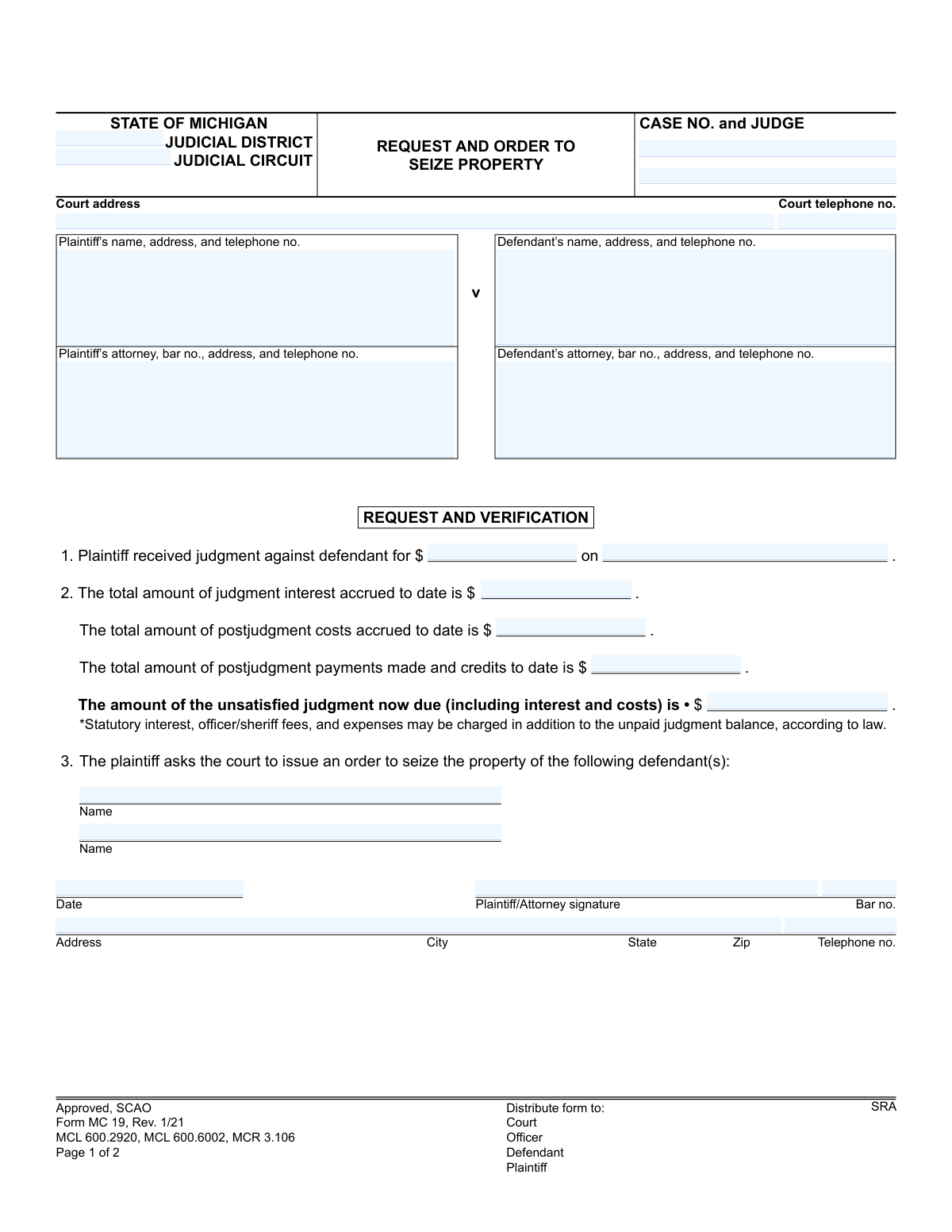
Yes! You can use AI to fill out Form MC 19, Request and Order to Seize Property

The Request and Order to Seize Property, Form MC 19, is a legal document filed in the state of Michigan by a creditor (plaintiff) who has won a judgment against a debtor (defendant). It formally asks the court to issue an order, often called a writ of execution, authorizing a sheriff or court officer to seize and sell the defendant's property to pay off the outstanding debt. Today, this form can be filled out quickly and accurately using AI-powered services like Instafill.ai, which can also convert non-fillable PDF versions into interactive fillable forms.
MC 19 is part of the Michigan court forms category on Instafill.
Our AI automatically handles information lookup, data retrieval, formatting, and form filling.
It takes less than a minute to fill out MC 19 using our AI form filling.
Securely upload your data. Information is encrypted in transit and deleted immediately after the form is filled out.

Form specifications

Form name: Form MC 19, Request and Order to Seize Property
Number of fields: 30
Number of pages: 1
Language: English
main-image

Instafill Demo: How to fill out PDF forms in seconds with AI

How to Fill Out MC 19 Online for Free in 2026

Are you looking to fill out a MC 19 form online quickly and accurately? Instafill.ai offers the #1 AI-powered PDF filling software of 2026, allowing you to complete your MC 19 form in just 37 seconds or less.
Follow these steps to fill out your MC 19 form online using Instafill.ai:
  1. 1 Navigate to Instafill.ai and upload or select the Form MC 19, Request and Order to Seize Property.
  2. 2 Provide the case details, including the judicial district/circuit, case number, judge, and court address.
  3. 3 Enter the full details for both the plaintiff and defendant, including names, addresses, and attorney information if applicable.
  4. 4 Input the financial information related to the judgment, such as the original judgment amount, date, accrued interest, costs, and any payments made to calculate the final amount due.
  5. 5 Carefully review all the information automatically populated by the AI to ensure accuracy and completeness.
  6. 6 Electronically sign the request and verification section, then download the completed form, ready for filing with the appropriate Michigan court.

Our AI-powered system ensures each field is filled out correctly, reducing errors and saving you time.

Why Choose Instafill.ai for Your Fillable MC 19 Form?

Speed

Complete your MC 19 in as little as 37 seconds.

Up-to-Date

Always use the latest 2026 MC 19 form version.

Cost-effective

No need to hire expensive lawyers.

Accuracy

Our AI performs 10 compliance checks to ensure your form is error-free.

Security

Your personal information is protected with bank-level encryption.

Frequently Asked Questions About Form MC 19

This form is used by a plaintiff who has won a monetary judgment in court to ask a judge to order the seizure and sale of the defendant's property to pay the outstanding debt.

The plaintiff (the person who won the judgment) or their attorney must complete the 'Request and Verification' section. A judge will then review it and, if approved, complete and sign the 'Order' section.

You will need the court and case information, the original judgment amount and date, and a calculation of the current amount owed after adding interest and costs and subtracting any payments made.

Start with the original judgment amount, add any accrued post-judgment interest and costs, and then subtract the total of any payments or credits the defendant has made to date.

A judge will review your request. If approved, the judge signs the order, which is then given to a sheriff or court officer to carry out the seizure of the defendant's property.

The order allows an officer to seize non-exempt personal property, such as vehicles or money, and in some cases, real property. Certain types of property are protected from seizure by law.

The officer must return the order to the court not less than 20 days and not more than 90 days from the date they receive it, though they may complete a service already in progress after the return date.

This section is used for cases where the judgment was for the return of specific, named property, not just a sum of money. It instructs the officer to seize that particular item and deliver it to the plaintiff.

The officer taking your property must provide you with a receipt for any money paid and an inventory of all property taken. You also have the right to request a review of any post-judgment costs and fees.

Yes, services like Instafill.ai use AI to accurately auto-fill form fields with your case information, which can save time and help prevent common errors.

Simply upload the MC 19 form to the Instafill.ai platform. The AI will make the document interactive, allowing you to easily type your information into the fields and generate a completed, ready-to-file PDF.

You can use a service like Instafill.ai, which can instantly convert flat, non-fillable PDFs into interactive, fillable forms online. This allows you to easily type your information directly into the correct fields.

The officer deducts their statutory fees and expenses from the sale proceeds. The remaining money is then deposited with either the court or the plaintiff to satisfy the judgment.

Once processed, copies of the form should be distributed to the court, the officer executing the order, the defendant, and the plaintiff.

Compliance MC 19
Validation Checks by Instafill.ai

1
Unsatisfied Judgment Calculation Accuracy
This check verifies that the 'unsatisfied judgment now due' amount is the correct result of the formula: (judgment amount + judgment interest + postjudgment costs) - postjudgment payments. It is critical for ensuring the financial accuracy of the legal order, as an incorrect total could lead to seizing the wrong value of property. If the calculation is incorrect, the form submission should be rejected and flagged for manual review to prevent legal and financial errors.
2
Case Number Format and Consistency
This validation ensures the 'CASE NO.' is present and matches the required format for the specified judicial circuit/district. It also cross-references that the 'Case No.' on page 2 is identical to the one on page 1. This is crucial for linking the order to the correct legal case file; a mismatch could result in the order being void or applied to the wrong case.
3
Logical Date Sequence
This check validates that the 'judgment date' is in the past and occurs before the 'request and verification date'. Furthermore, it ensures the 'Judge signature and date' on the order is on or after the 'request and verification date'. This chronological validation is essential to confirm the legal process is followed correctly, as a request cannot precede a judgment, nor can an order be signed before it is requested.
4
Attorney Bar Number Validation
This check ensures that if a plaintiff's or defendant's attorney is listed, the corresponding 'bar no.' field is not empty and conforms to the State of Michigan's official format (e.g., a 'P' followed by a series of numbers). This is important for verifying the attorney's credentials and their authority to act in the case. An invalid or missing bar number would prevent verification and could invalidate the request.
5
Defendant Name Consistency Check
This validation confirms that the defendant name(s) listed in the request section (item 3) exactly match the defendant name(s) provided in the case caption at the top of the form. This is a critical consistency check to prevent any ambiguity regarding which party is subject to the seizure order. A mismatch would make the order unenforceable and require correction.
6
Required Party Information Completeness
This check ensures that the name and address fields for both the plaintiff and the defendant are fully completed. This information is fundamental to the legal process, identifying the parties involved and where legal notices should be sent. An incomplete submission would render the order invalid as it would not clearly define the creditor and debtor.
7
Monetary Field Format Validation
This validation ensures that all fields representing monetary values (e.g., 'judgment amount', 'postjudgment costs') contain only valid, positive numeric data. This prevents data entry errors and ensures that the financial basis for the seizure is clear and accurate. Non-numeric or negative values would cause calculation errors and must be rejected.
8
Judge's Signature and Date Presence
This check verifies that the 'Judge signature and date' field on page 2 is completed. The judge's signature is what transforms the request into a legally binding court order. Without the signature and date, the document has no legal authority, and any attempt to seize property would be unlawful.
9
Proceeds Deposition Selection
This validation ensures that one of the two options, 'court' or 'plaintiff', is selected in item 4 of the 'ORDER' section. This selection provides a clear and legally binding instruction to the seizing officer on where to deposit the proceeds from the sale of property. Failure to make a selection creates ambiguity and would halt the process until clarified.
10
Service Officer Designation
This check confirms that the name of the 'Authorized court officer/Deputy sheriff' is provided in item 8 of the 'ORDER' section. The order must explicitly name or designate the officer who is legally authorized to execute the seizure. An order without this information is incomplete and cannot be acted upon.
11
Request and Verification Signature Requirement
This validation ensures the 'Plaintiff/Attorney signature' and 'Date' fields in the 'REQUEST AND VERIFICATION' section are filled. This signature serves as a legal attestation that the information provided in the request is true and accurate to the best of the signer's knowledge. A missing signature invalidates the verification, making the entire request void.
12
Telephone Number Standard Format
This check validates that all telephone number fields on the form adhere to a standard format, such as (XXX) XXX-XXXX or XXX-XXX-XXXX. This ensures that the contact information for the court, parties, and attorneys is usable and correctly recorded. An improperly formatted number could hinder necessary communication regarding the execution of the order.

Common Mistakes in Completing MC 19

Miscalculating the Unsatisfied Judgment Amount

This is one of the most critical errors, often stemming from incorrect interest calculations or failure to properly credit payments made by the defendant. An inaccurate total can lead to legal challenges, sanctions, and the need to refile the entire request, causing significant delays. To avoid this, meticulously verify all figures against financial records and use the correct statutory interest rate. AI-powered tools like Instafill.ai can help by integrating calculation features to ensure accuracy.

Using an Outdated or Incorrect Defendant Address

The success of a seizure order hinges on the court officer's ability to locate the defendant and their property. Filers often use the address from the original lawsuit, which may be months or years old. An incorrect address will result in a failed service attempt, wasting time and money, and requiring the plaintiff to perform due diligence like a skip trace to find a current address.

Inconsistent Judgment Details

The original judgment amount and date entered on this form must perfectly match the official court judgment. People often make typos or recall the details from memory, leading to discrepancies. Any mismatch, no matter how small, can render the request invalid and cause the court clerk to reject the filing, forcing the plaintiff to correct the error and resubmit.

Forgetting to Sign and Date the Request

The signature on the 'Request and Verification' section is a sworn statement affirming the accuracy of the provided information. An unsigned or undated form is legally incomplete and will be immediately rejected by the court. This simple oversight is a common reason for filing delays, requiring the document to be returned, signed, and resubmitted.

Entering Incorrect Court or Case Information

Filers frequently mistype the case number or confuse the Judicial District with the Judicial Circuit, especially when dealing with multiple cases. This can lead to the form being filed in the wrong court or docket, causing an immediate rejection and delaying the enforcement of the judgment. Always double-check this information against the original judgment order to ensure it is precise.

Incorrectly Identifying the Defendant

The defendant's name must be written exactly as it appears on the original judgment, including any middle initials or suffixes (e.g., Jr., Sr.). A misspelling or variation gives the defendant a legal basis to challenge the seizure, arguing the order does not apply to them. This can halt the collection process and lead to further court proceedings to amend the order.

Omitting the Attorney Bar Number

If an attorney is filing the form, their state bar number is a mandatory piece of information used for verification by the court clerk. Forgetting to include the bar number or entering it incorrectly is a frequent data entry error. This will cause the filing to be flagged as incomplete and returned for correction, pausing the progress of the request.

Submitting a Form with Illegible Handwriting

When a form is not fillable and must be completed by hand, poor handwriting can make critical information like names, addresses, and dollar amounts unreadable. This can lead to data entry errors by court staff, potentially causing notices to be sent to the wrong address or incorrect amounts to be levied. To prevent this, it is best to type the information. Tools like Instafill.ai can convert non-fillable PDFs into fillable versions, ensuring all entries are clear and legible.

Failing to Check the Correct Box for Proceeds

On page 2, item 4 requires the filer to specify whether the proceeds of the sale should be deposited with the 'court' or the 'plaintiff'. Overlooking this choice can create ambiguity for the court officer after a sale is completed. This can delay the plaintiff's receipt of funds as the officer may need to seek clarification from the court, slowing down the final step of the collection process.
Saved over 80 hours a year

“I was never sure if my IRS forms like W-9 were filled correctly. Now, I can complete the forms accurately without any external help.”

Kevin Martin Green

Your data stays secure with advanced protection from Instafill and our subprocessors

Robust compliance program

Transparent business model

You’re not the product. You always know where your data is and what it is processed for.

ISO 27001, HIPAA, and GDPR

Our subprocesses adhere to multiple compliance standards, including but not limited to ISO 27001, HIPAA, and GDPR.

Security & privacy by design

We consider security and privacy from the initial design phase of any new service or functionality. It’s not an afterthought, it’s built-in, including support for two-factor authentication (2FA) to further protect your account.

Fill out MC 19 with Instafill.ai

Worried about filling PDFs wrong? Instafill securely fills form-mc-19-request-and-order-to-seize-property forms, ensuring each field is accurate.