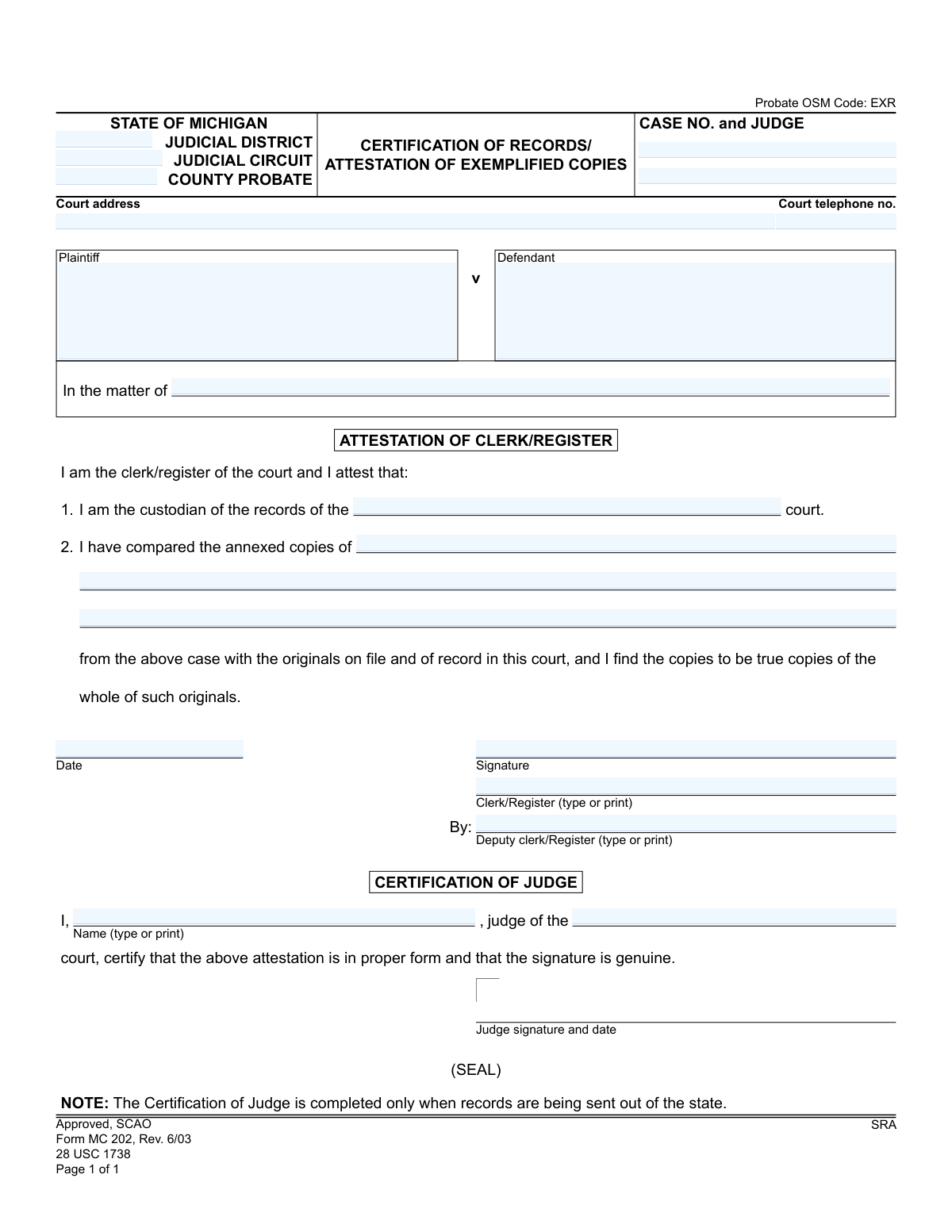
Yes! You can use AI to fill out Form MC 202, Certification of Records/Attestation of Exemplified Copies

The Michigan Form MC 202, Certification of Records/Attestation of Exemplified Copies, is a legal document used by a court clerk or register to attest that copies of records from a specific case are true and complete duplicates of the originals. A judge's certification is added when the records are to be sent out of state, ensuring their legal validity in other jurisdictions. Today, this form can be filled out quickly and accurately using AI-powered services like Instafill.ai, which can also convert non-fillable PDF versions into interactive fillable forms.
MC 202 is part of the Michigan court forms category on Instafill.
Our AI automatically handles information lookup, data retrieval, formatting, and form filling.
It takes less than a minute to fill out MC 202 using our AI form filling.
Securely upload your data. Information is encrypted in transit and deleted immediately after the form is filled out.

Form specifications

Form name: Form MC 202, Certification of Records/Attestation of Exemplified Copies
Number of fields: 20
Number of pages: 1
Language: English
main-image

Instafill Demo: How to fill out PDF forms in seconds with AI

How to Fill Out MC 202 Online for Free in 2026

Are you looking to fill out a MC 202 form online quickly and accurately? Instafill.ai offers the #1 AI-powered PDF filling software of 2026, allowing you to complete your MC 202 form in just 37 seconds or less.
Follow these steps to fill out your MC 202 form online using Instafill.ai:
  1. 1 Navigate to Instafill.ai and upload or select the Form MC 202.
  2. 2 Enter the court details, including the judicial district/circuit, county, court address, and telephone number.
  3. 3 Input the specific case information, such as the case number, judge's name, and the parties involved (plaintiff/defendant or 'In the matter of').
  4. 4 Clearly identify the specific records or documents for which certification is being requested.
  5. 5 Review the generated form to ensure all case and document details are accurate before it is presented for signature.
  6. 6 The court clerk/register will complete the attestation section, signing and dating the form to certify the copies.
  7. 7 If the records are for out-of-state use, a judge will complete the certification section to validate the clerk's attestation.

Our AI-powered system ensures each field is filled out correctly, reducing errors and saving you time.

Why Choose Instafill.ai for Your Fillable MC 202 Form?

Speed

Complete your MC 202 in as little as 37 seconds.

Up-to-Date

Always use the latest 2026 MC 202 form version.

Cost-effective

No need to hire expensive lawyers.

Accuracy

Our AI performs 10 compliance checks to ensure your form is error-free.

Security

Your personal information is protected with bank-level encryption.

Frequently Asked Questions About Form MC 202

This form is used by a Michigan court to officially certify that copies of court documents are true and accurate reproductions of the originals. This is often required when submitting records to a court or agency in another state.

The court clerk/register completes the 'Attestation' section, and a judge completes the 'Certification' section. You, the requester, must provide the necessary case information and specify which documents need to be copied.

A certified copy is attested by the court clerk as a true copy. An exemplified copy includes that certification plus a second signature from a judge, which verifies the clerk's authority and is necessary for out-of-state use.

As noted on the form, the judge's certification is only completed when the records are being sent for official use outside the state of Michigan. For use within Michigan, the clerk's attestation is usually sufficient.

You must submit a request to the clerk of the court where the case was filed. You will need to provide the case number and a list of the specific documents you need copied and exemplified.

You need to provide the court with the case number, judge's name, names of the parties involved, and a precise list of the documents from the case file that you require copies of.

Yes, courts typically charge fees for copying and certification services. You should contact the specific court clerk's office to inquire about the cost.

Processing times vary by court depending on their workload and the size of your request. It is best to contact the court clerk's office directly for an estimated timeframe.

The clerk will list the specific documents being certified, such as 'Final Judgment dated 01/15/2022,' 'Letters of Authority,' or 'the entire case file.' This confirms exactly which records the certification applies to.

Yes, services like Instafill.ai use AI to accurately auto-fill form fields with your case information, which can save time and help prevent errors before you submit your request to the court.

You can use a service like Instafill.ai to upload the MC 202 form and digitally fill in the required case details. You can then print the partially completed form to submit to the court for the official signatures.

If you have a flat, non-fillable PDF, you can use a tool like Instafill.ai to convert it into an interactive, fillable form. This allows you to easily type your information into the correct fields before printing.

Compliance MC 202
Validation Checks by Instafill.ai

1
Case Identifier Exclusivity
This check ensures that either the 'Plaintiff' and 'Defendant' fields ('pname', 'd name') are filled out, or the 'In the matter of' field ('matterof') is filled out, but not both. These sections are mutually exclusive and define the type of case. If both or neither are filled, the form should be rejected for ambiguity and incompleteness, as the subject of the record certification is unclear.
2
Case Number Format and Presence
Validates that the 'caseno' field is not empty and conforms to the standard Michigan court case number format (e.g., YYYY-######-XX). This is critical for uniquely identifying the case file to which the certified records belong. A missing or malformed case number makes the entire certification useless as it cannot be tied to a specific legal proceeding.
3
Court Telephone Number Format
Ensures the 'cttelno' field contains a valid 10-digit US telephone number, allowing for common formats like (XXX) XXX-XXXX or XXX-XXX-XXXX. This is important for contact and verification purposes. An invalid phone number hinders the ability of receiving parties to contact the court for clarification, potentially delaying processes.
4
Clerk Attestation Date Validity
This validation confirms that the 'datesig' field contains a valid date that is not in the future. The attestation date marks when the clerk certified the documents. An invalid or future date would invalidate the legal timing of the attestation, so the form must be corrected before processing.
5
Clerk Signature and Name Requirement
Checks that if a signature is detected in the 'sig' field, then either the 'cname' (Clerk/Register) or 'depname' (Deputy Clerk/Register) field is filled with a printed name. A signature is legally meaningless without the identity of the signer being clearly stated. Failure to provide a name would require the form to be returned for completion.
6
Certified Document Description Requirement
Verifies that at least one of the fields for describing the annexed copies ('reccopy1', 'reccopy2', 'reccopy3') is filled. The entire purpose of the form is to certify specific documents, so a description of those documents is mandatory. A form without this information is incomplete and serves no purpose.
7
Court Identification Completeness
Ensures that the court's identity is clearly established by requiring the 'ctaddress' and at least one of the court type fields ('district', 'circuit', 'county probate') to be filled. Without a complete court address and type, it's impossible to know the origin of the certified records. This is a fundamental requirement for the document's validity.
8
Conditional Judge Certification Logic
This check enforces the rule noted on the form: the 'Certification of Judge' section (fields 'jname', 'certct', and judge's signature) should only be completed if the records are being sent out of state. The system should flag a form for review if this section is filled for in-state use or empty for out-of-state use. This prevents unnecessary processing and ensures compliance with interstate legal standards.
9
Judge Certification Completeness
If the Judge's signature is present (indicating an out-of-state certification), this validation ensures that the judge's printed name ('jname') and the court name ('certct') are also filled. All parts of the judge's certification are required for it to be considered valid and properly executed. An incomplete certification would be rejected by the receiving out-of-state entity.
10
Judge Certification Date Logic
Validates that the date next to the judge's signature is a valid date, is not in the future, and occurs on or after the clerk's attestation date ('datesig'). The judge certifies the clerk's attestation, so logically the judge's signature must not predate the clerk's. This chronological consistency is essential for the document's legal integrity.
11
Court Name Consistency Check
Compares the court name provided in the header ('district'/'circuit'/'county probate') with the court name filled in the attestation body ('1 I am the custodian of the records of the...'). These should match to ensure consistency. A mismatch could indicate a copy-paste error and creates ambiguity about which court is actually issuing the certification.
12
Seal Presence for Judge Certification
When the 'Certification of Judge' section is completed, this check verifies the presence of the court seal. The seal is a formal requirement that authenticates the judge's signature and the document itself, especially for out-of-state use. A missing seal would render the judge's certification invalid and require the form to be re-processed and properly sealed.

Common Mistakes in Completing MC 202

Improper Case Caption Selection

Users often fill out both the 'Plaintiff v Defendant' and 'In the matter of' fields, or choose the incorrect one for their case type. This happens due to uncertainty about legal terminology. Using the wrong caption can lead to confusion and rejection, as 'Plaintiff v Defendant' is for adversarial lawsuits while 'In the matter of' is typically for probate, estate, or guardianship cases. To avoid this, verify the exact case style from previous court documents before filling out the form.

Misunderstanding the 'Certification of Judge' Requirement

A frequent error is either requesting the judge's certification for in-state use or failing to request it for out-of-state use. The note on the form explicitly states it's only for records sent out of state, but this is often missed. Unnecessary requests create extra work for the court, while failing to get it when needed can render the document invalid in another state's legal proceedings. Always determine the final destination of the certified records to correctly complete this section.

Requester Filling Out Clerk/Judge Sections

Individuals requesting the certification sometimes mistakenly fill in the signature and date fields in the 'Attestation of Clerk/Register' or 'Certification of Judge' sections. These sections are reserved exclusively for court officials to complete and sign. A form submitted with these areas pre-filled by the applicant is immediately invalid and will be rejected, causing significant delays. Applicants should only fill the top portion of the form identifying the case and the specific records needed.

Vague or Incomplete Description of Records

In the space provided for listing the documents to be copied, people often write generic phrases like 'the entire file' or 'all records.' This is a mistake because the clerk needs to know exactly which documents to copy and certify. This ambiguity can lead to the certification of incorrect or incomplete documents, or outright rejection of the request. Be specific and list each document by its title and date, such as 'Last Will and Testament dated January 1, 2020' or 'Order Appointing Personal Representative filed March 15, 2021'.

Incorrect Court Identification

The form requires specifying the Judicial District, Circuit, and/or County Probate court, and users often confuse them or leave fields blank. Michigan's court system has distinct jurisdictions, and entering the wrong one sends the request to the wrong place, leading to rejection and lost time. To prevent this, carefully check the original case filings to identify the precise court name and location responsible for the record.

Entering an Incomplete or Incorrect Case Number

The 'CASE NO. and JUDGE' field is critical for locating the file, but users often enter it in an incorrect format, omitting the year, case-type code, or judge's identifier. A partial or wrong case number makes it difficult or impossible for the clerk's office to retrieve the correct file, resulting in processing delays or rejection. Always copy the case number exactly as it appears on official court documents.

Illegible Handwriting on a Printed Form

When this form is printed and filled out by hand, illegible handwriting is a common cause for rejection. If a clerk cannot decipher the case number, party names, or the specific documents requested, they cannot process the form. This simple error can halt the entire certification process. Using a fillable PDF or an AI-powered tool like Instafill.ai, which can convert flat PDFs into fillable versions, ensures all entries are typed, legible, and clear.

Submitting an Outdated Version of the Form

The form revision date is '6/03', which is quite old. Courts periodically update their forms, and submitting an obsolete version can lead to automatic rejection. People often download the first version they find online, which may not be the current one accepted by the court. To avoid this, always obtain the form directly from the official Michigan courts website or use a service that maintains up-to-date forms.

Forgetting to Include the Presiding Judge's Name

In the header section, the form asks for both the Case No. and the Judge. Applicants frequently leave the judge's name blank, assuming the case number is sufficient. While a clerk may be able to look it up, omitting this required information can slow down the process, as it may require an extra verification step. Including the judge's name ensures the request is routed and processed as efficiently as possible.
Saved over 80 hours a year

“I was never sure if my IRS forms like W-9 were filled correctly. Now, I can complete the forms accurately without any external help.”

Kevin Martin Green

Your data stays secure with advanced protection from Instafill and our subprocessors

Robust compliance program

Transparent business model

You’re not the product. You always know where your data is and what it is processed for.

ISO 27001, HIPAA, and GDPR

Our subprocesses adhere to multiple compliance standards, including but not limited to ISO 27001, HIPAA, and GDPR.

Security & privacy by design

We consider security and privacy from the initial design phase of any new service or functionality. It’s not an afterthought, it’s built-in, including support for two-factor authentication (2FA) to further protect your account.

Fill out MC 202 with Instafill.ai

Worried about filling PDFs wrong? Instafill securely fills form-mc-202-certification-of-recordsattestation-of-exemplified-copies forms, ensuring each field is accurate.