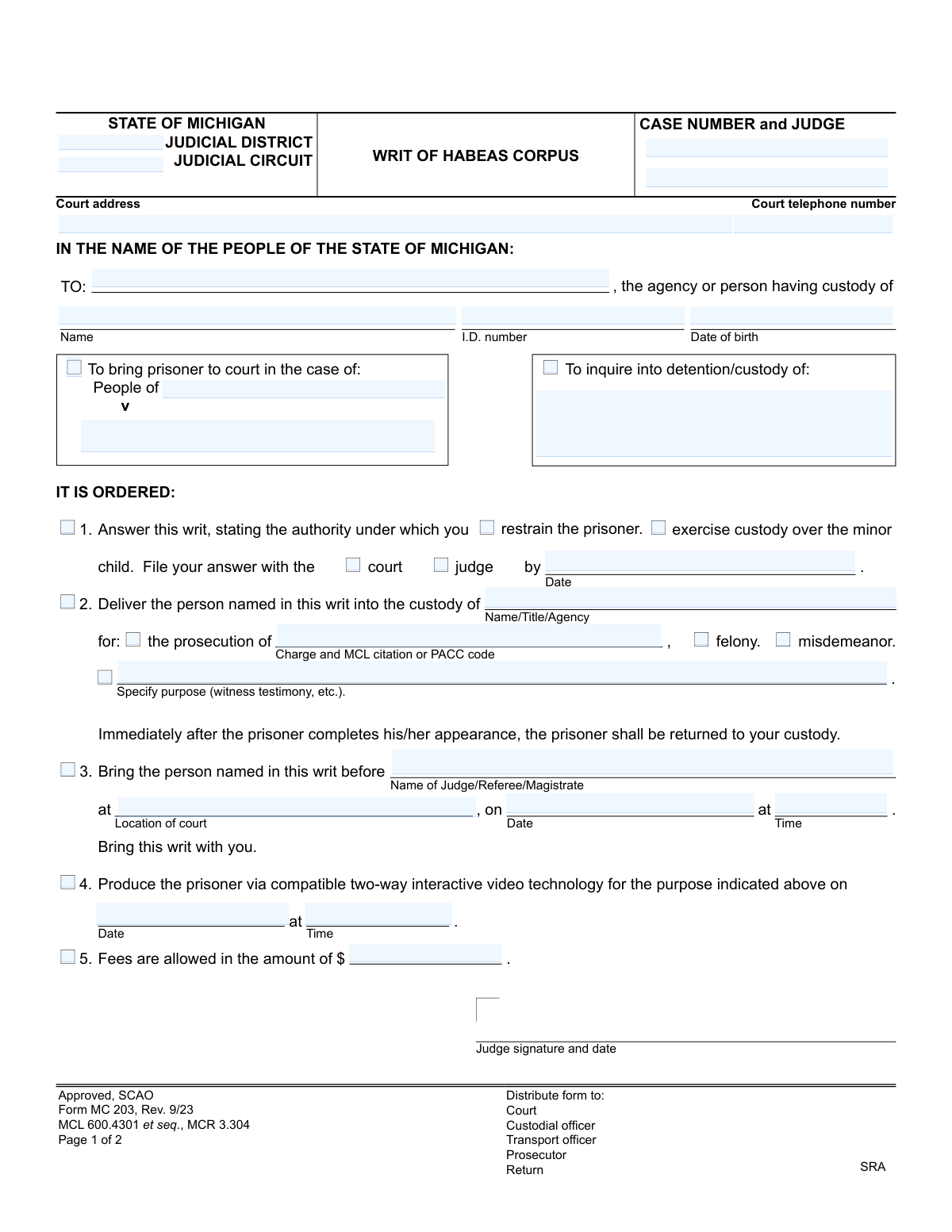
Yes! You can use AI to fill out Form MC 203, Writ of Habeas Corpus
A Writ of Habeas Corpus, specifically Michigan Form MC 203, is a fundamental legal instrument issued by a court to a person or agency holding someone in custody. It commands them to produce the detained individual before the court, usually to determine if the detention is lawful. This writ is a critical safeguard against illegal imprisonment. Today, this form can be filled out quickly and accurately using AI-powered services like Instafill.ai, which can also convert non-fillable PDF versions into interactive fillable forms.
MC 203 is part of the
Michigan court forms category on Instafill.
Our AI automatically handles information lookup, data retrieval, formatting, and form filling.
It takes less than a minute to fill out MC 203 using our AI form filling.
Securely upload your data. Information is encrypted in transit and deleted immediately after the form is filled out.
Form specifications
| Form name: | Form MC 203, Writ of Habeas Corpus |
| Number of fields: | 77 |
| Number of pages: | 1 |
| Language: | English |
More forms in Michigan court forms
Instafill Demo: How to fill out PDF forms in seconds with AI
How to Fill Out MC 203 Online for Free in 2026
Are you looking to fill out a MC 203 form online quickly and accurately? Instafill.ai offers the #1 AI-powered PDF filling software of 2026, allowing you to complete your MC 203 form in just 37 seconds or less.
Follow these steps to fill out your MC 203 form online using Instafill.ai:
- 1 Navigate to Instafill.ai and upload or select the Michigan Writ of Habeas Corpus (Form MC 203).
- 2 Enter the court and case details, including the judicial district/circuit, case number, and judge's name.
- 3 Identify the agency or person with custody and provide the full name, ID number, and date of birth of the person being detained.
- 4 Clearly state the purpose of the writ, such as to inquire into the detention or to bring the prisoner to court for testimony or prosecution.
- 5 Specify the court's orders, including dates, times, and locations for the appearance, whether in person or via video conference.
- 6 Review all the information populated by the AI for completeness and accuracy, then have the judge sign and date the writ.
- 7 Complete the Proof of Service section after the writ has been served on the appropriate parties.
Our AI-powered system ensures each field is filled out correctly, reducing errors and saving you time.
Why Choose Instafill.ai for Your Fillable MC 203 Form?
Speed
Complete your MC 203 in as little as 37 seconds.
Up-to-Date
Always use the latest 2026 MC 203 form version.
Cost-effective
No need to hire expensive lawyers.
Accuracy
Our AI performs 10 compliance checks to ensure your form is error-free.
Security
Your personal information is protected with bank-level encryption.
Frequently Asked Questions About Form MC 203
This form is a court order used for two main reasons: to command that a prisoner be brought to court for a proceeding, or to require the custodian to legally justify why a person is being detained.
A judge signs and issues the writ, which is an order directed to the person or agency having custody of an individual. The custodian (e.g., a warden) then completes the 'Answer' and 'Proof of Service' sections.
No, while commonly used for prisoners, the form also includes an option to 'inquire into detention/custody of' a minor child, meaning it can be used in certain civil or family law matters.
You will need to state the legal authority for holding the person, such as a warrant or commitment order, and attach a copy of that document. If the person is not in your custody, you must explain when they were released or where they were transferred.
In the 'Answer' section, you must indicate that you do not have the person and provide details about their release or transfer, including the date and the location or authority involved.
This is a court order for the prisoner to appear at a hearing remotely using a video conferencing system, instead of being physically transported to the courthouse.
The form indicates that copies should be distributed to the court, the custodial officer, any transport officer involved, and the prosecutor.
This section is completed by the person who delivers the writ to the custodian. It serves as a formal record for the court, certifying when and to whom the order was delivered.
You must complete the 'Answer' section of the form, stating the authority under which you are holding the person, and file it with the court or judge by the date specified in the order.
Yes, services like Instafill.ai use AI to accurately auto-fill form fields with your saved information, which can save time and help prevent errors.
You can use a service like Instafill.ai to upload the PDF and fill it out in your web browser. The platform allows you to type into fields, add signatures, and then download or print the completed form.
If you have a non-fillable or 'flat' PDF, you can upload it to a service like Instafill.ai. Their technology can convert it into an interactive, fillable form that you can complete online.
Compliance MC 203
Validation Checks by Instafill.ai
1
Case Number Format and Presence
Checks that the Case Number is provided and follows the standard Michigan court case number format. This is critical for associating the writ with the correct legal proceeding in the court's system. Failure to provide a valid case number would prevent the form from being filed and linked to the case file, causing significant delays and potential legal issues.
2
Valid Prisoner Date of Birth
Validates that the 'Date of birth' field for the prisoner is a complete and logical date (e.g., MM/DD/YYYY). The check should ensure the date is in the past and not a future date. This is essential for correctly identifying the individual and preventing data entry errors that could lead to a case of mistaken identity.
3
Mandatory Custodian Identification
This check verifies that the 'TO:' field, identifying the agency or person with custody of the prisoner, is not empty. This field is the primary directive of the writ, specifying who must comply with the order. A writ without a specified custodian is meaningless and cannot be executed.
4
Conditional Order Section Completion
This validation ensures that if an order option (e.g., 'Bring the person named in this writ before...') is selected, all associated required fields (e.g., 'Name of Judge/Referee/Magistrate', 'Location of court', 'Date', 'Time') are filled. This is vital because an incomplete order is unenforceable and legally invalid. The system should flag the missing information before allowing submission.
5
Mutually Exclusive Appearance Order
Verifies that only one of the appearance methods, either physical appearance (Order 3) or video appearance (Order 4), is selected and completed. The form should not allow both to be filled out for the same writ, as this creates a conflicting and ambiguous order. If both are selected, an error should be displayed, forcing the user to choose one.
6
Charge Requires Offense Type
Checks that if a 'Charge and MCL citation or PACC code' is entered under Order 2, then either the 'felony' or 'misdemeanor' checkbox must also be selected. This classification is fundamental for legal processing and understanding the severity of the case. An error should be triggered if a charge is listed without its corresponding classification.
7
Proof of Service Date and Time Validation
Ensures the 'Date' and 'Time' entered in the 'PROOF OF SERVICE' section are not in the future. This check maintains the integrity of the legal certification of service, which must reflect a past event. An invalid service date could nullify the writ's legal effect and lead to it being challenged.
8
Logical Consistency in 'Answer' Section
This validation checks for logical consistency within the 'ANSWER' section. A user cannot simultaneously state they 'do not have' the person (Option 1) and also that they 'have' the person under a warrant (Option 3). The system must enforce that only one of the three primary states (do not have, transferred, have) is selected and detailed.
9
Conditional Transfer Location
This validation ensures that if the 'transferred to' checkbox is selected in the 'ANSWER' section, the 'Location' field is filled out. This information is critical for tracking the prisoner's chain of custody. Failure to provide the transfer location would render the answer incomplete and could trigger further legal inquiry.
10
Attorney Bar Number Validation
Validates that if the 'Attorney' option is selected, the 'Attorney/Bar number' field is filled and follows the Michigan State Bar's 'P-number' format (e.g., P12345). This is crucial for verifying the attorney's credentials and ensuring they are authorized to practice. The system should reject submissions with an invalid or missing bar number when an attorney is indicated.
11
Valid Fee Amount
Ensures that the value entered in the 'Fees are allowed in the amount of $' field is a valid numerical currency format (e.g., 123.45). This prevents non-numeric characters from being entered, ensuring the financial data is accurate and processable. An error should be shown if text or invalid symbols are entered.
12
Purpose of Writ Selection
This check ensures that the user has indicated the purpose of the writ by filling in either the 'People of v.' fields for a criminal case or the 'To inquire into detention/custody of' field for a custody inquiry. This top-level information defines the context and legal basis for the writ. The form should not be submittable without one of these primary purposes being clearly defined.
13
Judge Signature Date Presence and Validity
Verifies that a date is present alongside the judge's signature field. This date authenticates when the writ was officially ordered and becomes legally effective. The validation should check that the date is not in the future and is in a valid format, as it is a critical piece of metadata for the legal document.
14
Mandatory Prisoner Name
Ensures that the 'Name' field for the person in custody is filled out. Correctly identifying the individual is the most fundamental purpose of the writ. A submission without the prisoner's name is invalid and would be immediately rejected, as it's impossible to know who the order applies to.
Common Mistakes in Completing MC 203
Entering the wrong case number or judge's name is a frequent data entry error on legal forms. This mistake often happens when transcribing information by hand or from memory. The consequence is significant: the writ may be filed in the wrong case, sent to the wrong judge, or rejected by the court clerk, causing critical delays. To avoid this, always double-check the case number and judge's name against official court documents before submission.
The 'TO:' field requires the specific person or agency with custody of the prisoner, but filers often provide a vague location like 'County Jail.' This ambiguity can make the writ unenforceable, as it's not directed to a specific authority (e.g., the Sheriff or Warden). To prevent rejection or non-compliance, research and use the correct official title and name of the person legally in charge of the facility holding the prisoner.
Relying on just a prisoner's name is insufficient and a common mistake. Large correctional facilities house many individuals, some with similar names, making the prisoner's I.D. number (e.g., MDOC number, booking number) and date of birth essential for positive identification. Omitting this information can lead to the facility being unable to identify the correct person, causing the writ to be returned unfulfilled. Always include all available identifiers.
The form contains several 'IT IS ORDERED' options, and the filer must clearly indicate the court's directive. People may forget to check a box, or check multiple conflicting boxes (e.g., bring to court in person AND produce via video). An ambiguous or missing order makes the writ invalid, as the custodian has no clear instruction to follow. Carefully select only one applicable order and complete all associated fields for that choice.
When specifying the reason for prosecution under Order #2, filers often write a common name for the crime (e.g., 'Robbery') but omit the required statutory reference. Legal documents demand precision, and the form specifically requests the 'MCL citation or PACC code.' This omission can create ambiguity and lead to processing delays. Always reference the official criminal complaint to find and include the exact legal citation for the charge.
The 'Proof of Service' section is legal evidence that the custodian received the writ, but it is often filled out improperly or forgotten. The person serving the document might forget to sign, enter the date and time, or correctly name the individual they served. An improper Proof of Service can invalidate the entire process if challenged in court, forcing the filer to start over. This section must be completed accurately and immediately after service is performed.
Courts periodically update their forms to reflect changes in laws and procedures, indicated by a revision date (e.g., 'Rev. 9/23'). Using an obsolete version is a common reason for a court clerk to reject a filing. This forces the filer to redo the paperwork on the correct form, wasting time and effort. Always ensure you are using the most current version by downloading it directly from the official SCAO (State Court Administrative Office) website.
If an attorney is preparing the writ, their state bar number is a required piece of identification on any court filing. Forgetting to include the bar number in the designated field is a simple but common oversight. This can lead to the filing being rejected by the clerk or cause delays in communication. AI-powered form-filling tools like Instafill.ai can help prevent this by storing an attorney's information and automatically populating it on all forms.
Because this is a critical legal document, every entry must be perfectly clear. If the form is printed and filled out by hand, illegible handwriting can render case numbers, names, or dates unreadable. This can cause the writ to be misinterpreted by the custodian, rejected by the court, or significantly delayed. To avoid this, it is best to use a fillable PDF; if one is not available, a tool like Instafill.ai can convert a flat PDF into a fillable version to ensure all entries are typed and legible.
This mistake is made by the recipient of the writ when filling out the 'Answer' section. They might check the box indicating the prisoner is held under a warrant or commitment but then fail to attach a copy of the specified document. An answer without the required supporting documentation is incomplete and may be rejected by the court, potentially leading to contempt proceedings for non-compliance. When responding, always attach copies of any documents cited as the authority for restraint.
Saved over 80 hours a year
“I was never sure if my IRS forms like W-9 were filled correctly. Now, I can complete the forms accurately without any external help.”
Kevin Martin Green
Your data stays secure with advanced protection from Instafill and our subprocessors
Robust compliance program
Transparent business model
You’re not the product. You always know where your data is and what it is processed for.
ISO 27001, HIPAA, and GDPR
Our subprocesses adhere to multiple compliance standards, including but not limited to ISO 27001, HIPAA, and GDPR.
Security & privacy by design
We consider security and privacy from the initial design phase of any new service or functionality. It’s not an afterthought, it’s built-in, including support for two-factor authentication (2FA) to further protect your account.
Fill out MC 203 with Instafill.ai
Worried about filling PDFs wrong? Instafill securely fills form-mc-203-writ-of-habeas-corpus forms, ensuring each field is accurate.