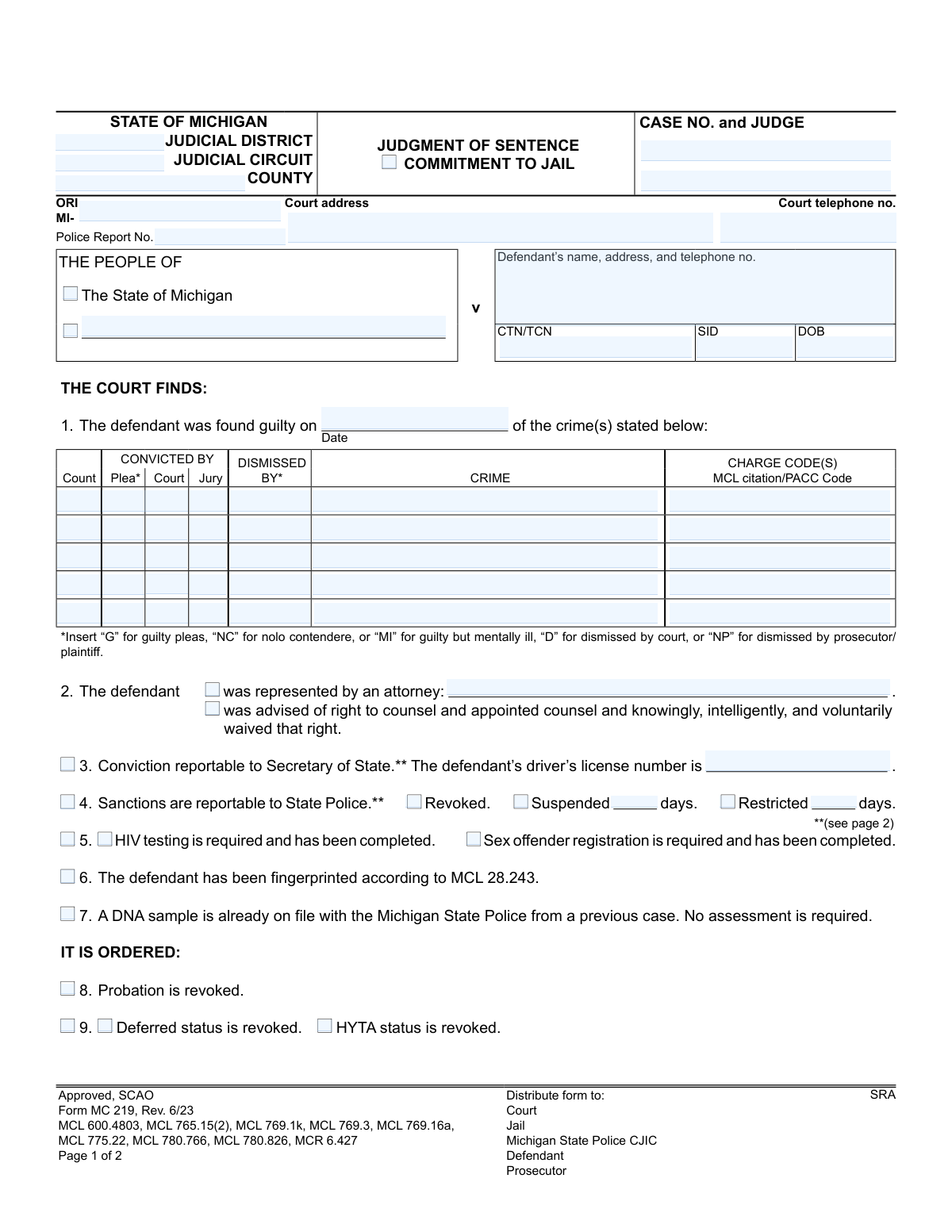
Yes! You can use AI to fill out Form MC 219, Judgment of Sentence/Commitment to Jail

Form MC 219, Judgment of Sentence/Commitment to Jail, is an official document from the State of Michigan judiciary. It is used by courts to formally record a defendant's conviction, sentence, and the order to commit them to jail, serving as the legal basis for their incarceration and other penalties. This critical legal document details everything from jail time and fines to probation terms and required rehabilitative services. Today, this form can be filled out quickly and accurately using AI-powered services like Instafill.ai, which can also convert non-fillable PDF versions into interactive fillable forms.
MC 219 is part of the Michigan court forms category on Instafill.
Our AI automatically handles information lookup, data retrieval, formatting, and form filling.
It takes less than a minute to fill out MC 219 using our AI form filling.
Securely upload your data. Information is encrypted in transit and deleted immediately after the form is filled out.

Form specifications

Form name: Form MC 219, Judgment of Sentence/Commitment to Jail
Number of fields: 154
Number of pages: 1
Language: English
main-image

Instafill Demo: How to fill out PDF forms in seconds with AI

How to Fill Out MC 219 Online for Free in 2026

Are you looking to fill out a MC 219 form online quickly and accurately? Instafill.ai offers the #1 AI-powered PDF filling software of 2026, allowing you to complete your MC 219 form in just 37 seconds or less.
Follow these steps to fill out your MC 219 form online using Instafill.ai:
  1. 1 Navigate to Instafill.ai and upload the MC 219 form or select it from the template library.
  2. 2 Provide the initial case information, such as the judicial district, county, case number, and judge's name, for the AI to populate.
  3. 3 Input the defendant's personal details and information regarding legal representation.
  4. 4 Fill in the conviction details, including the specific crimes, charge codes, and how the conviction was reached (plea, court, or jury).
  5. 5 Detail the complete sentence, including jail time, credited days, fines, court costs, restitution, and any other financial penalties.
  6. 6 Indicate any additional orders by checking the relevant boxes for probation, rehabilitative services, license sanctions, or other conditions.
  7. 7 Carefully review the entire auto-filled document for accuracy, then download the completed Judgment of Sentence for signature and distribution.

Our AI-powered system ensures each field is filled out correctly, reducing errors and saving you time.

Why Choose Instafill.ai for Your Fillable MC 219 Form?

Speed

Complete your MC 219 in as little as 37 seconds.

Up-to-Date

Always use the latest 2026 MC 219 form version.

Cost-effective

No need to hire expensive lawyers.

Accuracy

Our AI performs 10 compliance checks to ensure your form is error-free.

Security

Your personal information is protected with bank-level encryption.

Frequently Asked Questions About Form MC 219

This is an official court document that formalizes the judge's sentence in a criminal case. It serves as the official record of your conviction, jail time, fines, and other court-ordered conditions.

The judge or court clerk completes and signs this form after you have been sentenced. As the defendant, you will receive a copy for your records, but you do not fill it out yourself.

'Time Credited' is the amount of time you already spent in jail for this case, which is subtracted from your total sentence. 'Time to be Served' is the remaining jail time you must complete after that credit is applied.

You must contact the court immediately to request a payment alternative if you cannot pay on time. Fines not paid within 56 days of the due date are subject to a 20% late penalty, and the court may impose jail time if it determines you have the ability to pay but are refusing.

This means your sentences for different counts must be served one after the other, not at the same time. If this box is not checked, your sentences are 'concurrent' and are served simultaneously.

This indicates the court must notify the Michigan Secretary of State of your conviction, which is common for driving-related offenses. This can result in points on your license, suspension, or revocation.

No, this form is the overall judgment, which may state that you are sentenced to probation. You will receive a separate, more detailed probation order that lists all the specific rules and conditions you must follow.

Once signed by the judge, copies are officially distributed to the court, the jail where you will serve time, the Michigan State Police, the prosecutor, and you (the defendant).

This indicates that you were previously on probation, violated its terms, and the judge has now canceled that probation. This new judgment and sentence, which may include jail, is the result of that revocation.

These are court-ordered programs intended to help with rehabilitation, such as alcohol safety education or mental health treatment. You must complete any checked services as part of your sentence.

No, because this form is completed by the court, not the defendant. However, for other official forms you need to complete, AI services like Instafill.ai can save significant time by accurately auto-filling your information.

With Instafill.ai, you upload your form, and its AI technology identifies the fields and fills them with your saved personal data. You then review the pre-filled form for accuracy before downloading or submitting it.

Tools like Instafill.ai can convert non-fillable PDFs into interactive, fillable forms. This allows you to easily type your information into the fields directly on your computer.

Compliance MC 219
Validation Checks by Instafill.ai

1
Case Number Consistency Across Pages
This check ensures the 'Case No.' field on page 1 is identical to the 'Case No.' field on page 2. Maintaining a consistent case number is critical for document integrity and ensures that all pages of the judgment are correctly associated with the same legal case. A mismatch could lead to incorrect filing and legal ambiguity, so the form submission will be rejected until the numbers match.
2
Jail Sentence Time Calculation
Validates the arithmetic in the jail sentence table (item 10) for each count. The system will verify that the 'To Be Served' time (months and days) is the correct result of the 'Sentenced' time minus the 'Credited' time. This check prevents mathematical errors in calculating the final term of incarceration, which is crucial for legal accuracy. If the calculation is incorrect, an error will be flagged requiring manual correction before processing.
3
Financial Obligations Total Summation
This validation confirms that the 'Total' amount in the financial obligations section (item 12) is the exact sum of all individual preceding fields (State Minimum, Crime Victim, Restitution, DNA Assess., Court Costs, Attorney Fees, Fine, Other Costs). This ensures the financial summary is accurate and legally sound, preventing billing discrepancies for the defendant. If the total does not match the sum of its parts, the submission will be blocked until the financial figures are corrected.
4
Conditional Driver's License Number Presence
Verifies that if the 'Conviction reportable to Secretary of State' checkbox (item 3) is marked, the 'defendant’s driver’s license number' field is populated. This information is required by the Secretary of State to process actions against the defendant's driving record. Failure to provide the license number when required will result in an incomplete report and prevent the form from being submitted.
5
Mutually Exclusive Attorney Representation Status
Ensures that either the checkbox for 'was represented by an attorney' or 'waived that right' (item 2) is selected, but not both. Additionally, if 'was represented by an attorney' is checked, the attorney's name must be provided. This check clarifies the defendant's legal representation status, a fundamental right. An ambiguous or contradictory selection will trigger a validation error.
6
Consecutive Sentence Specification
Checks that if the 'sentence(s) to be served consecutively' box (item 11) is checked, a subsequent choice ('to each other' or 'to case number(s)') is also made. If 'to case number(s)' is selected, the corresponding text field listing the case numbers must not be empty. This validation ensures that the nature of a consecutive sentence is clearly and unambiguously defined. The form will be considered incomplete if this logic is not followed.
7
Sanction Days Requirement
This rule validates that if the 'Suspended' or 'Restricted' checkbox is selected under sanctions (item 4), the corresponding 'days' field contains a positive integer. The number of days is essential for defining the duration of the sanction. A missing or invalid value would make the sanction order unenforceable, so the system will reject the submission until a valid number of days is entered.
8
Probation Term Specification
Verifies that if the 'defendant shall be placed on probation' checkbox (item 13) is marked, the 'months' field is populated with a positive integer. The duration of probation is a critical component of the sentence. An empty or invalid value in the 'months' field would make the probation order incomplete, so the form will require this information before it can be accepted.
9
Conviction Date Validity
This check ensures the 'guilty on' date (item 1) is a valid calendar date and that it occurs on or before the current system date. A future date for a conviction is logically impossible and indicates a data entry error. This validation maintains the chronological accuracy of the legal record and will prevent submission if the date is invalid.
10
Defendant Date of Birth (DOB) Plausibility
Validates that the defendant's 'DOB' is a valid past date and suggests the defendant is of a legally plausible age (e.g., over 12 years old). This acts as a basic sanity check to catch significant data entry errors, such as an incorrect year. An invalid or implausible date of birth would require correction before the form can be processed.
11
Conviction vs. Dismissal Logic per Count
For each count in the conviction table (item 1), this validation ensures that either a conviction method ('Plea', 'Court', 'Jury') is indicated or a dismissal method ('Dismissed By') is indicated, but not both. A single charge cannot be both convicted and dismissed simultaneously. This check enforces logical consistency in the court's findings and will flag any count that violates this rule.
12
Plea Code Format Validation
This check ensures that for any count where a plea is entered, the value in the 'Plea' column is one of the officially sanctioned codes: 'G', 'NC', 'MI', 'D', or 'NP'. Using standardized codes is essential for accurate data aggregation and reporting. An invalid code will trigger an error, requiring the user to select from the approved list.
13
Jail Sentence Trigger
Validates that if the primary 'The defendant is sentenced to jail' checkbox (item 10) is selected, then at least one row in the subsequent sentence table is filled out with sentence details. Checking the box indicates a jail sentence is being imposed, so the details of that sentence must be specified. The form will be considered incomplete if the box is checked but no sentence details are provided.
14
Release Period Date Order
For any authorized release purpose in item 10 (e.g., 'To work or seek work'), this check validates that the 'To' date is on or after the 'From' date. A release period cannot end before it begins. This ensures the logical and chronological accuracy of the release order, and an invalid date range will block submission.

Common Mistakes in Completing MC 219

Inaccurate Case or Defendant Identification Numbers

Users often transpose digits or make typos when entering the Case No., CTN/TCN, or SID. These unique identifiers are critical for linking the judgment to the correct court file and individual's criminal history. An error here can lead to the document being misfiled, causing significant legal and administrative delays. Always double-check these numbers against the official case file before submission.

Using Incorrect Plea or Dismissal Codes

The form requires specific single-letter codes (e.g., 'G' for guilty, 'D' for dismissed by court) in the conviction table, with a key provided at the bottom. People frequently write out the full word or use an incorrect code, which can misrepresent the case's official disposition. This can lead to incorrect sentencing records and require later correction. Always refer to the key to ensure the precise code is used for each charge.

Omitting the Driver's License Number for Reportable Convictions

If box 3 is checked, indicating the conviction is reportable to the Secretary of State, the defendant's driver's license number is mandatory. Filers often check the box but forget to enter the corresponding license number. This omission prevents the Secretary of State from properly applying required sanctions to the defendant's driving record. Ensure the DLN is always provided when a conviction is marked as reportable.

Miscalculating 'Time to be Served' in Jail Sentence

The 'To Be Served' jail time is calculated by subtracting 'Credited' time from the total 'Sentenced' time. Manual math errors are extremely common and can result in the defendant serving an incorrect amount of time, potentially violating the court's order and creating legal liability. Using a calculator and double-checking the subtraction for each count is essential. AI-powered tools like Instafill.ai can prevent this by auto-calculating these fields based on your inputs.

Incorrect Summation of Fines and Costs

Item 12 requires the filer to add up multiple financial assessments (restitution, court costs, fines, etc.) to arrive at a 'Total' amount. Simple addition errors are frequent, leading to incorrect billing, payment disputes, and subsequent collection problems. Carefully sum all individual amounts to ensure the total is accurate. This is another area where form-filling software can eliminate errors by performing the calculation automatically.

Unclear Specification of Concurrent or Consecutive Sentences

Item 11 determines if multiple sentences are served together (concurrent) or back-to-back (consecutive). Filers may neglect to check any box, creating ambiguity for the jail and Department of Corrections. If sentences are consecutive, the appropriate box must be checked and the corresponding case numbers listed. Failing to do so can lead to incorrect release date calculations and legal challenges.

Contradictory Entries Between Sections

A frequent error is entering conflicting information, such as marking a charge as 'Dismissed' on page 1 but then assigning a jail sentence or fine for that same count on page 2. This creates a legally incoherent document that is unenforceable and requires correction, delaying case closure. A thorough review of the entire completed form is necessary to ensure all sections are consistent with one another.

Vague Rehabilitative Service Orders

When ordering rehabilitative services in item 14, such as 'Treatment,' it is crucial to specify the exact type (e.g., outpatient, inpatient, mental health). A common mistake is to check the main box without providing the necessary details. This leaves the order open to interpretation by probation officers and treatment providers, potentially failing to meet the court's intent. Always specify the nature of the service as required.

Entering Incorrect Agency or Report Identifiers

The Originating Agency Identifier (ORI) and Police Report Number link the court's judgment back to the arresting agency and the initial incident report. Errors in these fields can complicate data sharing between the court, law enforcement, and state repositories, hindering record-keeping and statistical analysis. These numbers should be carefully verified against the original case file. Since this form is often a non-fillable PDF, tools like Instafill.ai can convert it to a smart, fillable version and help validate data formats.

Forgetting the Judge's Signature and Date

A judgment of sentence is not a legally valid order until it is signed and dated by the presiding judge or magistrate. Submitting or distributing an unsigned form is a critical error that renders it unenforceable, halting the entire process. This final check is arguably the most important step before the document is considered complete and ready for distribution to the jail, prosecutor, and other parties.
Saved over 80 hours a year

“I was never sure if my IRS forms like W-9 were filled correctly. Now, I can complete the forms accurately without any external help.”

Kevin Martin Green

Your data stays secure with advanced protection from Instafill and our subprocessors

Robust compliance program

Transparent business model

You’re not the product. You always know where your data is and what it is processed for.

ISO 27001, HIPAA, and GDPR

Our subprocesses adhere to multiple compliance standards, including but not limited to ISO 27001, HIPAA, and GDPR.

Security & privacy by design

We consider security and privacy from the initial design phase of any new service or functionality. It’s not an afterthought, it’s built-in, including support for two-factor authentication (2FA) to further protect your account.

Fill out MC 219 with Instafill.ai

Worried about filling PDFs wrong? Instafill securely fills form-mc-219-judgment-of-sentencecommitment-to-jail forms, ensuring each field is accurate.