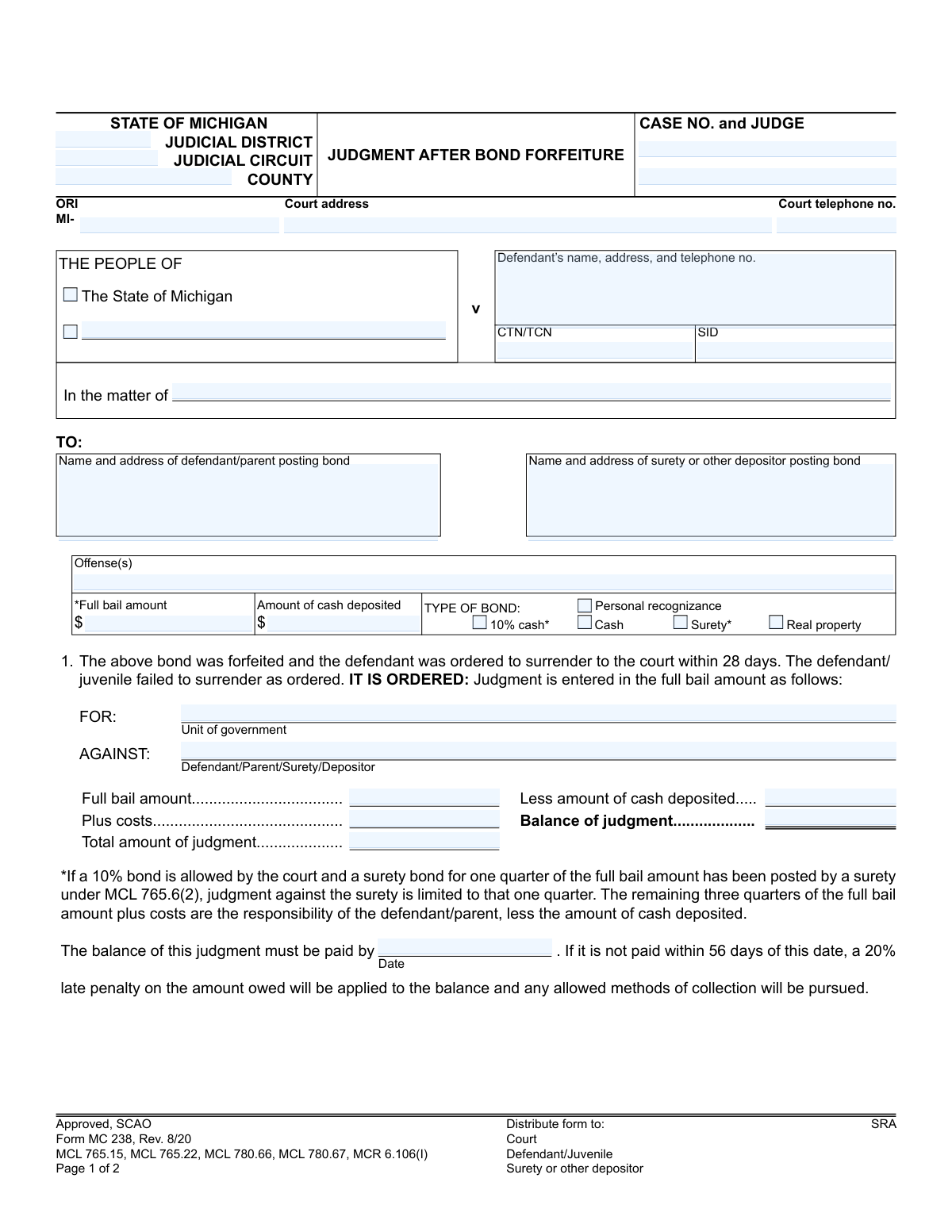
Yes! You can use AI to fill out Form MC 238, Judgment after Bond Forfeiture
The Judgment after Bond Forfeiture, Form MC 238, is a legal document issued by Michigan courts. It is used when a defendant who has posted a bond fails to surrender to the court as ordered, resulting in the forfeiture of that bond. This judgment formalizes the amount owed by the defendant, surety, or depositor to the court. Today, this form can be filled out quickly and accurately using AI-powered services like Instafill.ai, which can also convert non-fillable PDF versions into interactive fillable forms.
MC 238 is part of the
Michigan court forms category on Instafill.
Our AI automatically handles information lookup, data retrieval, formatting, and form filling.
It takes less than a minute to fill out MC 238 using our AI form filling.
Securely upload your data. Information is encrypted in transit and deleted immediately after the form is filled out.
Form specifications
| Form name: | Form MC 238, Judgment after Bond Forfeiture |
| Number of fields: | 37 |
| Number of pages: | 1 |
| Language: | English |
More forms in Michigan court forms
Instafill Demo: How to fill out PDF forms in seconds with AI
How to Fill Out MC 238 Online for Free in 2026
Are you looking to fill out a MC 238 form online quickly and accurately? Instafill.ai offers the #1 AI-powered PDF filling software of 2026, allowing you to complete your MC 238 form in just 37 seconds or less.
Follow these steps to fill out your MC 238 form online using Instafill.ai:
- 1 Navigate to an AI-powered platform like Instafill.ai and upload or select the MC 238, Judgment after Bond Forfeiture form.
- 2 Provide the case information, including the court address, case number, judge, and defendant's details.
- 3 Identify the parties against whom the judgment is entered, such as the defendant, parent, surety, or depositor.
- 4 Enter the financial details, including the full bail amount, amount of cash deposited, and any additional costs.
- 5 Indicate the type of bond that was forfeited (e.g., 10% cash, surety, personal recognizance).
- 6 Review the information auto-populated by the AI to ensure all details, including the total judgment amount and balance due, are correct.
- 7 Download, print, or electronically file the completed and signed judgment form as required by the court.
Our AI-powered system ensures each field is filled out correctly, reducing errors and saving you time.
Why Choose Instafill.ai for Your Fillable MC 238 Form?
Speed
Complete your MC 238 in as little as 37 seconds.
Up-to-Date
Always use the latest 2026 MC 238 form version.
Cost-effective
No need to hire expensive lawyers.
Accuracy
Our AI performs 10 compliance checks to ensure your form is error-free.
Security
Your personal information is protected with bank-level encryption.
Frequently Asked Questions About Form MC 238
This form is a court order stating that a judgment has been entered against a defendant, parent, or surety. It is issued when a defendant fails to appear in court as required, causing the posted bond to be forfeited.
You likely received this form because you are either the defendant who failed to appear, or you are the surety or depositor who posted the bond money on the defendant's behalf.
The court fills out and issues this form. It is a legal judgment sent to you, not a form for you to complete.
This is the final amount of money you owe the court. It is calculated by taking the full bail amount plus costs, and then subtracting any cash that was already deposited for the bond.
If the balance is not paid within 56 days of the date on the judgment, a 20% late penalty will be added to the amount you owe. The court will then pursue collection through any legally allowed methods.
In some cases, yes. If you posted a surety bond for one-quarter of the full bail amount under MCL 765.6(2), your judgment is limited to that amount, while the defendant is responsible for the rest.
This indicates that the criminal case for which the bond was posted is still active. A bench warrant for the defendant's arrest has likely been issued due to their failure to appear.
You must pay the court that issued the judgment, whose address and phone number are listed at the top of the form. Contact the court clerk for specific payment options and instructions.
The 'Full bail amount' is the total bond set by the judge. The 'Amount of cash deposited' is the actual money you paid to the court upfront, which is often a percentage (like 10%) of the full bail amount.
No, because this is a judgment issued by the court, not a form for you to fill out. However, AI tools like Instafill.ai can help you accurately complete other court forms you may need to file.
You can upload a blank court form to Instafill.ai, and its AI will help you auto-fill your personal information and other fields. This saves time and helps prevent common errors.
Services like Instafill.ai can convert flat, non-fillable PDFs into interactive forms. This allows you to easily type your information, complete the form online, and prepare it for submission.
A bench warrant is an order from a judge for the immediate arrest of the defendant. It is issued because the defendant failed to comply with a court order, such as appearing for a scheduled court date.
Compliance MC 238
Validation Checks by Instafill.ai
1
Case Number Consistency Across Pages
Checks that the 'CASE NO.' field is identical on both page 1 and page 2 of the form. This is critical for ensuring the entire document pertains to a single, unique case and prevents misfiling or incorrect association of pages. If the numbers do not match, the form is considered invalid and cannot be processed.
2
Judgment Financial Calculation Verification
Validates the arithmetic in the judgment calculation section. It ensures that 'Total amount of judgment' is the sum of 'Full bail amount' and 'Plus costs', and that 'Balance of judgment' is the result of subtracting 'Less amount of cash deposited' from the 'Total amount of judgment'. This check prevents mathematical errors that could lead to incorrect financial liabilities.
3
Bail and Deposit Amount Consistency
This check ensures the 'Full bail amount' and 'Amount of cash deposited' fields listed at the top of the form are identical to their corresponding fields in the judgment calculation section below. This cross-reference prevents data entry errors and ensures the financial judgment is based on the correct initial bond figures. A mismatch will flag the form for manual review and correction.
4
Exclusive Bond Type Selection
Verifies that exactly one option is selected from the 'TYPE OF BOND' checkboxes (10% cash, Personal recognizance, Cash, Surety, Real property). Selecting no bond type or multiple bond types makes the basis of the judgment ambiguous. This validation ensures the record accurately reflects the specific type of bond that was forfeited, which is essential for applying the correct legal rules.
5
ORI Number Format Validation
Ensures the 'ORI' (Originating Agency Identifier) field follows the specified format, which must begin with 'MI-'. This identifier is crucial for routing information to the correct law enforcement agency and for statistical tracking. An invalid format could cause the document to be rejected by state or federal systems.
6
Court Telephone Number Format
Validates that the 'Court telephone no.' field contains a valid 10-digit US phone number, allowing for common formats like (XXX) XXX-XXXX or XXX-XXX-XXXX. A valid phone number is essential for parties needing to contact the court for information regarding the judgment. An invalid number would be flagged for correction to ensure proper communication channels are documented.
7
Required Judgment Recipient Selection
Checks that at least one party (Defendant, Parent, Surety, or Depositor) is selected in the 'AGAINST' section of the judgment. A judgment must be entered against a specific legal entity to be enforceable. Failure to designate a party renders the judgment legally incomplete and unenforceable, requiring the form to be amended.
8
Plaintiff Identification Logic
This validation ensures that either 'The State of Michigan' or 'The People of' checkbox is selected, but not both. If 'The People of' is selected, it also verifies that the associated text field specifying the municipality is not empty. This is fundamental for correctly identifying the prosecuting party in the case caption.
9
Payment Deadline Date Validity
Confirms that the date entered in 'The balance of this judgment must be paid by' field is a valid date in a standard format (e.g., MM/DD/YYYY) and is not a date in the past. This is important for setting a clear and reasonable deadline for the payment of the judgment balance. An invalid or past date would make the payment term nonsensical and unenforceable.
10
Defendant Information Completeness
Verifies that the field for 'Defendant’s name, address, and telephone no.' is not empty and contains text that can be reasonably parsed as a name and address. This information is legally required for proper service of the judgment and for any subsequent collection actions. Incomplete information would prevent the judgment from being properly served on the defendant.
11
Case Status Indication
Ensures that at least one of the checkboxes in section 2 ('original charge(s) ... are still pending' or 'Fine and costs ... have not been paid') is selected. This information clarifies the underlying reason for the bond forfeiture and the current status of the case, which is important context for all parties and for court records. The form is incomplete without this status indication.
12
Non-Negative Currency Value Check
This check validates that all monetary fields, such as 'Full bail amount', 'Amount of cash deposited', and 'Plus costs', contain only positive numeric values or zero. Negative values in financial fields are illogical and indicate a data entry error. This ensures the financial integrity of the judgment calculation.
13
CTN/SID Format Validation
Validates that the 'CTN/TCN' and 'SID' fields adhere to their expected alphanumeric formats. These unique identifiers are critical for linking the judgment to the correct individual and case within statewide criminal justice databases. An incorrect format can lead to record-keeping errors and failure to associate the judgment with the proper case file.
Common Mistakes in Completing MC 238
This form requires a manual calculation: Full Bail Amount + Costs - Amount of Cash Deposited = Balance of Judgment. People often make simple arithmetic errors, leading to an incorrect judgment amount being entered. An incorrect balance can lead to legal challenges, payment disputes, and administrative rework to issue a corrected judgment. To prevent this, always use a calculator and double-check the figures against the case file before entering them on the form.
Mistakes in the defendant's name, address, or identifying numbers (CTN/TCN/SID) are common, as are errors in the surety or depositor's information. This often happens due to typos or referencing outdated records. The consequence is improper service of the judgment, which can render it invalid and cause significant delays, as the notice may be sent to the wrong person or address. Always verify this information against the most recent official court record before filling out the form.
The form contains a complex footnote regarding surety bonds posted under MCL 765.6(2), where a surety's liability is limited to one-quarter of the full bail amount. Fillers often overlook this note and incorrectly enter the full bail amount as the judgment against the surety. This results in a legally incorrect judgment that overstates the surety's liability and will likely be disputed or appealed. It is crucial to understand the type of bond posted and apply this specific rule when calculating the judgment against a surety.
The header section requires specific details like the Judicial District/Circuit, County, ORI, and most importantly, the Case Number and Judge. People often rush and leave these fields incomplete or use inconsistent formatting. A missing or incorrect Case Number, especially on the second page, can cause the document to be misfiled or separated from the case file, leading to significant processing delays. Ensure every identifier is filled out accurately and legibly on both pages.
The order includes a critical line: 'The balance of this judgment must be paid by [Date].' Forgetting to enter a specific date is a frequent oversight. This omission makes the payment demand ambiguous and can complicate enforcement, as the 56-day clock for the 20% late penalty becomes difficult to start. To ensure the judgment is enforceable and clear for the debtor, a specific calendar date must always be entered in this field.
The 'TO:' fields and the defendant's address field are essential for the Certificate of Mailing and ensuring proper legal service. Using an old, incomplete, or unverified address is a critical error. This leads to failed service, which can be grounds for the defendant or surety to have the judgment set aside, forcing the process to start over. Always use the 'last-known address' as defined by court rules (MCR 2.107(C)(3)) and verify it with the official case file.
The form requires specifying who the judgment is 'AGAINST': the Defendant, Parent, Surety, or Depositor. A common mistake is to default to the defendant, even when a surety or other depositor is the legally liable party for the forfeited bond. Entering the judgment against the wrong entity makes it unenforceable and allows the responsible party to evade payment. Carefully review the original bond agreement to correctly identify the party who is financially liable for the forfeiture.
People sometimes treat the second page as an afterthought, only for the judge's signature. However, it contains a mandatory field for the Case Number and crucial checkboxes (2a/2b) that indicate the status of the underlying charges or proceedings. Failing to enter the case number on page 2 can cause it to become an orphaned document if separated, and not checking the appropriate box leaves the record incomplete. Always fill out the case number on page 2 and check the relevant box to finalize the form correctly.
The judgment specifies that the forfeited funds are 'FOR' a specific 'Unit of government'. A frequent error is to use a generic entry like 'State of Michigan' when the funds should be directed to a specific county, city, or township that prosecuted the case. This mistake causes accounting problems, delays in disbursing the funds to the correct entity, and requires administrative effort to correct. The correct entity should be verified from the case's prosecutorial records.
The 'Offense(s)' field is often filled with unclear abbreviations or generic descriptions rather than the full, formal charge. This creates ambiguity in the record, especially if the defendant has multiple cases or charges. The consequences include confusion during audits or subsequent legal proceedings. To avoid this, the full name of the offense and the relevant statutory citation should be transcribed exactly as it appears in the original complaint or court file. AI-powered tools like Instafill.ai can help by auto-populating and validating such data from case records, and can also make non-fillable PDFs like this one fillable.
Saved over 80 hours a year
“I was never sure if my IRS forms like W-9 were filled correctly. Now, I can complete the forms accurately without any external help.”
Kevin Martin Green
Your data stays secure with advanced protection from Instafill and our subprocessors
Robust compliance program
Transparent business model
You’re not the product. You always know where your data is and what it is processed for.
ISO 27001, HIPAA, and GDPR
Our subprocesses adhere to multiple compliance standards, including but not limited to ISO 27001, HIPAA, and GDPR.
Security & privacy by design
We consider security and privacy from the initial design phase of any new service or functionality. It’s not an afterthought, it’s built-in, including support for two-factor authentication (2FA) to further protect your account.
Fill out MC 238 with Instafill.ai
Worried about filling PDFs wrong? Instafill securely fills form-mc-238-judgment-after-bond-forfeiture forms, ensuring each field is accurate.